
第11关 K8s排错debug实战
大约 4 分钟
K8s排错debug实战: 如何在Pod内进行tcpdump流量抓包
在日常的K8S运维工作中,我们时常需要在pod内运行一些运维调试工具,抓取服务pod的流量来分析问题,但基于安全因素以及镜像大小考虑,通常容器内不会带有过多的软件包,这个时候就给我们运维排查带来的困难,没关系,博哥这节课就教大家怎么去解决这个问题。
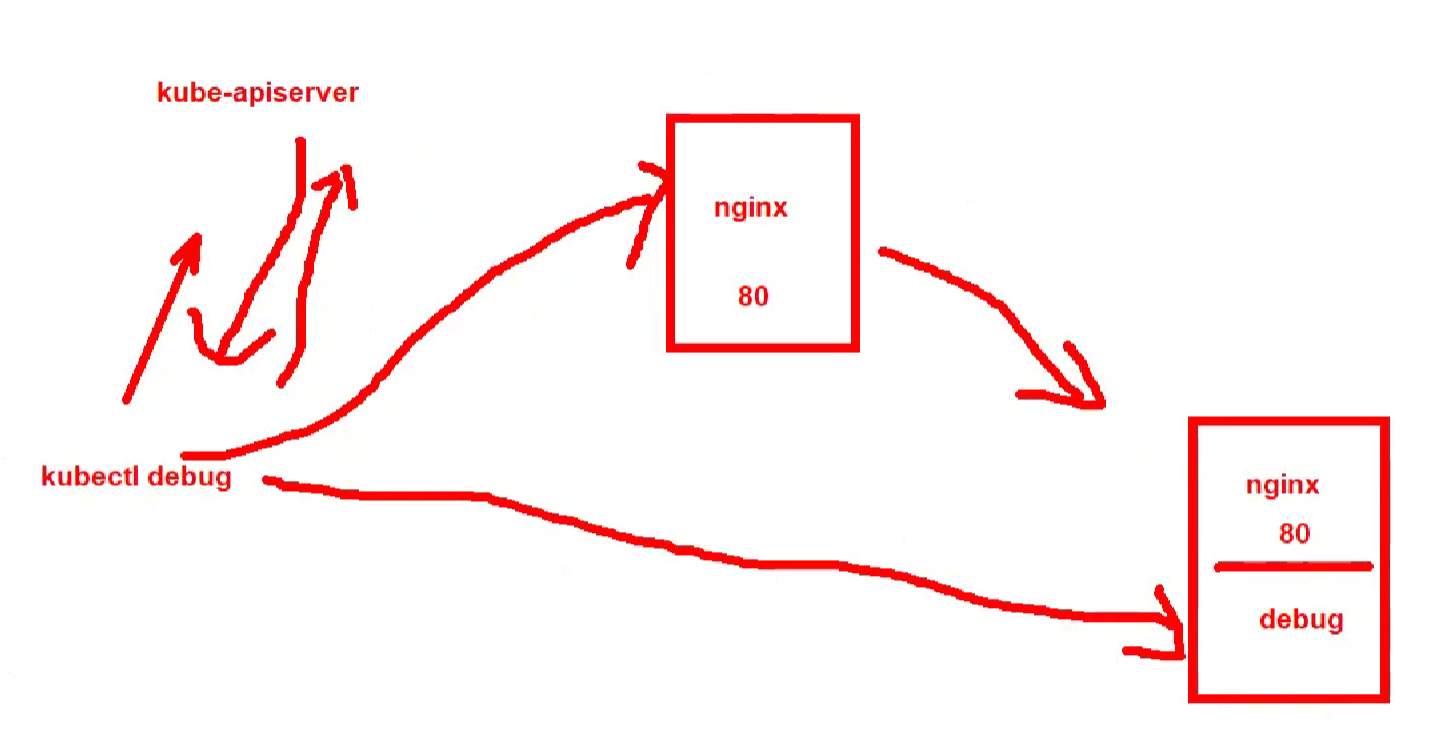
debug会复制一份nginx在pod里再挂一个镜像
我们利用nginx服务,以实战的形式来模拟演示一次在业务服务pod中利用tcpdump抓取80端口的流量包
使用k8s自带debug功能来分析pod的网络流量 注: 这里使用的k8s版本是 v1.27.5 , v1.20.4 以上版本应该都是可以支持的
给大家推荐一款开源的容器工具箱 https://github.com/nicolaka/netshoot
创建测试nginx服务
# 创建测试命名空间
# kubectl delete ns test && kubectl create ns test
namespace "test" deleted
namespace/test created

# 创建deployment
# kubectl -n test create deployment nginx --image=nginx:1.21.6
deployment.apps/nginx created

# 创建service
# kubectl -n test expose deployment nginx --port=80 --target-port=80
service/nginx exposed

# kubectl -n test get pod
NAME                     READY   STATUS    RESTARTS   AGE
nginx-6f648b8457-glrx6   1/1     Running   0          3m16s
# kubectl -n test get svc
NAME    TYPE        CLUSTER-IP     EXTERNAL-IP   PORT(S)   AGE
nginx   ClusterIP   10.68.25.225   <none>        80/TCP    70s
debug添加调试容器
创建一个 nginx 的副本,生成一个新的pod(boge-debugger),并添加一个调试容器(nicolaka/netshoot)并附加到它
# kubectl -n test debug nginx-6f648b8457-glrx6 -it --image=docker.io/nicolaka/netshoot --copy-to=boge-debugger# kubectl -n test describe pod boge-debugger
Events:
Type Reason Age From Message
---- ------ ---- ---- -------
Normal Scheduled 2m36s default-scheduler Successfully assigned test/boge-debugger to 10.0.1.203
Normal Pulling 2m35s kubelet Pulling image "nginx:1.21.6"
Normal Pulled 54s kubelet Successfully pulled image "nginx:1.21.6" in 1m41.423727971s (1m41.42376447s including waiting)
Normal Created 54s kubelet Created container nginx
Normal Started 54s kubelet Started container nginx
Normal Pulling 54s kubelet Pulling image "docker.io/nicolaka/netshoot"
Normal Pulled 13s kubelet Successfully pulled image "docker.io/nicolaka/netshoot" in 40.965253514s (40.965268212s including waiting)
Normal Created 13s kubelet Created container debugger-q46hb
Normal Started 13s kubelet Started container debugger-q46hb
打标签
新的debug用pod是没有任何label的
如果要引入流量,可以把生产的label加到这个debug的pod上面
# kubectl -n test-nginx2 get pod --show-labels
NAME                     READY   STATUS    RESTARTS   AGE     LABELS
boge-debugger            2/2     Running   0          4m39s   <none>
nginx-6f648b8457-glrx6   1/1     Running   0          11m     app=nginx,pod-template-hash=6f648b8457

# 添加label
# kubectl -n test label pods boge-debugger app=nginx
pod/boge-debugger labeled
# kubectl -n test get pod --show-labels
NAME                     READY   STATUS    RESTARTS   AGE     LABELS
boge-debugger            2/2     Running   0          8m49s   app=nginx
nginx-6f648b8457-glrx6   1/1     Running   0          15m     app=nginx,pod-template-hash=6f648b8457
这时可以看到endpoints已经把这个debug的pod地址更新进来了
# kubectl -n test describe endpoints nginx
Name:         nginx
Namespace:    test
Labels:       app=nginx
Annotations:  endpoints.kubernetes.io/last-change-trigger-time: 2024-05-21T03:26:31Z
Subsets:
  Addresses:          172.20.139.75,172.20.217.68
  NotReadyAddresses:  <none>
  Ports:
    Name     Port  Protocol
    ----     ----  --------
    <unset>  80    TCP

Events:  <none>
tcpdump抓包
在debug的pod内使用tcpdump抓包
tcpdump -nv -i eth0 port 80 -w /tmp/2.pcap# 同时在node1中请求
curl 10.68.25.225:80
# 复制到宿主机
kubectl -n test cp --container=debugger-q46hb boge-debugger:/tmp/2.pcap ./2.pcap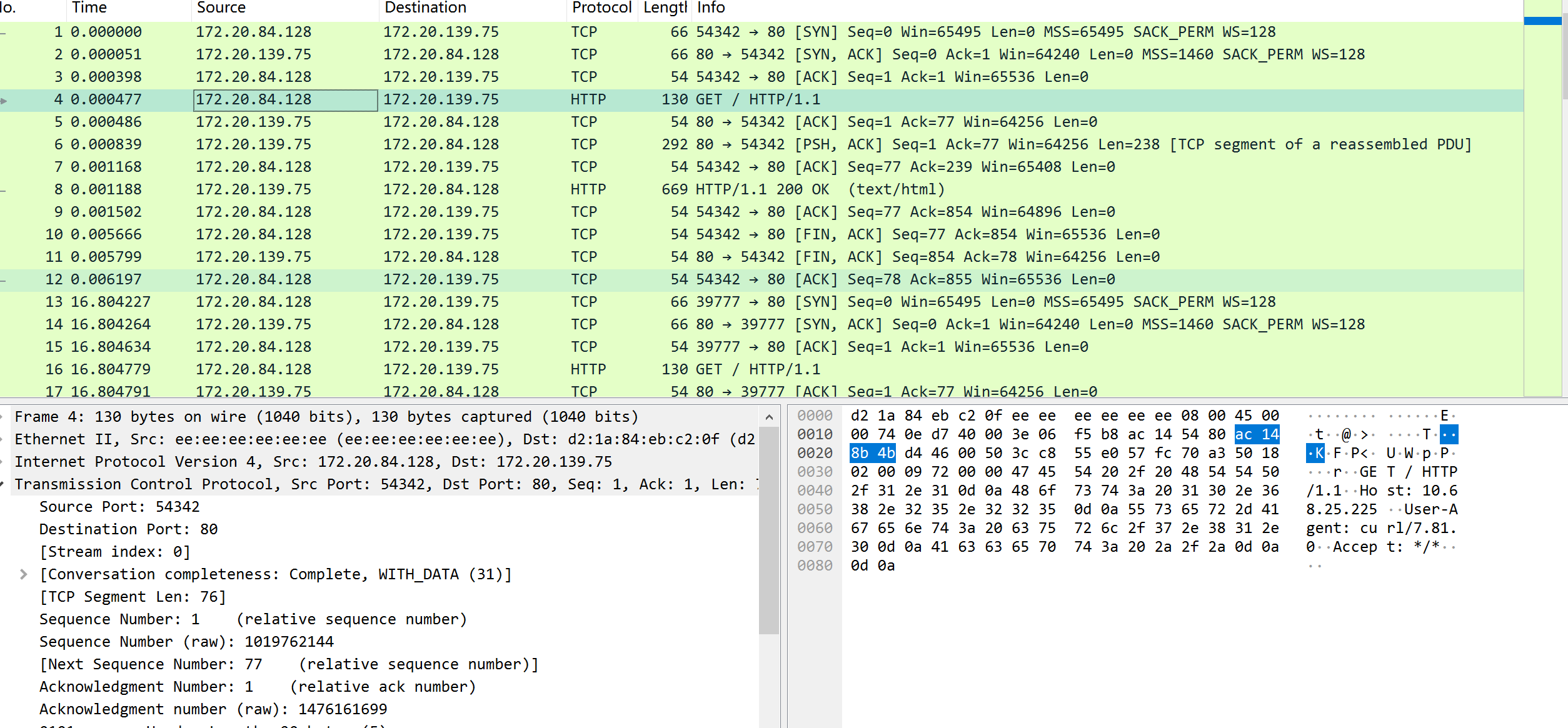
8: tunl0@NONE: <NOARP,UP,LOWER_UP> mtu 1480 qdisc noqueue state UNKNOWN group default qlen 1000
    link/ipip 0.0.0.0 brd 0.0.0.0
    inet 172.20.84.128/32 scope global tunl0
       valid_lft forever preferred_lft forever
是用tunl0发送请求
删除debug的pod
去掉label并删除debug的pod
(注意查看下endpoints是否已经去掉了debug的pod,并观察业务日志,确认没问题再删除)
# 去掉label
# kubectl -n test label pods boge-debugger app-
pod/boge-debugger unlabeled

# kubectl -n test describe endpoints nginx
Name:         nginx
Namespace:    test
Labels:       app=nginx
Annotations:  <none>
Subsets:
  Addresses:          172.20.217.68
  NotReadyAddresses:  <none>
  Ports:
    Name     Port  Protocol
    ----     ----  --------
    <unset>  80    TCP

Events:  <none>

# kubectl -n test delete pods boge-debugger
pod "boge-debugger" deleted
# ss -tlnp |grep 80
LISTEN 0 32768 10.0.1.201:2380 0.0.0.0:* users:(("etcd",pid=731,fd=7))
LISTEN 0 32768 169.254.20.10:8080 0.0.0.0:* users:(("node-cache",pid=1282,fd=7))5: nodelocaldns: <BROADCAST,NOARP> mtu 1500 qdisc noop state DOWN group default
link/ether 76:d4:e3:c6:b7:f2 brd ff:ff:ff:ff:ff:ff
inet 169.254.20.10/32 scope global nodelocaldns
valid_lft forever preferred_lft forever