
第31关 Gitlab部署及升级
课程链接
在2021年,博哥分享了完整的一套K8S架构师课程,链接在此,最后的CI/CD自动化流水线就是基于gitlab来完成的。那么时间过去2年多了,gitlab版本也更新迭代了很多,我们怎么在2021年版本的基础上,进行升级至新版本呢,我来分享这个升级经验给大家。
Gitlab的升级有其特定的路线图,严禁直接跨版本进行升级。每个版本之间的迁移都应遵循官方提供的升级路径,以确保数据的完整性和系统的稳定性。
随着春节临近,新版本的Gitlab及其CI/CD功能的相关录制教程可能会受到时间安排的影响,发布时间存在不确定性。
Gitlab的核心原理和底层精髓多年来保持一致,即使是21年的内容,至今仍具有很高的参考价值,并未过时。
若急于了解Gitlab的相关知识,可以先参考21年的课程内容,随后再根据官方的升级指南逐步进行版本升级。
<iframe src="//player.bilibili.com/player.html?isOutside=true&aid=544936978&bvid=BV17i4y1N71H&cid=1243419075&page=1&high_quality=1&danmaku=0" allowfullscreen="allowfullscreen" width="100%" height="500" scrolling="no" frameborder="0" sandbox="allow-top-navigation allow-same-origin allow-forms allow-scripts"></iframe>【第15关 k8s架构师课程之基于gitlab的CI-CD自动化一】 【文档】未找到
【第15关 k8s架构师课程之基于gitlab的CI-CD自动化二】 【文档】
【第15关 k8s架构师课程之基于gitlab的CI-CD自动化三】 【文档】
【第15关 k8s架构师课程之基于gitlab的CI-CD自动化四】 【文档】
【第15关 k8s架构师课程之基于gitlab的CI-CD自动化五】 【文档】
【第15关 k8s架构师课程之基于gitlab的CI-CD自动化六】 【文档】
【第15关 k8s架构师课程之CICD自动化devops大结局 】 【文档】
其他参考:
https://www.jianshu.com/p/7b9ef85f9d35
https://blog.csdn.net/fanhonooo/article/details/128591861
https://developer.aliyun.com/article/1495644
https://cakepanit.com/forward/852a3e1.html
转载https://cakepanit.com/forward/852a3e1.html
一 基于gitlab的CI/CD自动化
K8S生产架构设计
二进制安装K8S生产集群,把增删节点、升级K8S版本都试一下
https://github.com/easzlab/kubeasz
二进制安装比Kubeadm安装稳定。Kubeadm用容器跑k8s
安装ingress-nginx-controller --> 安装harbor
安装gitlab-- pg数据库, redis缓存, gitlab, runner执行任务, dind打包镜像docker in docker
准备生产项目 模拟 python golang
准备自动化CI/CD流程设计 工
开始实施CI/CD自动化流水线配置
kubeasz操作
vim ezctl200台node3个master足够了
有一台node要把它下掉,想升级 重启下
k8s 删除node节点
cd /etc/kubeasz
./ezctl del-node test 10.0.0.204

fatal: [1ocalhost]: FAILED! => {"changed": true, "cmd": "/etc/kubeasz/bin/kubect1 drain
10.0.1.204 --ignore-daemonsets --delete-emptydir-data --force", "delta":
"0:00:00. 601220","end": "2021-04-04 16:21:10. 630665","msg": "non-zero return code",
"rc": 1,"start":
"2021-04-04 16:21:10.029445", "stderr": "Error: unknown flag: --delete-
emptydi r-data\nSee 'kubect1 drain --help' for usage.", "stderr_lines": ["Error: unknown
flag: --delete-emptydir-data", "See 'kubect1 drain --he1p' for usage."], "stdout":
"stdout_ lines": []}

想要驱逐node上的pod,提示缺少--delete-emptydir-data参数

kubect1 drain --he1p|grep delete
--delete- local-data=false: Continue even if there are pods using emptyDir (local data that will
be deleted when the node is drained)


#如果出现上面的报错日志,则编辑对应的脚本文件,修改第9行为如下内容
# vim /etc/kubeasz/p1aybooks/32.de1node.ym1
9
she11: "{{ base_ dir }}/bin/kubect1 drain {{ NODE_TO_DEL }} --ignore-daemonsets --delete-local-data --force"

#接着删除下对应K8S集群目录下面的hosts文件里面的重复IP
[kube_ node]
10.0.1.204
集群服务多了,想多加几台node工作节点
# k8s 添加node节点
cd /etc/kubeasz

./ezctl add-node test 10.0.0.204

kubectl get node
想升级k8s版本
不要跨大版本升级
# K8S集群版本升级
要注意尽量不要跨大版本升级,升级前注意看下官方github的更新日志,看是否有重大变动,比如apiVersion的改动,
如果有就需要把之前运行的服务配置作相应修改,否则服务重启后就会起不来失败

/bata -->v1

#看下目前的K8S版本
# kubect1 get node -o wide

#替换新版本的K8S a二进制文件
cd /etc/kubeasz/bin
#11 kube*
kube-apiserver
kubect1
kube-proxy
kube-controller-manager
kubelet
kube-scheduler
# rm -f kube*


#把如上六个新版本的K8S二进制文件复制进来,并赋予它们可执行权限# chmod +x kube*
https://github.com/kubernetes/kubernetes/releases
https://github.com/kubernetes /kubernetes/b1ob/master/CHANGELOG/CHANGELOG-1.19. md

有源码 客户端 服务端,功能最齐 选服务端,功能最齐

./ezctl upgrade test
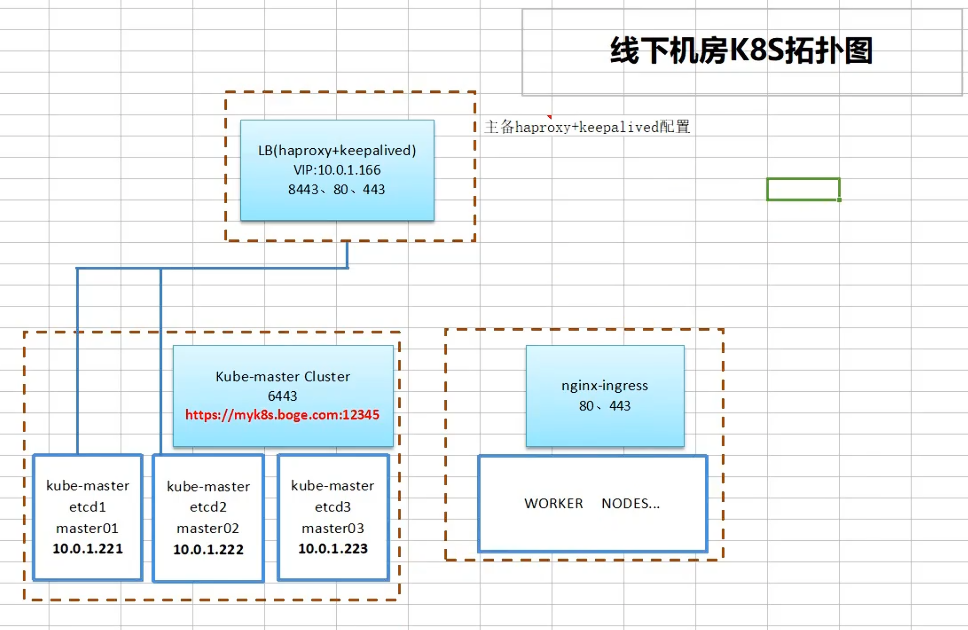
线下机房拓扑
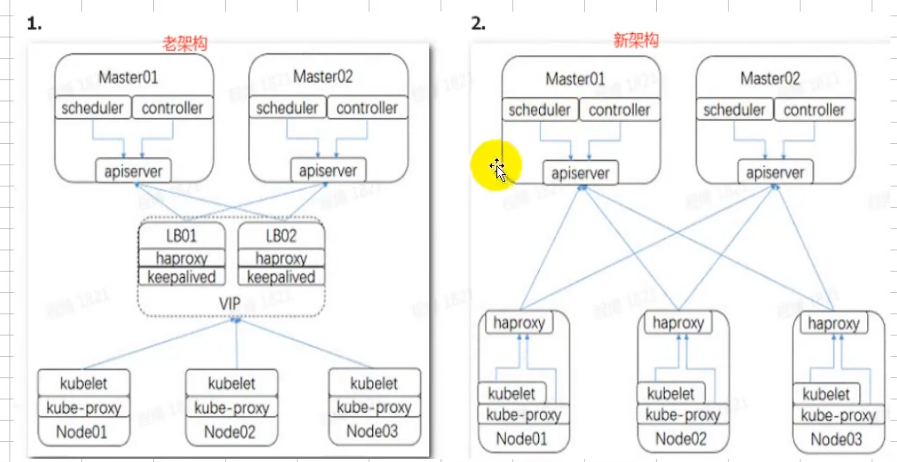
老架构一单VIP崩了整套就都用不了,耦合
HA(High Availability) proxy + keepalived 实现VIP(虚拟IP地址) 飘移,实现master高可用访问
https://www.cnblogs.com/xinrong2019/p/13833975.html
线上集群拓扑
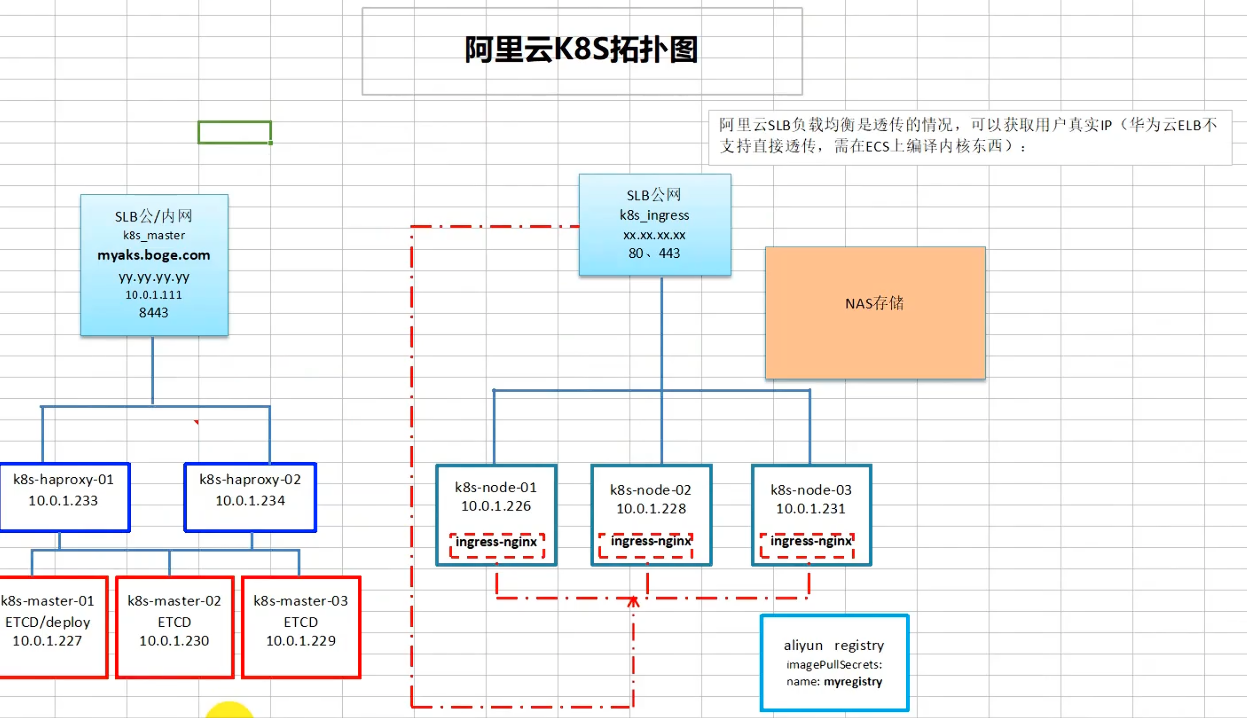
k8s一个SLB入口
ingress-controller一个SLB入口 流量大可以一个svc一个SLB
自建k8s用nfs储存如果做好备份可以很快重启一套k8s
阿里云nas更稳定,对存储io没有大的需求可以用 持久化存储
阿里云镜像仓库免费 可以不用自建habor
阿里云的k8s里拉取镜像默认从内网拉取,虽然写的是公网ip
问题:
master访问前面的haproxy,通讯会时好时坏。 阿里云网络机制的缺陷
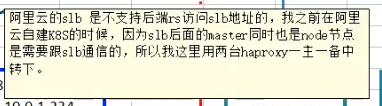
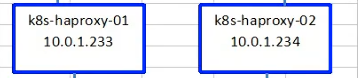
在中间加两台低配置机器,1c1g或1c2g(两台高可用),装一个haproxy做一个转发
gitlab 架构
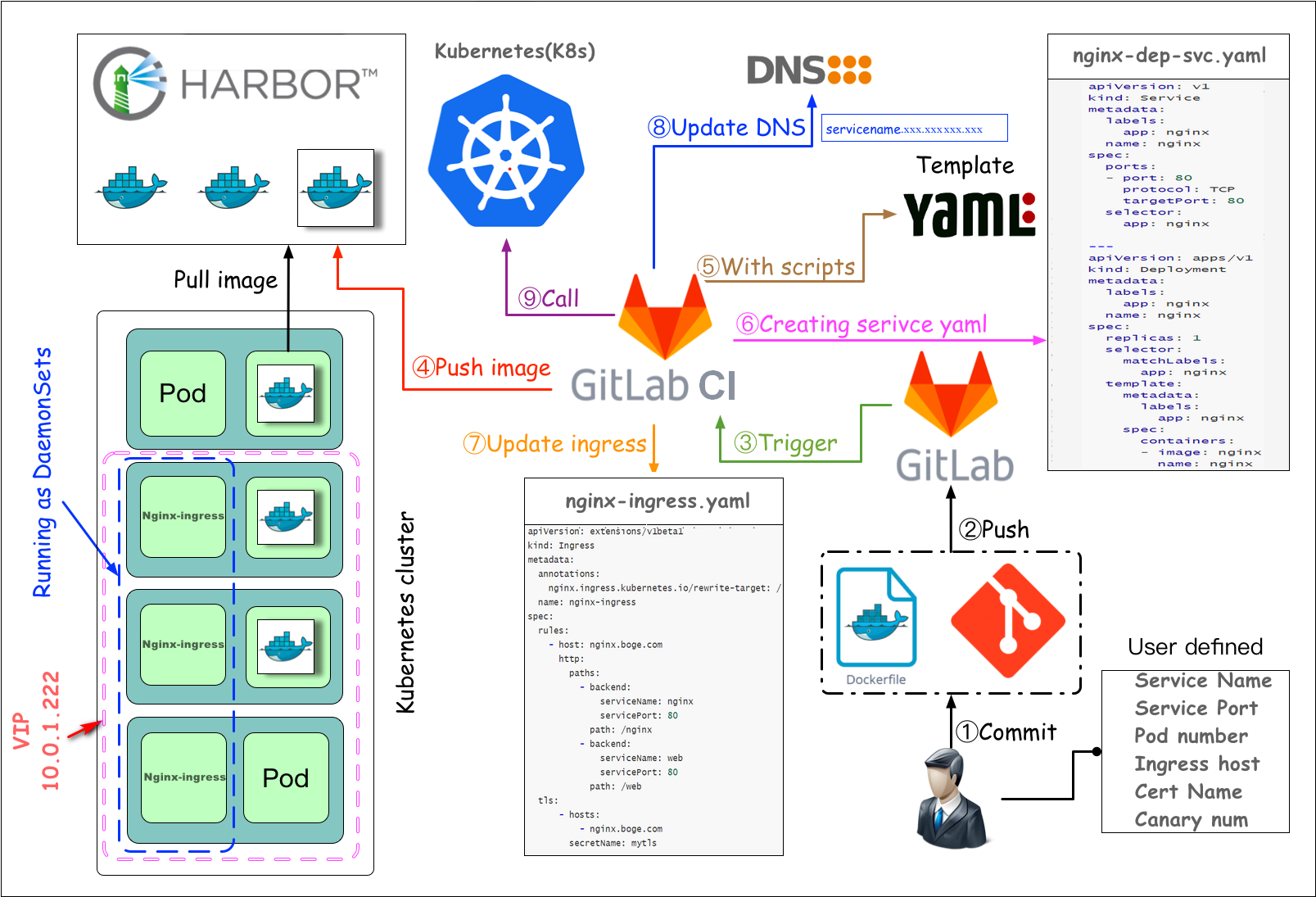
测试环境完全可以自动化
生产环境最好在CD环节人为手动发布
二 部署postgresql和redis
这节课我们先来部署gitlab私有代码仓库所需要的数据库postgresql和redis。
需要注意的是,如果大家的nfs-server的地址和挂载目录不是按博哥前面课程讲得来定义的话,那么下面的yaml配置中需要记得替换。
为什么手动创建pv、pvc。不用动态存储
因为要控制目录名称
部署postgresql
mkdir -p /nfs_dir/{gitlab_etc_ver130806,gitlab_log_ver130806,gitlab_opt_ver130806,gitlab_postgresql_data_ver130806}

kubectl create namespace gitlab-ver130806
# kubectl get storageclass
NAME PROVISIONER RECLAIMPOLICY VOLUMEBINDINGMODE ALLOWVOLUMEEXPANSION AGE
nfs-boge nfs-provisioner-01 Retain Immediate false 32d3postgres.yaml
# pv
---
apiVersion: v1
kind: PersistentVolume
metadata:
  name: gitlab-postgresql-data-ver130806
  labels:
    type: gitlab-postgresql-data-ver130806
spec:
  capacity:
    storage: 10Gi
  accessModes:
    - ReadWriteOnce
  persistentVolumeReclaimPolicy: Retain
  storageClassName: nfs-boge
  nfs:
    path: /nfs_dir/gitlab_postgresql_data_ver130806
    server: 10.0.1.201

# pvc
---
kind: PersistentVolumeClaim
apiVersion: v1
metadata:
  name: gitlab-postgresql-data-ver130806-pvc
spec:
  accessModes:
    - ReadWriteOnce
  resources:
    requests:
      storage: 10Gi
  storageClassName: nfs-boge
  selector:
    matchLabels:
      type: gitlab-postgresql-data-ver130806
---
apiVersion: v1
kind: Service
metadata:
  name: postgresql
  labels:
    app: gitlab
    tier: postgreSQL
spec:
  ports:
    - port: 5432
  selector:
    app: gitlab
    tier: postgreSQL

---

apiVersion: apps/v1
kind: Deployment
metadata:
  name: postgresql
  labels:
    app: gitlab
    tier: postgreSQL
spec:
  replicas: 1
  selector:
    matchLabels:
      app: gitlab
      tier: postgreSQL
  strategy:
    type: Recreate
  template:
    metadata:
      labels:
        app: gitlab
        tier: postgreSQL
    spec:
      #nodeSelector:
      #  gee/disk: "500g"
      containers:
        - image: harbor.boge.com/docker.io/postgres:12.6-alpine
          name: postgresql
          env:
            - name: POSTGRES_USER
              value: gitlab
            - name: POSTGRES_DB
              value: gitlabhq_production
            - name: POSTGRES_PASSWORD
              value: bogeusepg
            - name: TZ
              value: Asia/Shanghai
          ports:
            - containerPort: 5432
              name: postgresql
          livenessProbe:
            exec:
              command:
              - sh
              - -c
              - exec pg_isready -U gitlab -h 127.0.0.1 -p 5432 -d gitlabhq_production
            initialDelaySeconds: 110
            timeoutSeconds: 5
            failureThreshold: 6
          readinessProbe:
            exec:
              command:
              - sh
              - -c
              - exec pg_isready -U gitlab -h 127.0.0.1 -p 5432 -d gitlabhq_production
            initialDelaySeconds: 20
            timeoutSeconds: 3
            periodSeconds: 5
#          resources:
#            requests:
#              cpu: 100m
#              memory: 512Mi
#            limits:
#              cpu: "1"
#              memory: 1Gi
          volumeMounts:
            - name: postgresql
              mountPath: /var/lib/postgresql/data
      volumes:
        - name: postgresql
          persistentVolumeClaim:
            claimName: gitlab-postgresql-data-ver130806-pvc
# kubectl -n gitlab-ver130806 apply -f 3postgres.yaml
persistentvolume/gitlab-postgresql-data-ver130806 created
persistentvolumeclaim/gitlab-postgresql-data-ver130806-pvc created
service/postgresql created
deployment.apps/postgresql created
# kubectl -n gitlab-ver130806 get pv部署redis
4redis.yaml
---
apiVersion: v1
kind: Service
metadata:
  name: redis
  labels:
    app: gitlab
    tier: backend
spec:
  ports:
    - port: 6379
      targetPort: 6379
  selector:
    app: gitlab
    tier: backend
---

apiVersion: apps/v1
kind: Deployment
metadata:
  name: redis
  labels:
    app: gitlab
    tier: backend
spec:
  replicas: 1
  selector:
    matchLabels:
      app: gitlab
      tier: backend
  strategy:
    type: Recreate
  template:
    metadata:
      labels:
        app: gitlab
        tier: backend
    spec:
      #nodeSelector:
      #  gee/disk: "500g"
      containers:
        - image: harbor.boge.com/docker.io/redis:6.2.0-alpine3.13
          name: redis
          command:
            - "redis-server"
          args:
            - "--requirepass"
            - "bogeuseredis"
#          resources:
#            requests:
#              cpu: "1"
#              memory: 2Gi
#            limits:
#              cpu: "1"
#              memory: 2Gi
          ports:
            - containerPort: 6379
              name: redis
          livenessProbe:
            exec:
              command:
              - sh
              - -c
              - "redis-cli ping"
            initialDelaySeconds: 30
            periodSeconds: 10
            timeoutSeconds: 5
            successThreshold: 1
            failureThreshold: 3
          readinessProbe:
            exec:
              command:
              - sh
              - -c
              - "redis-cli ping"
            initialDelaySeconds: 5
            periodSeconds: 10
            timeoutSeconds: 1
            successThreshold: 1
            failureThreshold: 3
      initContainers:
      - command:
        - /bin/sh
        - -c
        - |
          ulimit -n 65536
          mount -o remount rw /sys
          echo never > /sys/kernel/mm/transparent_hugepage/enabled
          mount -o remount rw /proc/sys
          echo 2000 > /proc/sys/net/core/somaxconn
          echo 1 > /proc/sys/vm/overcommit_memory
        image: registry.cn-beijing.aliyuncs.com/acs/busybox:v1.29.2
        imagePullPolicy: IfNotPresent
        name: init-redis
        resources: {}
        securityContext:
          privileged: true
          procMount: Default
initContainers做内核参数优化
这里不需要持久化数据就不挂载了
# kubectl -n gitlab-ver130806 apply -f 4redis.yaml
service/redis created
deployment.apps/redis created
三 部署gitlab
部署gitlab
官方gitlab镜像会有一些镜像的缺失,比如有时候会进入容器进行ping curl等调试,还有就是缺少postgresql-client工具
/usr/bin/pg_dump数据库备份工具进行软连接
定制镜像
sources.list
deb http://mirrors.aliyun.com/ubuntu/ xenial main
deb-src http://mirrors.aliyun.com/ubuntu/ xenial main
deb http://mirrors.aliyun.com/ubuntu/ xenial-updates main
deb-src http://mirrors.aliyun.com/ubuntu/ xenial-updates main
deb http://mirrors.aliyun.com/ubuntu/ xenial universe
deb-src http://mirrors.aliyun.com/ubuntu/ xenial universe
deb http://mirrors.aliyun.com/ubuntu/ xenial-updates universe
deb-src http://mirrors.aliyun.com/ubuntu/ xenial-updates universe
deb http://mirrors.aliyun.com/ubuntu xenial-security main
deb-src http://mirrors.aliyun.com/ubuntu xenial-security main
deb http://mirrors.aliyun.com/ubuntu xenial-security universe
deb-src http://mirrors.aliyun.com/ubuntu xenial-security universe
Dockerfile
FROM harbor.boge.com/docker.io/gitlab/gitlab-ce:13.8.6-ce.0

RUN rm /etc/apt/sources.list \
    && echo 'deb http://apt.postgresql.org/pub/repos/apt/ xenial-pgdg main' > /etc/apt/sources.list.d/pgdg.list \
    && wget --quiet -O - https://www.postgresql.org/media/keys/ACCC4CF8.asc | apt-key add -
COPY sources.list /etc/apt/sources.list

RUN apt-get update -yq && \
    apt-get install -y vim iproute2 net-tools iputils-ping curl wget software-properties-common unzip postgresql-client-12 && \
    rm -rf /var/cache/apt/archives/*

RUN ln -svf /usr/bin/pg_dump /opt/gitlab/embedded/bin/pg_dump
2021-05-20: PostgreSQL官方仓库弃用Ubuntu xenial(16.04),postgresql-client-12
FROM harbor.boge.com/docker.io/gitlab/gitlab-ce:13.8.6-ce.0

RUN rm /etc/apt/sources.list
COPY sources.list /etc/apt/sources.list

RUN apt-get update -yq && \
    apt-get install -y vim iproute2 net-tools iputils-ping curl wget software-properties-common unzip && \
    rm -rf /var/cache/apt/archives/*
docker build -t gitlab/gitlab-ce:13.8.6-ce.1 .
docker build -t harbor.boge.com/boge/gitlab-ce:13.8.6-ce.1 .
docker push harbor.boge.com/boge/gitlab-ce:13.8.6-ce.1https://www.postgresql.org/download/linux/ubuntu/
The PostgreSQL Apt Repository supports the current versions of Ubuntu:
noble (24.04, LTS)
mantic (23.10, non-LTS)
jammy (22.04, LTS)
focal (20.04, LTS)
https://wiki.postgresql.org/wiki/Apt
2021-05-20: PostgreSQL 14beta1 added, Ubuntu xenial (16.04) deprecated, Ubuntu hirsute (21.04) added
2021-05-20: 添加PostgreSQL 14beta1,弃用Ubuntu xenial(16.04),添加Ubuntu hirsute(21.04)sources.list
docker run -it --rm --name my-gitlab harbor.boge.com/docker.io/gitlab/gitlab-ce:13.8.6-ce.0 /bin/bash

# cat /etc/os-release
NAME="Ubuntu"
VERSION="16.04.7 LTS (Xenial Xerus)"
ID=ubuntu
ID_LIKE=debian
PRETTY_NAME="Ubuntu 16.04.7 LTS"
VERSION_ID="16.04"
HOME_URL="http://www.ubuntu.com/"
SUPPORT_URL="http://help.ubuntu.com/"
BUG_REPORT_URL="http://bugs.launchpad.net/ubuntu/"
VERSION_CODENAME=xenial
UBUNTU_CODENAME=xenial

# psql -V
psql (PostgreSQL) 12.5

# find / -name pg_dump
/opt/gitlab/embedded/bin/pg_dump
/opt/gitlab/embedded/postgresql/11/bin/pg_dump
/opt/gitlab/embedded/postgresql/12/bin/pg_dump
# ll /opt/gitlab/embedded/bin | grep pg_dump
lrwxrwxrwx  1 root root       46 Mar 17  2021 pg_dump -> /opt/gitlab/embedded/postgresql/12/bin/pg_dump*
lrwxrwxrwx  1 root root       49 Mar 17  2021 pg_dumpall -> /opt/gitlab/embedded/postgresql/12/bin/pg_dumpall*


10.68.228.174

psql -h 10.68.228.174 -d gitlabhq_production -U gitlab
这里的选项含义如下:

-h 或 --host 指定了数据库服务器的主机名或 IP 地址。
-d 或 --dbname 指定了要连接的数据库名称。
-U 或 --username 指定了用于连接数据库的用户名。
# psql -h 10.68.228.174 -d gitlabhq_production -U gitlab
Password for user gitlab:
psql (12.5, server 12.6)
Type "help" for help.

gitlabhq_production=# \l
                                   List of databases
        Name         | Owner  | Encoding |  Collate   |   Ctype    | Access privileges
---------------------+--------+----------+------------+------------+-------------------
 gitlabhq_production | gitlab | UTF8     | en_US.utf8 | en_US.utf8 |
 postgres            | gitlab | UTF8     | en_US.utf8 | en_US.utf8 |
 template0           | gitlab | UTF8     | en_US.utf8 | en_US.utf8 | =c/gitlab        +
                     |        |          |            |            | gitlab=CTc/gitlab
 template1           | gitlab | UTF8     | en_US.utf8 | en_US.utf8 | =c/gitlab        +
                     |        |          |            |            | gitlab=CTc/gitlab
(4 rows)


完成与数据库的交互后,可以使用 \q 命令退出 psql:

\q
\l 列出所有可用的数据库。
\c 更改当前连接的数据库。
\h 显示帮助信息。
\password 更改用户密码。
开始部署
gitlab对高可用需求不是很大,但是对数据、文件是最关键的
定期做一次全备,比如一天或半天,在本地或异地备份一套
# 重要命令
restore gitlab data command example:

# 全备命令
kubectl -n gitlab-ver130806 exec -it $(kubectl -n gitlab-ver130806 get pod|grep -v runner|grep gitlab|awk '{print $1}') -- gitlab-rake gitlab:backup:restore BACKUP=1602889879_2020_10_17_12.9.2

# 重新加载配置 (导入全备后)
kubectl -n gitlab-ver130806 exec -it $(kubectl -n gitlab-ver130806 get pod|grep -v runner|grep gitlab|awk '{print $1}') -- gitlab-ctl reconfigure

# 查看状态
kubectl -n gitlab-ver130806 exec -it $(kubectl -n gitlab-ver130806 get pod|grep -v runner|grep gitlab|awk '{print $1}') -- gitlab-ctl status
kubectl -n gitlab-ver130806 create secret docker-registry boge-harbor-secret --docker-server=harbor.boge.com --docker-username=boge --docker-password=Boge@666 --docker-email=ops@boge.com5gitlab.yaml
# pv
---
apiVersion: v1
kind: PersistentVolume
metadata:
  name: gitlab-etc-ver130806
  labels:
    type: gitlab-etc-ver130806
spec:
  capacity:
    storage: 1Gi
  accessModes:
    - ReadWriteOnce
  persistentVolumeReclaimPolicy: Retain
  storageClassName: nfs-boge
  nfs:
    path: /nfs_dir/gitlab_etc_ver130806
    server: 10.0.1.201

# pvc
---
kind: PersistentVolumeClaim
apiVersion: v1
metadata:
  name: gitlab-etc-ver130806-pvc
spec:
  accessModes:
    - ReadWriteOnce
  resources:
    requests:
      storage: 1Gi
  storageClassName: nfs-boge
  selector:
    matchLabels:
      type: gitlab-etc-ver130806
# pv
---
apiVersion: v1
kind: PersistentVolume
metadata:
  name: gitlab-log-ver130806
  labels:
    type: gitlab-log-ver130806
spec:
  capacity:
    storage: 1Gi
  accessModes:
    - ReadWriteOnce
  persistentVolumeReclaimPolicy: Retain
  storageClassName: nfs-boge
  nfs:
    path: /nfs_dir/gitlab_log_ver130806
    server: 10.0.1.201

# pvc
---
kind: PersistentVolumeClaim
apiVersion: v1
metadata:
  name: gitlab-log-ver130806-pvc
spec:
  accessModes:
    - ReadWriteOnce
  resources:
    requests:
      storage: 1Gi
  storageClassName: nfs-boge
  selector:
    matchLabels:
      type: gitlab-log-ver130806

# pv
---
apiVersion: v1
kind: PersistentVolume
metadata:
  name: gitlab-opt-ver130806
  labels:
    type: gitlab-opt-ver130806
spec:
  capacity:
    storage: 1Gi
  accessModes:
    - ReadWriteOnce
  persistentVolumeReclaimPolicy: Retain
  storageClassName: nfs-boge
  nfs:
    path: /nfs_dir/gitlab_opt_ver130806
    server: 10.0.1.201

# pvc
---
kind: PersistentVolumeClaim
apiVersion: v1
metadata:
  name: gitlab-opt-ver130806-pvc
spec:
  accessModes:
    - ReadWriteOnce
  resources:
    requests:
      storage: 1Gi
  storageClassName: nfs-boge
  selector:
    matchLabels:
      type: gitlab-opt-ver130806
---
apiVersion: v1
kind: Service
metadata:
  name: gitlab
  labels:
    app: gitlab
    tier: frontend
spec:
  ports:
    - name: gitlab-ui
      port: 80
      protocol: TCP
      targetPort: 80
    - name: gitlab-ssh
      port: 22
      protocol: TCP
      targetPort: 22
  selector:
    app: gitlab
    tier: frontend
  type: NodePort
---
apiVersion: v1
kind: ServiceAccount
metadata:
  name: gitlab
---
apiVersion: rbac.authorization.k8s.io/v1
kind: ClusterRoleBinding
metadata:
  name: gitlab-cb-ver130806
roleRef:
  apiGroup: rbac.authorization.k8s.io
  kind: ClusterRole
  name: cluster-admin
subjects:
  - kind: ServiceAccount
    name: gitlab
    namespace: gitlab-ver130806
---

apiVersion: apps/v1
kind: Deployment
metadata:
  name: gitlab
  labels:
    app: gitlab
    tier: frontend
spec:
  replicas: 1
  selector:
    matchLabels:
      app: gitlab
      tier: frontend
  strategy:
    type: Recreate
  template:
    metadata:
      labels:
        app: gitlab
        tier: frontend
    spec:
      serviceAccountName: gitlab
      containers:
        - image: harbor.boge.com/boge/gitlab-ce:13.8.6-ce.1
          name: gitlab
#          resources:
#            requests:
#              cpu: 400m
#              memory: 4Gi
#            limits:
#              cpu: "800m"
#              memory: 8Gi
          securityContext:
            privileged: true
          env:
            - name: TZ
              value: Asia/Shanghai
            - name: GITLAB_OMNIBUS_CONFIG
              value: |
                postgresql['enable'] = false
                gitlab_rails['db_username'] = "gitlab"
                gitlab_rails['db_password'] = "bogeusepg"
                gitlab_rails['db_host'] = "postgresql"
                gitlab_rails['db_port'] = "5432"
                gitlab_rails['db_database'] = "gitlabhq_production"
                gitlab_rails['db_adapter'] = 'postgresql'
                gitlab_rails['db_encoding'] = 'utf8'
                redis['enable'] = false
                gitlab_rails['redis_host'] = 'redis'
                gitlab_rails['redis_port'] = '6379'
                gitlab_rails['redis_password'] = 'bogeuseredis'
                gitlab_rails['gitlab_shell_ssh_port'] = 22
                external_url 'http://git.boge.com/'
                nginx['listen_port'] = 80
                nginx['listen_https'] = false
                #-------------------------------------------
                gitlab_rails['gitlab_email_enabled'] = true
                gitlab_rails['gitlab_email_from'] = 'admin@boge.com'
                gitlab_rails['gitlab_email_display_name'] = 'boge'
                gitlab_rails['gitlab_email_reply_to'] = 'gitlab@boge.com'
                gitlab_rails['gitlab_default_can_create_group'] = true
                gitlab_rails['gitlab_username_changing_enabled'] = true
                gitlab_rails['smtp_enable'] = true
                gitlab_rails['smtp_address'] = "smtp.exmail.qq.com"
                gitlab_rails['smtp_port'] = 465
                gitlab_rails['smtp_user_name'] = "gitlab@boge.com"
                gitlab_rails['smtp_password'] = "bogesendmail"
                gitlab_rails['smtp_domain'] = "exmail.qq.com"
                gitlab_rails['smtp_authentication'] = "login"
                gitlab_rails['smtp_enable_starttls_auto'] = true
                gitlab_rails['smtp_tls'] = true
                #-------------------------------------------
                # 关闭 promethues
                prometheus['enable'] = false
                # 关闭 grafana
                grafana['enable'] = false
                # 减少内存占用
                unicorn['worker_memory_limit_min'] = "200 * 1 << 20"
                unicorn['worker_memory_limit_max'] = "300 * 1 << 20"
                # 减少 sidekiq 的并发数
                sidekiq['concurrency'] = 16
                # 减少 postgresql 数据库缓存
                postgresql['shared_buffers'] = "256MB"
                # 减少 postgresql 数据库并发数量
                postgresql['max_connections'] = 8
                # 减少进程数   worker=CPU核数+1
                unicorn['worker_processes'] = 2
                nginx['worker_processes'] = 2
                puma['worker_processes'] = 2
                # puma['per_worker_max_memory_mb'] = 850
                # 保留3天备份的数据文件
                gitlab_rails['backup_keep_time'] = 259200
                #-------------------------------------------
          ports:
            - containerPort: 80
              name: gitlab
          livenessProbe:
            exec:
              command:
              - sh
              - -c
              - "curl -s http://127.0.0.1/-/health|grep -w 'GitLab OK'"
            initialDelaySeconds: 120
            periodSeconds: 10
            timeoutSeconds: 5
            successThreshold: 1
            failureThreshold: 3
          readinessProbe:
            exec:
              command:
              - sh
              - -c
              - "curl -s http://127.0.0.1/-/health|grep -w 'GitLab OK'"
            initialDelaySeconds: 120
            periodSeconds: 10
            timeoutSeconds: 5
            successThreshold: 1
            failureThreshold: 3
          volumeMounts:
            - mountPath: /etc/gitlab
              name: gitlab1
            - mountPath: /var/log/gitlab
              name: gitlab2
            - mountPath: /var/opt/gitlab
              name: gitlab3
            - mountPath: /etc/localtime
              name: tz-config

      volumes:
        - name: gitlab1
          persistentVolumeClaim:
            claimName: gitlab-etc-ver130806-pvc
        - name: gitlab2
          persistentVolumeClaim:
            claimName: gitlab-log-ver130806-pvc
        - name: gitlab3
          persistentVolumeClaim:
            claimName: gitlab-opt-ver130806-pvc
        - name: tz-config
          hostPath:
            path: /usr/share/zoneinfo/Asia/Shanghai
      imagePullSecrets:
      - name: boge-harbor-secret
      securityContext:
        runAsUser: 0
        fsGroup: 0
# 上面的
kind: Service
metadata:
name: gitlab
spec:
ports:
- name: gitlab-ssh
port: 22
protocol: TCP
targetPort: 22
type: NodePort
# 用NodePort做端口映射,外部机器拉取代码kind: ClusterRoleBinding
metadata:
name: gitlab-cb-ver130806
roleRef:
apiGroup: rbac.authorization.k8s.io
kind: ClusterRole
name: cluster-admin
subjects:
- kind: ServiceAccount
name: gitlab
namespace: gitlab-ver130806
# gitlab pod 本身要管理其他pod,要赋予权限gitlab会随着项目、开发人员的增多而资源占用慢慢变大,生产中可以不做资源限制
关闭内置pg数据库、redis数据库
如果需要https访问,需要配置ingress
env:
- name: TZ
value: Asia/Shanghai
- name: GITLAB_OMNIBUS_CONFIG
value: |
gitlab最优配置
# 关闭 promethues 对于gitlab不需要时时刻刻关注
kubectl -n git top pod 够用了
自己添加的健康检测# kubectl -n gitlab-ver130806 apply -f 5gitlab.yaml
persistentvolume/gitlab-etc-ver130806 created
persistentvolumeclaim/gitlab-etc-ver130806-pvc created
persistentvolume/gitlab-log-ver130806 created
persistentvolumeclaim/gitlab-log-ver130806-pvc created
persistentvolume/gitlab-opt-ver130806 created
persistentvolumeclaim/gitlab-opt-ver130806-pvc created
service/gitlab created
serviceaccount/gitlab created
clusterrolebinding.rbac.authorization.k8s.io/gitlab-cb-ver130806 created
deployment.apps/gitlab created
等待12分钟
# kubectl -n gitlab-ver130806 top pod
NAME CPU(cores) MEMORY(bytes)
gitlab-58855cf744-kw87t 30m 1748Mi
postgresql-558877b587-qfsnx 6m 84Mi
redis-564b59c7b4-hh2vd 14m 8Mi部署gitlab-ingress-tls
# 老k8s版本 apiVersion
# old version

#apiVersion: extensions/v1beta1
#kind: Ingress
#metadata:
#  name: gitlab
#  annotations:
#    nginx.ingress.kubernetes.io/force-ssl-redirect: "true"
#    nginx.ingress.kubernetes.io/proxy-body-size: "20m"
#spec:
#  tls:
#  - hosts:
#    - git.boge.com
#    secretName: mytls
#  rules:
#  - host: git.boge.com
#    http:
#      paths:
#      - path: /
#        backend:
#          serviceName: gitlab
#          servicePort: 80
# 创建证书
# Add tls
# openssl genrsa -out tls.key 2048
# openssl req -new -x509 -key tls.key -out tls.cert -days 360 -subj /CN=*.boge.com
# kubectl -n gitlab-ver130806 create secret tls mytls --cert=tls.cert --key=tls.key# ls -l
total 28
-rw-r--r-- 1 root root 2139 Jul 20 18:28 boge.com.cert
-rw-r--r-- 1 root root 2139 Jul 20 18:28 boge.com.crt
-rw-r--r-- 1 root root 1700 Jul 20 18:28 boge.com.csr
-rw------- 1 root root 3272 Jul 20 18:28 boge.com.key
-rw-r--r-- 1 root root 2037 Jul 20 18:28 ca.crt
-rw------- 1 root root 3272 Jul 20 18:28 ca.key
-rw-r--r-- 1 root root 260 Jul 20 18:28 v3.ext
kubectl -n gitlab-ver130806 create secret tls boge-com-tls --cert=boge.com.cert --key=boge.com.keygit-boge-com-tls
6gitlab-tls.yaml
# new version

# https://kubernetes.io/docs/concepts/services-networking/ingress/
apiVersion: networking.k8s.io/v1
kind: Ingress
metadata:
  name: gitlab
  annotations:
    nginx.ingress.kubernetes.io/force-ssl-redirect: "false"
    nginx.ingress.kubernetes.io/proxy-body-size: "20m"
spec:
  tls:
  - hosts:
    - git.boge.com
    secretName: boge-com-tls
  rules:
  - host: git.boge.com
    http:
      paths:
      - path: /
        pathType: Prefix
        backend:
          service:
            name: gitlab
            port:
              number: 80
force-ssl-redirect: "false" 要不要强制308重定向到https
proxy-body-size: "20m" 默认上传1M文件
# kubectl -n gitlab-ver130806 apply -f 6gitlab-tls.yaml
ingress.networking.k8s.io/gitlab created
四 部署gitlab-runner
这节课我们来讲gitlab里面的runner,gitlab的CI/CD自动化,都是由gitlab下发指令,依靠runner这个组件去执行的,我们这里也是把runner运行在k8s上面。
runner按字面意思就是奔跑者的意思,它在整个自动化流程里面的角色也相当于一个外卖小哥,它接收gitlab下发的自动化指令,来去做相应的操作,从而实现整个CI/CD的效果。
# 创建对应runner目录
# 两种角色 1.打包镜像2.为所有gitlab项目服务,作cicd调度用,属于共享runner
mkdir -p /nfs_dir/{gitlab-runner1-ver130806-docker,gitlab-runner2-ver130806-share}
runner-docker
hostAliases:
- ip: "10.68.140.109"填gitlab的svc地址
# kubectl -n gitlab-ver130806 get svc
NAME         TYPE        CLUSTER-IP      EXTERNAL-IP   PORT(S)                     AGE
gitlab       NodePort    10.68.144.159   <none>        80:30249/TCP,22:32426/TCP   3h43m
postgresql   ClusterIP   10.68.228.174   <none>        5432/TCP                    11h
redis        ClusterIP   10.68.115.97    <none>        6379/TCP                    11h
7runner-docker.yaml
# pv
---
apiVersion: v1
kind: PersistentVolume
metadata:
  name: gitlab-runner1-ver130806-docker
  labels:
    type: gitlab-runner1-ver130806-docker
spec:
  capacity:
    storage: 100Mi # 修改为使用Mi(米比字节)因为0.1Gi等于100Mi
  accessModes:
    - ReadWriteMany
  persistentVolumeReclaimPolicy: Retain
  storageClassName: nfs-boge
  nfs:
    path: /nfs_dir/gitlab-runner1-ver130806-docker
    server: 10.0.1.201

# pvc
---
kind: PersistentVolumeClaim
apiVersion: v1
metadata:
  name: gitlab-runner1-ver130806-docker
  namespace: gitlab-ver130806
spec:
  accessModes:
    - ReadWriteMany
  resources:
    requests:
      storage: 100Mi # 修改为使用Mi(米比字节)因为0.1Gi等于100Mi
  storageClassName: nfs-boge
  selector:
    matchLabels:
      type: gitlab-runner1-ver130806-docker


---
apiVersion: apps/v1
kind: Deployment
metadata:
  name: gitlab-runner1-ver130806-docker
  namespace: gitlab-ver130806
spec:
  replicas: 1
  selector:
    matchLabels:
      name: gitlab-runner1-ver130806-docker
  template:
    metadata:
      labels:
        name: gitlab-runner1-ver130806-docker
    spec:
      hostAliases:
      - ip: "10.68.144.159"
        hostnames:
        - "git.boge.com"
      serviceAccountName: gitlab
      containers:
      - args:
        - run
        image: harbor.boge.com/docker.io/gitlab/gitlab-runner:v13.10.0
        name: gitlab-runner1-ver130806-docker
        volumeMounts:
        - mountPath: /etc/gitlab-runner
          name: config
        - mountPath: /etc/ssl/certs
          name: cacerts
          readOnly: true
      restartPolicy: Always
      volumes:
      - persistentVolumeClaim:
          claimName: gitlab-runner1-ver130806-docker
        name: config
      - hostPath:
          path: /usr/share/ca-certificates/mozilla
        name: cacerts
# kubectl -n gitlab-ver130806 apply -f 7runner-docker.yaml
# kubectl -n gitlab-ver130806 logs gitlab-runner1-ver130806-docker-8594765c9f-4xc58
Runtime platform arch=amd64 os=linux pid=7 revision=54944146 version=13.10.0
Starting multi-runner from /etc/gitlab-runner/config.toml... builds=0
Running in system-mode.
Configuration loaded builds=0
listen_address not defined, metrics & debug endpoints disabled builds=0
[session_server].listen_address not defined, session endpoints disabled builds=0
ERROR: Failed to load config stat /etc/gitlab-runner/config.toml: no such file or directory builds=0
ERROR: Failed to load config stat /etc/gitlab-runner/config.toml: no such file or directory builds=0
ERROR: Failed to load config stat /etc/gitlab-runner/config.toml: no such file or directory builds=0
ERROR: Failed to load config stat /etc/gitlab-runner/config.toml: no such file or directory builds=0
ERROR: Failed to load config stat /etc/gitlab-runner/config.toml: no such file or directory builds=0
ERROR: Failed to load config stat /etc/gitlab-runner/config.toml: no such file or directory builds=0
ERROR: Failed to load config stat /etc/gitlab-runner/config.toml: no such file or directory builds=0
配置没注册所以配置没生成
进入gitlab ui界面,点击工具栏扳手按钮 admin area --> overview --> runner
右边会显示url和token
注册runner
# 进入pod
# kubectl -n gitlab-ver130806 exec -it gitlab-runner1-ver130806-docker-8594765c9f-pt7kv -- bash
/# gitlab-ci-multi-runner register
Runtime platform arch=amd64 os=linux pid=22 revision=54944146 version=13.10.0
Running in system-mode.
Enter the GitLab instance URL (for example, https://gitlab.com/):
http://git.boge.com/
Enter the registration token:
J3sHnyDbQFq5ZsT_xATk
Enter a description for the runner:
[gitlab-runner1-ver130806-docker-8594765c9f-pt7kv]: gitlab-runner1-ver130806-docker-8594765c9f-pt7kv
Enter tags for the runner (comma-separated):
docker
Registering runner... succeeded runner=J3sHnyDb
Enter an executor: ssh, docker+machine, docker-ssh+machine, kubernetes, custom, docker, docker-ssh, parallels, shell, virtualbox:
[Kubernetes]: kubernetes
Runner registered successfully. Feel free to start it, but if it's running already the config should be automatically reloaded!
# tags是后面cicd的yaml配置用到
结束后进入进入gitlab ui界面的runner设置刷新一下
现在runner是锁住的,先不管
再查看
/# cat /etc/gitlab-runner/config.toml
concurrent = 1
check_interval = 0
[session_server]
session_timeout = 1800
[[runners]]
name = "gitlab-runner1-ver130806-docker-8594765c9f-pt7kv"
url = "http://git.boge.com/"
token = "nxEeQi8qoEd1NJ6a4GWD"
executor = "kubernetes"
[runners.custom_build_dir]
[runners.cache]
[runners.cache.s3]
[runners.cache.gcs]
[runners.cache.azure]
[runners.kubernetes]
host = ""
bearer_token_overwrite_allowed = false
image = ""
namespace = ""
namespace_overwrite_allowed = ""
privileged = false
service_account_overwrite_allowed = ""
pod_annotations_overwrite_allowed = ""
[runners.kubernetes.affinity]
[runners.kubernetes.pod_security_context]
[runners.kubernetes.volumes]
[runners.kubernetes.dns_config]
修改配置,pod没有编辑工具,再nfs目录修改
# cd /nfs_dir/gitlab-runner1-ver130806-docker/
# ls -l
total 4
-rw------- 1 root root 769 Jul 20 22:09 config.toml
对照来改 [runners.kubernetes]后面跟示例一样
# 新版本runner的配置是生成pod之后实时生成的配置,无法提前定义,等pod起来之后放到持久化存储里 修改
# https://docs.gitlab.com/runner/executors
#concurrent = 30
#check_interval = 0
#[session_server]
# session_timeout = 1800
[[runners]]
name = "gitlab-runner1-ver130806-docker"
url = "http://git.boge.com"
token = "xxxxxxxxxxxxxxxxxxxxxx"
executor = "kubernetes"
[runners.kubernetes]
namespace = "gitlab-ver130806"
image = "harbor.boge.com/docker.io/docker:stable"
helper_image = "harbor.boge.com/docker.io/gitlab/gitlab-runner-helper:x86_64-9fc34d48-pwsh"
privileged = true
[[runners.kubernetes.volumes.pvc]]
name = "gitlab-runner1-ver130806-docker"
mount_path = "/mnt"
修改后重启pod 删除
# kubectl -n gitlab-ver130806 delete pod gitlab-runner1-ver130806-docker-8594765c9f-pt7kv
解锁
进入gitlab ui界面,点击工具栏扳手按钮 admin area --> overview --> runner
点击对应的runner的编辑按钮 edit
取消 Lock to current projects 的勾选
save
选项
# Active √ Paused Runners don't accept new jobs
# Protected This runner will only run on pipelines triggered on protected branches
# Run untagged jobs Indicates whether this runner can pick jobs without tags
# Lock to current projects When a runner is locked, it cannot be assigned to other projectsrunner-share
8runner-share.yaml
# pv
---
apiVersion: v1
kind: PersistentVolume
metadata:
  name: gitlab-runner2-ver130806-share
  labels:
    type: gitlab-runner2-ver130806-share
spec:
  capacity:
    storage: 100Mi # 修改为使用Mi(米比字节)因为0.1Gi等于100Mi
  accessModes:
    - ReadWriteMany
  persistentVolumeReclaimPolicy: Retain
  storageClassName: nfs-boge
  nfs:
    path: /nfs_dir/gitlab-runner2-ver130806-share
    server: 10.0.1.201

# pvc
---
kind: PersistentVolumeClaim
apiVersion: v1
metadata:
  name: gitlab-runner2-ver130806-share
  namespace: gitlab-ver130806
spec:
  accessModes:
    - ReadWriteMany
  resources:
    requests:
      storage: 100Mi # 修改为使用Mi(米比字节)因为0.1Gi等于100Mi
  storageClassName: nfs-boge
  selector:
    matchLabels:
      type: gitlab-runner2-ver130806-share


---
apiVersion: apps/v1
kind: Deployment
metadata:
  name: gitlab-runner2-ver130806-share
  namespace: gitlab-ver130806
spec:
  replicas: 1
  selector:
    matchLabels:
      name: gitlab-runner2-ver130806-share
  template:
    metadata:
      labels:
        name: gitlab-runner2-ver130806-share
    spec:
      hostAliases:
      - ip: "10.68.144.159"
        hostnames:
        - "git.boge.com"
      serviceAccountName: gitlab
      containers:
      - args:
        - run
        image: harbor.boge.com/docker.io/gitlab/gitlab-runner:v13.10.0
        name: gitlab-runner2-ver130806-share
        volumeMounts:
        - mountPath: /etc/gitlab-runner
          name: config
        - mountPath: /etc/ssl/certs
          name: cacerts
          readOnly: true
      restartPolicy: Always
      volumes:
      - persistentVolumeClaim:
          claimName: gitlab-runner2-ver130806-share
        name: config
      - hostPath:
          path: /usr/share/ca-certificates/mozilla
        name: cacerts
# kubectl -n gitlab-ver130806 apply -f 8runner-share.yaml
persistentvolume/gitlab-runner2-ver130806-share created
persistentvolumeclaim/gitlab-runner2-ver130806-share created
deployment.apps/gitlab-runner2-ver130806-share created
进入gitlab ui界面,点击工具栏扳手按钮 admin area --> overview --> runner
右边会显示url和token
注册runner
# 进入pod
# kubectl -n gitlab-ver130806 exec -it gitlab-runner2-ver130806-share-7fdf644bff-wcnrp -- bash
/# gitlab-ci-multi-runner register
Runtime platform arch=amd64 os=linux pid=25 revision=54944146 version=13.10.0
Running in system-mode.
Enter the GitLab instance URL (for example, https://gitlab.com/):
http://git.boge.com/
Enter the registration token:
J3sHnyDbQFq5ZsT_xATk
Enter a description for the runner:
[gitlab-runner2-ver130806-share-7fdf644bff-wcnrp]: gitlab-runner2-ver130806-share
Enter tags for the runner (comma-separated):
share
Registering runner... succeeded runner=J3sHnyDb
Enter an executor: shell, docker-ssh+machine, ssh, virtualbox, docker+machine, kubernetes, custom, docker, docker-ssh, parallels:
kubernetes
Runner registered successfully. Feel free to start it, but if it's running already the config should be automatically reloaded!
# tags是后面cicd的yaml配置用到
结束后进入进入gitlab ui界面的runner设置刷新一下
现在runner是锁住的,先不管
修改配置,pod没有编辑工具,再nfs目录修改
# cd /nfs dir/gitlab-runner1-ver130806-share
#1l
total 4
1 root root 752 Apr 8 20:58 config.toml
vim config.toml
对照来改 [runners.kubernetes]后面跟示例一样
# 新版本runner的配置是生成pod之后实时生成的配置,无法提前定义,等pod起来之后放到持久化存储里 修改
# https://docs.gitlab.com/runner/executors
#concurrent = 30
#check_interval = 0
#[session_server]
# session_timeout = 1800
#[[runners]]
# name = "gitlab-runner2-ver130806-share"
# url = "http://git.boge.com"
# token = "xxxxxxxxxxxxxxxx"
# executor = "kubernetes"
[runners.kubernetes]
namespace = "gitlab-ver130806"
image = "harbor.boge.com/docker.io/docker:stable"
helper_image = "harbor.boge.com/docker.io/gitlab/gitlab-runner-helper:x86_64-9fc34d48-pwsh"
privileged = false
[[runners.kubernetes.volumes.pvc]]
name = "gitlab-runner2-ver130806-share"
mount_path = "/mnt"
修改后重启pod 删除
# kubectl -n gitlab-ver130806 delete pod gitlab-runner2-ver130806-share-7fdf644bff-wcnrp
pod "gitlab-runner2-ver130806-share-7fdf644bff-wcnrp" deleted
解锁
进入gitlab ui界面,点击工具栏扳手按钮 admin area --> overview --> runner
点击对应的runner的编辑按钮 edit
取消 Lock to current projects 的勾选
save
选项
# Active √ Paused Runners don't accept new jobs
# Protected This runner will only run on pipelines triggered on protected branches
# Run untagged jobs √ Indicates whether this runner can pick jobs without tags
# Lock to current projects When a runner is locked, it cannot be assigned to other projects
后面配置文件不指定这个runner也能选中它,这是共享使用五 配置内部解析和SSH
这节课我们继续来配置gitlab相关的服务。
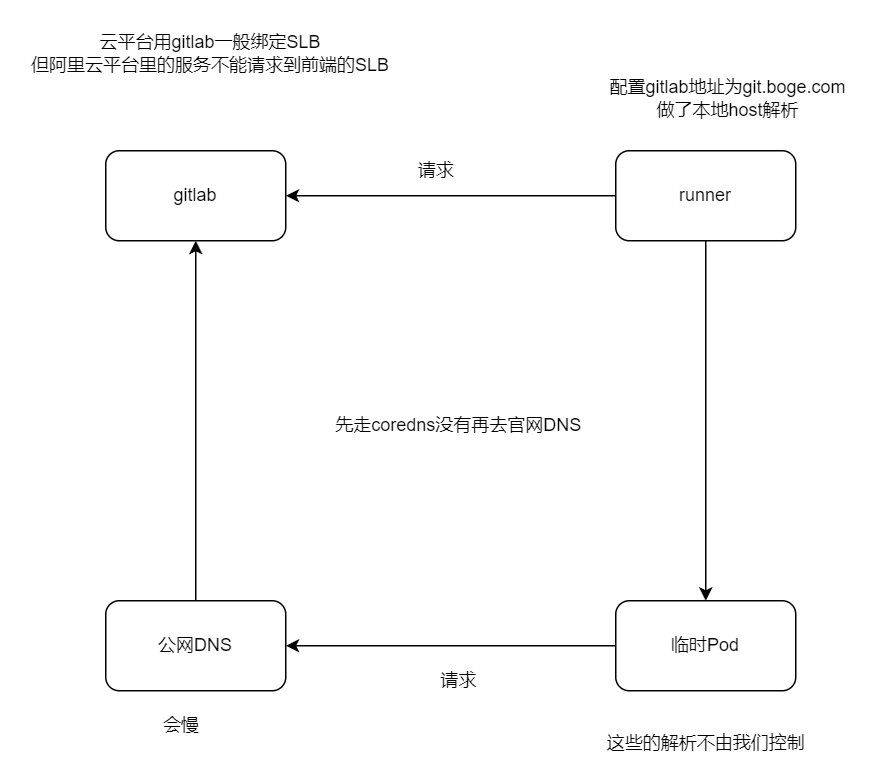
增加gitlab在k8s的内部解析
为什么这么做呢,博哥这里总结了两点原因:
- 优化gitlab网络通信,对于runner要调用gitlab服务来说,直接走内部地址速度更快
- 如果是在用阿里云的同学,采用在k8s上部署gitlab的话,那么k8s内部服务比如runner是不能通过同集群前面的公网入口SLB来请求访问的,这里阿里云自身网络架构原因,这个时候我们只需要做如下配置即可完美解决
# kubectl -n kube-system edit configmaps coredns

添加解析
rewrite stop {
  name regex git.boge.com gitlab.gitlab-ver130806.svc.cluster.local
  answer name gitlab.gitlab-ver130806.svc.cluster.local git.boge.com
}

# kubectl -n kube-system get configmaps coredns -o yamlapiVersion: v1
data:
Corefile: |
.:53 {
errors
health
ready
log
rewrite stop {
name regex git.boge.com gitlab.gitlab-ver130806.svc.cluster.local
answer name gitlab.gitlab-ver130806.svc.cluster.local git.boge.com
}
kubernetes cluster.local in-addr.arpa ip6.arpa {
pods verified
fallthrough in-addr.arpa ip6.arpa
}
autopath @kubernetes
prometheus :9153
forward . /etc/resolv.conf
cache 30
loop
reload
loadbalance
}
kind: ConfigMap
metadata:
name: coredns
namespace: kube-system# 重启dns
# kubectl -n kube-system delete pod coredns-65bc7b648d-9rccf
pod "coredns-65bc7b648d-9rccf" deleted测试
# vim /etc/hosts
10.0.1.204 git.boge.com

apt install iputils-ping

# ping git.boge.com
PING git.boge.com (10.0.1.204) 56(84) bytes of data.
64 bytes from git.boge.com (10.0.1.204): icmp_seq=1 ttl=64 time=0.433 ms
64 bytes from git.boge.com (10.0.1.204): icmp_seq=2 ttl=64 time=0.623 ms
64 bytes from git.boge.com (10.0.1.204): icmp_seq=3 ttl=64 time=0.608 ms
^C
--- git.boge.com ping statistics ---
3 packets transmitted, 3 received, 0% packet loss, time 2043ms
rtt min/avg/max/mdev = 0.433/0.554/0.623/0.086 msapiVersion: apps/v1
kind: Deployment
metadata:
labels:
app: netshoot
name: netshoot
spec:
replicas: 1
selector:
matchLabels:
app: netshoot
template:
metadata:
labels:
app: netshoot
spec:
containers:
- image: docker.io/nicolaka/netshoot
name: netshoot
args:
- /bin/bash
- -c
- >
while :; do
echo "[$(date +%F\ %T)] hello"
sleep 1
done# kubectl -n test apply -f test-netshoot.yaml
# kubectl -n test exec -it netshoot-659d7f6dcf-fvxmz -- bash
netshoot-659d7f6dcf-fvxmz:~# ping git.boge.com
PING git.boge.com.test.svc.cluster.local (10.68.144.159) 56(84) bytes of data.
From gitlab.gitlab-ver130806.svc.cluster.local (10.68.144.159) icmp_seq=1 Destination Port Unreachable
From gitlab.gitlab-ver130806.svc.cluster.local (10.68.144.159) icmp_seq=2 Destination Port Unreachable
From gitlab.gitlab-ver130806.svc.cluster.local (10.68.144.159) icmp_seq=3 Destination Port Unreachable
^C
--- git.boge.com.test.svc.cluster.local ping statistics ---
3 packets transmitted, 0 received, +3 errors, 100% packet loss, time 2011ms增加ssh端口转发
我们要保持所有开发人员能使用默认的22端口来通过ssh拉取代码,那么就需要做如下端口转发配置
再204机器上操作
# 注意配置此转发前,需要将对应NODE的本身ssh连接端口作一下修改,以防后面登陆不了该机器
vim /etc/ssh/sshd_config

把#Port 22 打开并修改为
Port 10022

重启ssh服务
systemctl restart sshd

测试
ssh -p10022 10.0.1.204

# kubectl -n gitlab-ver130806 get svc
NAME         TYPE        CLUSTER-IP      EXTERNAL-IP   PORT(S)                     AGE
gitlab       NodePort    10.68.144.159   <none>        80:30249/TCP,22:32426/TCP   4h58m


iptables -t nat -A PREROUTING -d 10.0.1.204 -p tcp --dport 22 -j DNAT --to-destination 10.0.1.204:32426

对于所有发往 IP 地址 10.0.1.204 并且目标端口为 22 的 TCP 数据包,它们的目的端口将被重定向到该机器的 32426 端口

#↑ 删除上面创建的这一条规则,将-A换成-D即可
iptables -t nat -D PREROUTING -d 10.0.1.204 -p tcp --dport 22 -j DNAT --to-destination 10.0.1.204:32426

iptables -t nat  -nvL PREROUTING
请求列出 (-L) nat 表中 PREROUTING 链的所有规则,并且以数字 (-n) 和简短 (-v) 格式显示结果
# iptables -t nat  -nvL PREROUTING
Chain PREROUTING (policy ACCEPT 0 packets, 0 bytes)
 pkts bytes target     prot opt in     out     source               destination
 5096  305K cali-PREROUTING  all  --  *      *       0.0.0.0/0            0.0.0.0/0            /* cali:6gwbT8clXdHdC1b1 */
 5318  325K KUBE-SERVICES  all  --  *      *       0.0.0.0/0            0.0.0.0/0            /* kubernetes service portals */
    0     0 DNAT       tcp  --  *      *       0.0.0.0/0            10.0.1.204           tcp dpt:22 to:10.0.1.204:32426


加入开机自启
vim /etc/rc.local

#!/bin/sh -e
iptables -t nat -A PREROUTING -d 10.0.1.204 -p tcp --dport 22 -j DNAT --to-destination 10.0.1.204:32426
exit 0

# sudo chmod +x /etc/rc.local


# ssh 10.0.1.204
@@@@@@@@@@@@@@@@@@@@@@@@@@@@@@@@@@@@@@@@@@@@@@@@@@@@@@@@@@@
@    WARNING: REMOTE HOST IDENTIFICATION HAS CHANGED!     @
@@@@@@@@@@@@@@@@@@@@@@@@@@@@@@@@@@@@@@@@@@@@@@@@@@@@@@@@@@@
IT IS POSSIBLE THAT SOMEONE IS DOING SOMETHING NASTY!
Someone could be eavesdropping on you right now (man-in-the-middle attack)!
It is also possible that a host key has just been changed.
The fingerprint for the ED25519 key sent by the remote host is
SHA256:iEa2RMZd/GocZozE1V9hGM+hRXn/D56Hkzeq/y1YH0w.
Please contact your system administrator.
Add correct host key in /root/.ssh/known_hosts to get rid of this message.
Offending ED25519 key in /root/.ssh/known_hosts:6
  remove with:
  ssh-keygen -f "/root/.ssh/known_hosts" -R "10.0.1.204"
Host key for 10.0.1.204 has changed and you have requested strict checking.
Host key verification failed.


# ssh 10.0.1.204
@@@@@@@@@@@@@@@@@@@@@@@@@@@@@@@@@@@@@@@@@@@@@@@@@@@@@@@@@@@
@    警告:远程主机的身份标识已改变!   @
@@@@@@@@@@@@@@@@@@@@@@@@@@@@@@@@@@@@@@@@@@@@@@@@@@@@@@@@@@@

这可能是有人正在做恶意的事情!
可能有人正在监听您的通信(中间人攻击)!
同时,也有可能是主机密钥刚刚被更改。

远程主机发送的ED25519密钥的指纹为:
SHA256:iEa2RMZd/GocZozE1V9hGM+hRXn/D56Hkzeq/y1YH0w。

请与您的系统管理员联系。
在/root/.ssh/known_hosts中添加正确的主机密钥以消除此消息。
在/root/.ssh/known_hosts中的第6行有冲突的ED25519密钥,
可以通过以下命令移除:
ssh-keygen -f "/root/.ssh/known_hosts" -R "10.0.1.204"

由于10.0.1.204的主机密钥已改变,并且您请求了严格的检查。
主机密钥验证失败。


需要ssh私钥
接着我们找一台机器,这里我们选取10.0.1.201这台机器,加一条本地hosts 10.0.1.204 git.boge.com,来试下推送gitlab代码仓库有无问题,详细操作见本节同名视频课程,希望大家能对着视频自己动手操作一遍,理解上面这些配置的含义,后面可以举一反三,在k8s的其他服务也可以这么来做,达到访问更优的效果。
测试gitlab 拉取推送
给每台机器做git.boge.com的本地host解析
添加公钥
登录gitlab ui 界面,点击默认Monitoring项目,点击提示 Add SSH Key按钮,
Key
Paste your public SSH key, which is usually contained in the file '~/.ssh/id_ed25519.pub' or '~/.ssh/id_rsa.pub' and begins with 'ssh-ed25519' or 'ssh-rsa'. Do not paste your private SSH key, as that can compromise your identity.
# ls -l
total 20
-rw------- 1 root root  565 Jun 15 23:10 authorized_keys
-rw------- 1 root root 2602 Jun 15 23:10 id_rsa
-rw-r--r-- 1 root root  565 Jun 15 23:10 id_rsa.pub
-rw------- 1 root root 1546 Jun 17 11:48 known_hosts
-rw-r--r-- 1 root root  142 Jun 15 23:10 known_hosts.old

公钥 rsa.pub,私钥id_rsa

# cat id_rsa.pub
ssh-rsa AAAAB3NzaC1yc2EAAAADAQABAAABgQDRxzDSY5ITO0KxQbtkq08tJ0JNd8ACmarMwsz51omz191vKMsocEWKYMqrBh1IviweuSlzQqtMbCXLIuXQyC08Tqz+U3khbsmqh1pazLMBnKKx+53dZITh1QqUXLfu9+nBMFc/fbzn9NAgkdtJaMaogqdtuHIsQU5cChZePLqJqNgEzOElK1J8INM/CV9RYEBnozTr2jywhloqLqIZLKcN0sKpIlknmaaYoa29Jau9iCl9wS+T50xG9zz6GKe7myqz5GDb6WQ97eRQwn11KsrW8Ip7kdEhlQNXbD0A/mO+grTZjV/iwle0wBwk2Qhnul7OceOFkwyXL6CL73TbtdaTwUuy6iVPboZzXjdn5RH/LIppuDFlLOVLrVEPUo4alUFmkTiYzab9WDnYlwvbVOeOUxkoPAAwHRmhHnCxRAwNc6NjitSTm93CgDCidVPptybJqsbrzXMWII7rk6HvsItwyuWQ6LA7Pm6VVMnbZgRuq+3LiwhDxrP8qe+TvXn/lnE= root@node-1
测试
Git global setup

git config-global user.name "Administrator"
git configglobal user.email "admin@example.com

Create a new repository
git clone git@git.boge.com:gitlab-instance-df24b333/monitoring.git
cd monitoring
touch README.md
git add README.md
git commit -m"add README"
git push u origin master
此处git.boge.com应该解析在204节点,
# git clone git@git.boge.com:gitlab-instance-35cbcee5/monitoring.git
Cloning into 'monitoring'...
@@@@@@@@@@@@@@@@@@@@@@@@@@@@@@@@@@@@@@@@@@@@@@@@@@@@@@@@@@@
@ WARNING: REMOTE HOST IDENTIFICATION HAS CHANGED! @
@@@@@@@@@@@@@@@@@@@@@@@@@@@@@@@@@@@@@@@@@@@@@@@@@@@@@@@@@@@
IT IS POSSIBLE THAT SOMEONE IS DOING SOMETHING NASTY!
Someone could be eavesdropping on you right now (man-in-the-middle attack)!
It is also possible that a host key has just been changed.
The fingerprint for the ED25519 key sent by the remote host is
SHA256:iEa2RMZd/GocZozE1V9hGM+hRXn/D56Hkzeq/y1YH0w.
Please contact your system administrator.
Add correct host key in /root/.ssh/known_hosts to get rid of this message.
Offending ED25519 key in /root/.ssh/known_hosts:8
remove with:
ssh-keygen -f "/root/.ssh/known_hosts" -R "git.boge.com"
Host key for git.boge.com has changed and you have requested strict checking.
Host key verification failed.
fatal: Could not read from remote repository.
Please make sure you have the correct access rights
and the repository exists.
# ssh-keygen -f "/root/.ssh/known_hosts" -R "git.boge.com"
# Host git.boge.com found: line 8
/root/.ssh/known_hosts updated.
Original contents retained as /root/.ssh/known_hosts.old
# git clone git@git.boge.com:gitlab-instance-35cbcee5/monitoring.git
Cloning into 'monitoring'...
The authenticity of host 'git.boge.com (10.0.1.204)' can't be established.
ED25519 key fingerprint is SHA256:iEa2RMZd/GocZozE1V9hGM+hRXn/D56Hkzeq/y1YH0w.
This key is not known by any other names
Are you sure you want to continue connecting (yes/no/[fingerprint])? yes
Warning: Permanently added 'git.boge.com' (ED25519) to the list of known hosts.
warning: You appear to have cloned an empty repository.
确认了连接到git.boge.com的认证信息,并将其永久地添加到了known_hosts文件中,这样将来的连接不会再出现警告。
尝试克隆 gitlab-instance-35cbcee5/monitoring.git 这个仓库,但是提示显示这是一个空仓库。这意味着这个仓库可能是新创建的或者里面没有任何文件。
# ll
drwxr-xr-x 3 root root 4096 Jul 20 23:53 monitoring/Git global setup
git config --global user.name "Administrator"
git config --global user.email "admin@example.com"
Create a new repository
git clone git@git.boge.com:gitlab-instance-35cbcee5/monitoring.git
cd monitoring
touch README.md
vim README.md
2024-07-20 23:58
git add README.md
git commit -m "add README"
git push -u origin master
Push an existing folder
cd existing_folder
git init
git remote add origin git@git.boge.com:gitlab-instance-35cbcee5/monitoring.git
git add .
git commit -m "Initial commit"
git push -u origin master
Push an existing Git repository
cd existing_repo
git remote rename origin old-origin
git remote add origin git@git.boge.com:gitlab-instance-35cbcee5/monitoring.git
git push -u origin --all
git push -u origin --tags六 部署dind(docker in docker)
大家好,我是博哥爱运维。我们现在在k8s来部署dind服务,提供整个CI(持续集成)的功能。
我们看看docker version列出的结果 Docker采取的是C/S架构 Docker进程默认不监听任何端口,它会生成一个socket(/var/run/docker.sock)文件来进行本地进程通信 Docker C/S 之间采取Rest API作为通信协议,我们可以让Docker daemon进程监听一个端口(2375),这就为我们用docker client调用远程调用docker daemon进程执行镜像构建提供了可行性
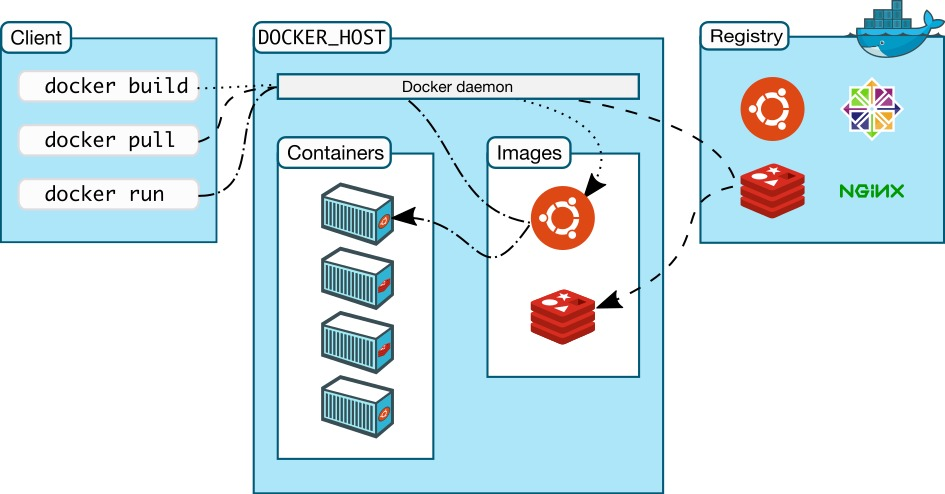
docker version先创建证书
# 命令是boge-secret
kubectl create secret docker-registry boge-secret --docker-server=harbor.boge.com --docker-username=admin --docker-password=boge666 --docker-email=admin@boge.com

# 但是配置写的是bogeharbor
imagePullSecrets:
- name: bogeharbor

# 前面在gitlab-ver130806 创建了 boge-harbor-secret
kubectl -n gitlab-ver130806 create secret docker-registry boge-harbor-secret --docker-server=harbor.boge.com --docker-username=boge --docker-password=Boge@666 --docker-email=ops@boge.com
# describe遇到下面错误是因为限制的资源太小了,k8s会重启它
dind pip instll staus : kill -9 code 137(128+9) ,may be limits(cpu,memory) resources need change
# 本地没有docker服务端
# only have docker client ,use dind can be use normal
#dindSvc=$(kubectl -n kube-system get svc dind |awk 'NR==2{print $3}')
#export DOCKER_HOST="tcp://${dindSvc}:2375/"
#export DOCKER_DRIVER=overlay2
#export DOCKER_TLS_CERTDIR=""
""定义为空,关闭证书验证9dind.yaml
# 这是在命名空间kube-system下的,下面有gitlab-ver130806命名空间的
---
# SVC
kind: Service
apiVersion: v1
metadata:
  name: dind
  namespace: kube-system
spec:
  selector:
    app: dind
  ports:
    - name: tcp-port
      port: 2375
      protocol: TCP
      targetPort: 2375

---
# Deployment
apiVersion: apps/v1
kind: Deployment
metadata:
  name: dind
  namespace: kube-system
  labels:
    app: dind
spec:
  replicas: 1
  selector:
    matchLabels:
      app: dind
  template:
    metadata:
      labels:
        app: dind
    spec:
      # 映射端口到宿主机,对打包好一些
      hostNetwork: true
      containers:
      - name: dind
        image: harbor.boge.com/docker.io/docker:24-dind
        # 生命周期
        lifecycle:
          # 启动之前
          postStart:
            exec:
              command: ["/bin/sh", "-c", "docker login harbor.boge.com -u 'admin' -p 'boge666'"]
           # 3. when delete this pod , use this keep kube-proxy to flush role done
          preStop:
            exec:
              # 有些容器退出比较快,导致kube api server 还没有感知到这个pod挂掉了,还会把流量引入 这里等待5s再关闭或重启
              command: ["/bin/sh", "-c", "sleep 5"]
        ports:
        - containerPort: 2375
#        resources:
#          requests:
#            cpu: 200m
#            memory: 256Mi
#          limits:
#            cpu: 0.5
#            memory: 1Gi
        readinessProbe:
          tcpSocket:
            port: 2375
          initialDelaySeconds: 10
          periodSeconds: 30
        livenessProbe:
          tcpSocket:
            port: 2375
          initialDelaySeconds: 10
          periodSeconds: 30
        securityContext:
            privileged: true
        env:
          - name: DOCKER_HOST
            value: tcp://localhost:2375
          - name: DOCKER_DRIVER
            value: overlay2
          - name: DOCKER_TLS_CERTDIR
            value: ''
        # 把宿主机docker的数据挂着到容器里,加快容器构 建速度
        volumeMounts:
          - name: docker-graph-storage
            mountPath: /var/lib/docker
          - name: tz-config
            mountPath: /etc/localtime
           # kubectl -n kube-system create secret generic harbor-ca --from-file=harbor-ca=/data/harbor/ssl/tls.cert
          - name: harbor-ca
            mountPath: /etc/docker/certs.d/harbor.boge.com/ca.crt
            subPath: harbor-ca
       # kubectl create secret docker-registry boge-secret --docker-server=harbor.boge.com --docker-username=admin --docker-password=boge666 --docker-email=admin@boge.com
      hostAliases:
      - hostnames:
        - harbor.boge.com
        ip: 10.0.1.204
      imagePullSecrets:
      - name: bogeharbor
      volumes:
#      - emptyDir:
#          medium: ""
#          sizeLimit: 10Gi
      - hostPath:
          path: /var/lib/container/docker
        name: docker-graph-storage
      - hostPath:
          path: /usr/share/zoneinfo/Asia/Shanghai
        name: tz-config
      - name: harbor-ca
        secret:
          secretName: harbor-ca
          defaultMode: 0600
#
#        kubectl taint node 10.0.1.201 Ingress=:NoExecute
#        kubectl describe node 10.0.1.201 |grep -i taint
#        kubectl taint node 10.0.1.201 Ingress:NoExecute-
      # docker的数据在201master节点,所以要指定
      nodeSelector:
        kubernetes.io/hostname: "10.0.1.201"
      # 忽视所有污点
      tolerations:
      - operator: Exists
# gitlab-ver130806命名空间的
---
# SVC
kind: Service
apiVersion: v1
metadata:
name: dind
namespace: gitlab-ver130806
spec:
selector:
app: dind
ports:
- name: tcp-port
port: 2375
protocol: TCP
targetPort: 2375
---
# Deployment
apiVersion: apps/v1
kind: Deployment
metadata:
name: dind
namespace: gitlab-ver130806
labels:
app: dind
spec:
replicas: 1
selector:
matchLabels:
app: dind
template:
metadata:
labels:
app: dind
spec:
# 映射端口到宿主机,对打包好一些
hostNetwork: true
containers:
- name: dind
image: harbor.boge.com/docker.io/docker:24-dind
# 生命周期
lifecycle:
# 启动之前
postStart:
exec:
command: ["/bin/sh", "-c", "docker login harbor.boge.com -u 'boge' -p 'Boge@666'"]
# 3. when delete this pod , use this keep kube-proxy to flush role done
preStop:
exec:
# 有些容器退出比较快,导致kube api server 还没有感知到这个pod挂掉了,还会把流量引入 这里等待5s再关闭或重启
command: ["/bin/sh", "-c", "sleep 5"]
ports:
- containerPort: 2375
# resources:
# requests:
# cpu: 200m
# memory: 256Mi
# limits:
# cpu: 0.5
# memory: 1Gi
readinessProbe:
tcpSocket:
port: 2375
initialDelaySeconds: 10
periodSeconds: 30
livenessProbe:
tcpSocket:
port: 2375
initialDelaySeconds: 10
periodSeconds: 30
securityContext:
privileged: true
env:
- name: DOCKER_HOST
value: tcp://localhost:2375
- name: DOCKER_DRIVER
value: overlay2
- name: DOCKER_TLS_CERTDIR
value: ''
# 把宿主机docker的数据挂着到容器里,加快容器构 建速度
volumeMounts:
- name: docker-graph-storage
mountPath: /var/lib/docker
- name: tz-config
mountPath: /etc/localtime
# kubectl -n gitlab-ver130806 create secret generic harbor-ca --from-file=harbor-ca=/root/boge/0720/tls/boge.com.cert
- name: harbor-ca
mountPath: /etc/docker/certs.d/harbor.boge.com/ca.crt
subPath: harbor-ca
# kubectl create secret docker-registry boge-secret --docker-server=harbor.boge.com --docker-username=boge --docker-password=Boge@666 --docker-email=admin@boge.com
hostAliases:
- hostnames:
- harbor.boge.com
ip: 10.0.1.204
imagePullSecrets:
- name: boge-harbor-secret
volumes:
# - emptyDir:
# medium: ""
# sizeLimit: 10Gi
- hostPath:
path: /var/lib/container/docker
name: docker-graph-storage
- hostPath:
path: /usr/share/zoneinfo/Asia/Shanghai
name: tz-config
- name: harbor-ca
secret:
secretName: harbor-ca
defaultMode: 0600
#
# kubectl taint node 10.0.1.201 Ingress=:NoExecute
# kubectl describe node 10.0.1.201 |grep -i taint
# kubectl taint node 10.0.1.201 Ingress:NoExecute-
# docker的数据在201master节点,所以要指定
nodeSelector:
kubernetes.io/hostname: "10.0.1.201"
# 忽视所有污点
tolerations:
- operator: Exists查看下pod的标签
注意密钥
# 204节点部署harbor,执行下面
mkdir /data/harbor/ssl && cd /data/harbor/ssl
openssl genrsa -out tls.key 2048
openssl req -new -x509 -key tls.key -out tls.cert -days 360 -subj /CN=*.boge.com


# 在201节点上面拉取harbor镜像
mkdir -p /etc/docker/certs.d/harbor.boge.com
scp 10.0.1.204:/data/harbor/ssl/tls.cert /etc/docker/certs.d/harbor.boge.com/ca.crt
使用scp(Secure Copy)命令从IP地址为10.0.1.204的远程主机上复制tls.cert文件到本地的/etc/docker/certs.d/harbor.boge.com/ca.crt路径下。这样做的目的是为了让Docker能够信任Harbor仓库的TLS证书,从而在进行图像拉取或推送操作时不会出现安全警告


# gitlab(204节点)部署dind
kubectl -n kube-system create secret generic harbor-ca --from-file=harbor-ca=/data/harbor/ssl/tls.cert

kubectl -n gitlab-ver130806 create secret generic harbor-ca --from-file=harbor-ca=/root/boge/0720/tls/boge.com.cert
# kubectl -n gitlab-ver130806 apply -f 9dind.yaml
service/dind created
deployment.apps/dind created进入pod查看密钥是否生效
拉取harbor仓库试试
# kubectl -n gitlab-ver130806 exec -it dind-74cb6dd4f8-mxpbs -- sh
/ # cat /etc/docker/certs.d/harbor.boge.com/ca.crt
/ # docker pull harbor.boge.com/registry.cn-beijing.aliyuncs.com/acs/busybox:v1.29.2
v1.29.2: Pulling from registry.cn-beijing.aliyuncs.com/acs/busybox
8c5a7da1afbc: Pull complete
Digest: sha256:5e8e0509e829bb8f990249135a36e81a3ecbe94294e7a185cc14616e5fad96bd
Status: Downloaded newer image for harbor.boge.com/registry.cn-beijing.aliyuncs.com/acs/busybox:v1.29.2
harbor.boge.com/registry.cn-beijing.aliyuncs.com/acs/busybox:v1.29.2七 CI/CD生产实战项目
大家好,我是博哥爱运维。这节课我们开始最终CI/CD自动化流程实战,终于要到打大BOSS大结局了,博哥自从2021年3月1日开始分享这套K8S架构师课程以来,坚持每天整理文档录制视频,一直坚持到今天,在这期间,博哥认识了不少喜欢K8S的朋友,也收到了很多朋友的鼓励和建议,这对博哥都是宝贵的财富。有些人可能会想,在现如今这个社会,免费的东西还存在嘛?免费的东西就是最贵的东西,诚然,这些博哥也认同,但也不能排除网上也有很多热爱技术,执着分享的人,像国内外很多大牛开源出来很多优化的代码项目,像优秀的操作系统LINUX,像谷歌开源的这套K8S系统等等,博哥虽然做不到这么优秀,但也想把自己工作中的一些踩坑经验积累分享给大家,要说私心嘛,就是博哥想锻炼下自己的讲课经验,拓宽下自己的职业发展路线,但这个和我分享给大家的内容不相冲突,反而我认为它们是有利的,相辅相成的,博哥分享的所有东西都是实实在在工作中拿下来的生产经验,再精心整理来作分享。
大家一定要仔细观看,多多操作,把整个流程都掌握透彻。这里我会采用目前企业较常见的编程语言python的flask模块来实施完整的项目自动化流程步骤,其他语言都可以参照这个项目来实施自动化流程。
先把k8s的二进制命令行工具kubectl容器化备用(CD发布需要用到)
配置
kubectl容器化
把二进制文件复制过来
# which kubectl
/opt/kube/bin/kubectl

# cp /opt/kube/bin/kubectl .
Dockerfile
FROM harbor.boge.com/docker.io/alpine:3.13

MAINTAINER boge

ENV TZ "Asia/Shanghai"

RUN sed -ri 's+dl-cdn.alpinelinux.org+mirrors.aliyun.com+g' /etc/apk/repositories \
 && apk add --no-cache curl tzdata ca-certificates \
 && cp -f /usr/share/zoneinfo/Asia/Shanghai /etc/localtime \
 && apk upgrade \
 && rm -rf /var/cache/apk/*

COPY kubectl /usr/local/bin/
RUN chmod +x /usr/local/bin/kubectl

ENTRYPOINT ["kubectl"]
CMD ["help"]
# kubectl get node
NAME STATUS ROLES AGE VERSION
10.0.1.201 Ready,SchedulingDisabled master 35d v1.27.5
10.0.1.202 Ready,SchedulingDisabled master 35d v1.27.5
10.0.1.203 Ready node 35d v1.27.5
10.0.1.204 Ready node 35d v1.27.5
docker build -t harbor.boge.com/boge/kubectl:v1.27.5 .
docker push harbor.boge.com/boge/kubectl:v1.27.5上传python的flask模块代码
准备好flask相关的代码文件上传到gitlab代码仓库
git clone git@git.boge.com:root/test.git
cd test
touch README.md
git add README.md
git commit -m "add README"
git push -u origin master
app.py
from flask import Flask
app = Flask(__name__)

@app.route('/')
def hello_world():
    return 'Hello, boge! 24.07.16.01'

@app.route('/gg/<username>')
def hello(username):
    return 'welcome' + ': ' + username + '!'
简单两个路由
vim app.py
git add app.py
git commit -m "add app.py"
git push -u origin master
Dockerfile
FROM harbor.boge.com/docker.io/python:3.10-slim-bullseye
MAINTAINER boge

WORKDIR /kae/app

COPY requirements.txt .

RUN  sed -i 's/deb.debian.org/ftp.cn.debian.org/g' /etc/apt/sources.list \
  && sed -i 's/security.debian.org/ftp.cn.debian.org/g' /etc/apt/sources.list \
  && apt-get update -y \
  && apt-get install -y wget gcc libsm6 libxext6 libglib2.0-0 libxrender1 make \
  && apt-get clean && apt-get autoremove -y && rm -rf /var/lib/apt/lists/*
RUN pip install --no-cache-dir -i https://mirrors.aliyun.com/pypi/simple -r requirements.txt \
    && rm requirements.txt

COPY . .

EXPOSE 5000
HEALTHCHECK CMD curl --fail http://localhost:5000 || exit 1

ENTRYPOINT ["gunicorn", "app:app", "-c", "gunicorn_config.py"]
https://www.debian.org/releases/index.zh-cn.html
sed -i 's/deb.debian.org/ftp.cn.debian.org/g' /etc/apt/sources.list
sed -i 's/security.debian.org/ftp.cn.debian.org/g' /etc/apt/sources.list
/# cat /etc/apt/sources.list
deb http://ftp.cn.debian.org/debian stretch main
deb http://ftp.cn.debian.org/debian-security stretch/updates main
deb http://ftp.cn.debian.org/debian stretch-updates main
# cat /etc/debian_version
9.13
root@973592d4f863:/# cat /etc/os-release
PRETTY_NAME="Debian GNU/Linux 9 (stretch)"
NAME="Debian GNU/Linux"
VERSION_ID="9"
VERSION="9 (stretch)"
VERSION_CODENAME=stretch
ID=debian
HOME_URL="https://www.debian.org/"
SUPPORT_URL="https://www.debian.org/support"
BUG_REPORT_URL="https://bugs.debian.org/"
清华
sed -i 's/deb.debian.org/ftp.cn.debian.org/g' /etc/apt/sources.list
sed -i 's/security.debian.org/ftp.cn.debian.org/g' /etc/apt/sources.list
apt-get update -y
apt-get install -y wget gcc libsm6 libxext6 libglib2.0-0 libxrender1 make
apt-get clean
&& apt-get autoremove -y
&& rm -rf /var/lib/apt/lists/*
RUN pip install --no-cache-dir -i https://mirrors.aliyun.com/pypi/simple -r requirements.txt \
&& rm requirements.txt
# cat /etc/apt/sources.list
# deb http://snapshot.debian.org/archive/debian/20200908T070000Z stretch main
deb http://deb.debian.org/debian stretch main
# deb http://snapshot.debian.org/archive/debian-security/20200908T070000Z stretch/updates main
deb http://security.debian.org/debian-security stretch/updates main
# deb http://snapshot.debian.org/archive/debian/20200908T070000Z stretch-updates main
deb http://deb.debian.org/debian stretch-updates main
echo 'deb http://mirrors.aliyun.com/debian/ stretch main non-free contrib
deb-src http://mirrors.aliyun.com/debian/ stretch main non-free contrib
deb http://mirrors.aliyun.com/debian-security stretch/updates main
deb-src http://mirrors.aliyun.com/debian-security stretch/updates main
deb http://mirrors.aliyun.com/debian/ stretch-updates main non-free contrib
deb-src http://mirrors.aliyun.com/debian/ stretch-updates main non-free contrib
deb http://mirrors.aliyun.com/debian/ stretch-backports main non-free contrib
deb-src http://mirrors.aliyun.com/debian/ stretch-backports main non-free contrib
' > /etc/apt/sources.list
echo 'deb http://ftp.cn.debian.org/debian oldoldstable main
deb http://ftp.cn.debian.org/debian-security oldoldstable/updates main
deb http://ftp.cn.debian.org/debian oldoldstable-updates main' > /etc/apt/sources.list
docker run --rm -it docker.io/python:3.10-slim-bullseye bash
docker pull python:3.5-slim-bullseye
docker pull python:3.10-slim-bullseyevim Dockerfile
git add Dockerfile
git commit -m "add Dockerfile"
git push -u origin mastergunicorn_config.py
bind = '0.0.0.0:5000'
graceful_timeout = 3600
timeout = 1200
max_requests = 1200
workers = 1
worker_class = 'gevent'
vim gunicorn_config.py
git add gunicorn_config.py
git commit -m "add gunicorn_config.py"
git push -u origin masterrequirements.txt
flask
gevent
gunicorn
vim requirements.txt
git add requirements.txt
git commit -m "add requirements.txt"
git push -u origin master上面4个文件上传到代码仓库
仓库名随便取,视频为test
配置代码仓库变量
在代码仓库变量配置里面配置如下变量值
gitlab ui --> 进入一个代码仓库 -->左侧边栏 --> Settings --> CI/CD --> Variables -->expand --> Add Variable
Type           Key                      Value                    State        Masked
Variable   DOCKER_USER                 boge                   Flags下面都关闭 下面都关闭
Variable   DOCKER_PASS                 Boge@666
Variable   REGISTRY_URL                harbor.boge.com
Variable   REGISTRY_NS                 boge #harbor项目名称
File       KUBE_CONFIG_TEST            k8s相关config配置文件内容(RBAC)
对于每个服务/项目,建议给他单独创建个命名空间,方便权限管理,资源控制 创建一个只能访问该命名空间资源的config配置
KUBE_CONFIG_TEST要填写整个配置文件的内容
第22关
kubectl create ns test-cicd-python
脚本创建
bash ns-all.sh [命名空间] [api server地址]
# bash ns-all.sh test-cicd-python https://10.0.1.201:6443
All namespaces is here:
default
gitlab-ver130806
harbor
kube-node-lease
kube-public
kube-system
test-cicd-python
endpoint server if local network you can use https://10.0.1.201:6443
serviceaccount/test-cicd-python-user created
secret/secret-sa-test-cicd-python-user created
role.rbac.authorization.k8s.io/test-cicd-python-user-full-access created
rolebinding.rbac.authorization.k8s.io/test-cicd-python-user-view created配置项目自动化文件
准备项目自动化配置文件.gitlab-ci.yml
注意修改DOCKER_HOST: tcp://10.68.86.33:2375/
# 之前创建的证书
# Add tls
# openssl genrsa -out tls.key 2048
# openssl req -new -x509 -key tls.key -out tls.cert -days 360 -subj /CN=*.boge.com
# kubectl -n gitlab-ver130806 create secret tls mytls --cert=tls.cert --key=tls.key


flask-test-boge-com-tls

# kubectl -n test-cicd-python create secret tls flask-test-boge-com-tls --cert=/root/boge/0720/tls/boge.com.cert --key=/root/boge/0720/tls/boge.com.key
# kubectl -n gitlab-ver130806 get svc
NAME TYPE CLUSTER-IP EXTERNAL-IP PORT(S) AGE
dind ClusterIP 10.68.1.198 <none> 2375/TCP 6h3m.gitlab-ci.yml推送到代码仓库
stages:
  - build
  - deploy
  - rollback

# tag name need: 20.11.21.01
variables:
  namecb: "flask-test"
  svcport: "5000"
  replicanum: "2"
  ingress: "flask-test.boge.com"
  certname: "flask-test-boge-com-tls"
  CanarylIngressNum: "20"

.deploy_k8s: &deploy_k8s |
  if [ $CANARY_CB -eq 1 ];then cp -arf .project-name-canary.yaml ${namecb}-${CI_COMMIT_TAG}.yaml; sed -ri "s+CanarylIngressNum+${CanarylIngressNum}+g" ${namecb}-${CI_COMMIT_TAG}.yaml; sed -ri "s+NomalIngressNum+$(expr 100 - ${CanarylIngressNum})+g" ${namecb}-${CI_COMMIT_TAG}.yaml ;else cp -arf .project-name.yaml ${namecb}-${CI_COMMIT_TAG}.yaml;fi
  sed -ri "s+projectnamecb.boge.com+${ingress}+g" ${namecb}-${CI_COMMIT_TAG}.yaml
  sed -ri "s+projectnamecb+${namecb}+g" ${namecb}-${CI_COMMIT_TAG}.yaml
  sed -ri "s+5000+${svcport}+g" ${namecb}-${CI_COMMIT_TAG}.yaml
  sed -ri "s+replicanum+${replicanum}+g" ${namecb}-${CI_COMMIT_TAG}.yaml
  sed -ri "s+mytls+${certname}+g" ${namecb}-${CI_COMMIT_TAG}.yaml
  sed -ri "s+mytagcb+${CI_COMMIT_TAG}+g" ${namecb}-${CI_COMMIT_TAG}.yaml
  sed -ri "s+harbor.boge.com/library+${IMG_URL}+g" ${namecb}-${CI_COMMIT_TAG}.yaml
  cat ${namecb}-${CI_COMMIT_TAG}.yaml
  [ -d ~/.kube ] || mkdir ~/.kube
  echo "$KUBE_CONFIG" > ~/.kube/config
  if [ $NORMAL_CB -eq 1 ];then if kubectl get deployments.|grep -w ${namecb}-canary &>/dev/null;then kubectl delete deployments.,svc ${namecb}-canary ;fi;fi
  kubectl apply -f ${namecb}-${CI_COMMIT_TAG}.yaml --record
  echo
  echo
  echo "============================================================="
  echo "                    Rollback Indx List"
  echo "============================================================="
  kubectl rollout history deployment ${namecb}|tail -5|awk -F"[ =]+" '{print $1"\t"$5}'|sed '$d'|sed '$d'|sort -r|awk '{print $NF}'|awk '$0=""NR".   "$0'

.rollback_k8s: &rollback_k8s |
  [ -d ~/.kube ] || mkdir ~/.kube
  echo "$KUBE_CONFIG" > ~/.kube/config
  last_version_command=$( kubectl rollout history deployment ${namecb}|tail -5|awk -F"[ =]+" '{print $1"\t"$5}'|sed '$d'|sed '$d'|tail -${ROLL_NUM}|head -1 )
  last_version_num=$( echo ${last_version_command}|awk '{print $1}' )
  last_version_name=$( echo ${last_version_command}|awk '{print $2}' )
  kubectl rollout undo deployment ${namecb} --to-revision=$last_version_num
  echo $last_version_num
  echo $last_version_name
  kubectl rollout history deployment ${namecb}


build:
  stage: build
  retry: 2
  variables:
    # use dind.yaml to depoy dind'service on k8s
    DOCKER_HOST: tcp://10.68.1.198:2375/
    DOCKER_DRIVER: overlay2
    DOCKER_TLS_CERTDIR: ""
  before_script:
    - docker login ${REGISTRY_URL} -u "$DOCKER_USER" -p "$DOCKER_PASS"
  script:
    - docker pull ${REGISTRY_URL}/${REGISTRY_NS}/${namecb}:latest || true
    - docker build --network host --cache-from ${REGISTRY_URL}/${REGISTRY_NS}/${namecb}:latest --tag ${REGISTRY_URL}/${REGISTRY_NS}/${namecb}:$CI_COMMIT_TAG --tag ${REGISTRY_URL}/${REGISTRY_NS}/${namecb}:latest .
    - docker push ${REGISTRY_URL}/${REGISTRY_NS}/${namecb}:$CI_COMMIT_TAG
    - docker push ${REGISTRY_URL}/${REGISTRY_NS}/${namecb}:latest
  after_script:
    - docker logout ${REGISTRY_URL}
  tags:
    - "docker"
  only:
    - tags


#--------------------------K8S DEPLOY--------------------------------------------------

BOGE-deploy:
  stage: deploy
  image: harbor.boge.com/docker.io/boge/kubectl:v1.27.5
  variables:
    # 仓库的变量
    KUBE_CONFIG: "$KUBE_CONFIG_TEST"
    IMG_URL: "${REGISTRY_URL}/${REGISTRY_NS}"
    # 标记 判断金丝雀发布还是正常发布
    NORMAL_CB: 1
  # 引用前面的函数
  script:
    - *deploy_k8s
  # 自动开关
  when: manual
  only:
    - tags

# canary start
BOGE-canary-deploy:
  stage: deploy
  image: harbor.boge.com/docker.io/boge/kubectl:v1.27.5
  variables:
    KUBE_CONFIG: "$KUBE_CONFIG_TEST"
    IMG_URL: "${REGISTRY_URL}/${REGISTRY_NS}"
    CANARY_CB: 1
  script:
    - *deploy_k8s
  when: manual
  only:
    - tags
# canary end

# 3个回滚
BOGE-rollback-1:
  stage: rollback
  image: harbor.boge.com/docker.io/boge/kubectl:v1.27.5
  variables:
    KUBE_CONFIG: "$KUBE_CONFIG_TEST"
    ROLL_NUM: 1
  script:
    - *rollback_k8s
  when: manual
  only:
    - tags


BOGE-rollback-2:
  stage: rollback
  image: harbor.boge.com/docker.io/boge/kubectl:v1.27.5
  variables:
    KUBE_CONFIG: "$KUBE_CONFIG_TEST"
    ROLL_NUM: 2
  script:
    - *rollback_k8s
  when: manual
  only:
    - tags


BOGE-rollback-3:
  stage: rollback
  image: harbor.boge.com/docker.io/boge/kubectl:v1.27.5
  variables:
    KUBE_CONFIG: "$KUBE_CONFIG_TEST"
    ROLL_NUM: 3
  script:
    - *rollback_k8s
  when: manual
  only:
    - tags
vim .gitlab-ci.yml
git add .gitlab-ci.yml
git commit -m "add gitlab-ci.yml"
git push -u origin masterk8s deployment模板
准备k8s的deployment模板文件 .project-name.yaml
这里要注意提前在K8S把harbor拉取的凭证secret给创建好,命令如下:
kubectl -n test create secret docker-registry boge-secret --docker-server=harbor.boge.com --docker-username=admin --docker-password=boge666 --docker-email=admin@boge.com
kubectl -n test-cicd-python create secret docker-registry boge-harbor-secret --docker-server=harbor.boge.com --docker-username=boge --docker-password=Boge@666 --docker-email=ops@boge.com
.project-name.yaml正式发布模板文件
---
# SVC
kind: Service
apiVersion: v1
metadata:
  labels:
    kae: "true"
    kae-app-name: projectnamecb
    kae-type: app
  name: projectnamecb
spec:
  selector:
    kae: "true"
    kae-app-name: projectnamecb
    kae-type: app
  ports:
    - name: http-port
      port: 80
      protocol: TCP
      targetPort: 5000
#      nodePort: 12345
#  type: NodePort

---
# Ingress
apiVersion: networking.k8s.io/v1
kind: Ingress
metadata:
  labels:
    kae: "true"
    kae-app-name: projectnamecb
    kae-type: app
  name: projectnamecb
spec:
  tls:
  - hosts:
    - projectnamecb.boge.com
    secretName: mytls
  rules:
  - host: projectnamecb.boge.com
    http:
      paths:
      - path: /
        pathType: Prefix
        backend:
          service:
            name: projectnamecb
            port:
              number: 80


---
# Deployment
apiVersion: apps/v1
kind: Deployment
metadata:
  name: projectnamecb
  labels:
    kae: "true"
    kae-app-name: projectnamecb
    kae-type: app
spec:
  replicas: replicanum
  selector:
    matchLabels:
      kae-app-name: projectnamecb
  template:
    metadata:
      labels:
        kae: "true"
        kae-app-name: projectnamecb
        kae-type: app
    spec:
      containers:
      - name: projectnamecb
        image: harbor.boge.com/library/projectnamecb:mytagcb
        env:
          - name: TZ
            value: Asia/Shanghai
        ports:
        - containerPort: 5000
        # 健康检测,根据实际修改
        readinessProbe:
          httpGet:
            scheme: HTTP
            path: /
            port: 5000
          initialDelaySeconds: 10
          periodSeconds: 5
          timeoutSeconds: 3
          successThreshold: 1
          failureThreshold: 3
        livenessProbe:
          httpGet:
            scheme: HTTP
            path: /
            port: 5000
          initialDelaySeconds: 10
          periodSeconds: 5
          timeoutSeconds: 3
          successThreshold: 1
          failureThreshold: 3
        # 资源分配,根据实际修改
        resources:
          requests:
            cpu: 0.3
            memory: 300Mi
          limits:
            cpu: 0.3
            memory: 300Mi
      imagePullSecrets:
      - name: boge-harbor-secret
vim .project-name.yaml
git add .project-name.yaml
git commit -m "add project-name.yaml"
git push -u origin master准备好K8S上金丝雀部署的模板文件 .project-name-canary.yaml
---
# SVC
kind: Service
apiVersion: v1
metadata:
  labels:
    kae: "true"
    kae-app-name: projectnamecb-canary
    kae-type: app
  name: projectnamecb-canary
spec:
  selector:
    kae: "true"
    kae-app-name: projectnamecb-canary
    kae-type: app
  ports:
    - name: http-port
      port: 80
      protocol: TCP
      targetPort: 5000
#      nodePort: 12345
#  type: NodePort

---
# Ingress
apiVersion: networking.k8s.io/v1
kind: Ingress
metadata:
  labels:
    kae: "true"
    kae-app-name: projectnamecb-canary
    kae-type: app
  name: projectnamecb
  annotations:
    # 金丝雀重点 定义2个svc 进行流量百分比
    nginx.ingress.kubernetes.io/service-weight: |
        projectnamecb: NomalIngressNum, projectnamecb-canary: CanarylIngressNum
spec:
  tls:
  - hosts:
    - projectnamecb.boge.com
    secretName: mytls
  rules:
  - host: projectnamecb.boge.com
    http:
      paths:
      - path: /
        backend:
          serviceName: projectnamecb
          servicePort: 80
      - path: /
        backend:
          serviceName: projectnamecb-canary
          servicePort: 80

---
# Deployment
apiVersion: apps/v1
kind: Deployment
metadata:
  name: projectnamecb-canary
  labels:
    kae: "true"
    kae-app-name: projectnamecb-canary
    kae-type: app
spec:
  replicas: replicanum
  selector:
    matchLabels:
      kae-app-name: projectnamecb-canary
  template:
    metadata:
      labels:
        kae: "true"
        kae-app-name: projectnamecb-canary
        kae-type: app
    spec:
      containers:
      - name: projectnamecb-canary
        image: harbor.boge.com/library/projectnamecb:mytagcb
        env:
          - name: TZ
            value: Asia/Shanghai
        ports:
        - containerPort: 5000
        readinessProbe:
          httpGet:
            scheme: HTTP
            path: /
            port: 5000
          initialDelaySeconds: 10
          periodSeconds: 5
          timeoutSeconds: 3
          successThreshold: 1
          failureThreshold: 3
        livenessProbe:
          httpGet:
            scheme: HTTP
            path: /
            port: 5000
          initialDelaySeconds: 10
          periodSeconds: 5
          timeoutSeconds: 3
          successThreshold: 1
          failureThreshold: 3
        resources:
          requests:
            cpu: 0.3
            memory: 0.3Gi
          limits:
            cpu: 0.3
            memory: 0.3Gi
      imagePullSecrets:
      - name: boge-harbor-secret
vim .project-name-canary.yaml
git add .project-name-canary.yaml
git commit -m "add project-name-canary.yaml"
git push -u origin master注意证书名称和之前的mytls不一样,重新创建
boge-secret在test项目命名空间
kubectl -n test-cicd-python create secret docker-registry boge-harbor-secret --docker-server=harbor.boge.com --docker-username=boge --docker-password=Boge@666 --docker-email=ops@boge.com最后,在修改完代码,提交tag版本号后,即会触发CI/CD自动化流程,详细操作可以看博哥录制的同名视频教程好了。
测试
gitlab 打tag
gitlab ui --> 进入一个代码仓库 -->左侧边栏 --> Repository --> Tags --> New Tag
20.11.21.01 年月日 次数
24.07.21.01
查看
gitlab ui --> 进入一个代码仓库 -->左侧边栏 --> CI/CD--> Pipelines
最好头5次发布之后再用金丝雀,不然没有旧的
回滚选择版本在日志看
echo "============================================================="
echo "                    Rollback Indx List"
echo "============================================================="
kubectl rollout history deployment ${namecb}|tail -5|awk -F"[ =]+" '{print $1"\t"$5}'|sed '$d'|sed '$d'|sort -r|awk '{print $NF}'|awk '$0=""NR".   "$0'
好啦,到这里为止整个历时40多天的K8S架构师课程也就告一个段落了,希望本套课程能对的大家有所帮助,如果你觉得博哥视频教程不错的话,请分享给你的朋友,让更多人能掌握K8S,掌握CI/CD自动化。
八 Gitlab升级
代码仓库Gitlab的升级之路
在2021年,博哥分享了完整的一套K8S架构师课程,链接在此,最后的CI/CD自动化流水线就是基于gitlab来完成的。那么时间过去2年多了,gitlab版本也更新迭代了很多,我们怎么在2021年版本的基础上,进行升级至新版本呢,我来分享这个升级经验给大家。
Gitlab的升级有其特定的路线图,严禁直接跨版本进行升级。每个版本之间的迁移都应遵循官方提供的升级路径,以确保数据的完整性和系统的稳定性。
随着春节临近,新版本的Gitlab及其CI/CD功能的相关录制教程可能会受到时间安排的影响,发布时间存在不确定性。
Gitlab的核心原理和底层精髓多年来保持一致,即使是21年的内容,至今仍具有很高的参考价值,并未过时。
若急于了解Gitlab的相关知识,可以先参考21年的课程内容,随后再根据官方的升级指南逐步进行版本升级。
首先在升级前,我们要确保gitlab的最新完整数据备份是有的,数据在手,万事无忧
失败了就重新部署一份原有版本的,再导入数据
namespace="gitlab"
gitlabname=$(kubectl -n ${namespace} get pod|grep -v runner|grep -i running|grep gitlab|awk 'NR==1{print $1}')
# 13旧版本的备份命令
kubectl -n ${namespace} exec -it ${gitlabname} -- gitlab-rake gitlab:backup:create
# 14、15版本的备份命令
kubectl -n ${namespace} exec -it ${gitlabname} -- gitlab-backup create STRATEGY=copy

# 最后,在挂载的目录下面,会生成一个gitlab数据全备文件
/nfs_dir/gitlab/gitlab_opt/backups/1706666029_2024_01_22_15.11.13_gitlab_backup.tar


root@573e575f3761:/var/opt/gitlab/backups# ls -lh
total 292K
-rw------- 1 git git 290K Jul 24 07:05 1721804747_2024_07_24_14.0.12_gitlab_backup.tar

# 恢复全备数据库命令
kubectl -n ${namespace} exec -it $(kubectl -n ${namespace} get pod|grep -v runner|grep gitlab|awk '{print $1}') -- gitlab-rake gitlab:backup:restore BACKUP=1706666029_2024_01_22_15.11.13namespace="gitlab-ver130806"
gitlabname=$(kubectl -n ${namespace} get pod|grep -v runner|grep -i running|grep gitlab|awk 'NR==1{print $1}')
# 13旧版本的备份命令
kubectl -n ${namespace} exec -it ${gitlabname} -- gitlab-rake gitlab:backup:create
# 14、15版本的备份命令
kubectl -n ${namespace} exec -it ${gitlabname} -- gitlab-backup create STRATEGY=copy
# 最后,在挂载的目录下面,会生成一个gitlab数据全备文件
/nfs_dir/gitlab/gitlab_opt/backups/1706666029_2024_01_22_15.11.13_gitlab_backup.tar
# 恢复全备数据库命令
kubectl -n ${namespace} exec -it $(kubectl -n ${namespace} get pod|grep -v runner|grep gitlab|awk '{print $1}') -- gitlab-rake gitlab:backup:restore BACKUP=1706666029_2024_01_22_15.11.13然后看看完整的升级路线
从13版本升级到15版本的完整路线:
13.8.6 > 13.8.8 > 13.12.15 > 14.0.12 > 14.3.6 > 14.9.5 > 14.10.5 > 15.0.5 > 15.1.6 > 15.4.6 > 15.11.13
13.8.8数据库结构变化
13.8.6版本的pg数据库版本较低,当时定制化用新版本。现在14、15版本的gitlab的pg版本
从14大版本后,每次升级之前注意检查https://{yourhost}/admin/background migrations 里面之前的升级任务是否完成,进度条全部完成才能进行下一步的版本升级
单看pod日志是完成的,但是一些升级操作还在运行中
最新16,不建议,不够稳定
可以升一个版本备份一下,出问题了再降镜像版本导入恢复一下
执行角色 runner版本要不不那么明显
15版本可以用13、14的runner
后面有时间再做15版本新的部署课程
https://docs.gitlab.com/ee/administration/package_information/postgresql_versions.html
https://gitlab-org.gitlab.io/omnibus-gitlab/licenses.html
https://gitlab-org.gitlab.io/omnibus-gitlab/gitlab-ce/13.8/13.8.6-ce.0.html
https://gitlab-com.gitlab.io/support/toolbox/upgrade-path/?current=13.7.9&target=15.11.13&distro=docker&edition=ce
| First GitLab version | PostgreSQL versions | Default version for fresh installs | Default version for upgrades | Notes |
|---|---|---|---|---|
| 17.0.0 | 14.11 | 14.11 | 14.11 | Package upgrades are aborted if PostgreSQL is not upgraded to 14 already. |
| 16.10.1, 16.9.3, 16.8.5 | 13.14, 14.11 | 14.11 | 14.11 | |
| 16.6.7, 16.7.5, 16.8.2 | 13.13, 14.10 | 14.10 | 14.10 | |
| 16.7.0 | 13.12, 14.9 | 14.9 | 14.9 | |
| 16.4.3, 16.5.3, 16.6.1 | 13.12, 14.9 | 13.12 | 13.12 | For upgrades, you can manually upgrade to 14.9 following the upgrade documentation. |
| 16.2.0 | 13.11, 14.8 | 13.11 | 13.11 | For upgrades, you can manually upgrade to 14.8 following the upgrade documentation. |
| 16.0.2 | 13.11 | 13.11 | 13.11 | |
| 16.0.0 | 13.8 | 13.8 | 13.8 | |
| 15.11.7 | 13.11 | 13.11 | 12.12 | |
| 15.10.8 | 13.11 | 13.11 | 12.12 | |
| 15.6 | 12.12, 13.8 | 13.8 | 12.12 | For upgrades, you can manually upgrade to 13.8 following the upgrade documentation. |
| 15.0 | 12.10, 13.6 | 13.6 | 12.10 | For upgrades, you can manually upgrade to 13.6 following the upgrade documentation. |
| 14.1 | 12.7, 13.3 | 12.7 | 12.7 | PostgreSQL 13 available for fresh installations if not using Geo or Patroni. |
| 14.0 | 12.7 | 12.7 | 12.7 | HA installations with repmgr are no longer supported and are prevented from upgrading to Linux package 14.0 |
| 13.8 | 11.9, 12.4 | 12.4 | 12.4 | Package upgrades automatically performed PostgreSQL upgrade for nodes that are not part of a Geo or HA cluster. |
https://blog.csdn.net/wayne_primes/article/details/121487542
13.8.6 > 13.8.8
13.8.8数据库结构变化
从14大版本后,每次升级之前注意检查https://{yourhost}/admin/background migrations
http://10.0.1.204:30249/admin/background_migrations
Batched background migrations (FREE SELF)
Introduced in GitLab 13.11.
[Deployed behind a feature flag], disabled by default.
Enabled by default in GitLab 13.12.
在 GitLab 13.11 中引入。
[部署在功能标志后面],默认禁用。
在 GitLab 13.12 中默认启用。
Enabled on GitLab.com.
Recommended for production use.
For GitLab self-managed instances, GitLab administrators can opt to disable it.
There can be [risks when disabling released features]. Refer to this feature's version history for more details.
To update database tables in batches, GitLab can use batched background migrations. These migrations are created by GitLab developers and run automatically on upgrade. However, such migrations are limited in scope to help with migrating some database columns to . This is needed to prevent integer overflow for some tables.
integer``bigint
1.备份
namespace="gitlab-ver130806"
gitlabname=$(kubectl -n ${namespace} get pod|grep -v runner|grep -i running|grep gitlab|awk 'NR==1{print $1}')

echo namespace:gitlabname=${namespace}:${gitlabname}
# 13旧版本的备份命令
# kubectl -n ${namespace} exec -it ${gitlabname} -- gitlab-rake gitlab:backup:create
2024-07-23 15:31:55 +0800 -- Dumping database ...
Dumping PostgreSQL database gitlabhq_production ... [DONE]
2024-07-23 15:32:11 +0800 -- done
2024-07-23 15:32:11 +0800 -- Dumping repositories ...
 * gitlab-instance-35cbcee5/monitoring (@hashed/6b/86/6b86b273ff34fce19d6b804eff5a3f5747ada4eaa22f1d49c01e52ddb7875b4b) ...
 * gitlab-instance-35cbcee5/monitoring (@hashed/6b/86/6b86b273ff34fce19d6b804eff5a3f5747ada4eaa22f1d49c01e52ddb7875b4b) ... [DONE]
 * gitlab-instance-35cbcee5/monitoring.wiki (@hashed/6b/86/6b86b273ff34fce19d6b804eff5a3f5747ada4eaa22f1d49c01e52ddb7875b4b.wiki) ...
 * gitlab-instance-35cbcee5/monitoring.wiki (@hashed/6b/86/6b86b273ff34fce19d6b804eff5a3f5747ada4eaa22f1d49c01e52ddb7875b4b.wiki) ... [SKIPPED]
 * gitlab-instance-35cbcee5/monitoring.design (@hashed/6b/86/6b86b273ff34fce19d6b804eff5a3f5747ada4eaa22f1d49c01e52ddb7875b4b.design) ...
 * gitlab-instance-35cbcee5/monitoring.design (@hashed/6b/86/6b86b273ff34fce19d6b804eff5a3f5747ada4eaa22f1d49c01e52ddb7875b4b.design) ... [SKIPPED]
 * root/test (@hashed/d4/73/d4735e3a265e16eee03f59718b9b5d03019c07d8b6c51f90da3a666eec13ab35) ...
 * root/test (@hashed/d4/73/d4735e3a265e16eee03f59718b9b5d03019c07d8b6c51f90da3a666eec13ab35) ... [DONE]
 * root/test.wiki (@hashed/d4/73/d4735e3a265e16eee03f59718b9b5d03019c07d8b6c51f90da3a666eec13ab35.wiki) ...
 * root/test.wiki (@hashed/d4/73/d4735e3a265e16eee03f59718b9b5d03019c07d8b6c51f90da3a666eec13ab35.wiki) ... [SKIPPED]
 * root/test.design (@hashed/d4/73/d4735e3a265e16eee03f59718b9b5d03019c07d8b6c51f90da3a666eec13ab35.design) ...
 * root/test.design (@hashed/d4/73/d4735e3a265e16eee03f59718b9b5d03019c07d8b6c51f90da3a666eec13ab35.design) ... [SKIPPED]
2024-07-23 15:32:16 +0800 -- done
2024-07-23 15:32:16 +0800 -- Dumping uploads ...
2024-07-23 15:32:16 +0800 -- done
2024-07-23 15:32:16 +0800 -- Dumping builds ...
2024-07-23 15:32:16 +0800 -- done
2024-07-23 15:32:16 +0800 -- Dumping artifacts ...
2024-07-23 15:32:17 +0800 -- done
2024-07-23 15:32:17 +0800 -- Dumping pages ...
2024-07-23 15:32:17 +0800 -- done
2024-07-23 15:32:17 +0800 -- Dumping lfs objects ...
2024-07-23 15:32:17 +0800 -- done
2024-07-23 15:32:17 +0800 -- Dumping container registry images ...
2024-07-23 15:32:17 +0800 -- [DISABLED]
Creating backup archive: 1721719937_2024_07_23_13.8.6_gitlab_backup.tar ... done
Uploading backup archive to remote storage  ... skipped
Deleting tmp directories ... done
done
Deleting old backups ... done. (0 removed)
Warning: Your gitlab.rb and gitlab-secrets.json files contain sensitive data
and are not included in this backup. You will need these files to restore a backup.
Please back them up manually.
Backup task is done.

gitlab.rb and gitlab-secrets.json在
/nfs_dir/gitlab_etc_ver130806/

# 最后,在挂载的目录下面,会生成一个gitlab数据全备文件
# ll -h /nfs_dir/gitlab_opt_ver130806/backups/
-rw-------  1  998  998 400K Jul 23 15:32 1721719937_2024_07_23_13.8.6_gitlab_backup.tar
1.修改镜像
不定制镜像了
kubectl -n gitlab-ver130806 edit deployments.apps gitlab

image: harbor.boge.com/boge/gitlab-ce:13.8.6-ce.1
image: harbor.boge.com/docker.io/gitlab/gitlab-ce:13.8.8-ce.0
# kubectl -n gitlab-ver130806 get pod -w
NAME READY STATUS RESTARTS AGE
gitlab-7cd5456b6d-mf8s5 0/1 ContainerCreating 0 3s
gitlab-7cd5456b6d-mf8s5 0/1 Running 0 3m15s
gitlab-7cd5456b6d-mf8s5 1/1 Running 0 7m13shttp://10.0.1.204:30249/admin
Components
GitLab13.8.8 (b419abb3b4a)
GitLab Shell13.15.1
GitLab Workhorsev8.59.3
GitLab APIv4
Ruby2.7.2p137
Rails6.0.3.4
PostgreSQL12.6
Redis6.2.03.失败恢复数据
# 恢复全备数据库命令
kubectl -n ${namespace} exec -it $(kubectl -n ${namespace} get pod|grep -v runner|grep gitlab|awk '{print $1}') -- gitlab-rake gitlab:backup:restore BACKUP=1706666029_2024_01_22_15.11.13
13.8.8 > 13.12.15
namespace="gitlab-ver130806"
gitlabname=$(kubectl -n ${namespace} get pod|grep -v runner|grep -i running|grep gitlab|awk 'NR==1{print $1}')

echo namespace:gitlabname=${namespace}:${gitlabname}
# 13旧版本的备份命令
# kubectl -n ${namespace} exec -it ${gitlabname} -- gitlab-rake gitlab:backup:create

# 最后,在挂载的目录下面,会生成一个gitlab数据全备文件
ll -h /nfs_dir/gitlab_opt_ver130806/backups/s/
-rw-------  1  998  998 400K Jul 23 15:32 1721719937_2024_07_23_13.8.6_gitlab_backup.tar
-rw-------  1  998  998 400K Jul 23 16:05 1721721910_2024_07_23_13.8.8_gitlab_backup.tar
1.修改镜像
kubectl -n gitlab-ver130806 edit deployments.apps gitlab

image: harbor.boge.com/docker.io/gitlab/gitlab-ce:13.12.15-ce.0
# kubectl -n gitlab-ver130806 get pod -w-w
NAME READY STATUS RESTARTS AGE
gitlab-7cd5456b6d-mf8s5 1/1 Terminating 0 32m
gitlab-7cd5456b6d-mf8s5 0/1 Terminating 0 32m
gitlab-9cc5ddf7-cgmq4 0/1 Pending 0 0s
gitlab-9cc5ddf7-cgmq4 0/1 ContainerCreating 0 1s
gitlab-9cc5ddf7-cgmq4 0/1 Running 0 2m32s
gitlab-9cc5ddf7-cgmq4 1/1 Running 0 6m32shttp://10.0.1.204:30249/admin13.12.15 > 14.0.12
14开始使用内置pg数据库
备份
namespace="gitlab-ver130806"
gitlabname=$(kubectl -n ${namespace} get pod|grep -v runner|grep -i running|grep gitlab|awk 'NR==1{print $1}')

echo namespace:gitlabname=${namespace}:${gitlabname}
# 13旧版本的备份命令
# kubectl -n ${namespace} exec -it ${gitlabname} -- gitlab-rake gitlab:backup:create

# 最后,在挂载的目录下面,会生成一个gitlab数据全备文件
# ll -h /nfs_dir/gitlab_opt_ver130806/backups/
-rw-------  1  998  998 400K Jul 23 15:32 1721719937_2024_07_23_13.8.6_gitlab_backup.tar
-rw-------  1  998  998 400K Jul 23 16:05 1721721910_2024_07_23_13.8.8_gitlab_backup.tar
-rw-------  1  998  998 420K Jul 23 16:39 1721723958_2024_07_23_13.12.15_gitlab_backup.tar
修改配置
https://www.cnblogs.com/andy9468/p/10609682.html
docker run --rm -it \
  --hostname gitlab.hong.com \
  --publish 10443:443 --publish 10080:80 --publish 10022:22 \
  --name gitlab-ce-temp \
  gitlab/gitlab-ce:14.0.12-ce.0
kubectl -n gitlab-ver130806 edit deployments.apps gitlab
image: harbor.boge.com/docker.io/gitlab/gitlab-ce:13.12.15-ce.0 要用原来的数据库升级后再备份导入新的数据库
postgresql['enable'] = false
gitlab_rails['db_username'] = "gitlab"
gitlab_rails['db_password'] = "bogeusepg"
gitlab_rails['db_host'] = "postgresql"
gitlab_rails['db_port'] = "5432"
gitlab_rails['db_database'] = "gitlabhq_production"
gitlab_rails['db_adapter'] = 'postgresql'
gitlab_rails['db_encoding'] = 'utf8'
redis['enable'] = false
gitlab_rails['redis_host'] = 'redis'
gitlab_rails['redis_port'] = '6379'
gitlab_rails['redis_password'] = 'bogeuseredis'gitlab_rails['gitlab_shell_ssh_port'] = 22
external_url 'http://git.boge.com/'
nginx['listen_port'] = 80
nginx['listen_https'] = false
#-------------------------------------------
gitlab_rails['gitlab_email_enabled'] = true
gitlab_rails['gitlab_email_from'] = 'admin@boge.com'
gitlab_rails['gitlab_email_display_name'] = 'boge'
gitlab_rails['gitlab_email_reply_to'] = 'gitlab@boge.com'
gitlab_rails['gitlab_default_can_create_group'] = true
gitlab_rails['gitlab_username_changing_enabled'] = true
gitlab_rails['smtp_enable'] = true
gitlab_rails['smtp_address'] = "smtp.exmail.qq.com"
gitlab_rails['smtp_port'] = 465
gitlab_rails['smtp_user_name'] = "gitlab@boge.com"
gitlab_rails['smtp_password'] = "bogesendmail"
gitlab_rails['smtp_domain'] = "exmail.qq.com"
gitlab_rails['smtp_authentication'] = "login"
gitlab_rails['smtp_enable_starttls_auto'] = true
gitlab_rails['smtp_tls'] = true
#-------------------------------------------
# 关闭 promethues
prometheus['enable'] = false
# 关闭 grafana
grafana['enable'] = false
# 减少内存占用
puma['per_worker_max_memory_mb'] = 850
# 减少 sidekiq 的并发数
sidekiq['concurrency'] = 16
# 减少 postgresql 数据库缓存
postgresql['shared_buffers'] = "256MB"
# 减少 postgresql 数据库并发数量
postgresql['max_connections'] = 400
# 减少进程数 worker=CPU核数+1
nginx['worker_processes'] = 2
puma['worker_processes'] = 2
# 保留3天备份的数据文件
gitlab_rails['backup_keep_time'] = 259200# kubectl -n gitlab-ver130806 get pod -w
NAME READY STATUS RESTARTS AGE
gitlab-7cd5456b6d-mf8s5 1/1 Terminating 0 32m
gitlab-7cd5456b6d-mf8s5 0/1 Terminating 0 32m
gitlab-9cc5ddf7-cgmq4 0/1 Pending 0 0s
gitlab-9cc5ddf7-cgmq4 0/1 ContainerCreating 0 1s
gitlab-9cc5ddf7-cgmq4 0/1 Running 0 2m32s
gitlab-9cc5ddf7-cgmq4 1/1 Running 0 6m32shttp://10.0.1.204:30249/admin
http://10.0.1.204:30249/admin/background_migrations
Queued:排队中 Failed:失败 Finished:完成
Migration:迁移 Progress:进度 Status:状态
CopyColumnUsingBackgroundMigrationJob: ci_builds 0.00% Active
CopyColumnUsingBackgroundMigrationJob: taggings 0.00% Active
CopyColumnUsingBackgroundMigrationJob: ci_stages 0.00% Active
CopyColumnUsingBackgroundMigrationJob: ci_builds_metadata 0.00% Activels -lh /var/opt/gitlab/backups
-rw------- 1 git git 290K Jul 24 07:05 1721804747_2024_07_24_14.0.12_gitlab_backup.tar
# 恢复全备数据库命令
kubectl -n ${namespace} exec -it $(kubectl -n ${namespace} get pod|grep -v runner|grep gitlab|awk '{print $1}') -- gitlab-rake gitlab:backup:restore BACKUP=1721723958_2024_07_23_13.12.15研究配置
scp gitlab.rb root@192.168.10.246:/home/
scp gitlab-secrets.json root@192.168.10.246:/home/
没有密码
# psql -h 127.0.0.1 -d gitlabhq_production -U gitlab
psql (12.7)
SSL connection (protocol: TLSv1.3, cipher: TLS_AES_256_GCM_SHA384, bits: 256, compression: off)
Type "help" for help.
gitlabhq_production=> \l
List of databases
Name | Owner | Encoding | Collate | Ctype | Access privileges
---------------------+-------------+----------+---------+---------+---------------------------------
gitlabhq_production | gitlab | UTF8 | C.UTF-8 | C.UTF-8 |
postgres | gitlab-psql | UTF8 | C.UTF-8 | C.UTF-8 |
template0 | gitlab-psql | UTF8 | C.UTF-8 | C.UTF-8 | =c/"gitlab-psql" +
| | | | | "gitlab-psql"=CTc/"gitlab-psql"
template1 | gitlab-psql | UTF8 | C.UTF-8 | C.UTF-8 | =c/"gitlab-psql" +
| | | | | "gitlab-psql"=CTc/"gitlab-psql"
(4 rows)
gitlabhq_production=>
完成与数据库的交互后,可以使用 \q 命令退出 psql:
\q
\l 列出所有可用的数据库。
\c 更改当前连接的数据库。
\h 显示帮助信息。
\password 更改用户密码。
# gitlab-ctl restart
ok: run: alertmanager: (pid 10246) 0s
ok: run: gitaly: (pid 10256) 1s
ok: run: gitlab-exporter: (pid 10275) 0s
ok: run: gitlab-workhorse: (pid 10278) 1s
ok: run: grafana: (pid 10289) 0s
ok: run: logrotate: (pid 10301) 0s
ok: run: nginx: (pid 10312) 0s
ok: run: postgres-exporter: (pid 10329) 0s
ok: run: postgresql: (pid 10338) 1s
ok: run: prometheus: (pid 10347) 0s
ok: run: puma: (pid 10360) 0s
ok: run: redis: (pid 10368) 0s
ok: run: redis-exporter: (pid 10374) 0s
ok: run: sidekiq: (pid 10458) 1s
ok: run: sshd: (pid 10464) 0s################################################################
### GitLab PostgreSQL
################################################################
###! Changing any of these settings requires a restart of postgresql.
###! By default, reconfigure reloads postgresql if it is running. If you
###! change any of these settings, be sure to run `gitlab-ctl restart postgresql`
###! after reconfigure in order for the changes to take effect.
# postgresql['enable'] = true
# postgresql['listen_address'] = nil
# postgresql['port'] = 5432
#### GitLab database settings
###! Docs: https://docs.gitlab.com/omnibus/settings/database.html
###! **Only needed if you use an external database.**
# gitlab_rails['db_adapter'] = "postgresql"
# gitlab_rails['db_encoding'] = "unicode"
# gitlab_rails['db_collation'] = nil
# gitlab_rails['db_database'] = "gitlabhq_production"
# gitlab_rails['db_username'] = "gitlab"
# gitlab_rails['db_password'] = nil
# gitlab_rails['db_host'] = nil
# gitlab_rails['db_port'] = 5432
# gitlab_rails['db_socket'] = nil
# gitlab_rails['db_sslmode'] = nil
# gitlab_rails['db_sslcompression'] = 0
# gitlab_rails['db_sslrootcert'] = nil
# gitlab_rails['db_sslcert'] = nil
# gitlab_rails['db_sslkey'] = nil
# gitlab_rails['db_prepared_statements'] = false
# gitlab_rails['db_statements_limit'] = 1000
# gitlab_rails['db_connect_timeout'] = nil
# gitlab_rails['db_keepalives'] = nil
# gitlab_rails['db_keepalives_idle'] = nil
# gitlab_rails['db_keepalives_interval'] = nil
# gitlab_rails['db_keepalives_count'] = nil
# gitlab_rails['db_tcp_user_timeout'] = nil
# gitlab_rails['db_application_name'] = nil
################################################################################
### GitLab Redis
##! **Can be disabled if you are using your own Redis instance.**
##! Docs: https://docs.gitlab.com/omnibus/settings/redis.html
################################################################################
# redis['enable'] = true
# redis['ha'] = false
# redis['hz'] = 10
# redis['dir'] = "/var/opt/gitlab/redis"
# redis['log_directory'] = "/var/log/gitlab/redis"
# redis['username'] = "gitlab-redis"
# redis['group'] = "gitlab-redis"
# redis['maxclients'] = "10000"
# redis['maxmemory'] = "0"
# redis['maxmemory_policy'] = "noeviction"
# redis['maxmemory_samples'] = "5"
# redis['tcp_backlog'] = 511
# redis['tcp_timeout'] = "60"
# redis['tcp_keepalive'] = "300"
# redis['uid'] = nil
# redis['gid'] = nil
#### GitLab Redis settings
###! Connect to your own Redis instance
###! Docs: https://docs.gitlab.com/omnibus/settings/redis.html
##### Redis TCP connection
# gitlab_rails['redis_host'] = "127.0.0.1"
# gitlab_rails['redis_port'] = 6379
# gitlab_rails['redis_ssl'] = false
# gitlab_rails['redis_password'] = nil
# gitlab_rails['redis_database'] = 0
# gitlab_rails['redis_enable_client'] = true
### GitLab URL
##! URL on which GitLab will be reachable.
##! For more details on configuring external_url see:
##! https://docs.gitlab.com/omnibus/settings/configuration.html#configuring-the-external-url-for-gitlab
##!
##! Note: During installation/upgrades, the value of the environment variable
##! EXTERNAL_URL will be used to populate/replace this value.
##! On AWS EC2 instances, we also attempt to fetch the public hostname/IP
##! address from AWS. For more details, see:
##! https://docs.aws.amazon.com/AWSEC2/latest/UserGuide/instancedata-data-retrieval.html
# external_url 'GENERATED_EXTERNAL_URL'
################################################################################
### GitLab NGINX
##! Docs: https://docs.gitlab.com/omnibus/settings/nginx.html
################################################################################
# nginx['enable'] = true
# nginx['client_max_body_size'] = '250m'
# nginx['redirect_http_to_https'] = false
# nginx['redirect_http_to_https_port'] = 80
##! Most root CA's are included by default
# nginx['ssl_client_certificate'] = "/etc/gitlab/ssl/ca.crt"
##! enable/disable 2-way SSL client authentication
# nginx['ssl_verify_client'] = "off"
##! if ssl_verify_client on, verification depth in the client certificates chain
# nginx['ssl_verify_depth'] = "1"
# nginx['ssl_certificate'] = "/etc/gitlab/ssl/#{node['fqdn']}.crt"
# nginx['ssl_certificate_key'] = "/etc/gitlab/ssl/#{node['fqdn']}.key"
# nginx['ssl_ciphers'] = "ECDHE-RSA-AES256-GCM-SHA384:ECDHE-ECDSA-AES256-GCM-SHA384:ECDHE-RSA-AES128-GCM-SHA256:ECDHE-ECDSA-AES128-GCM-SHA256"
# nginx['ssl_prefer_server_ciphers'] = "on"
##! **Recommended by: https://raymii.org/s/tutorials/Strong_SSL_Security_On_nginx.html
##! https://cipherli.st/**
# nginx['ssl_protocols'] = "TLSv1.2 TLSv1.3"
##! **Recommended in: https://nginx.org/en/docs/http/ngx_http_ssl_module.html**
# nginx['ssl_session_cache'] = "builtin:1000 shared:SSL:10m"
##! **Default according to https://nginx.org/en/docs/http/ngx_http_ssl_module.html**
# nginx['ssl_session_timeout'] = "5m"
# nginx['ssl_dhparam'] = nil # Path to dhparams.pem, eg. /etc/gitlab/ssl/dhparams.pem
# nginx['listen_addresses'] = ['*', '[::]']
##! **Defaults to forcing web browsers to always communicate using only HTTPS**
##! Docs: https://docs.gitlab.com/omnibus/settings/nginx.html#setting-http-strict-transport-security
# nginx['hsts_max_age'] = 31536000
# nginx['hsts_include_subdomains'] = false
##! Defaults to stripping path information when making cross-origin requests
# nginx['referrer_policy'] = 'strict-origin-when-cross-origin'
##! **Docs: http://nginx.org/en/docs/http/ngx_http_gzip_module.html**
# nginx['gzip_enabled'] = true
##! **Override only if you use a reverse proxy**
##! Docs: https://docs.gitlab.com/omnibus/settings/nginx.html#setting-the-nginx-listen-port
# nginx['listen_port'] = nil
##! **Override only if your reverse proxy internally communicates over HTTP**
##! Docs: https://docs.gitlab.com/omnibus/settings/nginx.html#supporting-proxied-ssl
# nginx['listen_https'] = nilRunning handlers:
There was an error running gitlab-ctl reconfigure:
rails_migration[gitlab-rails] (gitlab::database_migrations line 51) had an error: Mixlib::ShellOut::ShellCommandFailed: bash[migrate gitlab-rails database] (/opt/gitlab/embedded/cookbooks/cache/cookbooks/gitlab/resources/rails_migration.rb line 16) had an error: Mixlib::ShellOut::ShellCommandFailed: Expected process to exit with [0], but received '1'
---- Begin output of "bash" "/tmp/chef-script20240723-7675-lllhv1" ----
STDOUT: rake aborted!
ActiveRecord::ConnectionNotEstablished: could not connect to server: Connection refused
Is the server running on host "0.0.0.0" and accepting
TCP/IP connections on port 5432?
/opt/gitlab/embedded/service/gitlab-rails/lib/tasks/gitlab/db.rake:60:in `block (3 levels) in <top (required)>'
/opt/gitlab/embedded/bin/bundle:23:in `load'
/opt/gitlab/embedded/bin/bundle:23:in `<main>'
Caused by:
PG::ConnectionBad: could not connect to server: Connection refused
Is the server running on host "0.0.0.0" and accepting
TCP/IP connections on port 5432?
/opt/gitlab/embedded/service/gitlab-rails/lib/tasks/gitlab/db.rake:60:in `block (3 levels) in <top (required)>'
/opt/gitlab/embedded/bin/bundle:23:in `load'
/opt/gitlab/embedded/bin/bundle:23:in `<main>'
Tasks: TOP => gitlab:db:configure
(See full trace by running task with --trace)
STDERR:
---- End output of "bash" "/tmp/chef-script20240723-7675-lllhv1" ----
Ran "bash" "/tmp/chef-script20240723-7675-lllhv1" returned 1
Running handlers complete
Chef Infra Client failed. 5 resources updated in 02 minutes 22 seconds# kubectl -n gitlab-ver130806 get pod -w-w
NAME READY STATUS RESTARTS AGE
gitlab-7cd5456b6d-mf8s5 1/1 Terminating 0 32m
gitlab-7cd5456b6d-mf8s5 0/1 Terminating 0 32m
gitlab-9cc5ddf7-cgmq4 0/1 Pending 0 0s
gitlab-9cc5ddf7-cgmq4 0/1 ContainerCreating 0 1s
gitlab-9cc5ddf7-cgmq4 0/1 Running 0 2m32s
gitlab-9cc5ddf7-cgmq4 1/1 Running 0 6m32shttp://10.0.1.204:30249/admin14.0.12 > 14.3.6
http://10.0.1.204:30249/admin
http://10.0.1.204:30249/admin/background_migrations

Queued:排队中 Failed:失败 Finished:完成

Migration:迁移 Progress:进度 Status:状态
CopyColumnUsingBackgroundMigrationJob: ci_builds	0.00%	Active
CopyColumnUsingBackgroundMigrationJob: taggings	0.00%	Active
CopyColumnUsingBackgroundMigrationJob: ci_stages	0.00%	Active
CopyColumnUsingBackgroundMigrationJob: ci_builds_metadata	0.00%	Active
等全部完成再备份namespace="gitlab-ver130806"
gitlabname=$(kubectl -n ${namespace} get pod|grep -v runner|grep -i running|grep gitlab|awk 'NR==1{print $1}')
# 14、15版本的备份命令
kubectl -n ${namespace} exec -it ${gitlabname} -- gitlab-backup create STRATEGY=copy
# 最后,在挂载的目录下面,会生成一个gitlab数据全备文件
/nfs_dir/gitlab/gitlab_opt/backups/1706666029_2024_01_22_15.11.13_gitlab_backup.tar
root@573e575f3761:/var/opt/gitlab/backups# ls -lh
total 292K
-rw------- 1 git git 290K Jul 24 07:05 1721804747_2024_07_24_14.0.12_gitlab_backup.tar
# 恢复全备数据库命令
kubectl -n ${namespace} exec -it $(kubectl -n ${namespace} get pod|grep -v runner|grep gitlab|awk '{print $1}') -- gitlab-rake gitlab:backup:restore BACKUP=1706666029_2024_01_22_15.11.13需要持久化内置数据库的目录(好像已经持久化)
kubectl -n gitlab-ver130806 edit deployments.apps gitlab
image: harbor.boge.com/docker.io/gitlab/gitlab-ce:14.3.6-ce.0
# kubectl -n gitlab-ver130806 get pod -w
http://10.0.1.204:30249/admin
http://10.0.1.204:30249/admin/background_migrations
Queued:排队中 Failed:失败 Finished:完成
Migration:迁移 Progress:进度 Status:状态
CopyColumnUsingBackgroundMigrationJob: ci_builds 0.00% Active
CopyColumnUsingBackgroundMigrationJob: taggings 0.00% Active
CopyColumnUsingBackgroundMigrationJob: ci_stages 0.00% Active
CopyColumnUsingBackgroundMigrationJob: ci_builds_metadata 0.00% Active14.3.6 > 14.9.5
1
namespace="gitlab-ver130806"
gitlabname=$(kubectl -n ${namespace} get pod|grep -v runner|grep -i running|grep gitlab|awk 'NR==1{print $1}')
# 14、15版本的备份命令
kubectl -n ${namespace} exec -it ${gitlabname} -- gitlab-backup create STRATEGY=copy

# 最后,在挂载的目录下面,会生成一个gitlab数据全备文件
/nfs_dir/gitlab/gitlab_opt/backups/1706666029_2024_01_22_15.11.13_gitlab_backup.tar


root@573e575f3761:/var/opt/gitlab/backups# ls -lh
total 292K
-rw------- 1 git git 290K Jul 24 07:05 1721804747_2024_07_24_14.0.12_gitlab_backup.tar
kubectl -n gitlab-ver130806 edit deployments.apps gitlab
image: harbor.boge.com/docker.io/gitlab/gitlab-ce:14.3.6-ce.0# kubectl -n gitlab-ver130806 get pod -w
http://10.0.1.204:30249/admin
http://10.0.1.204:30249/admin/background_migrations
Queued:排队中 Failed:失败 Finished:完成
Migration:迁移 Progress:进度 Status:状态1
14.9.5 > 14.10.5
1
namespace="gitlab-ver130806"
gitlabname=$(kubectl -n ${namespace} get pod|grep -v runner|grep -i running|grep gitlab|awk 'NR==1{print $1}')
# 14、15版本的备份命令
kubectl -n ${namespace} exec -it ${gitlabname} -- gitlab-backup create STRATEGY=copy
# 最后,在挂载的目录下面,会生成一个gitlab数据全备文件
/nfs_dir/gitlab/gitlab_opt/backups/1706666029_2024_01_22_15.11.13_gitlab_backup.tar
root@573e575f3761:/var/opt/gitlab/backups# ls -lh
total 292K
-rw------- 1 git git 290K Jul 24 07:05 1721804747_2024_07_24_14.0.12_gitlab_backup.tarkubectl -n gitlab-ver130806 edit deployments.apps gitlab
image: harbor.boge.com/docker.io/gitlab/gitlab-ce:14.10.5-ce.0# kubectl -n gitlab-ver130806 get pod -w
http://10.0.1.204:30249/admin
http://10.0.1.204:30249/admin/background_migrations
Queued:排队中 Failed:失败 Finished:完成
Migration:迁移 Progress:进度 Status:状态14.10.5 > 15.0.5
namespace="gitlab-ver130806"
gitlabname=$(kubectl -n ${namespace} get pod|grep -v runner|grep -i running|grep gitlab|awk 'NR==1{print $1}')
# 14、15版本的备份命令
kubectl -n ${namespace} exec -it ${gitlabname} -- gitlab-backup create STRATEGY=copy
# 最后,在挂载的目录下面,会生成一个gitlab数据全备文件
/nfs_dir/gitlab/gitlab_opt/backups/1706666029_2024_01_22_15.11.13_gitlab_backup.tar
root@573e575f3761:/var/opt/gitlab/backups# ls -lh
total 292K
-rw------- 1 git git 290K Jul 24 07:05 1721804747_2024_07_24_14.0.12_gitlab_backup.tarkubectl -n gitlab-ver130806 edit deployments.apps gitlab
image: harbor.boge.com/docker.io/gitlab/gitlab-ce:15.0.5-ce.0# kubectl -n gitlab-ver130806 get pod -w
http://10.0.1.204:30249/admin
http://10.0.1.204:30249/admin/background_migrations
Queued:排队中 Failed:失败 Finished:完成
Migration:迁移 Progress:进度 Status:状态15.0.5 > 15.1.6
namespace="gitlab-ver130806"
gitlabname=$(kubectl -n ${namespace} get pod|grep -v runner|grep -i running|grep gitlab|awk 'NR==1{print $1}')
# 14、15版本的备份命令
kubectl -n ${namespace} exec -it ${gitlabname} -- gitlab-backup create STRATEGY=copy
# 最后,在挂载的目录下面,会生成一个gitlab数据全备文件
/nfs_dir/gitlab/gitlab_opt/backups/1706666029_2024_01_22_15.11.13_gitlab_backup.tar
root@573e575f3761:/var/opt/gitlab/backups# ls -lh
total 292K
-rw------- 1 git git 290K Jul 24 07:05 1721804747_2024_07_24_14.0.12_gitlab_backup.tarkubectl -n gitlab-ver130806 edit deployments.apps gitlab
image: harbor.boge.com/docker.io/gitlab/gitlab-ce:15.1.6-ce.0# kubectl -n gitlab-ver130806 get pod -w
http://10.0.1.204:30249/admin
http://10.0.1.204:30249/admin/background_migrations
Queued:排队中 Failed:失败 Finished:完成
Migration:迁移 Progress:进度 Status:状态15.1.6 > 15.4.6
namespace="gitlab-ver130806"
gitlabname=$(kubectl -n ${namespace} get pod|grep -v runner|grep -i running|grep gitlab|awk 'NR==1{print $1}')
# 14、15版本的备份命令
kubectl -n ${namespace} exec -it ${gitlabname} -- gitlab-backup create STRATEGY=copy
# 最后,在挂载的目录下面,会生成一个gitlab数据全备文件
/nfs_dir/gitlab/gitlab_opt/backups/1706666029_2024_01_22_15.11.13_gitlab_backup.tar
root@573e575f3761:/var/opt/gitlab/backups# ls -lh
total 292K
-rw------- 1 git git 290K Jul 24 07:05 1721804747_2024_07_24_14.0.12_gitlab_backup.tarkubectl -n gitlab-ver130806 edit deployments.apps gitlab
image: harbor.boge.com/docker.io/gitlab/gitlab-ce:15.4.6-ce.0# kubectl -n gitlab-ver130806 get pod -w
http://10.0.1.204:30249/admin
http://10.0.1.204:30249/admin/background_migrations
Queued:排队中 Failed:失败 Finished:完成
Migration:迁移 Progress:进度 Status:状态15.4.6 > 15.11.13
namespace="gitlab-ver130806"
gitlabname=$(kubectl -n ${namespace} get pod|grep -v runner|grep -i running|grep gitlab|awk 'NR==1{print $1}')
# 14、15版本的备份命令
kubectl -n ${namespace} exec -it ${gitlabname} -- gitlab-backup create STRATEGY=copy
# 最后,在挂载的目录下面,会生成一个gitlab数据全备文件
/nfs_dir/gitlab/gitlab_opt/backups/1706666029_2024_01_22_15.11.13_gitlab_backup.tar
root@573e575f3761:/var/opt/gitlab/backups# ls -lh
total 292K
-rw------- 1 git git 290K Jul 24 07:05 1721804747_2024_07_24_14.0.12_gitlab_backup.tarkubectl -n gitlab-ver130806 edit deployments.apps gitlab
image: harbor.boge.com/docker.io/gitlab/gitlab-ce:15.11.13-ce.0
gitlab_rails['smtp_enable_starttls_auto'] = falseRunning handlers: [2024-07-24T21:28:33+08:00] ERROR: Running exception handlers There was an error running gitlab-ctl reconfigure:
gitlab_rails['smtp_tls'] and gitlab_rails['smtp_enable_starttls_auto'] are mutually exclusive. Set one of them to false. SMTP providers usually use port 465 for TLS and port 587 for STARTTLS.
Running handlers complete
https://blog.csdn.net/zrc_xiaoguo/article/details/135557104
# kubectl -n gitlab-ver130806 get pod -w
http://10.0.1.204:30249/admin
http://10.0.1.204:30249/admin/background_migrations

Queued:排队中 Failed:失败 Finished:完成

Migration:迁移 Progress:进度 Status:状态报错
gitlab启动失败
    Liveness:       exec [sh -c curl -s http://127.0.0.1/-/health|grep -w 'GitLab OK'] delay=120s timeout=5s period=10s #success=1 #failure=3
    Readiness:      exec [sh -c curl -s http://127.0.0.1/-/health|grep -w 'GitLab OK'] delay=120s timeout=5s period=10s #success=1 #failure=3

Events:
  Type     Reason     Age                  From               Message
  ----     ------     ----                 ----               -------
  Normal   Scheduled  7m15s                default-scheduler  Successfully assigned gitlab-ver130806/gitlab-58855cf744-kw87t to 10.0.1.204
  Normal   Pulling    7m15s                kubelet            Pulling image "harbor.boge.com/boge/gitlab-ce:13.8.6-ce.1"
  Normal   Pulled     3m25s                kubelet            Successfully pulled image "harbor.boge.com/boge/gitlab-ce:13.8.6-ce.1" in 3m50.498583488s (3m50.498598487s including waiting)
  Warning  Unhealthy  56s (x3 over 76s)    kubelet            Liveness probe failed:
  Normal   Killing    56s                  kubelet            Container gitlab failed liveness probe, will be restarted
  Warning  Unhealthy  26s (x8 over 76s)    kubelet            Readiness probe failed:
  Normal   Created    25s (x2 over 3m25s)  kubelet            Created container gitlab
  Normal   Started    25s (x2 over 3m24s)  kubelet            Started container gitlab
  Normal   Pulled     25s                  kubelet            Container image "harbor.boge.com/boge/gitlab-ce:13.8.6-ce.1" already present on machine
curl -s http://172.20.217.91/-/health# kubectl -n gitlab-ver130806 exec -it gitlab-58855cf744-kw87t -- bash
root@gitlab-58855cf744-kw87t:/# curl -s http://127.0.0.1/-/health
GitLab OK# kubectl -n gitlab-ver130806 get pod
NAME READY STATUS RESTARTS AGE
gitlab-58855cf744-kw87t 1/1 Running 2 (3m1s ago) 12m
postgresql-558877b587-qfsnx 1/1 Running 1 (32m ago) 8h
redis-564b59c7b4-hh2vd 1/1 Running 1 (32m ago) 8hrunner pvc
# kubectl -n gitlab-ver130806 apply -f 7runner-docker.yaml
persistentvolume/gitlab-runner1-ver130806-docker created
Warning: spec.resources.requests[storage]: fractional byte value "107374182400m" is invalid, must be an integer
persistentvolumeclaim/gitlab-runner1-ver130806-docker created

# kubectl -n gitlab-ver130806 get pvc
NAME                                   STATUS   VOLUME                             CAPACITY        ACCESS MODES   STORAGECLASS   AGE
gitlab-etc-ver130806-pvc               Bound    gitlab-etc-ver130806               1Gi             RWO            nfs-boge       3h54m
gitlab-log-ver130806-pvc               Bound    gitlab-log-ver130806               1Gi             RWO            nfs-boge       3h54m
gitlab-opt-ver130806-pvc               Bound    gitlab-opt-ver130806               1Gi             RWO            nfs-boge       3h54m
gitlab-postgresql-data-ver130806-pvc   Bound    gitlab-postgresql-data-ver130806   10Gi            RWO            nfs-boge       12h
gitlab-runner1-ver130806-docker Bound gitlab-runner1-ver130806-docker 107374182400m RWX nfs-boge 8m56s不能直接写0.1Gi,因为Kubernetes的API不支持小数形式的单位。但是,你可以通过换算来表达相同的意思。0.1Gi实际上是1073741824字节(即1024^3 * 0.1),这等同于100Mi(1024^2 * 100)
dind
events
kubectl -n gitlab-ver130806 describe pod dind-c7446b544-9snr4Events:
Type Reason Age From Message
---- ------ ---- ---- -------
Normal Scheduled 10m default-scheduler Successfully assigned gitlab-ver130806/dind-c7446b544-9snr4 to 10.0.1.201
Normal Pulling 10m kubelet Pulling image "harbor.boge.com/docker.io/docker:19-dind"
Normal Pulled 10m kubelet Successfully pulled image "harbor.boge.com/docker.io/docker:19-dind" in 12.465493944s (12.465555008s including waiting)
Warning BackOff 10m (x2 over 10m) kubelet Back-off restarting failed container dind in pod dind-c7446b544-9snr4_gitlab-ver130806(c8f09aa8-36f4-4814-977f-104095b60cce)
Normal Created 10m (x3 over 10m) kubelet Created container dind
Normal Started 10m (x3 over 10m) kubelet Started container dind
Normal Pulled 10m (x2 over 10m) kubelet Container image "harbor.boge.com/docker.io/docker:19-dind" already present on machine
Warning FailedPostStartHook 10m (x3 over 10m) kubelet PostStartHook failed
Normal Killing 10m (x3 over 10m) kubelet FailedPostStartHook
Warning DNSConfigForming 40s (x60 over 10m) kubelet Nameserver limits were exceeded, some nameservers have been omitted, the applied nameserver line is: 223.5.5.5 114.114.114.114 223.5.5.5配置
        # 生命周期
        lifecycle:
          # 启动之前
          postStart:
            exec:
              command: ["/bin/sh", "-c", "docker login harbor.boge.com -u 'admin' -p 'boge666'"]
'admin' -p 'boge666 账号密码错误
logs
kubectl -n gitlab-ver130806 logs dind-c7446b544-9snr4# kubectl logs dind-c7446b544-9snr4 -n gitlab-ver130806
time="2024-07-21T10:37:28.615948449+08:00" level=info msg="Starting up"
time="2024-07-21T10:37:28.618746097+08:00" level=warning msg="could not change group /var/run/docker.sock to docker: group docker not found"
time="2024-07-21T10:37:28.618980643+08:00" level=warning msg="[!] DON'T BIND ON ANY IP ADDRESS WITHOUT setting --tlsverify IF YOU DON'T KNOW WHAT YOU'RE DOING [!]"
time="2024-07-21T10:37:28.620376671+08:00" level=info msg="libcontainerd: started new containerd process" pid=266
time="2024-07-21T10:37:28.620504639+08:00" level=info msg="parsed scheme: \"unix\"" module=grpc
time="2024-07-21T10:37:28.620530066+08:00" level=info msg="scheme \"unix\" not registered, fallback to default scheme" module=grpc
time="2024-07-21T10:37:28.620572956+08:00" level=info msg="ccResolverWrapper: sending update to cc: {[{unix:///var/run/docker/containerd/containerd.sock 0 <nil>}] <nil>}" module=grpc
time="2024-07-21T10:37:28.620601299+08:00" level=info msg="ClientConn switching balancer to \"pick_first\"" module=grpc
time="2024-07-21T10:37:28.651331872+08:00" level=info msg="starting containerd" revision=ea765aba0d05254012b0b9e595e995c09186427f version=v1.3.9
time="2024-07-21T10:37:28.676285562+08:00" level=info msg="loading plugin \"io.containerd.content.v1.content\"..." type=io.containerd.content.v1
time="2024-07-21T10:37:28.676411707+08:00" level=info msg="loading plugin \"io.containerd.snapshotter.v1.btrfs\"..." type=io.containerd.snapshotter.v1
time="2024-07-21T10:37:28.676776015+08:00" level=info msg="skip loading plugin \"io.containerd.snapshotter.v1.btrfs\"..." error="path /var/lib/docker/containerd/daemon/io.containerd.snapshotter.v1.btrfs (ext4) must be a btrfs filesystem to be used with the btrfs snapshotter: skip plugin" type=io.containerd.snapshotter.v1
time="2024-07-21T10:37:28.676833772+08:00" level=info msg="loading plugin \"io.containerd.snapshotter.v1.devmapper\"..." type=io.containerd.snapshotter.v1
time="2024-07-21T10:37:28.676884276+08:00" level=warning msg="failed to load plugin io.containerd.snapshotter.v1.devmapper" error="devmapper not configured"
time="2024-07-21T10:37:28.676905686+08:00" level=info msg="loading plugin \"io.containerd.snapshotter.v1.aufs\"..." type=io.containerd.snapshotter.v1
time="2024-07-21T10:37:28.689437717+08:00" level=info msg="skip loading plugin \"io.containerd.snapshotter.v1.aufs\"..." error="modprobe aufs failed: \"ip: can't find device 'aufs'\\nmodprobe: can't change directory to '/lib/modules': No such file or directory\\n\": exit status 1: skip plugin" type=io.containerd.snapshotter.v1
time="2024-07-21T10:37:28.689524598+08:00" level=info msg="loading plugin \"io.containerd.snapshotter.v1.native\"..." type=io.containerd.snapshotter.v1
time="2024-07-21T10:37:28.689593657+08:00" level=info msg="loading plugin \"io.containerd.snapshotter.v1.overlayfs\"..." type=io.containerd.snapshotter.v1
time="2024-07-21T10:37:28.689754596+08:00" level=info msg="loading plugin \"io.containerd.snapshotter.v1.zfs\"..." type=io.containerd.snapshotter.v1
time="2024-07-21T10:37:28.690098967+08:00" level=info msg="skip loading plugin \"io.containerd.snapshotter.v1.zfs\"..." error="path /var/lib/docker/containerd/daemon/io.containerd.snapshotter.v1.zfs must be a zfs filesystem to be used with the zfs snapshotter: skip plugin" type=io.containerd.snapshotter.v1
time="2024-07-21T10:37:28.690167485+08:00" level=info msg="loading plugin \"io.containerd.metadata.v1.bolt\"..." type=io.containerd.metadata.v1
time="2024-07-21T10:37:28.690215184+08:00" level=warning msg="could not use snapshotter devmapper in metadata plugin" error="devmapper not configured"
time="2024-07-21T10:37:28.690235752+08:00" level=info msg="metadata content store policy set" policy=shared
time="2024-07-21T10:37:28.690498801+08:00" level=info msg="loading plugin \"io.containerd.differ.v1.walking\"..." type=io.containerd.differ.v1
time="2024-07-21T10:37:28.690559585+08:00" level=info msg="loading plugin \"io.containerd.gc.v1.scheduler\"..." type=io.containerd.gc.v1
time="2024-07-21T10:37:28.690647288+08:00" level=info msg="loading plugin \"io.containerd.service.v1.containers-service\"..." type=io.containerd.service.v1
time="2024-07-21T10:37:28.690682063+08:00" level=info msg="loading plugin \"io.containerd.service.v1.content-service\"..." type=io.containerd.service.v1
time="2024-07-21T10:37:28.690707109+08:00" level=info msg="loading plugin \"io.containerd.service.v1.diff-service\"..." type=io.containerd.service.v1
time="2024-07-21T10:37:28.690734049+08:00" level=info msg="loading plugin \"io.containerd.service.v1.images-service\"..." type=io.containerd.service.v1
time="2024-07-21T10:37:28.690762382+08:00" level=info msg="loading plugin \"io.containerd.service.v1.leases-service\"..." type=io.containerd.service.v1
time="2024-07-21T10:37:28.690787709+08:00" level=info msg="loading plugin \"io.containerd.service.v1.namespaces-service\"..." type=io.containerd.service.v1
time="2024-07-21T10:37:28.690811954+08:00" level=info msg="loading plugin \"io.containerd.service.v1.snapshots-service\"..." type=io.containerd.service.v1
time="2024-07-21T10:37:28.690855556+08:00" level=info msg="loading plugin \"io.containerd.runtime.v1.linux\"..." type=io.containerd.runtime.v1
time="2024-07-21T10:37:28.691129906+08:00" level=info msg="loading plugin \"io.containerd.runtime.v2.task\"..." type=io.containerd.runtime.v2
time="2024-07-21T10:37:28.691425456+08:00" level=info msg="loading plugin \"io.containerd.monitor.v1.cgroups\"..." type=io.containerd.monitor.v1
time="2024-07-21T10:37:28.691971783+08:00" level=info msg="loading plugin \"io.containerd.service.v1.tasks-service\"..." type=io.containerd.service.v1
time="2024-07-21T10:37:28.692040932+08:00" level=info msg="loading plugin \"io.containerd.internal.v1.restart\"..." type=io.containerd.internal.v1
time="2024-07-21T10:37:28.692117685+08:00" level=info msg="loading plugin \"io.containerd.grpc.v1.containers\"..." type=io.containerd.grpc.v1
time="2024-07-21T10:37:28.692149474+08:00" level=info msg="loading plugin \"io.containerd.grpc.v1.content\"..." type=io.containerd.grpc.v1
time="2024-07-21T10:37:28.692172947+08:00" level=info msg="loading plugin \"io.containerd.grpc.v1.diff\"..." type=io.containerd.grpc.v1
time="2024-07-21T10:37:28.692195650+08:00" level=info msg="loading plugin \"io.containerd.grpc.v1.events\"..." type=io.containerd.grpc.v1
time="2024-07-21T10:37:28.692217581+08:00" level=info msg="loading plugin \"io.containerd.grpc.v1.healthcheck\"..." type=io.containerd.grpc.v1
time="2024-07-21T10:37:28.692247927+08:00" level=info msg="loading plugin \"io.containerd.grpc.v1.images\"..." type=io.containerd.grpc.v1
time="2024-07-21T10:37:28.692274887+08:00" level=info msg="loading plugin \"io.containerd.grpc.v1.leases\"..." type=io.containerd.grpc.v1
time="2024-07-21T10:37:28.692297950+08:00" level=info msg="loading plugin \"io.containerd.grpc.v1.namespaces\"..." type=io.containerd.grpc.v1
time="2024-07-21T10:37:28.692320372+08:00" level=info msg="loading plugin \"io.containerd.internal.v1.opt\"..." type=io.containerd.internal.v1
time="2024-07-21T10:37:28.692775519+08:00" level=info msg="loading plugin \"io.containerd.grpc.v1.snapshots\"..." type=io.containerd.grpc.v1
time="2024-07-21T10:37:28.692808530+08:00" level=info msg="loading plugin \"io.containerd.grpc.v1.tasks\"..." type=io.containerd.grpc.v1
time="2024-07-21T10:37:28.692824550+08:00" level=info msg="loading plugin \"io.containerd.grpc.v1.version\"..." type=io.containerd.grpc.v1
time="2024-07-21T10:37:28.692838797+08:00" level=info msg="loading plugin \"io.containerd.grpc.v1.introspection\"..." type=io.containerd.grpc.v1
time="2024-07-21T10:37:28.693280459+08:00" level=info msg=serving... address=/var/run/docker/containerd/containerd-debug.sock
time="2024-07-21T10:37:28.693538128+08:00" level=info msg=serving... address=/var/run/docker/containerd/containerd.sock.ttrpc
time="2024-07-21T10:37:28.693718174+08:00" level=info msg=serving... address=/var/run/docker/containerd/containerd.sock
time="2024-07-21T10:37:28.693743891+08:00" level=info msg="containerd successfully booted in 0.043357s"
time="2024-07-21T10:37:28.698504401+08:00" level=info msg="Setting the storage driver from the $DOCKER_DRIVER environment variable (overlay2)"
time="2024-07-21T10:37:28.698943157+08:00" level=info msg="parsed scheme: \"unix\"" module=grpc
time="2024-07-21T10:37:28.698989904+08:00" level=info msg="scheme \"unix\" not registered, fallback to default scheme" module=grpc
time="2024-07-21T10:37:28.699029308+08:00" level=info msg="ccResolverWrapper: sending update to cc: {[{unix:///var/run/docker/containerd/containerd.sock 0 <nil>}] <nil>}" module=grpc
time="2024-07-21T10:37:28.699051759+08:00" level=info msg="ClientConn switching balancer to \"pick_first\"" module=grpc
time="2024-07-21T10:37:28.700100067+08:00" level=info msg="parsed scheme: \"unix\"" module=grpc
time="2024-07-21T10:37:28.700227965+08:00" level=info msg="scheme \"unix\" not registered, fallback to default scheme" module=grpc
time="2024-07-21T10:37:28.700253953+08:00" level=info msg="ccResolverWrapper: sending update to cc: {[{unix:///var/run/docker/containerd/containerd.sock 0 <nil>}] <nil>}" module=grpc
time="2024-07-21T10:37:28.700289740+08:00" level=info msg="ClientConn switching balancer to \"pick_first\"" module=grpc
time="2024-07-21T10:37:28.738256926+08:00" level=warning msg="Your kernel does not support swap memory limit"
time="2024-07-21T10:37:28.738300117+08:00" level=warning msg="Your kernel does not support memory reservation"
time="2024-07-21T10:37:28.738309094+08:00" level=warning msg="Your kernel does not support oom control"
time="2024-07-21T10:37:28.738315646+08:00" level=warning msg="Your kernel does not support memory swappiness"
time="2024-07-21T10:37:28.738327237+08:00" level=warning msg="Your kernel does not support kernel memory limit"
time="2024-07-21T10:37:28.738333439+08:00" level=warning msg="Your kernel does not support kernel memory TCP limit"
time="2024-07-21T10:37:28.738340682+08:00" level=warning msg="Your kernel does not support cgroup cpu shares"
time="2024-07-21T10:37:28.738346483+08:00" level=warning msg="Your kernel does not support cgroup cfs period"
time="2024-07-21T10:37:28.738352224+08:00" level=warning msg="Your kernel does not support cgroup cfs quotas"
time="2024-07-21T10:37:28.738358315+08:00" level=warning msg="Your kernel does not support cgroup rt period"
time="2024-07-21T10:37:28.738363986+08:00" level=warning msg="Your kernel does not support cgroup rt runtime"
time="2024-07-21T10:37:28.738369997+08:00" level=warning msg="Unable to find blkio cgroup in mounts"
time="2024-07-21T10:37:28.738737291+08:00" level=info msg="Loading containers: start."
time="2024-07-21T10:37:28.908035881+08:00" level=info msg="Default bridge (docker0) is assigned with an IP address 172.17.0.0/16. Daemon option --bip can be used to set a preferred IP address"
time="2024-07-21T10:37:28.980263174+08:00" level=info msg="Loading containers: done."
time="2024-07-21T10:37:29.018532679+08:00" level=info msg="Docker daemon" commit=99e3ed8 graphdriver(s)=overlay2 version=19.03.15
time="2024-07-21T10:37:29.019240656+08:00" level=info msg="Daemon has completed initialization"
time="2024-07-21T10:37:29.049823212+08:00" level=info msg="API listen on [::]:2375"
time="2024-07-21T10:37:29.049853976+08:00" level=info msg="API listen on /var/run/docker.sock"
time="2024-07-21T10:37:34.999345472+08:00" level=info msg="Processing signal 'terminated'"
time="2024-07-21T10:37:35.001141154+08:00" level=info msg="Daemon shutdown complete"
time="2024-07-21T10:37:35.001229358+08:00" level=info msg="stopping event stream following graceful shutdown" error="context canceled" module=libcontainerd namespace=moby
time="2024-07-21T10:37:35.001343681+08:00" level=info msg="stopping healthcheck following graceful shutdown" module=libcontainerd
time="2024-07-21T10:37:35.001484292+08:00" level=info msg="stopping event stream following graceful shutdown" error="context canceled" module=libcontainerd namespace=plugins.mobylevel=warning msg="Your kernel does not support swap memory limit"
level=warning msg="Your kernel does not support memory reservation"
level=warning msg="Your kernel does not support oom control"
level=warning msg="Your kernel does not support memory swappiness"
level=warning msg="Your kernel does not support kernel memory limit"
level=warning msg="Your kernel does not support kernel memory TCP limit"
level=warning msg="Your kernel does not support cgroup cpu shares"
level=warning msg="Your kernel does not support cgroup cfs period"
level=warning msg="Your kernel does not support cgroup cfs quotas"
level=warning msg="Your kernel does not support cgroup rt period"
level=warning msg="Your kernel does not support cgroup rt runtime"
level=warning msg="Unable to find blkio cgroup in mounts"Your kernel does not support swap memory limit
Your kernel does not support memory reservation
Your kernel does not support oom control
Your kernel does not support memory swappiness
Your kernel does not support kernel memory limit
Your kernel does not support kernel memory TCP limit
Your kernel does not support cgroup cpu shares
Your kernel does not support cgroup cfs period
Your kernel does not support cgroup cfs quotas
Your kernel does not support cgroup rt period
Your kernel does not support cgroup rt runtime
Unable to find blkio cgroup in mounts
Your kernel does not support cgroup cpu shares cfs period cfs quotas cgroup rt period cgroup rt runtime
Unable to find blkio cgroup in mountsyour kernal does not suppor swap memory limit
操作系统 ubuntu18(Linux eason-machine 4.15.0-38-generic #41-Ubuntu SMP Wed Oct 10 10:59:38 UTC 2018 x86_64 x86_64 x86_64 GNU/Linux)
解决办法:cgroup_enable=memory swapaccount=1
1). vim /etc/default/grub
2 ) . 末尾追加 GRUB_CMDLINE_LINUX=“cgroup_enable swapaccount=1”
3 ) . update-grubDocker 运行镜像警告Your kernel does not support swap limit capabilities解决方案
这是因为主机上默认不启用cgroup来控制swap分区,可以参考docker官方的相应文档,修改grub启动参数。
https://docs.docker.com/engine/installation/linux/ubuntulinux/#adjust-memory-and-swap-accounting
Adjust memory and swap accounting
When users run Docker, they may see these messages when working with an image:
WARNING: Your kernel does not support cgroup swap limit. WARNING: Your
kernel does not support swap limit capabilities. Limitation discarded.
To prevent these messages, enable memory and swap accounting on your system. To enable these on system using GNU GRUB (GNU GRand Unified Bootloader), do the following.
Log into Ubuntu as a user with sudo privileges.
Edit the /etc/default/grub file.
Set the GRUB_CMDLINE_LINUX value as follows:
GRUB_CMDLINE_LINUX="cgroup_enable=memory swapaccount=1"
Save and close the file.
Update GRUB.
$ sudo update-grub
Reboot your system.Docker:Docker的Run命令使用时报错
命令报错:WARNING: Your kernel does not support swap limit capabilities, memory limited without swap.
这是因为宿主机内核的相关功能没有打开。按照下面的设置就行:
step 1:编辑/etc/default/grub文件,将GRUB_CMDLINE_LINUX一行改为GRUB_CMDLINE_LINUX="cgroup_enable=memory swapaccount=1"
step 2:更新 GRUB,即执行$ sudo update-grub(centOS-7使用如下命令:grub2-mkconfig -o /boot/grub2/grub.cfg 或 centos7启动项丢失则使用grub2-install /dev/sdx来安装grub2到磁盘启动区)
step 3: 重启系统。reboot流水线构建
日志
Running with gitlab-runner 13.10.0 (54944146)
  on gitlab-runner1-ver130806-docker-8594765c9f-pt7kv nxEeQi8q
Preparing the "kubernetes" executor
00:00
Using Kubernetes namespace: gitlab-ver130806
Using Kubernetes executor with image harbor.boge.com/docker.io/docker:stable ...
Preparing environment
00:51
Waiting for pod gitlab-ver130806/runner-nxeeqi8q-project-2-concurrent-0tm2lb to be running, status is Pending
Waiting for pod gitlab-ver130806/runner-nxeeqi8q-project-2-concurrent-0tm2lb to be running, status is Pending
	ContainersNotReady: "containers with unready status: [build helper]"
	ContainersNotReady: "containers with unready status: [build helper]"
Waiting for pod gitlab-ver130806/runner-nxeeqi8q-project-2-concurrent-0tm2lb to be running, status is Pending
	ContainersNotReady: "containers with unready status: [build helper]"
	ContainersNotReady: "containers with unready status: [build helper]"
Waiting for pod gitlab-ver130806/runner-nxeeqi8q-project-2-concurrent-0tm2lb to be running, status is Pending
	ContainersNotReady: "containers with unready status: [build helper]"
	ContainersNotReady: "containers with unready status: [build helper]"
Waiting for pod gitlab-ver130806/runner-nxeeqi8q-project-2-concurrent-0tm2lb to be running, status is Pending
	ContainersNotReady: "containers with unready status: [build helper]"
	ContainersNotReady: "containers with unready status: [build helper]"
Waiting for pod gitlab-ver130806/runner-nxeeqi8q-project-2-concurrent-0tm2lb to be running, status is Pending
	ContainersNotReady: "containers with unready status: [build helper]"
	ContainersNotReady: "containers with unready status: [build helper]"
Waiting for pod gitlab-ver130806/runner-nxeeqi8q-project-2-concurrent-0tm2lb to be running, status is Pending
	ContainersNotReady: "containers with unready status: [build helper]"
	ContainersNotReady: "containers with unready status: [build helper]"
Waiting for pod gitlab-ver130806/runner-nxeeqi8q-project-2-concurrent-0tm2lb to be running, status is Pending
	ContainersNotReady: "containers with unready status: [build helper]"
	ContainersNotReady: "containers with unready status: [build helper]"
Waiting for pod gitlab-ver130806/runner-nxeeqi8q-project-2-concurrent-0tm2lb to be running, status is Pending
	ContainersNotReady: "containers with unready status: [build helper]"
	ContainersNotReady: "containers with unready status: [build helper]"
Waiting for pod gitlab-ver130806/runner-nxeeqi8q-project-2-concurrent-0tm2lb to be running, status is Pending
	ContainersNotReady: "containers with unready status: [build helper]"
	ContainersNotReady: "containers with unready status: [build helper]"
Waiting for pod gitlab-ver130806/runner-nxeeqi8q-project-2-concurrent-0tm2lb to be running, status is Pending
	ContainersNotReady: "containers with unready status: [build helper]"
	ContainersNotReady: "containers with unready status: [build helper]"
Waiting for pod gitlab-ver130806/runner-nxeeqi8q-project-2-concurrent-0tm2lb to be running, status is Pending
	ContainersNotReady: "containers with unready status: [build helper]"
	ContainersNotReady: "containers with unready status: [build helper]"
Waiting for pod gitlab-ver130806/runner-nxeeqi8q-project-2-concurrent-0tm2lb to be running, status is Pending
	ContainersNotReady: "containers with unready status: [build helper]"
	ContainersNotReady: "containers with unready status: [build helper]"
Waiting for pod gitlab-ver130806/runner-nxeeqi8q-project-2-concurrent-0tm2lb to be running, status is Pending
	ContainersNotReady: "containers with unready status: [build helper]"
	ContainersNotReady: "containers with unready status: [build helper]"
Waiting for pod gitlab-ver130806/runner-nxeeqi8q-project-2-concurrent-0tm2lb to be running, status is Pending
	ContainersNotReady: "containers with unready status: [build helper]"
	ContainersNotReady: "containers with unready status: [build helper]"
Waiting for pod gitlab-ver130806/runner-nxeeqi8q-project-2-concurrent-0tm2lb to be running, status is Pending
	ContainersNotReady: "containers with unready status: [build helper]"
	ContainersNotReady: "containers with unready status: [build helper]"
Running on runner-nxeeqi8q-project-2-concurrent-0tm2lb via gitlab-runner1-ver130806-docker-8594765c9f-lpsm6...
Getting source from Git repository
00:06
Fetching changes with git depth set to 50...
Initialized empty Git repository in /builds/root/test/.git/
Created fresh repository.
Checking out 4c341f69 as 24.07.21.02...
Skipping Git submodules setup
Executing "step_script" stage of the job script
00:24
$ docker login ${REGISTRY_URL} -u "$DOCKER_USER" -p "$DOCKER_PASS"
WARNING! Using --password via the CLI is insecure. Use --password-stdin.
WARNING! Your password will be stored unencrypted in /root/.docker/config.json.
Configure a credential helper to remove this warning. See
https://docs.docker.com/engine/reference/commandline/login/#credentials-store
Login Succeeded
$ docker pull ${REGISTRY_URL}/${REGISTRY_NS}/${namecb}:latest || true
Error response from daemon: unknown: repository boge/flask-test not found
$ docker build --network host --cache-from ${REGISTRY_URL}/${REGISTRY_NS}/${namecb}:latest --tag ${REGISTRY_URL}/${REGISTRY_NS}/${namecb}:$CI_COMMIT_TAG --tag ${REGISTRY_URL}/${REGISTRY_NS}/${namecb}:latest .
Step 1/10 : FROM harbor.boge.com/docker.io/python:3.5-slim-stretch
3.5-slim-stretch: Pulling from python
abb454610128: Pulling fs layer
607cca7c254b: Pulling fs layer
e9e2967b0f46: Pulling fs layer
948cf423d2e6: Pulling fs layer
cb35ebc3b7f6: Pulling fs layer
948cf423d2e6: Waiting
cb35ebc3b7f6: Waiting
607cca7c254b: Verifying Checksum
607cca7c254b: Download complete
948cf423d2e6: Verifying Checksum
948cf423d2e6: Download complete
e9e2967b0f46: Verifying Checksum
e9e2967b0f46: Download complete
cb35ebc3b7f6: Verifying Checksum
cb35ebc3b7f6: Download complete
abb454610128: Verifying Checksum
abb454610128: Download complete
abb454610128: Pull complete
607cca7c254b: Pull complete
e9e2967b0f46: Pull complete
948cf423d2e6: Pull complete
cb35ebc3b7f6: Pull complete
Digest: sha256:9b435c742567bfe44e18003f7af036726308d64759c96ce638808aa495f807b0
Status: Downloaded newer image for harbor.boge.com/docker.io/python:3.5-slim-stretch
 ---> fd7f48a5b1e4
Step 2/10 : MAINTAINER boge
 ---> Running in 39e081ab7e3f
Removing intermediate container 39e081ab7e3f
 ---> d6e850e2b711
Step 3/10 : WORKDIR /kae/app
 ---> Running in ab3b2e57e60a
Removing intermediate container ab3b2e57e60a
 ---> a45743b184cb
Step 4/10 : COPY requirements.txt .
 ---> 83d26beddfb5
Step 5/10 : RUN  sed -i 's/deb.debian.org/ftp.cn.debian.org/g' /etc/apt/sources.list   && sed -i 's/security.debian.org/ftp.cn.debian.org/g' /etc/apt/sources.list   && apt-get update -y   && apt-get install -y wget gcc libsm6 libxext6 libglib2.0-0 libxrender1 make   && apt-get clean && apt-get autoremove -y && rm -rf /var/lib/apt/lists/*
 ---> Running in 4dd2a5094103
cgroups: cgroup mountpoint does not exist: unknown
Running after_script
00:00
Running after script...
$ docker logout ${REGISTRY_URL}
Removing login credentials for harbor.boge.com
ERROR: Job failed: command terminated with exit code 1
linux发行版过低
修改后
Running with gitlab-runner 13.10.0 (54944146)
  on gitlab-runner1-ver130806-docker-8594765c9f-pt7kv nxEeQi8q
Preparing the "kubernetes" executor
00:00
Using Kubernetes namespace: gitlab-ver130806
Using Kubernetes executor with image harbor.boge.com/docker.io/docker:stable ...
Preparing environment
Waiting for pod gitlab-ver130806/runner-nxeeqi8q-project-2-concurrent-0dp7sp to be running, status is Pending
Running on runner-nxeeqi8q-project-2-concurrent-0dp7sp via gitlab-runner1-ver130806-docker-8594765c9f-lpsm6...
Getting source from Git repository
00:01
Fetching changes with git depth set to 50...
Initialized empty Git repository in /builds/root/test/.git/
Created fresh repository.
Checking out 18dcfa24 as 24.07.21.03...
Skipping Git submodules setup
Executing "step_script" stage of the job script
00:15
$ docker login ${REGISTRY_URL} -u "$DOCKER_USER" -p "$DOCKER_PASS"
WARNING! Using --password via the CLI is insecure. Use --password-stdin.
Login Succeeded
WARNING! Your password will be stored unencrypted in /root/.docker/config.json.
Configure a credential helper to remove this warning. See
https://docs.docker.com/engine/reference/commandline/login/#credentials-store
$ docker pull ${REGISTRY_URL}/${REGISTRY_NS}/${namecb}:latest || true
Error response from daemon: unknown: repository boge/flask-test not found
$ docker build --network host --cache-from ${REGISTRY_URL}/${REGISTRY_NS}/${namecb}:latest --tag ${REGISTRY_URL}/${REGISTRY_NS}/${namecb}:$CI_COMMIT_TAG --tag ${REGISTRY_URL}/${REGISTRY_NS}/${namecb}:latest .
Step 1/10 : FROM harbor.boge.com/docker.io/python:3.10-slim-bullseye
3.10-slim-bullseye: Pulling from python
76956b537f14: Pulling fs layer
c80d9280082b: Pulling fs layer
d773171ea002: Pulling fs layer
696497820dab: Pulling fs layer
9588dc194b6c: Pulling fs layer
9588dc194b6c: Waiting
696497820dab: Waiting
c80d9280082b: Download complete
696497820dab: Verifying Checksum
696497820dab: Download complete
d773171ea002: Verifying Checksum
d773171ea002: Download complete
9588dc194b6c: Verifying Checksum
9588dc194b6c: Download complete
76956b537f14: Verifying Checksum
76956b537f14: Download complete
76956b537f14: Pull complete
c80d9280082b: Pull complete
d773171ea002: Pull complete
696497820dab: Pull complete
9588dc194b6c: Pull complete
Digest: sha256:a4055bfc5034314ce51f00fc65cabf727b32d6681f10e8321335295e300152c0
Status: Downloaded newer image for harbor.boge.com/docker.io/python:3.10-slim-bullseye
 ---> 81a574fd3e14
Step 2/10 : MAINTAINER boge
 ---> Running in 07a7a4006f6f
Removing intermediate container 07a7a4006f6f
 ---> b64afa563031
Step 3/10 : WORKDIR /kae/app
 ---> Running in 660fdface68e
Removing intermediate container 660fdface68e
 ---> 9c4d1658afc8
Step 4/10 : COPY requirements.txt .
 ---> d488ad051f83
Step 5/10 : RUN  sed -i 's/deb.debian.org/ftp.cn.debian.org/g' /etc/apt/sources.list   && sed -i 's/security.debian.org/ftp.cn.debian.org/g' /etc/apt/sources.list   && apt-get update -y   && apt-get install -y wget gcc libsm6 libxext6 libglib2.0-0 libxrender1 make   && apt-get clean && apt-get autoremove -y && rm -rf /var/lib/apt/lists/*
 ---> Running in 4fed34b68624
cgroups: cgroup mountpoint does not exist: unknown
Running after_script
00:00
Running after script...
$ docker logout ${REGISTRY_URL}
Removing login credentials for harbor.boge.com
ERROR: Job failed: command terminated with exit code 1
正常
Running with gitlab-runner 13.10.0 (54944146)
  on gitlab-runner1-ver130806-docker-8594765c9f-pt7kv nxEeQi8q
Preparing the "kubernetes" executor
00:00
Using Kubernetes namespace: gitlab-ver130806
Using Kubernetes executor with image harbor.boge.com/docker.io/docker:stable ...
Preparing environment
Waiting for pod gitlab-ver130806/runner-nxeeqi8q-project-2-concurrent-0brqtr to be running, status is Pending
Waiting for pod gitlab-ver130806/runner-nxeeqi8q-project-2-concurrent-0brqtr to be running, status is Pending
	ContainersNotReady: "containers with unready status: [build helper]"
	ContainersNotReady: "containers with unready status: [build helper]"
Running on runner-nxeeqi8q-project-2-concurrent-0brqtr via gitlab-runner1-ver130806-docker-8594765c9f-lpsm6...
Getting source from Git repository
00:02
Fetching changes with git depth set to 50...
Initialized empty Git repository in /builds/root/test/.git/
Created fresh repository.
Checking out 18dcfa24 as 24.07.21.05...
Skipping Git submodules setup
Executing "step_script" stage of the job script
$ docker login ${REGISTRY_URL} -u "$DOCKER_USER" -p "$DOCKER_PASS"
WARNING! Using --password via the CLI is insecure. Use --password-stdin.
WARNING! Your password will be stored unencrypted in /root/.docker/config.json.
Configure a credential helper to remove this warning. See
https://docs.docker.com/engine/reference/commandline/login/#credentials-store
Login Succeeded
$ docker pull ${REGISTRY_URL}/${REGISTRY_NS}/${namecb}:latest || true
Error response from daemon: unknown: repository boge/flask-test not found
$ docker build --network host --cache-from ${REGISTRY_URL}/${REGISTRY_NS}/${namecb}:latest --tag ${REGISTRY_URL}/${REGISTRY_NS}/${namecb}:$CI_COMMIT_TAG --tag ${REGISTRY_URL}/${REGISTRY_NS}/${namecb}:latest .
#1 [internal] load build definition from Dockerfile
#1 transferring dockerfile: 761B 0.0s done
#1 DONE 0.1s
#2 [internal] load .dockerignore
#2 transferring context: 2B 0.0s done
#2 DONE 0.1s
#3 [internal] load metadata for harbor.boge.com/docker.io/python:3.10-slim-...
#3 DONE 0.0s
#11 importing cache manifest from harbor.boge.com/boge/flask-test:latest
#11 ERROR: failed to configure registry cache importer: harbor.boge.com/boge/flask-test:latest: not found
#10 [1/6] FROM harbor.boge.com/docker.io/python:3.10-slim-bullseye
#10 DONE 0.1s
#8 [internal] load build context
#8 transferring context: 26.02kB 0.0s done
#8 DONE 0.1s
#9 [2/6] WORKDIR /kae/app
#9 DONE 0.2s
#7 [3/6] COPY requirements.txt .
#7 DONE 0.0s
#6 [4/6] RUN  sed -i 's/deb.debian.org/ftp.cn.debian.org/g' /etc/apt/source...
#6 3.748 Get:1 http://mirrors.ustc.edu.cn/debian bullseye InRelease [116 kB]
#6 3.920 Get:2 http://mirrors.ustc.edu.cn/debian-security bullseye-security InRelease [48.4 kB]
#6 3.982 Get:3 http://mirrors.ustc.edu.cn/debian bullseye-updates InRelease [44.1 kB]
#6 4.567 Get:4 http://mirrors.ustc.edu.cn/debian bullseye/main amd64 Packages [8067 kB]
#6 6.030 Get:5 http://mirrors.ustc.edu.cn/debian-security bullseye-security/main amd64 Packages [280 kB]
#6 6.055 Get:6 http://mirrors.ustc.edu.cn/debian bullseye-updates/main amd64 Packages [18.8 kB]
#6 7.533 Fetched 8574 kB in 4s (1968 kB/s)
#6 7.533 Reading package lists...
#6 8.290 Reading package lists...
#6 8.999 Building dependency tree...
#6 9.199 Reading state information...
#6 9.510 The following additional packages will be installed:
#6 9.510   binutils binutils-common binutils-x86-64-linux-gnu cpp cpp-10
#6 9.513   fontconfig-config fonts-dejavu-core gcc-10 libasan6 libatomic1 libbinutils
#6 9.513   libbrotli1 libbsd0 libc-dev-bin libc-devtools libc6-dev libcc1-0
#6 9.513   libcrypt-dev libctf-nobfd0 libctf0 libdeflate0 libfontconfig1 libfreetype6
#6 9.513   libgcc-10-dev libgd3 libglib2.0-data libgomp1 libice6 libicu67 libisl23
#6 9.513   libitm1 libjbig0 libjpeg62-turbo liblsan0 libmd0 libmpc3 libmpfr6 libnsl-dev
#6 9.513   libpng16-16 libpsl5 libquadmath0 libtiff5 libtirpc-dev libtsan0 libubsan1
#6 9.513   libwebp6 libx11-6 libx11-data libxau6 libxcb1 libxdmcp6 libxml2 libxpm4
#6 9.513   linux-libc-dev manpages manpages-dev publicsuffix sensible-utils
#6 9.513   shared-mime-info ucf x11-common xdg-user-dirs
#6 9.513 Suggested packages:
#6 9.513   binutils-doc cpp-doc gcc-10-locales gcc-multilib autoconf automake libtool
#6 9.513   flex bison gdb gcc-doc gcc-10-multilib gcc-10-doc glibc-doc libgd-tools
#6 9.513   make-doc man-browser
#6 10.02 The following NEW packages will be installed:
#6 10.02   binutils binutils-common binutils-x86-64-linux-gnu cpp cpp-10
#6 10.02   fontconfig-config fonts-dejavu-core gcc gcc-10 libasan6 libatomic1
#6 10.02   libbinutils libbrotli1 libbsd0 libc-dev-bin libc-devtools libc6-dev libcc1-0
#6 10.02   libcrypt-dev libctf-nobfd0 libctf0 libdeflate0 libfontconfig1 libfreetype6
#6 10.02   libgcc-10-dev libgd3 libglib2.0-0 libglib2.0-data libgomp1 libice6 libicu67
#6 10.02   libisl23 libitm1 libjbig0 libjpeg62-turbo liblsan0 libmd0 libmpc3 libmpfr6
#6 10.02   libnsl-dev libpng16-16 libpsl5 libquadmath0 libsm6 libtiff5 libtirpc-dev
#6 10.02   libtsan0 libubsan1 libwebp6 libx11-6 libx11-data libxau6 libxcb1 libxdmcp6
#6 10.02   libxext6 libxml2 libxpm4 libxrender1 linux-libc-dev make manpages
#6 10.02   manpages-dev publicsuffix sensible-utils shared-mime-info ucf wget
#6 10.02   x11-common xdg-user-dirs
#6 10.43 0 upgraded, 69 newly installed, 0 to remove and 4 not upgraded.
#6 10.43 Need to get 69.9 MB of archives.
#6 10.43 After this operation, 254 MB of additional disk space will be used.
#6 10.43 Get:1 http://mirrors.ustc.edu.cn/debian bullseye/main amd64 sensible-utils all 0.0.14 [14.8 kB]
#6 10.52 Get:2 http://mirrors.ustc.edu.cn/debian bullseye/main amd64 manpages all 5.10-1 [1412 kB]
#6 10.78 Get:3 http://mirrors.ustc.edu.cn/debian bullseye/main amd64 ucf all 3.0043 [74.0 kB]
#6 10.79 Get:4 http://mirrors.ustc.edu.cn/debian bullseye/main amd64 libpsl5 amd64 0.21.0-1.2 [57.3 kB]
#6 10.79 Get:5 http://ftp.cn.debian.org/debian bullseye/main amd64 wget amd64 1.21-1+deb11u1 [964 kB]
#6 11.14 Get:6 http://mirrors.ustc.edu.cn/debian bullseye/main amd64 binutils-common amd64 2.35.2-2 [2220 kB]
#6 11.82 Get:7 http://mirrors.ustc.edu.cn/debian bullseye/main amd64 libbinutils amd64 2.35.2-2 [570 kB]
#6 11.83 Get:8 http://mirrors.ustc.edu.cn/debian bullseye/main amd64 libctf-nobfd0 amd64 2.35.2-2 [110 kB]
#6 11.83 Get:9 http://mirrors.ustc.edu.cn/debian bullseye/main amd64 libctf0 amd64 2.35.2-2 [53.2 kB]
#6 11.83 Get:10 http://mirrors.ustc.edu.cn/debian bullseye/main amd64 binutils-x86-64-linux-gnu amd64 2.35.2-2 [1809 kB]
#6 12.40 Get:11 http://mirrors.ustc.edu.cn/debian bullseye/main amd64 binutils amd64 2.35.2-2 [61.2 kB]
#6 12.49 Get:12 http://mirrors.ustc.edu.cn/debian bullseye/main amd64 libisl23 amd64 0.23-1 [676 kB]
#6 12.82 Get:13 http://mirrors.ustc.edu.cn/debian bullseye/main amd64 libmpfr6 amd64 4.1.0-3 [2012 kB]
#6 13.28 Get:14 http://mirrors.ustc.edu.cn/debian bullseye/main amd64 libmpc3 amd64 1.2.0-1 [45.0 kB]
#6 13.28 Get:15 http://mirrors.ustc.edu.cn/debian bullseye/main amd64 cpp-10 amd64 10.2.1-6 [8528 kB]
#6 14.93 Get:16 http://mirrors.ustc.edu.cn/debian bullseye/main amd64 cpp amd64 4:10.2.1-1 [19.7 kB]
#6 14.93 Get:17 http://mirrors.ustc.edu.cn/debian bullseye/main amd64 fonts-dejavu-core all 2.37-2 [1069 kB]
#6 15.32 Get:18 http://mirrors.ustc.edu.cn/debian bullseye/main amd64 fontconfig-config all 2.13.1-4.2 [281 kB]
#6 15.44 Get:19 http://mirrors.ustc.edu.cn/debian bullseye/main amd64 libcc1-0 amd64 10.2.1-6 [47.0 kB]
#6 15.44 Get:20 http://mirrors.ustc.edu.cn/debian bullseye/main amd64 libgomp1 amd64 10.2.1-6 [99.9 kB]
#6 15.44 Get:21 http://mirrors.ustc.edu.cn/debian bullseye/main amd64 libitm1 amd64 10.2.1-6 [25.8 kB]
#6 15.44 Get:22 http://mirrors.ustc.edu.cn/debian bullseye/main amd64 libatomic1 amd64 10.2.1-6 [9008 B]
#6 15.44 Get:23 http://mirrors.ustc.edu.cn/debian bullseye/main amd64 libasan6 amd64 10.2.1-6 [2065 kB]
#6 16.42 Get:24 http://mirrors.ustc.edu.cn/debian bullseye/main amd64 liblsan0 amd64 10.2.1-6 [828 kB]
#6 16.76 Get:25 http://mirrors.ustc.edu.cn/debian bullseye/main amd64 libtsan0 amd64 10.2.1-6 [2000 kB]
#6 17.13 Get:26 http://mirrors.ustc.edu.cn/debian bullseye/main amd64 libubsan1 amd64 10.2.1-6 [777 kB]
#6 17.47 Get:27 http://mirrors.ustc.edu.cn/debian bullseye/main amd64 libquadmath0 amd64 10.2.1-6 [145 kB]
#6 17.47 Get:28 http://mirrors.ustc.edu.cn/debian bullseye/main amd64 libgcc-10-dev amd64 10.2.1-6 [2328 kB]
#6 17.62 Get:29 http://mirrors.ustc.edu.cn/debian bullseye/main amd64 gcc-10 amd64 10.2.1-6 [17.0 MB]
#6 21.23 Get:30 http://mirrors.ustc.edu.cn/debian bullseye/main amd64 gcc amd64 4:10.2.1-1 [5192 B]
#6 21.24 Get:31 http://ftp.cn.debian.org/debian bullseye/main amd64 libbrotli1 amd64 1.0.9-2+b2 [279 kB]
#6 21.24 Get:32 http://mirrors.ustc.edu.cn/debian bullseye/main amd64 libmd0 amd64 1.0.3-3 [28.0 kB]
#6 21.24 Get:33 http://ftp.cn.debian.org/debian bullseye/main amd64 libbsd0 amd64 0.11.3-1+deb11u1 [108 kB]
#6 21.35 Get:34 http://ftp.cn.debian.org/debian bullseye/main amd64 libc-dev-bin amd64 2.31-13+deb11u10 [276 kB]
#6 21.46 Get:35 http://mirrors.ustc.edu.cn/debian bullseye/main amd64 libpng16-16 amd64 1.6.37-3 [294 kB]
#6 21.57 Get:36 http://ftp.cn.debian.org/debian bullseye/main amd64 libfreetype6 amd64 2.10.4+dfsg-1+deb11u1 [418 kB]
#6 21.68 Get:37 http://mirrors.ustc.edu.cn/debian bullseye/main amd64 libfontconfig1 amd64 2.13.1-4.2 [347 kB]
#6 22.00 Get:38 http://mirrors.ustc.edu.cn/debian bullseye/main amd64 libjpeg62-turbo amd64 1:2.0.6-4 [151 kB]
#6 22.11 Get:39 http://mirrors.ustc.edu.cn/debian bullseye/main amd64 libdeflate0 amd64 1.7-1 [53.1 kB]
#6 22.11 Get:40 http://ftp.cn.debian.org/debian bullseye/main amd64 libjbig0 amd64 2.1-3.1+b2 [31.0 kB]
#6 22.11 Get:41 http://ftp.cn.debian.org/debian bullseye/main amd64 libwebp6 amd64 0.6.1-2.1+deb11u2 [259 kB]
#6 22.33 Get:42 http://ftp.cn.debian.org/debian bullseye/main amd64 libtiff5 amd64 4.2.0-1+deb11u5 [290 kB]
#6 22.44 Get:43 http://mirrors.ustc.edu.cn/debian bullseye/main amd64 libxau6 amd64 1:1.0.9-1 [19.7 kB]
#6 22.44 Get:44 http://mirrors.ustc.edu.cn/debian bullseye/main amd64 libxdmcp6 amd64 1:1.1.2-3 [26.3 kB]
#6 22.44 Get:45 http://mirrors.ustc.edu.cn/debian bullseye/main amd64 libxcb1 amd64 1.14-3 [140 kB]
#6 22.45 Get:46 http://ftp.cn.debian.org/debian bullseye/main amd64 libx11-data all 2:1.7.2-1+deb11u2 [311 kB]
#6 22.45 Get:47 http://ftp.cn.debian.org/debian bullseye/main amd64 libx11-6 amd64 2:1.7.2-1+deb11u2 [772 kB]
#6 22.78 Get:48 http://ftp.cn.debian.org/debian bullseye/main amd64 libxpm4 amd64 1:3.5.12-1.1+deb11u1 [50.0 kB]
#6 22.78 Get:49 http://mirrors.ustc.edu.cn/debian bullseye/main amd64 libgd3 amd64 2.3.0-2 [137 kB]
#6 22.90 Get:50 http://ftp.cn.debian.org/debian bullseye/main amd64 libc-devtools amd64 2.31-13+deb11u10 [246 kB]
#6 23.01 Get:51 http://mirrors.ustc.edu.cn/debian-security bullseye-security/main amd64 linux-libc-dev amd64 5.10.221-1 [1752 kB]
#6 23.49 Get:52 http://mirrors.ustc.edu.cn/debian bullseye/main amd64 libcrypt-dev amd64 1:4.4.18-4 [104 kB]
#6 23.50 Get:53 http://ftp.cn.debian.org/debian bullseye/main amd64 libtirpc-dev amd64 1.3.1-1+deb11u1 [191 kB]
#6 23.54 Get:54 http://mirrors.ustc.edu.cn/debian bullseye/main amd64 libnsl-dev amd64 1.3.0-2 [66.4 kB]
#6 23.55 Get:55 http://ftp.cn.debian.org/debian bullseye/main amd64 libc6-dev amd64 2.31-13+deb11u10 [2362 kB]
#6 23.82 Get:56 http://ftp.cn.debian.org/debian bullseye/main amd64 libglib2.0-0 amd64 2.66.8-1+deb11u4 [1377 kB]
#6 23.93 Get:57 http://ftp.cn.debian.org/debian bullseye/main amd64 libglib2.0-data all 2.66.8-1+deb11u4 [1178 kB]
#6 24.60 Get:58 http://ftp.cn.debian.org/debian bullseye/main amd64 x11-common all 1:7.7+22 [252 kB]
#6 24.60 Get:59 http://mirrors.ustc.edu.cn/debian bullseye/main amd64 libice6 amd64 2:1.0.10-1 [58.5 kB]
#6 24.71 Get:60 http://mirrors.ustc.edu.cn/debian bullseye/main amd64 libicu67 amd64 67.1-7 [8622 kB]
#6 26.79 Get:61 http://mirrors.ustc.edu.cn/debian bullseye/main amd64 libsm6 amd64 2:1.2.3-1 [35.1 kB]
#6 26.79 Get:62 http://mirrors.ustc.edu.cn/debian bullseye/main amd64 libxext6 amd64 2:1.3.3-1.1 [52.7 kB]
#6 26.79 Get:63 http://ftp.cn.debian.org/debian bullseye/main amd64 libxml2 amd64 2.9.10+dfsg-6.7+deb11u4 [693 kB]
#6 27.01 Get:64 http://mirrors.ustc.edu.cn/debian bullseye/main amd64 libxrender1 amd64 1:0.9.10-1 [33.0 kB]
#6 27.01 Get:65 http://mirrors.ustc.edu.cn/debian bullseye/main amd64 make amd64 4.3-4.1 [396 kB]
#6 27.12 Get:66 http://mirrors.ustc.edu.cn/debian bullseye/main amd64 manpages-dev all 5.10-1 [2309 kB]
#6 27.78 Get:67 http://ftp.cn.debian.org/debian bullseye/main amd64 publicsuffix all 20220811.1734-0+deb11u1 [127 kB]
#6 27.78 Get:68 http://mirrors.ustc.edu.cn/debian bullseye/main amd64 shared-mime-info amd64 2.0-1 [701 kB]
#6 28.13 Get:69 http://mirrors.ustc.edu.cn/debian bullseye/main amd64 xdg-user-dirs amd64 0.17-2 [53.8 kB]
#6 28.96 debconf: delaying package configuration, since apt-utils is not installed
#6 29.06 Fetched 69.9 MB in 18s (3864 kB/s)
#6 29.24 Selecting previously unselected package sensible-utils.
(Reading database ... 7040 files and directories currently installed.)
#6 29.40 Preparing to unpack .../00-sensible-utils_0.0.14_all.deb ...
#6 29.40 Unpacking sensible-utils (0.0.14) ...
#6 29.46 Selecting previously unselected package manpages.
#6 29.46 Preparing to unpack .../01-manpages_5.10-1_all.deb ...
#6 29.47 Unpacking manpages (5.10-1) ...
#6 29.65 Selecting previously unselected package ucf.
#6 29.65 Preparing to unpack .../02-ucf_3.0043_all.deb ...
#6 29.65 Moving old data out of the way
#6 29.68 Unpacking ucf (3.0043) ...
#6 29.73 Selecting previously unselected package libpsl5:amd64.
#6 29.73 Preparing to unpack .../03-libpsl5_0.21.0-1.2_amd64.deb ...
#6 29.74 Unpacking libpsl5:amd64 (0.21.0-1.2) ...
#6 29.78 Selecting previously unselected package wget.
#6 29.78 Preparing to unpack .../04-wget_1.21-1+deb11u1_amd64.deb ...
#6 29.79 Unpacking wget (1.21-1+deb11u1) ...
#6 29.92 Selecting previously unselected package binutils-common:amd64.
#6 29.92 Preparing to unpack .../05-binutils-common_2.35.2-2_amd64.deb ...
#6 29.92 Unpacking binutils-common:amd64 (2.35.2-2) ...
#6 30.23 Selecting previously unselected package libbinutils:amd64.
#6 30.23 Preparing to unpack .../06-libbinutils_2.35.2-2_amd64.deb ...
#6 30.23 Unpacking libbinutils:amd64 (2.35.2-2) ...
#6 30.34 Selecting previously unselected package libctf-nobfd0:amd64.
#6 30.34 Preparing to unpack .../07-libctf-nobfd0_2.35.2-2_amd64.deb ...
#6 30.34 Unpacking libctf-nobfd0:amd64 (2.35.2-2) ...
#6 30.39 Selecting previously unselected package libctf0:amd64.
#6 30.39 Preparing to unpack .../08-libctf0_2.35.2-2_amd64.deb ...
#6 30.39 Unpacking libctf0:amd64 (2.35.2-2) ...
#6 30.43 Selecting previously unselected package binutils-x86-64-linux-gnu.
#6 30.43 Preparing to unpack .../09-binutils-x86-64-linux-gnu_2.35.2-2_amd64.deb ...
#6 30.43 Unpacking binutils-x86-64-linux-gnu (2.35.2-2) ...
#6 31.03 Selecting previously unselected package binutils.
#6 31.04 Preparing to unpack .../10-binutils_2.35.2-2_amd64.deb ...
#6 31.04 Unpacking binutils (2.35.2-2) ...
#6 31.11 Selecting previously unselected package libisl23:amd64.
#6 31.12 Preparing to unpack .../11-libisl23_0.23-1_amd64.deb ...
#6 31.12 Unpacking libisl23:amd64 (0.23-1) ...
#6 31.24 Selecting previously unselected package libmpfr6:amd64.
#6 31.24 Preparing to unpack .../12-libmpfr6_4.1.0-3_amd64.deb ...
#6 31.25 Unpacking libmpfr6:amd64 (4.1.0-3) ...
#6 31.41 Selecting previously unselected package libmpc3:amd64.
#6 31.41 Preparing to unpack .../13-libmpc3_1.2.0-1_amd64.deb ...
#6 31.41 Unpacking libmpc3:amd64 (1.2.0-1) ...
#6 31.45 Selecting previously unselected package cpp-10.
#6 31.45 Preparing to unpack .../14-cpp-10_10.2.1-6_amd64.deb ...
#6 31.45 Unpacking cpp-10 (10.2.1-6) ...
#6 32.36 Selecting previously unselected package cpp.
#6 32.36 Preparing to unpack .../15-cpp_4%3a10.2.1-1_amd64.deb ...
#6 32.37 Unpacking cpp (4:10.2.1-1) ...
#6 32.41 Selecting previously unselected package fonts-dejavu-core.
#6 32.41 Preparing to unpack .../16-fonts-dejavu-core_2.37-2_all.deb ...
#6 32.41 Unpacking fonts-dejavu-core (2.37-2) ...
#6 32.68 Selecting previously unselected package fontconfig-config.
#6 32.68 Preparing to unpack .../17-fontconfig-config_2.13.1-4.2_all.deb ...
#6 33.02 Unpacking fontconfig-config (2.13.1-4.2) ...
#6 33.08 Selecting previously unselected package libcc1-0:amd64.
#6 33.08 Preparing to unpack .../18-libcc1-0_10.2.1-6_amd64.deb ...
#6 33.08 Unpacking libcc1-0:amd64 (10.2.1-6) ...
#6 33.12 Selecting previously unselected package libgomp1:amd64.
#6 33.12 Preparing to unpack .../19-libgomp1_10.2.1-6_amd64.deb ...
#6 33.12 Unpacking libgomp1:amd64 (10.2.1-6) ...
#6 33.17 Selecting previously unselected package libitm1:amd64.
#6 33.17 Preparing to unpack .../20-libitm1_10.2.1-6_amd64.deb ...
#6 33.18 Unpacking libitm1:amd64 (10.2.1-6) ...
#6 33.21 Selecting previously unselected package libatomic1:amd64.
#6 33.21 Preparing to unpack .../21-libatomic1_10.2.1-6_amd64.deb ...
#6 33.22 Unpacking libatomic1:amd64 (10.2.1-6) ...
#6 33.25 Selecting previously unselected package libasan6:amd64.
#6 33.26 Preparing to unpack .../22-libasan6_10.2.1-6_amd64.deb ...
#6 33.26 Unpacking libasan6:amd64 (10.2.1-6) ...
#6 33.57 Selecting previously unselected package liblsan0:amd64.
#6 33.57 Preparing to unpack .../23-liblsan0_10.2.1-6_amd64.deb ...
#6 33.57 Unpacking liblsan0:amd64 (10.2.1-6) ...
#6 33.74 Selecting previously unselected package libtsan0:amd64.
#6 33.74 Preparing to unpack .../24-libtsan0_10.2.1-6_amd64.deb ...
#6 33.75 Unpacking libtsan0:amd64 (10.2.1-6) ...
#6 34.06 Selecting previously unselected package libubsan1:amd64.
#6 34.07 Preparing to unpack .../25-libubsan1_10.2.1-6_amd64.deb ...
#6 34.07 Unpacking libubsan1:amd64 (10.2.1-6) ...
#6 34.20 Selecting previously unselected package libquadmath0:amd64.
#6 34.20 Preparing to unpack .../26-libquadmath0_10.2.1-6_amd64.deb ...
#6 34.20 Unpacking libquadmath0:amd64 (10.2.1-6) ...
#6 34.25 Selecting previously unselected package libgcc-10-dev:amd64.
#6 34.25 Preparing to unpack .../27-libgcc-10-dev_10.2.1-6_amd64.deb ...
#6 34.25 Unpacking libgcc-10-dev:amd64 (10.2.1-6) ...
#6 34.56 Selecting previously unselected package gcc-10.
#6 34.56 Preparing to unpack .../28-gcc-10_10.2.1-6_amd64.deb ...
#6 34.57 Unpacking gcc-10 (10.2.1-6) ...
#6 36.55 Selecting previously unselected package gcc.
#6 36.55 Preparing to unpack .../29-gcc_4%3a10.2.1-1_amd64.deb ...
#6 36.55 Unpacking gcc (4:10.2.1-1) ...
#6 36.60 Selecting previously unselected package libbrotli1:amd64.
#6 36.60 Preparing to unpack .../30-libbrotli1_1.0.9-2+b2_amd64.deb ...
#6 36.60 Unpacking libbrotli1:amd64 (1.0.9-2+b2) ...
#6 36.67 Selecting previously unselected package libmd0:amd64.
#6 36.68 Preparing to unpack .../31-libmd0_1.0.3-3_amd64.deb ...
#6 36.68 Unpacking libmd0:amd64 (1.0.3-3) ...
#6 36.74 Selecting previously unselected package libbsd0:amd64.
#6 36.75 Preparing to unpack .../32-libbsd0_0.11.3-1+deb11u1_amd64.deb ...
#6 36.75 Unpacking libbsd0:amd64 (0.11.3-1+deb11u1) ...
#6 36.80 Selecting previously unselected package libc-dev-bin.
#6 36.80 Preparing to unpack .../33-libc-dev-bin_2.31-13+deb11u10_amd64.deb ...
#6 36.80 Unpacking libc-dev-bin (2.31-13+deb11u10) ...
#6 36.84 Selecting previously unselected package libpng16-16:amd64.
#6 36.84 Preparing to unpack .../34-libpng16-16_1.6.37-3_amd64.deb ...
#6 36.85 Unpacking libpng16-16:amd64 (1.6.37-3) ...
#6 36.91 Selecting previously unselected package libfreetype6:amd64.
#6 36.92 Preparing to unpack .../35-libfreetype6_2.10.4+dfsg-1+deb11u1_amd64.deb ...
#6 36.92 Unpacking libfreetype6:amd64 (2.10.4+dfsg-1+deb11u1) ...
#6 37.01 Selecting previously unselected package libfontconfig1:amd64.
#6 37.02 Preparing to unpack .../36-libfontconfig1_2.13.1-4.2_amd64.deb ...
#6 37.02 Unpacking libfontconfig1:amd64 (2.13.1-4.2) ...
#6 37.11 Selecting previously unselected package libjpeg62-turbo:amd64.
#6 37.11 Preparing to unpack .../37-libjpeg62-turbo_1%3a2.0.6-4_amd64.deb ...
#6 37.12 Unpacking libjpeg62-turbo:amd64 (1:2.0.6-4) ...
#6 37.18 Selecting previously unselected package libdeflate0:amd64.
#6 37.18 Preparing to unpack .../38-libdeflate0_1.7-1_amd64.deb ...
#6 37.18 Unpacking libdeflate0:amd64 (1.7-1) ...
#6 37.23 Selecting previously unselected package libjbig0:amd64.
#6 37.23 Preparing to unpack .../39-libjbig0_2.1-3.1+b2_amd64.deb ...
#6 37.23 Unpacking libjbig0:amd64 (2.1-3.1+b2) ...
#6 37.27 Selecting previously unselected package libwebp6:amd64.
#6 37.27 Preparing to unpack .../40-libwebp6_0.6.1-2.1+deb11u2_amd64.deb ...
#6 37.27 Unpacking libwebp6:amd64 (0.6.1-2.1+deb11u2) ...
#6 37.34 Selecting previously unselected package libtiff5:amd64.
#6 37.34 Preparing to unpack .../41-libtiff5_4.2.0-1+deb11u5_amd64.deb ...
#6 37.34 Unpacking libtiff5:amd64 (4.2.0-1+deb11u5) ...
#6 37.40 Selecting previously unselected package libxau6:amd64.
#6 37.40 Preparing to unpack .../42-libxau6_1%3a1.0.9-1_amd64.deb ...
#6 37.41 Unpacking libxau6:amd64 (1:1.0.9-1) ...
#6 37.44 Selecting previously unselected package libxdmcp6:amd64.
#6 37.45 Preparing to unpack .../43-libxdmcp6_1%3a1.1.2-3_amd64.deb ...
#6 37.45 Unpacking libxdmcp6:amd64 (1:1.1.2-3) ...
#6 37.49 Selecting previously unselected package libxcb1:amd64.
#6 37.49 Preparing to unpack .../44-libxcb1_1.14-3_amd64.deb ...
#6 37.49 Unpacking libxcb1:amd64 (1.14-3) ...
#6 37.54 Selecting previously unselected package libx11-data.
#6 37.54 Preparing to unpack .../45-libx11-data_2%3a1.7.2-1+deb11u2_all.deb ...
#6 37.54 Unpacking libx11-data (2:1.7.2-1+deb11u2) ...
#6 37.66 Selecting previously unselected package libx11-6:amd64.
#6 37.67 Preparing to unpack .../46-libx11-6_2%3a1.7.2-1+deb11u2_amd64.deb ...
#6 37.67 Unpacking libx11-6:amd64 (2:1.7.2-1+deb11u2) ...
#6 37.79 Selecting previously unselected package libxpm4:amd64.
#6 37.79 Preparing to unpack .../47-libxpm4_1%3a3.5.12-1.1+deb11u1_amd64.deb ...
#6 37.80 Unpacking libxpm4:amd64 (1:3.5.12-1.1+deb11u1) ...
#6 37.83 Selecting previously unselected package libgd3:amd64.
#6 37.84 Preparing to unpack .../48-libgd3_2.3.0-2_amd64.deb ...
#6 37.84 Unpacking libgd3:amd64 (2.3.0-2) ...
#6 37.90 Selecting previously unselected package libc-devtools.
#6 37.90 Preparing to unpack .../49-libc-devtools_2.31-13+deb11u10_amd64.deb ...
#6 37.90 Unpacking libc-devtools (2.31-13+deb11u10) ...
#6 37.95 Selecting previously unselected package linux-libc-dev:amd64.
#6 37.95 Preparing to unpack .../50-linux-libc-dev_5.10.221-1_amd64.deb ...
#6 37.95 Unpacking linux-libc-dev:amd64 (5.10.221-1) ...
#6 38.30 Selecting previously unselected package libcrypt-dev:amd64.
#6 38.30 Preparing to unpack .../51-libcrypt-dev_1%3a4.4.18-4_amd64.deb ...
#6 38.31 Unpacking libcrypt-dev:amd64 (1:4.4.18-4) ...
#6 38.36 Selecting previously unselected package libtirpc-dev:amd64.
#6 38.36 Preparing to unpack .../52-libtirpc-dev_1.3.1-1+deb11u1_amd64.deb ...
#6 38.36 Unpacking libtirpc-dev:amd64 (1.3.1-1+deb11u1) ...
#6 38.42 Selecting previously unselected package libnsl-dev:amd64.
#6 38.42 Preparing to unpack .../53-libnsl-dev_1.3.0-2_amd64.deb ...
#6 38.42 Unpacking libnsl-dev:amd64 (1.3.0-2) ...
#6 38.46 Selecting previously unselected package libc6-dev:amd64.
#6 38.46 Preparing to unpack .../54-libc6-dev_2.31-13+deb11u10_amd64.deb ...
#6 38.47 Unpacking libc6-dev:amd64 (2.31-13+deb11u10) ...
#6 38.94 Selecting previously unselected package libglib2.0-0:amd64.
#6 38.94 Preparing to unpack .../55-libglib2.0-0_2.66.8-1+deb11u4_amd64.deb ...
#6 38.94 Unpacking libglib2.0-0:amd64 (2.66.8-1+deb11u4) ...
#6 39.13 Selecting previously unselected package libglib2.0-data.
#6 39.13 Preparing to unpack .../56-libglib2.0-data_2.66.8-1+deb11u4_all.deb ...
#6 39.13 Unpacking libglib2.0-data (2.66.8-1+deb11u4) ...
#6 39.32 Selecting previously unselected package x11-common.
#6 39.32 Preparing to unpack .../57-x11-common_1%3a7.7+22_all.deb ...
#6 39.33 Unpacking x11-common (1:7.7+22) ...
#6 39.38 Selecting previously unselected package libice6:amd64.
#6 39.39 Preparing to unpack .../58-libice6_2%3a1.0.10-1_amd64.deb ...
#6 39.39 Unpacking libice6:amd64 (2:1.0.10-1) ...
#6 39.43 Selecting previously unselected package libicu67:amd64.
#6 39.43 Preparing to unpack .../59-libicu67_67.1-7_amd64.deb ...
#6 39.44 Unpacking libicu67:amd64 (67.1-7) ...
#6 41.56 Selecting previously unselected package libsm6:amd64.
#6 41.56 Preparing to unpack .../60-libsm6_2%3a1.2.3-1_amd64.deb ...
#6 41.57 Unpacking libsm6:amd64 (2:1.2.3-1) ...
#6 41.60 Selecting previously unselected package libxext6:amd64.
#6 41.60 Preparing to unpack .../61-libxext6_2%3a1.3.3-1.1_amd64.deb ...
#6 41.61 Unpacking libxext6:amd64 (2:1.3.3-1.1) ...
#6 41.71 Selecting previously unselected package libxml2:amd64.
#6 41.71 Preparing to unpack .../62-libxml2_2.9.10+dfsg-6.7+deb11u4_amd64.deb ...
#6 41.71 Unpacking libxml2:amd64 (2.9.10+dfsg-6.7+deb11u4) ...
#6 41.81 Selecting previously unselected package libxrender1:amd64.
#6 41.81 Preparing to unpack .../63-libxrender1_1%3a0.9.10-1_amd64.deb ...
#6 41.81 Unpacking libxrender1:amd64 (1:0.9.10-1) ...
#6 41.86 Selecting previously unselected package make.
#6 41.86 Preparing to unpack .../64-make_4.3-4.1_amd64.deb ...
#6 41.86 Unpacking make (4.3-4.1) ...
#6 42.00 Selecting previously unselected package manpages-dev.
#6 42.01 Preparing to unpack .../65-manpages-dev_5.10-1_all.deb ...
#6 42.01 Unpacking manpages-dev (5.10-1) ...
#6 42.36 Selecting previously unselected package publicsuffix.
#6 42.37 Preparing to unpack .../66-publicsuffix_20220811.1734-0+deb11u1_all.deb ...
#6 42.37 Unpacking publicsuffix (20220811.1734-0+deb11u1) ...
#6 42.42 Selecting previously unselected package shared-mime-info.
#6 42.42 Preparing to unpack .../67-shared-mime-info_2.0-1_amd64.deb ...
#6 42.42 Unpacking shared-mime-info (2.0-1) ...
#6 42.55 Selecting previously unselected package xdg-user-dirs.
#6 42.56 Preparing to unpack .../68-xdg-user-dirs_0.17-2_amd64.deb ...
#6 42.57 Unpacking xdg-user-dirs (0.17-2) ...
#6 42.63 Setting up libxau6:amd64 (1:1.0.9-1) ...
#6 42.64 Setting up libpsl5:amd64 (0.21.0-1.2) ...
#6 42.64 Setting up wget (1.21-1+deb11u1) ...
#6 42.65 Setting up libicu67:amd64 (67.1-7) ...
#6 42.66 Setting up xdg-user-dirs (0.17-2) ...
#6 42.67 Setting up libglib2.0-0:amd64 (2.66.8-1+deb11u4) ...
#6 43.02 No schema files found: doing nothing.
#6 43.05 Setting up manpages (5.10-1) ...
#6 43.05 Setting up libbrotli1:amd64 (1.0.9-2+b2) ...
#6 43.06 Setting up binutils-common:amd64 (2.35.2-2) ...
#6 43.07 Setting up x11-common (1:7.7+22) ...
#6 43.37 debconf: unable to initialize frontend: Dialog
#6 43.37 debconf: (TERM is not set, so the dialog frontend is not usable.)
#6 43.37 debconf: falling back to frontend: Readline
#6 43.37 debconf: unable to initialize frontend: Readline
#6 43.37 debconf: (Can't locate Term/ReadLine.pm in @INC (you may need to install the Term::ReadLine module) (@INC contains: /etc/perl /usr/local/lib/x86_64-linux-gnu/perl/5.32.1 /usr/local/share/perl/5.32.1 /usr/lib/x86_64-linux-gnu/perl5/5.32 /usr/share/perl5 /usr/lib/x86_64-linux-gnu/perl-base /usr/lib/x86_64-linux-gnu/perl/5.32 /usr/share/perl/5.32 /usr/local/lib/site_perl) at /usr/share/perl5/Debconf/FrontEnd/Readline.pm line 7.)
#6 43.37 debconf: falling back to frontend: Teletype
#6 43.46 invoke-rc.d: could not determine current runlevel
#6 43.47 invoke-rc.d: policy-rc.d denied execution of start.
#6 43.48 Setting up libdeflate0:amd64 (1.7-1) ...
#6 43.48 Setting up linux-libc-dev:amd64 (5.10.221-1) ...
#6 43.49 Setting up libctf-nobfd0:amd64 (2.35.2-2) ...
#6 43.50 Setting up libgomp1:amd64 (10.2.1-6) ...
#6 43.50 Setting up libjbig0:amd64 (2.1-3.1+b2) ...
#6 43.51 Setting up libasan6:amd64 (10.2.1-6) ...
#6 43.51 Setting up libglib2.0-data (2.66.8-1+deb11u4) ...
#6 43.52 Setting up libtirpc-dev:amd64 (1.3.1-1+deb11u1) ...
#6 43.53 Setting up libjpeg62-turbo:amd64 (1:2.0.6-4) ...
#6 43.53 Setting up libx11-data (2:1.7.2-1+deb11u2) ...
#6 43.54 Setting up make (4.3-4.1) ...
#6 43.54 Setting up libmpfr6:amd64 (4.1.0-3) ...
#6 43.55 Setting up libquadmath0:amd64 (10.2.1-6) ...
#6 43.55 Setting up libpng16-16:amd64 (1.6.37-3) ...
#6 43.56 Setting up libmpc3:amd64 (1.2.0-1) ...
#6 43.57 Setting up libatomic1:amd64 (10.2.1-6) ...
#6 43.57 Setting up libwebp6:amd64 (0.6.1-2.1+deb11u2) ...
#6 43.58 Setting up fonts-dejavu-core (2.37-2) ...
#6 43.61 Setting up libubsan1:amd64 (10.2.1-6) ...
#6 43.62 Setting up libmd0:amd64 (1.0.3-3) ...
#6 43.63 Setting up libnsl-dev:amd64 (1.3.0-2) ...
#6 43.63 Setting up sensible-utils (0.0.14) ...
#6 43.64 Setting up libcrypt-dev:amd64 (1:4.4.18-4) ...
#6 43.65 Setting up libtiff5:amd64 (4.2.0-1+deb11u5) ...
#6 43.66 Setting up libbinutils:amd64 (2.35.2-2) ...
#6 43.67 Setting up libisl23:amd64 (0.23-1) ...
#6 43.68 Setting up libc-dev-bin (2.31-13+deb11u10) ...
#6 43.69 Setting up libbsd0:amd64 (0.11.3-1+deb11u1) ...
#6 43.70 Setting up publicsuffix (20220811.1734-0+deb11u1) ...
#6 43.71 Setting up libxml2:amd64 (2.9.10+dfsg-6.7+deb11u4) ...
#6 43.71 Setting up libcc1-0:amd64 (10.2.1-6) ...
#6 43.72 Setting up liblsan0:amd64 (10.2.1-6) ...
#6 43.73 Setting up cpp-10 (10.2.1-6) ...
#6 43.73 Setting up libitm1:amd64 (10.2.1-6) ...
#6 43.74 Setting up libtsan0:amd64 (10.2.1-6) ...
#6 43.75 Setting up libctf0:amd64 (2.35.2-2) ...
#6 43.76 Setting up manpages-dev (5.10-1) ...
#6 43.76 Setting up libice6:amd64 (2:1.0.10-1) ...
#6 43.77 Setting up libxdmcp6:amd64 (1:1.1.2-3) ...
#6 43.78 Setting up libxcb1:amd64 (1.14-3) ...
#6 43.79 Setting up libgcc-10-dev:amd64 (10.2.1-6) ...
#6 43.80 Setting up libfreetype6:amd64 (2.10.4+dfsg-1+deb11u1) ...
#6 43.80 Setting up shared-mime-info (2.0-1) ...
#6 45.22 Setting up ucf (3.0043) ...
#6 45.34 debconf: unable to initialize frontend: Dialog
#6 45.34 debconf: (TERM is not set, so the dialog frontend is not usable.)
#6 45.34 debconf: falling back to frontend: Readline
#6 45.34 debconf: unable to initialize frontend: Readline
#6 45.34 debconf: (Can't locate Term/ReadLine.pm in @INC (you may need to install the Term::ReadLine module) (@INC contains: /etc/perl /usr/local/lib/x86_64-linux-gnu/perl/5.32.1 /usr/local/share/perl/5.32.1 /usr/lib/x86_64-linux-gnu/perl5/5.32 /usr/share/perl5 /usr/lib/x86_64-linux-gnu/perl-base /usr/lib/x86_64-linux-gnu/perl/5.32 /usr/share/perl/5.32 /usr/local/lib/site_perl) at /usr/share/perl5/Debconf/FrontEnd/Readline.pm line 7.)
#6 45.34 debconf: falling back to frontend: Teletype
#6 45.39 Setting up cpp (4:10.2.1-1) ...
#6 45.48 Setting up libc6-dev:amd64 (2.31-13+deb11u10) ...
#6 45.49 Setting up libx11-6:amd64 (2:1.7.2-1+deb11u2) ...
#6 45.49 Setting up libsm6:amd64 (2:1.2.3-1) ...
#6 45.50 Setting up binutils-x86-64-linux-gnu (2.35.2-2) ...
#6 45.50 Setting up libxpm4:amd64 (1:3.5.12-1.1+deb11u1) ...
#6 45.51 Setting up libxrender1:amd64 (1:0.9.10-1) ...
#6 45.52 Setting up fontconfig-config (2.13.1-4.2) ...
#6 45.69 debconf: unable to initialize frontend: Dialog
#6 45.69 debconf: (TERM is not set, so the dialog frontend is not usable.)
#6 45.69 debconf: falling back to frontend: Readline
#6 45.69 debconf: unable to initialize frontend: Readline
#6 45.69 debconf: (Can't locate Term/ReadLine.pm in @INC (you may need to install the Term::ReadLine module) (@INC contains: /etc/perl /usr/local/lib/x86_64-linux-gnu/perl/5.32.1 /usr/local/share/perl/5.32.1 /usr/lib/x86_64-linux-gnu/perl5/5.32 /usr/share/perl5 /usr/lib/x86_64-linux-gnu/perl-base /usr/lib/x86_64-linux-gnu/perl/5.32 /usr/share/perl/5.32 /usr/local/lib/site_perl) at /usr/share/perl5/Debconf/FrontEnd/Readline.pm line 7.)
#6 45.69 debconf: falling back to frontend: Teletype
#6 46.05 Setting up libxext6:amd64 (2:1.3.3-1.1) ...
#6 46.06 Setting up binutils (2.35.2-2) ...
#6 46.07 Setting up gcc-10 (10.2.1-6) ...
#6 46.08 Setting up libfontconfig1:amd64 (2.13.1-4.2) ...
#6 46.09 Setting up gcc (4:10.2.1-1) ...
#6 46.11 Setting up libgd3:amd64 (2.3.0-2) ...
#6 46.12 Setting up libc-devtools (2.31-13+deb11u10) ...
#6 46.12 Processing triggers for libc-bin (2.31-13+deb11u10) ...
#6 49.18 Reading package lists...
#6 49.95 Building dependency tree...
#6 50.13 Reading state information...
#6 50.36 0 upgraded, 0 newly installed, 0 to remove and 4 not upgraded.
#6 DONE 50.5s
#5 [5/6] RUN pip install --no-cache-dir -i https://mirrors.aliyun.com/pypi/...
#5 5.506 Looking in indexes: https://mirrors.aliyun.com/pypi/simple
#5 6.267 Collecting flask
#5 6.517   Downloading https://mirrors.aliyun.com/pypi/packages/61/80/ffe1da13ad9300f87c93af113edd0638c75138c42a0994becfacac078c06/flask-3.0.3-py3-none-any.whl (101 kB)
#5 6.579      ━━━━━━━━━━━━━━━━━━━━━━━━━━━━━━━━━━━━━━━ 101.7/101.7 kB 1.7 MB/s eta 0:00:00
#5 7.462 Collecting gevent
#5 7.661   Downloading https://mirrors.aliyun.com/pypi/packages/1e/0f/66b517209682f7ec2863fd6ea13e26cc015d3c7e12c0acbd19d14cc67ac8/gevent-24.2.1-cp310-cp310-manylinux_2_28_x86_64.whl (6.5 MB)
#5 10.27      ━━━━━━━━━━━━━━━━━━━━━━━━━━━━━━━━━━━━━━━━ 6.5/6.5 MB 2.5 MB/s eta 0:00:00
#5 10.58 Collecting gunicorn
#5 10.89   Downloading https://mirrors.aliyun.com/pypi/packages/29/97/6d610ae77b5633d24b69c2ff1ac3044e0e565ecbd1ec188f02c45073054c/gunicorn-22.0.0-py3-none-any.whl (84 kB)
#5 10.96      ━━━━━━━━━━━━━━━━━━━━━━━━━━━━━━━━━━━━━━━━ 84.4/84.4 kB 1.1 MB/s eta 0:00:00
#5 11.25 Collecting Werkzeug>=3.0.0
#5 11.72   Downloading https://mirrors.aliyun.com/pypi/packages/9d/6e/e792999e816d19d7fcbfa94c730936750036d65656a76a5a688b57a656c4/werkzeug-3.0.3-py3-none-any.whl (227 kB)
#5 11.73      ━━━━━━━━━━━━━━━━━━━━━━━━━━━━━━━━━━━━━━ 227.3/227.3 kB 36.2 MB/s eta 0:00:00
#5 11.95 Collecting click>=8.1.3
#5 12.15   Downloading https://mirrors.aliyun.com/pypi/packages/00/2e/d53fa4befbf2cfa713304affc7ca780ce4fc1fd8710527771b58311a3229/click-8.1.7-py3-none-any.whl (97 kB)
#5 12.15      ━━━━━━━━━━━━━━━━━━━━━━━━━━━━━━━━━━━━━━━━ 97.9/97.9 kB 58.7 MB/s eta 0:00:00
#5 12.38 Collecting Jinja2>=3.1.2
#5 12.66   Downloading https://mirrors.aliyun.com/pypi/packages/31/80/3a54838c3fb461f6fec263ebf3a3a41771bd05190238de3486aae8540c36/jinja2-3.1.4-py3-none-any.whl (133 kB)
#5 12.67      ━━━━━━━━━━━━━━━━━━━━━━━━━━━━━━━━━━━━━━ 133.3/133.3 kB 97.6 MB/s eta 0:00:00
#5 12.89 Collecting itsdangerous>=2.1.2
#5 13.34   Downloading https://mirrors.aliyun.com/pypi/packages/04/96/92447566d16df59b2a776c0fb82dbc4d9e07cd95062562af01e408583fc4/itsdangerous-2.2.0-py3-none-any.whl (16 kB)
#5 13.59 Collecting blinker>=1.6.2
#5 13.78   Downloading https://mirrors.aliyun.com/pypi/packages/bb/2a/10164ed1f31196a2f7f3799368a821765c62851ead0e630ab52b8e14b4d0/blinker-1.8.2-py3-none-any.whl (9.5 kB)
#5 14.16 Collecting zope.event
#5 14.27   Downloading https://mirrors.aliyun.com/pypi/packages/fe/42/f8dbc2b9ad59e927940325a22d6d3931d630c3644dae7e2369ef5d9ba230/zope.event-5.0-py3-none-any.whl (6.8 kB)
#5 15.15 Collecting greenlet>=2.0.0
#5 15.62   Downloading https://mirrors.aliyun.com/pypi/packages/24/35/945d5b10648fec9b20bcc6df8952d20bb3bba76413cd71c1fdbee98f5616/greenlet-3.0.3-cp310-cp310-manylinux_2_24_x86_64.manylinux_2_28_x86_64.whl (616 kB)
#5 16.07      ━━━━━━━━━━━━━━━━━━━━━━━━━━━━━━━━━━━━━━━ 616.0/616.0 kB 1.4 MB/s eta 0:00:00
#5 17.09 Collecting zope.interface
#5 17.27   Downloading https://mirrors.aliyun.com/pypi/packages/64/0a/849dc6346aae1929101174b413517b1105e278bd649c856584944b834208/zope.interface-6.4.post2-cp310-cp310-manylinux_2_5_x86_64.manylinux1_x86_64.manylinux_2_17_x86_64.manylinux2014_x86_64.whl (247 kB)
#5 17.39      ━━━━━━━━━━━━━━━━━━━━━━━━━━━━━━━━━━━━━━━ 247.8/247.8 kB 2.1 MB/s eta 0:00:00
#5 17.62 Collecting packaging
#5 17.78   Downloading https://mirrors.aliyun.com/pypi/packages/08/aa/cc0199a5f0ad350994d660967a8efb233fe0416e4639146c089643407ce6/packaging-24.1-py3-none-any.whl (53 kB)
#5 17.78      ━━━━━━━━━━━━━━━━━━━━━━━━━━━━━━━━━━━━━━━ 54.0/54.0 kB 169.4 MB/s eta 0:00:00
#5 18.14 Collecting MarkupSafe>=2.0
#5 18.22   Downloading https://mirrors.aliyun.com/pypi/packages/7c/52/2b1b570f6b8b803cef5ac28fdf78c0da318916c7d2fe9402a84d591b394c/MarkupSafe-2.1.5-cp310-cp310-manylinux_2_17_x86_64.manylinux2014_x86_64.whl (25 kB)
#5 18.26 Requirement already satisfied: setuptools in /usr/local/lib/python3.10/site-packages (from zope.event->gevent->-r requirements.txt (line 2)) (65.5.1)
#5 18.55 Installing collected packages: zope.interface, zope.event, packaging, MarkupSafe, itsdangerous, greenlet, click, blinker, Werkzeug, Jinja2, gunicorn, gevent, flask
#5 20.55 Successfully installed Jinja2-3.1.4 MarkupSafe-2.1.5 Werkzeug-3.0.3 blinker-1.8.2 click-8.1.7 flask-3.0.3 gevent-24.2.1 greenlet-3.0.3 gunicorn-22.0.0 itsdangerous-2.2.0 packaging-24.1 zope.event-5.0 zope.interface-6.4.post2
#5 20.55 WARNING: Running pip as the 'root' user can result in broken permissions and conflicting behaviour with the system package manager. It is recommended to use a virtual environment instead: https://pip.pypa.io/warnings/venv
#5 21.02
#5 21.02 [notice] A new release of pip is available: 23.0.1 -> 24.1.2
#5 21.02 [notice] To update, run: pip install --upgrade pip
#5 DONE 21.6s
#4 [6/6] COPY . .
#4 DONE 0.1s
#12 exporting to image
#12 exporting layers
#12 exporting layers 1.3s done
#12 writing image sha256:9c3725bece0efc3f3a7f8bc89798db30fcc0b92a94c25b95bcb88270fcb34201 done
#12 naming to harbor.boge.com/boge/flask-test:24.07.21.05 done
#12 naming to harbor.boge.com/boge/flask-test:latest done
#12 DONE 1.3s
------
 > importing cache manifest from harbor.boge.com/boge/flask-test:latest:
------
$ docker push ${REGISTRY_URL}/${REGISTRY_NS}/${namecb}:$CI_COMMIT_TAG
The push refers to repository [harbor.boge.com/boge/flask-test]
4cab07be608c: Preparing
59c68c4e24b1: Preparing
4a22b61088f9: Preparing
7735268a66a6: Preparing
1fabefe1761b: Preparing
d400416b9718: Preparing
a7aa99e8e368: Preparing
d3e46c3565a6: Preparing
3cd5ce73e787: Preparing
a2375faae132: Preparing
d400416b9718: Waiting
a7aa99e8e368: Waiting
d3e46c3565a6: Waiting
3cd5ce73e787: Waiting
a2375faae132: Waiting
4cab07be608c: Pushed
1fabefe1761b: Pushed
7735268a66a6: Pushed
d400416b9718: Mounted from docker.io/python
a7aa99e8e368: Mounted from docker.io/python
d3e46c3565a6: Mounted from docker.io/python
3cd5ce73e787: Mounted from docker.io/python
a2375faae132: Mounted from docker.io/python
59c68c4e24b1: Pushed
4a22b61088f9: Pushed
24.07.21.05: digest: sha256:e6beaec03e62b07c7d63bdcb794daeaccb7668f79cd5e2c6b49eeb5a77b922b1 size: 2417
$ docker push ${REGISTRY_URL}/${REGISTRY_NS}/${namecb}:latest
The push refers to repository [harbor.boge.com/boge/flask-test]
4cab07be608c: Preparing
59c68c4e24b1: Preparing
4a22b61088f9: Preparing
7735268a66a6: Preparing
1fabefe1761b: Preparing
d400416b9718: Preparing
a7aa99e8e368: Preparing
d3e46c3565a6: Preparing
3cd5ce73e787: Preparing
a2375faae132: Preparing
a7aa99e8e368: Waiting
d3e46c3565a6: Waiting
3cd5ce73e787: Waiting
a2375faae132: Waiting
d400416b9718: Waiting
7735268a66a6: Layer already exists
4cab07be608c: Layer already exists
59c68c4e24b1: Layer already exists
4a22b61088f9: Layer already exists
1fabefe1761b: Layer already exists
a7aa99e8e368: Layer already exists
d3e46c3565a6: Layer already exists
d400416b9718: Layer already exists
3cd5ce73e787: Layer already exists
a2375faae132: Layer already exists
latest: digest: sha256:e6beaec03e62b07c7d63bdcb794daeaccb7668f79cd5e2c6b49eeb5a77b922b1 size: 2417
Running after_script
00:01
Running after script...
$ docker logout ${REGISTRY_URL}
Removing login credentials for harbor.boge.com
Job succeeded
流水线发布
byjzpgbn是share
镜像仓库密钥
Running with gitlab-runner 13.10.0 (54944146)
  on gitlab-runner2-ver130806-share ByJZpgbN
Preparing the "kubernetes" executor
00:00
Using Kubernetes namespace: gitlab-ver130806
Using Kubernetes executor with image harbor.boge.com/boge/kubectl:v1.27.5 ...
Preparing environment
00:03
Waiting for pod gitlab-ver130806/runner-byjzpgbn-project-2-concurrent-0xsxmj to be running, status is Pending
ERROR: Job failed (system failure): prepare environment: image pull failed: rpc error: code = Unknown desc = failed to pull and unpack image "harbor.boge.com/boge/kubectl:v1.27.5": failed to resolve reference "harbor.boge.com/boge/kubectl:v1.27.5": pulling from host harbor.boge.com failed with status code [manifests v1.27.5]: 401 Unauthorized. Check https://docs.gitlab.com/runner/shells/index.html#shell-profile-loading for more information
docker tag harbor.boge.com/boge/kubectl:v1.27.5 harbor.boge.com/docker.io/boge/kubectl:v1.27.5
docker push harbor.boge.com/docker.io/boge/kubectl:v1.27.5旧版ingress
Running with gitlab-runner 13.10.0 (54944146)
  on gitlab-runner2-ver130806-share ByJZpgbN
Preparing the "kubernetes" executor
00:00
Using Kubernetes namespace: gitlab-ver130806
Using Kubernetes executor with image harbor.boge.com/docker.io/boge/kubectl:v1.27.5 ...
Preparing environment
Waiting for pod gitlab-ver130806/runner-byjzpgbn-project-2-concurrent-0bf4qm to be running, status is Pending
Running on runner-byjzpgbn-project-2-concurrent-0bf4qm via gitlab-runner2-ver130806-share-79c9556b66-ggsb4...
Getting source from Git repository
00:01
Fetching changes with git depth set to 50...
Initialized empty Git repository in /builds/root/test/.git/
Created fresh repository.
Checking out 7b57d82e as 24.07.21.08...
Skipping Git submodules setup
Executing "step_script" stage of the job script
00:02
sh: 1: unknown operand
$ if [ $CANARY_CB -eq 1 ];then cp -arf .project-name-canary.yaml ${namecb}-${CI_COMMIT_TAG}.yaml; sed -ri "s+CanarylIngressNum+${CanarylIngressNum}+g" ${namecb}-${CI_COMMIT_TAG}.yaml; sed -ri "s+NomalIngressNum+$(expr 100 - ${CanarylIngressNum})+g" ${namecb}-${CI_COMMIT_TAG}.yaml ;else cp -arf .project-name.yaml ${namecb}-${CI_COMMIT_TAG}.yaml;fi # collapsed multi-line command
---
# SVC
kind: Service
apiVersion: v1
metadata:
  labels:
    kae: "true"
    kae-app-name: flask-test
    kae-type: app
  name: flask-test
spec:
  selector:
    kae: "true"
    kae-app-name: flask-test
    kae-type: app
  ports:
    - name: http-port
      port: 80
      protocol: TCP
      targetPort: 5000
#      nodePort: 12345
#  type: NodePort
---
# Ingress
apiVersion: networking.k8s.io/v1
kind: Ingress
metadata:
  labels:
    kae: "true"
    kae-app-name: flask-test
    kae-type: app
  name: flask-test
spec:
  tls:
  - hosts:
    - flask-test.boge.com
    secretName: flask-test-boge-com-tls
  rules:
  - host: flask-test.boge.com
    http:
      paths:
      - path: /
        backend:
          serviceName: flask-test
          servicePort: 80
---
# Deployment
apiVersion: apps/v1
kind: Deployment
metadata:
  name: flask-test
  labels:
    kae: "true"
    kae-app-name: flask-test
    kae-type: app
spec:
  replicas: 2
  selector:
    matchLabels:
      kae-app-name: flask-test
  template:
    metadata:
      labels:
        kae: "true"
        kae-app-name: flask-test
        kae-type: app
    spec:
      containers:
      - name: flask-test
        image: harbor.boge.com/boge/flask-test:24.07.21.08
        env:
          - name: TZ
            value: Asia/Shanghai
        ports:
        - containerPort: 5000
        # 健康检测,根据实际修改
        readinessProbe:
          httpGet:
            scheme: HTTP
            path: /
            port: 5000
          initialDelaySeconds: 10
          periodSeconds: 5
          timeoutSeconds: 3
          successThreshold: 1
          failureThreshold: 3
        livenessProbe:
          httpGet:
            scheme: HTTP
            path: /
            port: 5000
          initialDelaySeconds: 10
          periodSeconds: 5
          timeoutSeconds: 3
          successThreshold: 1
          failureThreshold: 3
        # 资源分配,根据实际修改
        resources:
          requests:
            cpu: 0.3
            memory: 0.3Gi
          limits:
            cpu: 0.3
            memory: 0.3Gi
      imagePullSecrets:
      - name: boge-harbor-secret
No resources found in test-cicd-python namespace.
Flag --record has been deprecated, --record will be removed in the future
service/flask-test created
Warning: spec.template.spec.containers[0].resources.limits[memory]: fractional byte value "322122547200m" is invalid, must be an integer
Warning: spec.template.spec.containers[0].resources.requests[memory]: fractional byte value "322122547200m" is invalid, must be an integer
Error from server (BadRequest): error when creating "flask-test-24.07.21.08.yaml": Ingress in version "v1" cannot be handled as a Ingress: strict decoding error: unknown field "spec.rules[0].http.paths[0].backend.serviceName", unknown field "spec.rules[0].http.paths[0].backend.servicePort"
deployment.apps/flask-test created
ERROR: Job failed: command terminated with exit code 1
修改
新
  rules:
  - host: git.boge.com
    http:
      paths:
      - path: /
        pathType: Prefix
        backend:
          service:
            name: gitlab
            port:
              number: 80
旧
  rules:
  - host: projectnamecb.boge.com
    http:
      paths:
      - path: /
        backend:
          serviceName: projectnamecb
          servicePort: 80
改
  rules:
  - host: projectnamecb.boge.com
    http:
      paths:
      - path: /
        backend:
          serviceName: projectnamecb
          servicePort: 80


  rules:
  - host: projectnamecb.boge.com
    http:
      paths:
      - path: /
        pathType: Prefix
        backend:
          service:
            name: projectnamecb
            port:
              number: 80
k8s dns
/var/lib/kubelet/config.yaml
resolvConf: /run/systemd/resolve/resolv.conf204节点
# This is /run/systemd/resolve/resolv.conf managed by man:systemd-resolved(8).
# Do not edit.
#
# This file might be symlinked as /etc/resolv.conf. If you're looking at
# /etc/resolv.conf and seeing this text, you have followed the symlink.
#
# This is a dynamic resolv.conf file for connecting local clients directly to
# all known uplink DNS servers. This file lists all configured search domains.
#
# Third party programs should typically not access this file directly, but only
# through the symlink at /etc/resolv.conf. To manage man:resolv.conf(5) in a
# different way, replace this symlink by a static file or a different symlink.
#
# See man:systemd-resolved.service(8) for details about the supported modes of
# operation for /etc/resolv.conf.

nameserver 223.5.5.5
nameserver 114.114.114.114
search .
201节点
# cat /run/systemd/resolve/resolv.conf
# This is /run/systemd/resolve/resolv.conf managed by man:systemd-resolved(8).
# Do not edit.
#
# This file might be symlinked as /etc/resolv.conf. If you're looking at
# /etc/resolv.conf and seeing this text, you have followed the symlink.
#
# This is a dynamic resolv.conf file for connecting local clients directly to
# all known uplink DNS servers. This file lists all configured search domains.
#
# Third party programs should typically not access this file directly, but only
# through the symlink at /etc/resolv.conf. To manage man:resolv.conf(5) in a
# different way, replace this symlink by a static file or a different symlink.
#
# See man:systemd-resolved.service(8) for details about the supported modes of
# operation for /etc/resolv.conf.

nameserver 223.5.5.5
nameserver 114.114.114.114
nameserver 223.5.5.5
# Too many DNS servers configured, the following entries may be ignored.
nameserver 114.114.114.114
search .
root@node-4:~# cat /etc/resolv.conf
nameserver 223.5.5.5
nameserver 114.114.114.114
nameserver 127.0.0.53
root@node-4:~# cat /etc/hosts
127.0.0.1 localhost
127.0.0.1 hong
127.0.1.1 hong
127.0.1.1 node-4
# The following lines are desirable for IPv6 capable hosts
::1 ip6-localhost ip6-loopback
# The following lines are desirable for IPv6 capable hosts
::1 ip6-localhost ip6-loopback
fe00::0 ip6-localnet
ff00::0 ip6-mcastprefix
ff02::1 ip6-allnodes
ff02::2 ip6-allrouters
10.0.1.201 easzlab.io.local harbor.boge.com
#### BEGIN KUBEASZ MANAGED BLOCK
#### END KUBEASZ MANAGED BLOCKroot@node-1:~# cat /etc/resolv.conf
nameserver 223.5.5.5
nameserver 114.114.114.114
nameserver 127.0.0.53
root@node-1:~# cat /etc/hosts
127.0.0.1 localhost node-1
127.0.0.1 hong
127.0.1.1 hong
# The following lines are desirable for IPv6 capable hosts
::1 ip6-localhost ip6-loopback
fe00::0 ip6-localnet
ff00::0 ip6-mcastprefix
ff02::1 ip6-allnodes
ff02::2 ip6-allrouters
10.0.1.201 easzlab.io.local harbor.boge.com
10.0.1.204 git.boge.com
#### BEGIN KUBEASZ MANAGED BLOCK
#### END KUBEASZ MANAGED BLOCK