
第27关 Harbor镜像仓库
在K8s集群上使用Helm3部署最新版本v2.10.0的私有镜像仓库Harbor
在前面的几十关里面,博哥在k8s上部署服务一直都是用的docker hub上的公有镜像,对于企业服务来说,有些我们是不想把服务镜像放在公网上面的; 同时如果在有内部的镜像仓库,那拉取镜像的速度就会很快,这时候就需要我们来部署公司内部的私有镜像仓库了,这里博哥会使用我们最常用的harbor来部署我们内部的私有镜像仓库。
Docker Registry也可以,但是管理镜像不太方便
Harbor是Vmvare中国团队开发的开源registry仓库
harbor内部架构图
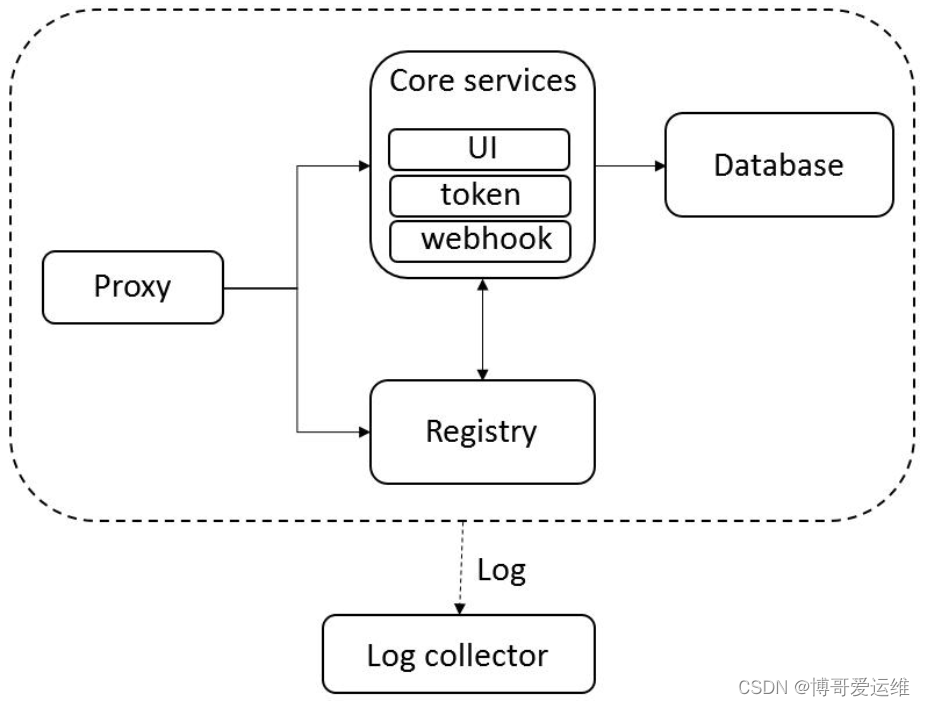
底层用的是Docker Registry
在生产中安装一般有两种方式,一种是用docker-compose启动官方打包好的离线安装包; 二上用helm chart的形式在k8s上来运行harbor,两种方式都可以用,在21年博哥是推荐用docker-compose来部署,随着时间的推移,helm部署在k8s上也越来越稳定,这次我们就用helm3来部署harbor到k8s集群上面。
说明: 这里安装的harbor使用专属命名空间harbor,并采用了独立部署的redis和postgresql,这样方便横向扩展harbor的资源以便达到更好的效果,目前测试helm和docker-compose安装,helm删除镜像需等待2小时后才会被实际GC清理。
注意:离线镜像可以去github离线安装包里获取
导入离线镜像
在二进制部署k8s时的deploy节点上进行操作,这台节点上部署有docker(server+client),为什么这么做?因为harbor的所有服务离线镜像都打包在一起,并且格式为tar.gz,
实测用Containerd客户端工具ctr无法正常导入,只能用Docker导入再把单个镜像导出来
2023年12月19日 发布v2.10.0 https://github.com/goharbor/harbor/releases/tag/v2.10.0
2024年6月6日 发布v2.11.0 https://github.com/goharbor/harbor/releases/tag/v2.11.0
2024年8月21日 v2.11.1 https://github.com/goharbor/harbor/releases/tag/v2.11.1
博哥23年课程使用的2.10.0版本,我自己部署的最新正式版
# 下载harbor离线安装包
wget https://github.com/goharbor/harbor/releases/download/v2.11.1/harbor-offline-installer-v2.11.1.tgz

# 解压
# tar zxvf harbor-offline-installer-v2.11.1.tgz
harbor/harbor.v2.11.1.tar.gz
harbor/prepare
harbor/LICENSE
harbor/install.sh
harbor/common.sh
harbor/harbor.yml.tmpl

# docker 导入所有离线镜像
cd harbor
docker load -i harbor.v2.11.1.tar.gz
# 有10多个包

# mkdir -p ../images && cd ../images
# 用 docker 将harbor每个镜像包独立导出,方便给Containerd导入
# docker images|grep goharbor|awk -F"[/ ]+" '{print "docker save "$1"/"$2":"$3" > "$2"-"$3".tar"}'|bash
# ls -lh
total 2.2G
-rw-r--r-- 1 root root 185M Aug 29 10:36 harbor-core-v2.11.1.tar
-rw-r--r-- 1 root root 269M Aug 29 10:36 harbor-db-v2.11.1.tar
-rw-r--r-- 1 root root 111M Aug 29 10:35 harbor-exporter-v2.11.1.tar
-rw-r--r-- 1 root root 160M Aug 29 10:36 harbor-jobservice-v2.11.1.tar
-rw-r--r-- 1 root root 164M Aug 29 10:35 harbor-log-v2.11.1.tar
-rw-r--r-- 1 root root 163M Aug 29 10:36 harbor-portal-v2.11.1.tar
-rw-r--r-- 1 root root 162M Aug 29 10:35 harbor-registryctl-v2.11.1.tar
-rw-r--r-- 1 root root 155M Aug 29 10:35 nginx-photon-v2.11.1.tar
-rw-r--r-- 1 root root 212M Aug 29 10:36 prepare-v2.11.1.tar
-rw-r--r-- 1 root root 165M Aug 29 10:35 redis-photon-v2.11.1.tar
-rw-r--r-- 1 root root  88M Aug 29 10:35 registry-photon-v2.11.1.tar
-rw-r--r-- 1 root root 325M Aug 29 10:35 trivy-adapter-photon-v2.11.1.tar


# 删除导入docker的镜像
# docker rmi $(docker images | grep goharbor | awk '{print $3}')


现在没有实际部署就先不导入
# 将导出的*.tar离线镜像包复制到需要导入的节点上(Pod运行的节点),使用下面命令批量导入离线镜像包
# for image in `ls -1v /tmp/*.tar`;do ctr -n k8s.io images import $image;done

ls -1v /tmp/*.tar:这个部分是用来列出/tmp目录下所有的.tar文件,并按照版本号顺序进行排序。其中,-1参数确保每个文件只占一行,-v参数是为了按照版本号进行排序。
`...`:反引号用来执行其中的命令,并将结果传递给 for 循环进行处理。
for image in ...; do ...; done:这是一个循环结构,在这里,image 会依次代表被列出的.tar镜像文件。
ctr -n k8s.io images import $image:在每次循环中,会执行这个命令,使用 ctr 工具将相应的镜像导入到 containerd 中。其中,-n k8s.io参数表示使用k8s.io作为命名空间进行镜像导入。
awk -F"[/ ]+" '{print "docker save "$1"/"$2":"$3" > "$2"-"$3".tar"}':这是一个 AWK 命令,它会对前一步筛选出的镜像进行处理。具体来说,它会把镜像的信息按照指定的分隔符(这里是"/"和空格)分割,并组合成一个新的命令,使用docker save命令将镜像保存为.tar文件。|bash:这个管道操作会将之前 awk 命令生成的结果作为参数传递给 bash 命令,实际上会执行之前生成的docker save命令来保存镜像。- 对于
harbor/nginx:latest,将会执行docker save harbor/nginx:latest > nginx-latest.tar
部署NFS存储及StorageClass
https://blog.csdn.net/weixin_46887489/article/details/134817519
# kubectl get sc
NAME             PROVISIONER          RECLAIMPOLICY   VOLUMEBINDINGMODE   ALLOWVOLUMEEXPANSION   AGE
nfs-icurvestar   nfs-provisioner-01   Retain          Immediate           false                  9h
部署Ingress-nginx-controller
https://blog.csdn.net/weixin_46887489/article/details/134586363
# kubectl get ingressclass
NAME           CONTROLLER             PARAMETERS   AGE
nginx-master   k8s.io/ingress-nginx   <none>       11h
部署独立的postgresql和redis
创建nampspace
kubectl create ns harbor部署postgresql
从发行候选版本2.9.0-rc1开始在2.9.0版本中将内部PostgreSQL升级到14(Upgrade the internal PostgreSQL to 14 in 2.9.0)
在正式版本2.9.0的发布日志中提到
As of Harbor v2.9.0, only PostgreSQL >= 12 is supported for external databases. Before upgrading, you should make sure that your external databases are using a supported version of PostgreSQL.
截至Harbor v2.9.0版本,仅支持外部数据库使用PostgreSQL >= 12版本。在升级之前,您应确保您的外部数据库正在使用受支持的PostgreSQL版本。
从发行候选版本2.11.0-rc1开始在2.11.0版本中将PostgreSQL从14提升到15(Bump up PostgreSQL from 14 to 15)
博哥课程使用的是postgres:13.7-bullseye
官方chart包:
https://github.com/goharbor/harbor-helm/archive/refs/tags/v1.15.1.zip

里面使用的数据库镜像是
goharbor/harbor-db:v2.11.1

临时运行
docker run --rm -it goharbor/harbor-db:v2.11.1 bash
查看版本
postgres [ / ]$ psql -V
psql (PostgreSQL) 15.8我这里使用的是postgres:15.8-bullseye
harbor-postgresql.yaml
#psql -U harbordata -h 127.0.0.1 -p 5432 registry -c "create database registry;"
#psql -U harbordata -h 127.0.0.1 -p 5432 registry -c "create database clair;"
#psql -U harbordata -h 127.0.0.1 -p 5432 registry -c "create database notary_server;"
#psql -U harbordata -h 127.0.0.1 -p 5432 registry -c "create database notary_signer;"
#psql -U harbordata -h 127.0.0.1 -p 5432 registry -c "create database harbor_core;"
#psql -U harbordata -h 127.0.0.1 -p 5432 registry -c "\l+"


# backup and restore database
# export PGPASSWORD=registryauthdata ; pg_dump -h 127.0.0.1 -U harbordata -c -C registry -f /tmp/registry_$(date +%y%m%d).sql
# export PGPASSWORD=registryauthdata ; psql -U harbordata -h 127.0.0.1 -p 5432 registry < /tmp/registry_$(date +%y%m%d).sql && rm /tmp/registry_$(date +%y%m%d).sql

# remote ip connect:
#  pip3 install pgcli -i https://mirrors.aliyun.com/pypi/simple
#  export PGPASSWORD=registryauthdata ; psql -h 10.0.0.201 -p 28201 postgres -U postgres -c "\l+"

# delete database and create new database
#  psql -U harbordata -h 127.0.0.1 -p 5432 postgres
#  drop database registry;
#  create database registry with owner harbordata;
#  \l+


# pg web admin
# docker run -p 5050:80 -v /mnt/data/pgadmin:/var/lib/pgadmin -e "PGADMIN_DEFAULT_EMAIL=ops@boge.com" -e "PGADMIN_DEFAULT_PASSWORD=Boge@666" -d dpage/pgadmin4


# pvc
---
kind: PersistentVolumeClaim
apiVersion: v1
metadata:
  name: harbor-postgresql
spec:
  accessModes:
    - ReadWriteOnce
  resources:
    requests:
      storage: 10Gi # 20G
  storageClassName: nfs-boge

---
apiVersion: v1
kind: Service
metadata:
  name: harbor-postgresql
  labels:
    app: harbor
    tier: postgresql
spec:
  ports:
    - port: 5432
  selector:
    app: harbor
    tier: postgresql

---
apiVersion: apps/v1
kind: Deployment
metadata:
  name: harbor-postgresql
  labels:
    app: harbor
    tier: postgresql
spec:
  replicas: 1
  selector:
    matchLabels:
      app: harbor
      tier: postgresql
  strategy:
    type: Recreate
  template:
    metadata:
      labels:
        app: harbor
        tier: postgresql
    spec:
      #nodeSelector:
      #  gee/disk: "500g"
      initContainers:
        - name: "remove-lost-found"
          image: registry.cn-shanghai.aliyuncs.com/acs/busybox:v1.29.2
          imagePullPolicy: "IfNotPresent"
          command:  ["rm", "-fr", "/var/lib/postgresql/data/lost+found"]
          volumeMounts:
            - name: harbor-postgresqldata
              mountPath: /var/lib/postgresql/data
      containers:
        - image: postgres:13.7-bullseye
          name: harbor-postgresql
          lifecycle:
            postStart:
              exec:
                command:
                  - /bin/sh
                  - -c
                  - echo 'leon'
            preStop:
              exec:
                command: ["/bin/sh", "-c", "sleep 5"]
          env:
            - name: POSTGRES_USER
              value: harbordata
            - name: POSTGRES_DB
              value: registry
            - name: POSTGRES_PASSWORD
              value: registryauthdata
            - name: TZ
              value: Asia/Shanghai
          args:
             - -c
             - shared_buffers=256MB
             - -c
             - max_connections=3000
             - -c
             - work_mem=128MB
          ports:
            - containerPort: 5432
              name: postgresql
          livenessProbe:
            exec:
              command:
              - sh
              - -c
              - exec pg_isready -U harbordata -h 127.0.0.1 -p 5432 -d registry
            initialDelaySeconds: 120
            timeoutSeconds: 5
            failureThreshold: 6
          readinessProbe:
            exec:
              command:
              - sh
              - -c
              - exec pg_isready -U harbordata -h 127.0.0.1 -p 5432 -d registry
            initialDelaySeconds: 20
            timeoutSeconds: 3
            periodSeconds: 5
#          resources:
#            requests:
#              cpu: "4"
#              memory: 8Gi # 8G或4G
#            limits:
#              cpu: "4"
#              memory: 8Gi
          volumeMounts:
            - name: harbor-postgresqldata
              mountPath: /var/lib/postgresql/data
      volumes:
        - name: harbor-postgresqldata
          persistentVolumeClaim:
            claimName: harbor-postgresql
kubectl create ns harbor
kubectl -n harbor apply -f harbor-postgresql.yaml
# kubectl -n harbor get pod
NAME READY STATUS RESTARTS AGE
harbor-postgresql-6766f4c7cc-xhsz7 1/1 Running 0 2m3s
拉取镜像一分钟
docker pull postgres:13.7-bullseye && docker save postgres:13.7-bullseye > postgres-13.7-bullseye.tar
# kubectl -n harbor get pod -o wide
NAME READY STATUS RESTARTS AGE IP NODE NOMINATED NODE READINESS GATES
harbor-postgresql-6766f4c7cc-xhsz7 1/1 Running 0 10m 172.20.217.93 10.0.1.204 <none> <none>
# scp postgres-13.7-bullseye.tar 10.0.1.204:/tmp/
postgres-13.7-bullseye.tar
root@node-4:~# ctr -n k8s.io image import /tmp/postgres-13.7-bullseye.tar
root@node-4:~# rm /tmp/postgres-13.7-bullseye.tar
# kubectl -n harbor logs harbor-postgresql-6766f4c7cc-xhsz7
PostgreSQL init process complete; ready for start up.
2024-06-17 09:52:28.206 CST [1] LOG: starting PostgreSQL 13.7 (Debian 13.7-1.pgdg110+1) on x86_64-pc-linux-gnu, compiled by gcc (Debian 10.2.1-6) 10.2.1 20210110, 64-bit
2024-06-17 09:52:28.207 CST [1] LOG: listening on IPv4 address "0.0.0.0", port 5432
2024-06-17 09:52:28.207 CST [1] LOG: listening on IPv6 address "::", port 5432
2024-06-17 09:52:28.212 CST [1] LOG: listening on Unix socket "/var/run/postgresql/.s.PGSQL.5432"
2024-06-17 09:52:28.243 CST [84] LOG: database system was shut down at 2024-06-17 09:52:27 CST
2024-06-17 09:52:28.258 CST [1] LOG: database system is ready to accept connectionsscp [选项] [源文件] [目标文件]
[选项]:可以是一些可选的参数,用于指定SCP的行为,比如-r用于递归复制整个目录。[源文件]:要复制的源文件或目录的路径。[目标文件]:复制到的目标路径,可以是本地路径或者远程计算机的路径(格式为[用户名@]主机名:[目标路径])。
创建对应的数据库
kubectl -n harbor exec -it $(kubectl -n harbor get pod --no-headers |awk '/^harbor-postgresql/{print $1}') -- bash

psql -U harbordata -h 127.0.0.1 -p 5432 registry -c "create database registry;"
psql -U harbordata -h 127.0.0.1 -p 5432 registry -c "create database clair;"
psql -U harbordata -h 127.0.0.1 -p 5432 registry -c "create database notary_server;"
psql -U harbordata -h 127.0.0.1 -p 5432 registry -c "create database notary_signer;"
psql -U harbordata -h 127.0.0.1 -p 5432 registry -c "create database harbor_core;"
psql -U harbordata -h 127.0.0.1 -p 5432 registry -c "\l+"
数据库registry在yaml配置里创建了
部署redis
harbor-redis.yaml
---
apiVersion: v1
kind: Service
metadata:
  name: redis-harbor
  labels:
    app: redis-harbor
spec:
  ports:
    - port: 6379
      targetPort: 6379
#      nodePort: 26379
  selector:
    app: redis-harbor
    tier: backend
#  type: NodePort

---
apiVersion: apps/v1
kind: Deployment
metadata:
  name: redis-harbor
  labels:
    app: redis-harbor
spec:
  replicas: 1
  selector:
    matchLabels:
      app: redis-harbor
  strategy:
    type: Recreate
  template:
    metadata:
      labels:
        app: redis-harbor
        tier: backend
    spec:
      containers:
        - image: redis:6.2.7-alpine3.16
          name: redis-harbor
          command:
            - "redis-server"
          args:
            - "--requirepass"
            - "registryauthdata"
          ports:
            - containerPort: 6379
              name: redis-harbor
          livenessProbe:
            exec:
              command:
              - sh
              - -c
              - "redis-cli ping"
            initialDelaySeconds: 30
            periodSeconds: 10
            timeoutSeconds: 5
            successThreshold: 1
            failureThreshold: 3
          readinessProbe:
            exec:
              command:
              - sh
              - -c
              - "redis-cli ping"
            initialDelaySeconds: 5
            periodSeconds: 10
            timeoutSeconds: 1
            successThreshold: 1
            failureThreshold: 3
      initContainers:
      - command:
        - /bin/sh
        - -c
        - |
          ulimit -n 65536
          mount -o remount rw /sys
          echo never > /sys/kernel/mm/transparent_hugepage/enabled
          mount -o remount rw /proc/sys
          echo 2000 > /proc/sys/net/core/somaxconn
          echo 1 > /proc/sys/vm/overcommit_memory
        image: registry.cn-shanghai.aliyuncs.com/acs/busybox:v1.29.2
        imagePullPolicy: IfNotPresent
        name: init-redis
        resources: {}
        securityContext:
          privileged: true
          procMount: Default
       # 选择打了label的NODE节点运行,暂时先注释掉,要用的时候再打开
       # kubectl label node 10.0.1.5 cb/harbor-redis-ready=true
       # kubectl get node --show-labels
       # kubectl label node 10.0.1.5 cb/harbor-redis-ready-
      #nodeSelector:
      #  cb/harbor-redis-ready: "true"
kubectl -n harbor apply -f harbor-redis.yaml
kubectl -n harbor get pod配置Helm3
/etc/kubeasz/bin/helm也有,不知道版本


# 下载helm3
wget https://get.helm.sh/helm-v3.13.1-linux-amd64.tar.gz
mkdir helm && tar zxvf helm-v3.13.1-linux-amd64.tar.gz -C helm && rm -f helm-v3.13.1-linux-amd64.tar.gz
mv helm/linux-amd64/helm /usr/bin/ && rm -rf ./helm/linux-amd64

# 检测helm3
# which helm
/usr/bin/helm

# helm version
version.BuildInfo{Version:"v3.13.1", GitCommit:"3547a4b5bf5edb5478ce352e18858d8a552a4110", GitTreeState:"clean", GoVersion:"go1.20.8"}

# 配置helm命令补齐功能
echo 'source <(helm completion bash)' >> ~/.bashrc && . ~/.bashrc

# 配置harbor的chart仓库(可选,由于海外网络关系,可直接提前下载好离线chart包安装)
# 添加一个仓库
helm repo add harbor https://helm.goharbor.io
# 更新
helm repo update
helm repo ls
部署harbor(离线chart包)
所以提前要创建好(课程是创建harbor后创建证书)
这里我自己使用申请的正式域名证书
# kubectl -n harbor create secret tls icurvestar-cn-tls --key icurvestar-cn-privkey.pem --cert icurvestar-cn-fullchain.pem
secret/icurvestar-cn-tls created
# 在k8s上生成tls secret
kubectl -n harbor create secret tls boge-com-tls --cert=boge.com.crt --key=boge.com.key
harbor的https访问配置
https://goharbor.io/docs/2.6.0/install-config/configure-https/
默认情况下,Harbor 并不自带证书。可以不启用安全设置来部署 Harbor,这样你就可以通过 HTTP 来连接它。但是,仅在与外部互联网无连接的隔离测试或开发环境中使用 HTTP 才是可接受的。在非隔离的环境中使用 HTTP 会让你面临中间人攻击的风险。在生产环境中,应始终使用 HTTPS。如果启用了借助 Notary 的内容信任以正确签署所有镜像,那么必须使用 HTTPS。
为了配置 HTTPS,你需要创建 SSL 证书。你可以使用由可信的第三方 CA 签名的证书,或者使用自签名证书。本节将说明如何使用 OpenSSL 创建一个 CA,以及如何使用你的 CA 签发服务器证书和客户端证书。你也可以使用其他 CA 提供商,比如 Let’s Encrypt。
以下步骤假设你的 Harbor 注册表的主机名为 boge.com,并且其 DNS 记录指向运行 Harbor 的主机。
生成证书颁发机构证书
在生产环境中,你应该从证书权威机构(CA)获取证书。而在测试或开发环境中,你可以自行生成一个CA证书。要生成一个CA证书,请执行以下命令:
生成 CA 证书私钥。
openssl genrsa -out ca.key 4096生成 CA 证书。
调整
-subj选项中的值,以反映您的组织信息。如果您使用完全合格域名(FQDN)连接 Harbor 主机,必须将其指定为通用名(CN)属性。openssl req -x509 -new -nodes -sha512 -days 3650 \ -subj "/C=CN/ST=Beijing/L=Beijing/O=example/OU=Personal/CN=boge.com" \ -key ca.key \ -out ca.crtopenssl x509 -in ca.crt -text -noout
生成服务器证书
证书通常包含一个.crt文件和一个.key文件,例如boge.com.crt和boge.com.key。
生产是基于买的证书生成
生成私钥。
openssl genrsa -out boge.com.key 4096生成证书签名请求 (CSR)。
调整选项中的值
-subj以反映您的组织。如果您使用FQDN连接 Harbor 主机,则必须将其指定为公用名 (CN) 属性,并在密钥和 CSR 文件名中使用它。全限定域名(Fully Qualified Domain Name)包含了主机名和域名后缀 www.example.com
openssl req -sha512 -new \
    -subj "/C=CN/ST=Beijing/L=Beijing/O=example/OU=Personal/CN=boge.com" \
    -key boge.com.key \
    -out boge.com.csr
生成 x509 v3 扩展文件。
不论您是使用完全合格域名(FQDN)还是IP地址来连接 Harbor 主机,都必须创建此文件,以便为您的 Harbor 主机生成符合主题备用名称(SAN)及 x509 v3 扩展要求的证书。请将DNS条目替换为您的实际域名。
主题备用名称(Subject Alternative Name,简称 SAN)是 X.509 数字证书标准的一个扩展项,它允许一张证书中除了包含主主体名(Common Name, CN)之外,还能包含多个额外的主机名或IP地址。这意味着一张证书可以用来保护多个不同的站点或服务,而不仅仅局限于一个主域名。这对于拥有多个子域名或者需要证书覆盖多个不同域名的组织特别有用。
至于 x509 v3 扩展,这是指在X.509证书版本3中引入的一系列可选扩展字段,这些扩展提供了比基本证书主体和发行者信息更多的功能性和安全性。
cat > v3.ext <<-EOF
authorityKeyIdentifier=keyid,issuer
basicConstraints=CA:FALSE
keyUsage = digitalSignature, nonRepudiation, keyEncipherment, dataEncipherment
extendedKeyUsage = serverAuth
subjectAltName = @alt_names

[alt_names]
DNS.1=boge.com
DNS.2=boge
DNS.3=harbor.boge.com
EOF
使用该
v3.ext文件CA私钥为您的 Harbor 主机生成证书。boge.com将CRS 和 CRT 文件名中的替换为 Harbor 主机名。openssl x509 -req -sha512 -days 3650 \ -extfile v3.ext \ -CA ca.crt -CAkey ca.key -CAcreateserial \ -in boge.com.csr \ -out boge.com.crt将给定的证书请求(CSR)
boge.com.csr,通过指定的CA证书ca.crt和私钥ca.key,生成一个有效期为10年的X.509证书boge.com.crt。同时,通过v3.ext文件可以添加额外的证书扩展信息。
# 在k8s上生成tls secret
kubectl -n harbor create secret tls boge-com-tls --cert=boge.com.crt --key=boge.com.key

TLS密钥用于配置SSL/TLS加密,以确保在与boge.com通信时的安全性。其中,--cert=boge.com.crt表示使用boge.com.crt文件作为证书,--key=boge.com.key表示使用boge.com.key文件作为私钥
离线部署
kubectl label node k8s-192-168-10-202 icurvestar/harbor-ready=true

spec:
  template:
    spec:
      nodeSelector:
        icurvestar/harbor-ready: "true"
      tolerations:
      - operator: Exists
# 下载对应harbor版本的chart离线包
https://github.com/goharbor/harbor-helm
# 直接下载main分支
wget https://github.com/goharbor/harbor-helm/archive/refs/heads/main.zip -O harbor-helm-main.zip
# 解压chart包
unzip harbor-helm-main.zip && rm -f harbor-helm-main.zip
# 定制配置(具体修改的地方,可以用文本对比工具对比原始的values.yaml和values-v2.10.0.yaml)
# 也可以不复制,直接用课程给的,对比看可以知道改了哪里怎么定制
cp harbor-helm-main/values.yaml ./values-v2.10.0.yaml
# 安装(可先模拟安装观察下,接上参数 --dry-run --debug)
helm install -n harbor harbor -f values-v2.11.1-icurvestar.yaml ./harbor-helm-main/ --dry-run --debug > harbor-debug.yaml
# helm install -n harbor harbor -f values-v2.11.1-icurvestar.yaml ./harbor-helm-main/
NAME: harbor
LAST DEPLOYED: Thu Aug 29 18:51:32 2024
NAMESPACE: harbor
STATUS: deployed
REVISION: 1
TEST SUITE: None
NOTES:
Please wait for several minutes for Harbor deployment to complete.
Then you should be able to visit the Harbor portal at https://harbor.icurvestar.cn
For more details, please visit https://github.com/goharbor/harbor
-n harbor 指定了要在 Kubernetes 集群中的 "harbor" 命名空间
harbor 该 Helm release 的名称,是 Chart 部署的实例,通过这个名字可以管理和升级这个实例
f values-v2.10.0.yaml 指定了一个自定义的 Chart 的配置
./harbor-helm-main/ 离线Helm Chart包的本地路径。如果 Chart 存储在远程仓库,也可以使用仓库的 URL
# 查看安装结果
# helm -n harbor ls
NAME NAMESPACE REVISION UPDATED STATUS CHART APP VERSION
harbor harbor 1 2024-08-29 18:51:32.062825489 +0800 CST deployed harbor-1.4.0-dev dev
查看 pod跑在哪个节点
# kubectl -n harbor get pod -o wide
NAME READY STATUS RESTARTS AGE IP NODE NOMINATED NODE READINESS GATES
harbor-core-767f5f745f-b8nft 1/1 Running 0 4m50s 172.20.255.195 k8s-192-168-10-202 <none> <none>
harbor-jobservice-6fdf67b8b7-8thmd 1/1 Running 2 (3m48s ago) 4m50s 172.20.255.197 k8s-192-168-10-202 <none> <none>
harbor-portal-658b87bd54-pt7cv 1/1 Running 0 4m50s 172.20.255.196 k8s-192-168-10-202 <none> <none>
harbor-postgresql-59f5d8584f-qrrvn 1/1 Running 0 18m 172.20.255.193 k8s-192-168-10-202 <none> <none>
harbor-registry-7dbbd78bc5-mbnrw 2/2 Running 0 4m50s 172.20.255.198 k8s-192-168-10-202 <none> <none>
harbor-trivy-0 1/1 Running 0 4m50s 172.20.255.199 k8s-192-168-10-202 <none> <none>
redis-harbor-969868c7f-hkm6d 1/1 Running 0 9m45s 172.20.255.194 k8s-192-168-10-202 <none> <none>
# 复制镜像文件到对应节点再导入镜像
# scp ./images 10.0.1.204:/tmp/harbor/
# 将导出的*.tar离线镜像包复制到需要导入的节点上(Pod运行的节点),使用下面命令批量导入离线镜像包
# for image in `ls -1v /tmp/harbor/*.tar`;do ctr -n k8s.io images import $image;done
# 删除镜像
rm
我这里有速度就不导入了
# kubectl -n harbor get pod
NAME READY STATUS RESTARTS AGE
harbor-core-c6884d7b8-7n7k2 1/1 Running 0 2m25s
harbor-jobservice-5d7d966b99-vt26f 1/1 Running 2 (80s ago) 2m25s
harbor-portal-8cf5b5dc9-mlmc6 1/1 Running 0 2m25s
harbor-postgresql-6766f4c7cc-xhsz7 1/1 Running 1 (97m ago) 24h
harbor-registry-7f599777dd-w6k82 2/2 Running 0 2m25s
harbor-trivy-0 1/1 Running 0 2m25s
redis-harbor-747dc48b88-tkr5w 1/1 Running 1 (97m ago) 23h
# 卸载
# helm -n harbor uninstall harbor修改配置
修改证书、域名
expose:
  tls:
    certSource: secret
    secret:
      secretName: "icurvestar-cn-tls"
  ingress:
    hosts:
      core: harbor.icurvestar.cn
TLS证书的来源。设置为"auto"、“secret"或"none”,并在相应部分填写信息
- auto:自动生成TLS证书
- secret:从指定的secret中读取TLS证书。TLS证书可以手动生成或由证书管理器生成
- none:不对ingress配置TLS证书。如果ingress控制器中已配置默认TLS证书,请选择此选项
# 如果Harbor部署在代理后面,请将其设置为代理的URL
externalURL: https://harbor.icurvestar.cn
数据持久化
persistence:
  persistentVolumeClaim:
    registry:
      storageClass: "nfs-icurvestar"
      size: 50Gi
    jobservice:
      jobLog:
        storageClass: "nfs-icurvestar"
        size: 10Gi
    trivy:
      storageClass: "nfs-icurvestar"
# Harbor管理员初始密码
harborAdminPassword: "icurvestar@666"# 关闭ipv6
ipFamily:
ipv6:
enabled: false给各个镜像替换tag
core:
image:
repository: goharbor/harbor-core
tag: v2.11.1# 配置外部数据信息
database:
type: external
external:
host: "harbor-postgresql.harbor.svc.cluster.local"
port: "5432"
username: "harbordata"
password: "registryauthdata"
coreDatabase: "harbor_core"
clairDatabase: "clair"psql -U harbordata -h 127.0.0.1 -p 5432 registry -c "create database registry;" psql -U harbordata -h 127.0.0.1 -p 5432 registry -c "create database clair;" psql -U harbordata -h 127.0.0.1 -p 5432 registry -c "create database notary_server;" psql -U harbordata -h 127.0.0.1 -p 5432 registry -c "create database notary_signer;" psql -U harbordata -h 127.0.0.1 -p 5432 registry -c "create database harbor_core;"
# 配置外部数据信息
redis:
  type: external
  external:
    addr: "redis-harbor.harbor.svc.cluster.local:6379"
    password: "registryauthdata"
打标签
kubectl label node k8s-192-168-10-202 icurvestar/harbor-ready=true nodeSelector:
icurvestar/harbor-ready: "true"
tolerations:
- operator: Exists旧:
harbor:
# harbor ingress-specific annotations
annotations: {}
# harbor ingress-specific labels
labels: {}
新:
# ingress-specific labels
labels: {}
并且有很多地方新加了labels上去# 新配置还添加限制权限
## set Container Security Context to comply with PSP restricted policy if necessary
## each of the conatiner will apply the same security context
## containerSecurityContext:{} is initially an empty yaml that you could edit it on demand, we just filled with a common template for convenience
containerSecurityContext:
privileged: false
allowPrivilegeEscalation: false
seccompProfile:
type: RuntimeDefault
runAsNonRoot: true
capabilities:
drop:
- ALL# 新配置还有很多空白的初始化容器
# containers to be run before the controller's container starts.
initContainers: []
# Example:
#
# - name: wait
# image: busybox
# command: [ 'sh', '-c', "sleep 20" ]旧:
gdpr:
deleteUser: false
新:
gdpr:
deleteUser: false
auditLogsCompliant: false
gdpr:
这个设置与欧盟通用数据保护条例(GDPR)的合规性相关。
deleteUser: 当设置为 true 时,表示启用删除用户的功能,以满足GDPR要求中的“被遗忘权”,即用户可以要求删除其个人数据。
在您提供的配置中,该值设置为 false,这意味着删除用户的功能是禁用的。
auditLogsCompliant: 当设置为 true 时,表示启用符合GDPR要求的审计日志功能。
在您提供的配置中,该值设置为 false,这意味着审计日志功能可能不完全符合GDPR的要求。博哥提供的配置-2.10.0
values-v2.10.0.yaml
secret:secretName: "boge-com-tls" 在后面弄
imagePullSecrets的docker-registry-secret被注释掉了和创建的docker-registry不一样
3个地方用了storageClass: "nfs-dynamic-class" 要改
expose:
# Set how to expose the service. Set the type as "ingress", "clusterIP", "nodePort" or "loadBalancer"
# and fill the information in the corresponding section
type: ingress
tls:
# Enable TLS or not.
# Delete the "ssl-redirect" annotations in "expose.ingress.annotations" when TLS is disabled and "expose.type" is "ingress"
# Note: if the "expose.type" is "ingress" and TLS is disabled,
# the port must be included in the command when pulling/pushing images.
# Refer to https://github.com/goharbor/harbor/issues/5291 for details.
enabled: true
# The source of the tls certificate. Set as "auto", "secret"
# or "none" and fill the information in the corresponding section
# 1) auto: generate the tls certificate automatically
# 2) secret: read the tls certificate from the specified secret.
# The tls certificate can be generated manually or by cert manager
# 3) none: configure no tls certificate for the ingress. If the default
# tls certificate is configured in the ingress controller, choose this option
certSource: secret
auto:
# The common name used to generate the certificate, it's necessary
# when the type isn't "ingress"
commonName: ""
secret:
# The name of secret which contains keys named:
# "tls.crt" - the certificate
# "tls.key" - the private key
secretName: "boge-com-tls"
ingress:
hosts:
core: harbor.boge.com
# set to the type of ingress controller if it has specific requirements.
# leave as `default` for most ingress controllers.
# set to `gce` if using the GCE ingress controller
# set to `ncp` if using the NCP (NSX-T Container Plugin) ingress controller
# set to `alb` if using the ALB ingress controller
# set to `f5-bigip` if using the F5 BIG-IP ingress controller
controller: default
## Allow .Capabilities.KubeVersion.Version to be overridden while creating ingress
kubeVersionOverride: ""
className: ""
annotations:
# note different ingress controllers may require a different ssl-redirect annotation
# for Envoy, use ingress.kubernetes.io/force-ssl-redirect: "true" and remove the nginx lines below
ingress.kubernetes.io/ssl-redirect: "true"
ingress.kubernetes.io/proxy-body-size: "0"
nginx.ingress.kubernetes.io/ssl-redirect: "true"
nginx.ingress.kubernetes.io/proxy-body-size: "0"
harbor:
# harbor ingress-specific annotations
annotations: {}
# harbor ingress-specific labels
labels: {}
clusterIP:
# The name of ClusterIP service
name: harbor
# The ip address of the ClusterIP service (leave empty for acquiring dynamic ip)
staticClusterIP: ""
# Annotations on the ClusterIP service
annotations: {}
ports:
# The service port Harbor listens on when serving HTTP
httpPort: 80
# The service port Harbor listens on when serving HTTPS
httpsPort: 443
nodePort:
# The name of NodePort service
name: harbor
ports:
http:
# The service port Harbor listens on when serving HTTP
port: 80
# The node port Harbor listens on when serving HTTP
nodePort: 30002
https:
# The service port Harbor listens on when serving HTTPS
port: 443
# The node port Harbor listens on when serving HTTPS
nodePort: 30003
loadBalancer:
# The name of LoadBalancer service
name: harbor
# Set the IP if the LoadBalancer supports assigning IP
IP: ""
ports:
# The service port Harbor listens on when serving HTTP
httpPort: 80
# The service port Harbor listens on when serving HTTPS
httpsPort: 443
annotations: {}
sourceRanges: []
# The external URL for Harbor core service. It is used to
# 1) populate the docker/helm commands showed on portal
# 2) populate the token service URL returned to docker client
#
# Format: protocol://domain[:port]. Usually:
# 1) if "expose.type" is "ingress", the "domain" should be
# the value of "expose.ingress.hosts.core"
# 2) if "expose.type" is "clusterIP", the "domain" should be
# the value of "expose.clusterIP.name"
# 3) if "expose.type" is "nodePort", the "domain" should be
# the IP address of k8s node
#
# If Harbor is deployed behind the proxy, set it as the URL of proxy
externalURL: https://harbor.boge.com
# The internal TLS used for harbor components secure communicating. In order to enable https
# in each component tls cert files need to provided in advance.
internalTLS:
# If internal TLS enabled
enabled: false
# enable strong ssl ciphers (default: false)
strong_ssl_ciphers: false
# There are three ways to provide tls
# 1) "auto" will generate cert automatically
# 2) "manual" need provide cert file manually in following value
# 3) "secret" internal certificates from secret
certSource: "auto"
# The content of trust ca, only available when `certSource` is "manual"
trustCa: ""
# core related cert configuration
core:
# secret name for core's tls certs
secretName: ""
# Content of core's TLS cert file, only available when `certSource` is "manual"
crt: ""
# Content of core's TLS key file, only available when `certSource` is "manual"
key: ""
# jobservice related cert configuration
jobservice:
# secret name for jobservice's tls certs
secretName: ""
# Content of jobservice's TLS key file, only available when `certSource` is "manual"
crt: ""
# Content of jobservice's TLS key file, only available when `certSource` is "manual"
key: ""
# registry related cert configuration
registry:
# secret name for registry's tls certs
secretName: ""
# Content of registry's TLS key file, only available when `certSource` is "manual"
crt: ""
# Content of registry's TLS key file, only available when `certSource` is "manual"
key: ""
# portal related cert configuration
portal:
# secret name for portal's tls certs
secretName: ""
# Content of portal's TLS key file, only available when `certSource` is "manual"
crt: ""
# Content of portal's TLS key file, only available when `certSource` is "manual"
key: ""
# trivy related cert configuration
trivy:
# secret name for trivy's tls certs
secretName: ""
# Content of trivy's TLS key file, only available when `certSource` is "manual"
crt: ""
# Content of trivy's TLS key file, only available when `certSource` is "manual"
key: ""
ipFamily:
# ipv6Enabled set to true if ipv6 is enabled in cluster, currently it affected the nginx related component
ipv6:
enabled: false
# ipv4Enabled set to true if ipv4 is enabled in cluster, currently it affected the nginx related component
ipv4:
enabled: true
# The persistence is enabled by default and a default StorageClass
# is needed in the k8s cluster to provision volumes dynamically.
# Specify another StorageClass in the "storageClass" or set "existingClaim"
# if you already have existing persistent volumes to use
#
# For storing images and charts, you can also use "azure", "gcs", "s3",
# "swift" or "oss". Set it in the "imageChartStorage" section
persistence:
enabled: true
# Setting it to "keep" to avoid removing PVCs during a helm delete
# operation. Leaving it empty will delete PVCs after the chart deleted
# (this does not apply for PVCs that are created for internal database
# and redis components, i.e. they are never deleted automatically)
resourcePolicy: "keep"
persistentVolumeClaim:
registry:
# Use the existing PVC which must be created manually before bound,
# and specify the "subPath" if the PVC is shared with other components
existingClaim: ""
# Specify the "storageClass" used to provision the volume. Or the default
# StorageClass will be used (the default).
# Set it to "-" to disable dynamic provisioning
storageClass: "nfs-boge"
subPath: ""
accessMode: ReadWriteOnce
size: 50Gi
annotations: {}
jobservice:
jobLog:
existingClaim: ""
storageClass: "nfs-boge"
subPath: ""
accessMode: ReadWriteOnce
size: 10Gi
annotations: {}
# If external database is used, the following settings for database will
# be ignored
database:
existingClaim: ""
storageClass: ""
subPath: ""
accessMode: ReadWriteOnce
size: 1Gi
annotations: {}
# If external Redis is used, the following settings for Redis will
# be ignored
redis:
existingClaim: ""
storageClass: ""
subPath: ""
accessMode: ReadWriteOnce
size: 1Gi
annotations: {}
trivy:
existingClaim: ""
storageClass: "nfs-boge"
subPath: ""
accessMode: ReadWriteOnce
size: 5Gi
annotations: {}
# Define which storage backend is used for registry to store
# images and charts. Refer to
# https://github.com/distribution/distribution/blob/main/docs/configuration.md#storage
# for the detail.
imageChartStorage:
# Specify whether to disable `redirect` for images and chart storage, for
# backends which not supported it (such as using minio for `s3` storage type), please disable
# it. To disable redirects, simply set `disableredirect` to `true` instead.
# Refer to
# https://github.com/distribution/distribution/blob/main/docs/configuration.md#redirect
# for the detail.
disableredirect: false
# Specify the "caBundleSecretName" if the storage service uses a self-signed certificate.
# The secret must contain keys named "ca.crt" which will be injected into the trust store
# of registry's containers.
# caBundleSecretName:
# Specify the type of storage: "filesystem", "azure", "gcs", "s3", "swift",
# "oss" and fill the information needed in the corresponding section. The type
# must be "filesystem" if you want to use persistent volumes for registry
type: filesystem
filesystem:
rootdirectory: /storage
#maxthreads: 100
azure:
accountname: accountname
accountkey: base64encodedaccountkey
container: containername
#realm: core.windows.net
# To use existing secret, the key must be AZURE_STORAGE_ACCESS_KEY
existingSecret: ""
gcs:
bucket: bucketname
# The base64 encoded json file which contains the key
encodedkey: base64-encoded-json-key-file
#rootdirectory: /gcs/object/name/prefix
#chunksize: "5242880"
# To use existing secret, the key must be GCS_KEY_DATA
existingSecret: ""
useWorkloadIdentity: false
s3:
# Set an existing secret for S3 accesskey and secretkey
# keys in the secret should be REGISTRY_STORAGE_S3_ACCESSKEY and REGISTRY_STORAGE_S3_SECRETKEY for registry
#existingSecret: ""
region: us-west-1
bucket: bucketname
#accesskey: awsaccesskey
#secretkey: awssecretkey
#regionendpoint: http://myobjects.local
#encrypt: false
#keyid: mykeyid
#secure: true
#skipverify: false
#v4auth: true
#chunksize: "5242880"
#rootdirectory: /s3/object/name/prefix
#storageclass: STANDARD
#multipartcopychunksize: "33554432"
#multipartcopymaxconcurrency: 100
#multipartcopythresholdsize: "33554432"
swift:
authurl: https://storage.myprovider.com/v3/auth
username: username
password: password
container: containername
# keys in existing secret must be REGISTRY_STORAGE_SWIFT_PASSWORD, REGISTRY_STORAGE_SWIFT_SECRETKEY, REGISTRY_STORAGE_SWIFT_ACCESSKEY
existingSecret: ""
#region: fr
#tenant: tenantname
#tenantid: tenantid
#domain: domainname
#domainid: domainid
#trustid: trustid
#insecureskipverify: false
#chunksize: 5M
#prefix:
#secretkey: secretkey
#accesskey: accesskey
#authversion: 3
#endpointtype: public
#tempurlcontainerkey: false
#tempurlmethods:
oss:
accesskeyid: accesskeyid
accesskeysecret: accesskeysecret
region: regionname
bucket: bucketname
# key in existingSecret must be REGISTRY_STORAGE_OSS_ACCESSKEYSECRET
existingSecret: ""
#endpoint: endpoint
#internal: false
#encrypt: false
#secure: true
#chunksize: 10M
#rootdirectory: rootdirectory
imagePullPolicy: IfNotPresent
# Use this set to assign a list of default pullSecrets
imagePullSecrets:
# - name: docker-registry-secret
# - name: internal-registry-secret
# The update strategy for deployments with persistent volumes(jobservice, registry): "RollingUpdate" or "Recreate"
# Set it as "Recreate" when "RWM" for volumes isn't supported
updateStrategy:
type: RollingUpdate
# debug, info, warning, error or fatal
logLevel: info
# The initial password of Harbor admin. Change it from portal after launching Harbor
# or give an existing secret for it
# key in secret is given via (default to HARBOR_ADMIN_PASSWORD)
# existingSecretAdminPassword:
existingSecretAdminPasswordKey: HARBOR_ADMIN_PASSWORD
harborAdminPassword: "Boge@666"
# The name of the secret which contains key named "ca.crt". Setting this enables the
# download link on portal to download the CA certificate when the certificate isn't
# generated automatically
caSecretName: ""
# The secret key used for encryption. Must be a string of 16 chars.
secretKey: "not-a-secure-key"
# If using existingSecretSecretKey, the key must be secretKey
existingSecretSecretKey: ""
# The proxy settings for updating trivy vulnerabilities from the Internet and replicating
# artifacts from/to the registries that cannot be reached directly
proxy:
httpProxy:
httpsProxy:
noProxy: 127.0.0.1,localhost,.local,.internal
components:
- core
- jobservice
- trivy
# Run the migration job via helm hook
enableMigrateHelmHook: false
# The custom ca bundle secret, the secret must contain key named "ca.crt"
# which will be injected into the trust store for core, jobservice, registry, trivy components
# caBundleSecretName: ""
## UAA Authentication Options
# If you're using UAA for authentication behind a self-signed
# certificate you will need to provide the CA Cert.
# Set uaaSecretName below to provide a pre-created secret that
# contains a base64 encoded CA Certificate named `ca.crt`.
# uaaSecretName:
# If service exposed via "ingress", the Nginx will not be used
nginx:
image:
repository: goharbor/nginx-photon
tag: v2.10.0
# set the service account to be used, default if left empty
serviceAccountName: ""
# mount the service account token
automountServiceAccountToken: false
replicas: 1
revisionHistoryLimit: 10
# resources:
# requests:
# memory: 256Mi
# cpu: 100m
extraEnvVars: []
nodeSelector: {}
tolerations: []
affinity: {}
# Spread Pods across failure-domains like regions, availability zones or nodes
topologySpreadConstraints: []
# - maxSkew: 1
# topologyKey: topology.kubernetes.io/zone
# nodeTaintsPolicy: Honor
# whenUnsatisfiable: DoNotSchedule
## Additional deployment annotations
podAnnotations: {}
## Additional deployment labels
podLabels: {}
## The priority class to run the pod as
priorityClassName:
portal:
image:
repository: goharbor/harbor-portal
tag: v2.10.0
# set the service account to be used, default if left empty
serviceAccountName: ""
# mount the service account token
automountServiceAccountToken: false
replicas: 1
revisionHistoryLimit: 10
# resources:
# requests:
# memory: 256Mi
# cpu: 100m
extraEnvVars: []
nodeSelector: {}
tolerations: []
affinity: {}
# Spread Pods across failure-domains like regions, availability zones or nodes
topologySpreadConstraints: []
# - maxSkew: 1
# topologyKey: topology.kubernetes.io/zone
# nodeTaintsPolicy: Honor
# whenUnsatisfiable: DoNotSchedule
## Additional deployment annotations
podAnnotations: {}
## Additional deployment labels
podLabels: {}
## Additional service annotations
serviceAnnotations: {}
## The priority class to run the pod as
priorityClassName:
core:
image:
repository: goharbor/harbor-core
tag: v2.10.0
# set the service account to be used, default if left empty
serviceAccountName: ""
# mount the service account token
automountServiceAccountToken: false
replicas: 1
revisionHistoryLimit: 10
## Startup probe values
startupProbe:
enabled: true
initialDelaySeconds: 10
# resources:
# requests:
# memory: 256Mi
# cpu: 100m
extraEnvVars: []
nodeSelector: {}
tolerations: []
affinity: {}
# Spread Pods across failure-domains like regions, availability zones or nodes
topologySpreadConstraints: []
# - maxSkew: 1
# topologyKey: topology.kubernetes.io/zone
# nodeTaintsPolicy: Honor
# whenUnsatisfiable: DoNotSchedule
## Additional deployment annotations
podAnnotations: {}
## Additional deployment labels
podLabels: {}
## Additional service annotations
serviceAnnotations: {}
## User settings configuration json string
configureUserSettings:
# The provider for updating project quota(usage), there are 2 options, redis or db.
# By default it is implemented by db but you can configure it to redis which
# can improve the performance of high concurrent pushing to the same project,
# and reduce the database connections spike and occupies.
# Using redis will bring up some delay for quota usage updation for display, so only
# suggest switch provider to redis if you were ran into the db connections spike around
# the scenario of high concurrent pushing to same project, no improvment for other scenes.
quotaUpdateProvider: db # Or redis
# Secret is used when core server communicates with other components.
# If a secret key is not specified, Helm will generate one. Alternatively set existingSecret to use an existing secret
# Must be a string of 16 chars.
secret: ""
# Fill in the name of a kubernetes secret if you want to use your own
# If using existingSecret, the key must be secret
existingSecret: ""
# Fill the name of a kubernetes secret if you want to use your own
# TLS certificate and private key for token encryption/decryption.
# The secret must contain keys named:
# "tls.key" - the private key
# "tls.crt" - the certificate
secretName: ""
# If not specifying a preexisting secret, a secret can be created from tokenKey and tokenCert and used instead.
# If none of secretName, tokenKey, and tokenCert are specified, an ephemeral key and certificate will be autogenerated.
# tokenKey and tokenCert must BOTH be set or BOTH unset.
# The tokenKey value is formatted as a multiline string containing a PEM-encoded RSA key, indented one more than tokenKey on the following line.
tokenKey: |
# If tokenKey is set, the value of tokenCert must be set as a PEM-encoded certificate signed by tokenKey, and supplied as a multiline string, indented one more than tokenCert on the following line.
tokenCert: |
# The XSRF key. Will be generated automatically if it isn't specified
xsrfKey: ""
# If using existingSecret, the key is defined by core.existingXsrfSecretKey
existingXsrfSecret: ""
# If using existingSecret, the key
existingXsrfSecretKey: CSRF_KEY
## The priority class to run the pod as
priorityClassName:
# The time duration for async update artifact pull_time and repository
# pull_count, the unit is second. Will be 10 seconds if it isn't set.
# eg. artifactPullAsyncFlushDuration: 10
artifactPullAsyncFlushDuration:
gdpr:
deleteUser: false
jobservice:
image:
repository: goharbor/harbor-jobservice
tag: v2.10.0
replicas: 1
revisionHistoryLimit: 10
# set the service account to be used, default if left empty
serviceAccountName: ""
# mount the service account token
automountServiceAccountToken: false
maxJobWorkers: 10
# The logger for jobs: "file", "database" or "stdout"
jobLoggers:
- file
# - database
# - stdout
# The jobLogger sweeper duration (ignored if `jobLogger` is `stdout`)
loggerSweeperDuration: 14 #days
notification:
webhook_job_max_retry: 3
webhook_job_http_client_timeout: 3 # in seconds
reaper:
# the max time to wait for a task to finish, if unfinished after max_update_hours, the task will be mark as error, but the task will continue to run, default value is 24
max_update_hours: 24
# the max time for execution in running state without new task created
max_dangling_hours: 168
# resources:
# requests:
# memory: 256Mi
# cpu: 100m
extraEnvVars: []
nodeSelector: {}
tolerations: []
affinity: {}
# Spread Pods across failure-domains like regions, availability zones or nodes
topologySpreadConstraints:
# - maxSkew: 1
# topologyKey: topology.kubernetes.io/zone
# nodeTaintsPolicy: Honor
# whenUnsatisfiable: DoNotSchedule
## Additional deployment annotations
podAnnotations: {}
## Additional deployment labels
podLabels: {}
# Secret is used when job service communicates with other components.
# If a secret key is not specified, Helm will generate one.
# Must be a string of 16 chars.
secret: ""
# Use an existing secret resource
existingSecret: ""
# Key within the existing secret for the job service secret
existingSecretKey: JOBSERVICE_SECRET
## The priority class to run the pod as
priorityClassName:
registry:
# set the service account to be used, default if left empty
serviceAccountName: ""
# mount the service account token
automountServiceAccountToken: false
registry:
image:
repository: goharbor/registry-photon
tag: v2.10.0
# resources:
# requests:
# memory: 256Mi
# cpu: 100m
extraEnvVars: []
controller:
image:
repository: goharbor/harbor-registryctl
tag: v2.10.0
# resources:
# requests:
# memory: 256Mi
# cpu: 100m
extraEnvVars: []
replicas: 1
revisionHistoryLimit: 10
nodeSelector: {}
tolerations: []
affinity: {}
# Spread Pods across failure-domains like regions, availability zones or nodes
topologySpreadConstraints: []
# - maxSkew: 1
# topologyKey: topology.kubernetes.io/zone
# nodeTaintsPolicy: Honor
# whenUnsatisfiable: DoNotSchedule
## Additional deployment annotations
podAnnotations: {}
## Additional deployment labels
podLabels: {}
## The priority class to run the pod as
priorityClassName:
# Secret is used to secure the upload state from client
# and registry storage backend.
# See: https://github.com/distribution/distribution/blob/main/docs/configuration.md#http
# If a secret key is not specified, Helm will generate one.
# Must be a string of 16 chars.
secret: ""
# Use an existing secret resource
existingSecret: ""
# Key within the existing secret for the registry service secret
existingSecretKey: REGISTRY_HTTP_SECRET
# If true, the registry returns relative URLs in Location headers. The client is responsible for resolving the correct URL.
relativeurls: false
credentials:
username: "harbor_registry_user"
password: "harbor_registry_password"
# If using existingSecret, the key must be REGISTRY_PASSWD and REGISTRY_HTPASSWD
existingSecret: ""
# Login and password in htpasswd string format. Excludes `registry.credentials.username` and `registry.credentials.password`. May come in handy when integrating with tools like argocd or flux. This allows the same line to be generated each time the template is rendered, instead of the `htpasswd` function from helm, which generates different lines each time because of the salt.
# htpasswdString: $apr1$XLefHzeG$Xl4.s00sMSCCcMyJljSZb0 # example string
htpasswdString: ""
middleware:
enabled: false
type: cloudFront
cloudFront:
baseurl: example.cloudfront.net
keypairid: KEYPAIRID
duration: 3000s
ipfilteredby: none
# The secret key that should be present is CLOUDFRONT_KEY_DATA, which should be the encoded private key
# that allows access to CloudFront
privateKeySecret: "my-secret"
# enable purge _upload directories
upload_purging:
enabled: true
# remove files in _upload directories which exist for a period of time, default is one week.
age: 168h
# the interval of the purge operations
interval: 24h
dryrun: false
trivy:
# enabled the flag to enable Trivy scanner
enabled: true
image:
# repository the repository for Trivy adapter image
repository: goharbor/trivy-adapter-photon
# tag the tag for Trivy adapter image
tag: v2.10.0
# set the service account to be used, default if left empty
serviceAccountName: ""
# mount the service account token
automountServiceAccountToken: false
# replicas the number of Pod replicas
replicas: 1
# debugMode the flag to enable Trivy debug mode with more verbose scanning log
debugMode: false
# vulnType a comma-separated list of vulnerability types. Possible values are `os` and `library`.
vulnType: "os,library"
# severity a comma-separated list of severities to be checked
severity: "UNKNOWN,LOW,MEDIUM,HIGH,CRITICAL"
# ignoreUnfixed the flag to display only fixed vulnerabilities
ignoreUnfixed: false
# insecure the flag to skip verifying registry certificate
insecure: false
# gitHubToken the GitHub access token to download Trivy DB
#
# Trivy DB contains vulnerability information from NVD, Red Hat, and many other upstream vulnerability databases.
# It is downloaded by Trivy from the GitHub release page https://github.com/aquasecurity/trivy-db/releases and cached
# in the local file system (`/home/scanner/.cache/trivy/db/trivy.db`). In addition, the database contains the update
# timestamp so Trivy can detect whether it should download a newer version from the Internet or use the cached one.
# Currently, the database is updated every 12 hours and published as a new release to GitHub.
#
# Anonymous downloads from GitHub are subject to the limit of 60 requests per hour. Normally such rate limit is enough
# for production operations. If, for any reason, it's not enough, you could increase the rate limit to 5000
# requests per hour by specifying the GitHub access token. For more details on GitHub rate limiting please consult
# https://developer.github.com/v3/#rate-limiting
#
# You can create a GitHub token by following the instructions in
# https://help.github.com/en/github/authenticating-to-github/creating-a-personal-access-token-for-the-command-line
gitHubToken: ""
# skipUpdate the flag to disable Trivy DB downloads from GitHub
#
# You might want to set the value of this flag to `true` in test or CI/CD environments to avoid GitHub rate limiting issues.
# If the value is set to `true` you have to manually download the `trivy.db` file and mount it in the
# `/home/scanner/.cache/trivy/db/trivy.db` path.
skipUpdate: false
# The offlineScan option prevents Trivy from sending API requests to identify dependencies.
#
# Scanning JAR files and pom.xml may require Internet access for better detection, but this option tries to avoid it.
# For example, the offline mode will not try to resolve transitive dependencies in pom.xml when the dependency doesn't
# exist in the local repositories. It means a number of detected vulnerabilities might be fewer in offline mode.
# It would work if all the dependencies are in local.
# This option doesn’t affect DB download. You need to specify skipUpdate as well as offlineScan in an air-gapped environment.
offlineScan: false
# Comma-separated list of what security issues to detect. Possible values are `vuln`, `config` and `secret`. Defaults to `vuln`.
securityCheck: "vuln"
# The duration to wait for scan completion
timeout: 5m0s
resources:
requests:
cpu: 200m
memory: 512Mi
limits:
cpu: 1
memory: 1Gi
extraEnvVars: []
nodeSelector: {}
tolerations: []
affinity: {}
# Spread Pods across failure-domains like regions, availability zones or nodes
topologySpreadConstraints: []
# - maxSkew: 1
# topologyKey: topology.kubernetes.io/zone
# nodeTaintsPolicy: Honor
# whenUnsatisfiable: DoNotSchedule
## Additional deployment annotations
podAnnotations: {}
## Additional deployment labels
podLabels: {}
## The priority class to run the pod as
priorityClassName:
database:
# if external database is used, set "type" to "external"
# and fill the connection information in "external" section
type: external
internal:
# set the service account to be used, default if left empty
serviceAccountName: ""
# mount the service account token
automountServiceAccountToken: false
image:
repository: goharbor/harbor-db
tag: v2.10.0
# The initial superuser password for internal database
password: "changeit"
# The size limit for Shared memory, pgSQL use it for shared_buffer
# More details see:
# https://github.com/goharbor/harbor/issues/15034
shmSizeLimit: 512Mi
# resources:
# requests:
# memory: 256Mi
# cpu: 100m
# The timeout used in livenessProbe; 1 to 5 seconds
livenessProbe:
timeoutSeconds: 1
# The timeout used in readinessProbe; 1 to 5 seconds
readinessProbe:
timeoutSeconds: 1
extraEnvVars: []
nodeSelector: {}
tolerations: []
affinity: {}
## The priority class to run the pod as
priorityClassName:
initContainer:
migrator: {}
# resources:
# requests:
# memory: 128Mi
# cpu: 100m
permissions: {}
# resources:
# requests:
# memory: 128Mi
# cpu: 100m
external:
host: "harbor-postgresql.harbor.svc.cluster.local"
port: "5432"
username: "harbordata"
password: "registryauthdata"
coreDatabase: "harbor_core"
clairDatabase: "clair"
# if using existing secret, the key must be "password"
existingSecret: ""
# "disable" - No SSL
# "require" - Always SSL (skip verification)
# "verify-ca" - Always SSL (verify that the certificate presented by the
# server was signed by a trusted CA)
# "verify-full" - Always SSL (verify that the certification presented by the
# server was signed by a trusted CA and the server host name matches the one
# in the certificate)
sslmode: "disable"
# The maximum number of connections in the idle connection pool per pod (core+exporter).
# If it <=0, no idle connections are retained.
maxIdleConns: 100
# The maximum number of open connections to the database per pod (core+exporter).
# If it <= 0, then there is no limit on the number of open connections.
# Note: the default number of connections is 1024 for postgre of harbor.
maxOpenConns: 900
## Additional deployment annotations
podAnnotations: {}
## Additional deployment labels
podLabels: {}
redis:
# if external Redis is used, set "type" to "external"
# and fill the connection information in "external" section
type: external
internal:
# set the service account to be used, default if left empty
serviceAccountName: ""
# mount the service account token
automountServiceAccountToken: false
image:
repository: goharbor/redis-photon
tag: v2.10.0
# resources:
# requests:
# memory: 256Mi
# cpu: 100m
extraEnvVars: []
nodeSelector: {}
tolerations: []
affinity: {}
## The priority class to run the pod as
priorityClassName:
# # jobserviceDatabaseIndex defaults to "1"
# # registryDatabaseIndex defaults to "2"
# # trivyAdapterIndex defaults to "5"
# # harborDatabaseIndex defaults to "0", but it can be configured to "6", this config is optional
# # cacheLayerDatabaseIndex defaults to "0", but it can be configured to "7", this config is optional
jobserviceDatabaseIndex: "1"
registryDatabaseIndex: "2"
trivyAdapterIndex: "5"
# harborDatabaseIndex: "6"
# cacheLayerDatabaseIndex: "7"
external:
# support redis, redis+sentinel
# addr for redis: <host_redis>:<port_redis>
# addr for redis+sentinel: <host_sentinel1>:<port_sentinel1>,<host_sentinel2>:<port_sentinel2>,<host_sentinel3>:<port_sentinel3>
addr: "redis-harbor.harbor.svc.cluster.local:6379"
# The name of the set of Redis instances to monitor, it must be set to support redis+sentinel
sentinelMasterSet: ""
# The "coreDatabaseIndex" must be "0" as the library Harbor
# used doesn't support configuring it
# harborDatabaseIndex defaults to "0", but it can be configured to "6", this config is optional
# cacheLayerDatabaseIndex defaults to "0", but it can be configured to "7", this config is optional
coreDatabaseIndex: "0"
jobserviceDatabaseIndex: "1"
registryDatabaseIndex: "2"
trivyAdapterIndex: "5"
# harborDatabaseIndex: "6"
# cacheLayerDatabaseIndex: "7"
# username field can be an empty string, and it will be authenticated against the default user
username: ""
password: "registryauthdata"
# If using existingSecret, the key must be REDIS_PASSWORD
existingSecret: ""
## Additional deployment annotations
podAnnotations: {}
## Additional deployment labels
podLabels: {}
exporter:
replicas: 1
revisionHistoryLimit: 10
# resources:
# requests:
# memory: 256Mi
# cpu: 100m
extraEnvVars: []
podAnnotations: {}
## Additional deployment labels
podLabels: {}
serviceAccountName: ""
# mount the service account token
automountServiceAccountToken: false
image:
repository: goharbor/harbor-exporter
tag: v2.10.0
nodeSelector: {}
tolerations: []
affinity: {}
# Spread Pods across failure-domains like regions, availability zones or nodes
topologySpreadConstraints: []
# - maxSkew: 1
# topologyKey: topology.kubernetes.io/zone
# nodeTaintsPolicy: Honor
# whenUnsatisfiable: DoNotSchedule
cacheDuration: 23
cacheCleanInterval: 14400
## The priority class to run the pod as
priorityClassName:
metrics:
enabled: false
core:
path: /metrics
port: 8001
registry:
path: /metrics
port: 8001
jobservice:
path: /metrics
port: 8001
exporter:
path: /metrics
port: 8001
## Create prometheus serviceMonitor to scrape harbor metrics.
## This requires the monitoring.coreos.com/v1 CRD. Please see
## https://github.com/prometheus-operator/prometheus-operator/blob/main/Documentation/user-guides/getting-started.md
##
serviceMonitor:
enabled: false
additionalLabels: {}
# Scrape interval. If not set, the Prometheus default scrape interval is used.
interval: ""
# Metric relabel configs to apply to samples before ingestion.
metricRelabelings:
[]
# - action: keep
# regex: 'kube_(daemonset|deployment|pod|namespace|node|statefulset).+'
# sourceLabels: [__name__]
# Relabel configs to apply to samples before ingestion.
relabelings:
[]
# - sourceLabels: [__meta_kubernetes_pod_node_name]
# separator: ;
# regex: ^(.*)$
# targetLabel: nodename
# replacement: $1
# action: replace
trace:
enabled: false
# trace provider: jaeger or otel
# jaeger should be 1.26+
provider: jaeger
# set sample_rate to 1 if you wanna sampling 100% of trace data; set 0.5 if you wanna sampling 50% of trace data, and so forth
sample_rate: 1
# namespace used to differentiate different harbor services
# namespace:
# attributes is a key value dict contains user defined attributes used to initialize trace provider
# attributes:
# application: harbor
jaeger:
# jaeger supports two modes:
# collector mode(uncomment endpoint and uncomment username, password if needed)
# agent mode(uncomment agent_host and agent_port)
endpoint: http://hostname:14268/api/traces
# username:
# password:
# agent_host: hostname
# export trace data by jaeger.thrift in compact mode
# agent_port: 6831
otel:
endpoint: hostname:4318
url_path: /v1/traces
compression: false
insecure: true
# timeout is in seconds
timeout: 10
# cache layer configurations
# if this feature enabled, harbor will cache the resource
# `project/project_metadata/repository/artifact/manifest` in the redis
# which help to improve the performance of high concurrent pulling manifest.
cache:
# default is not enabled.
enabled: false
# default keep cache for one day.
expireHours: 24自己改的配置-2.11.1
values-v2.11.1.yaml
expose:
# Set how to expose the service. Set the type as "ingress", "clusterIP", "nodePort" or "loadBalancer"
# and fill the information in the corresponding section
type: ingress
tls:
# Enable TLS or not.
# Delete the "ssl-redirect" annotations in "expose.ingress.annotations" when TLS is disabled and "expose.type" is "ingress"
# Note: if the "expose.type" is "ingress" and TLS is disabled,
# the port must be included in the command when pulling/pushing images.
# Refer to https://github.com/goharbor/harbor/issues/5291 for details.
enabled: true
# The source of the tls certificate. Set as "auto", "secret"
# or "none" and fill the information in the corresponding section
# 1) auto: generate the tls certificate automatically
# 2) secret: read the tls certificate from the specified secret.
# The tls certificate can be generated manually or by cert manager
# 3) none: configure no tls certificate for the ingress. If the default
# tls certificate is configured in the ingress controller, choose this option
certSource: secret
auto:
# The common name used to generate the certificate, it's necessary
# when the type isn't "ingress"
commonName: ""
secret:
# The name of secret which contains keys named:
# "tls.crt" - the certificate
# "tls.key" - the private key
secretName: "icurvestar-cn-tls"
ingress:
hosts:
core: harbor.icurvestar.cn
# set to the type of ingress controller if it has specific requirements.
# leave as `default` for most ingress controllers.
# set to `gce` if using the GCE ingress controller
# set to `ncp` if using the NCP (NSX-T Container Plugin) ingress controller
# set to `alb` if using the ALB ingress controller
# set to `f5-bigip` if using the F5 BIG-IP ingress controller
controller: default
## Allow .Capabilities.KubeVersion.Version to be overridden while creating ingress
kubeVersionOverride: ""
className: ""
annotations:
# note different ingress controllers may require a different ssl-redirect annotation
# for Envoy, use ingress.kubernetes.io/force-ssl-redirect: "true" and remove the nginx lines below
ingress.kubernetes.io/ssl-redirect: "true"
ingress.kubernetes.io/proxy-body-size: "0"
nginx.ingress.kubernetes.io/ssl-redirect: "true"
nginx.ingress.kubernetes.io/proxy-body-size: "0"
# ingress-specific labels
labels: {}
clusterIP:
# The name of ClusterIP service
name: harbor
# The ip address of the ClusterIP service (leave empty for acquiring dynamic ip)
staticClusterIP: ""
ports:
# The service port Harbor listens on when serving HTTP
httpPort: 80
# The service port Harbor listens on when serving HTTPS
httpsPort: 443
# Annotations on the ClusterIP service
annotations: {}
# ClusterIP-specific labels
labels: {}
nodePort:
# The name of NodePort service
name: harbor
ports:
http:
# The service port Harbor listens on when serving HTTP
port: 80
# The node port Harbor listens on when serving HTTP
nodePort: 30002
https:
# The service port Harbor listens on when serving HTTPS
port: 443
# The node port Harbor listens on when serving HTTPS
nodePort: 30003
# Annotations on the nodePort service
annotations: {}
# nodePort-specific labels
labels: {}
loadBalancer:
# The name of LoadBalancer service
name: harbor
# Set the IP if the LoadBalancer supports assigning IP
IP: ""
ports:
# The service port Harbor listens on when serving HTTP
httpPort: 80
# The service port Harbor listens on when serving HTTPS
httpsPort: 443
# Annotations on the loadBalancer service
annotations: {}
# loadBalancer-specific labels
labels: {}
sourceRanges: []
# The external URL for Harbor core service. It is used to
# 1) populate the docker/helm commands showed on portal
# 2) populate the token service URL returned to docker client
#
# Format: protocol://domain[:port]. Usually:
# 1) if "expose.type" is "ingress", the "domain" should be
# the value of "expose.ingress.hosts.core"
# 2) if "expose.type" is "clusterIP", the "domain" should be
# the value of "expose.clusterIP.name"
# 3) if "expose.type" is "nodePort", the "domain" should be
# the IP address of k8s node
#
# If Harbor is deployed behind the proxy, set it as the URL of proxy
externalURL: https://harbor.icurvestar.cn
# The persistence is enabled by default and a default StorageClass
# is needed in the k8s cluster to provision volumes dynamically.
# Specify another StorageClass in the "storageClass" or set "existingClaim"
# if you already have existing persistent volumes to use
#
# For storing images and charts, you can also use "azure", "gcs", "s3",
# "swift" or "oss". Set it in the "imageChartStorage" section
persistence:
enabled: true
# Setting it to "keep" to avoid removing PVCs during a helm delete
# operation. Leaving it empty will delete PVCs after the chart deleted
# (this does not apply for PVCs that are created for internal database
# and redis components, i.e. they are never deleted automatically)
resourcePolicy: "keep"
persistentVolumeClaim:
registry:
# Use the existing PVC which must be created manually before bound,
# and specify the "subPath" if the PVC is shared with other components
existingClaim: ""
# Specify the "storageClass" used to provision the volume. Or the default
# StorageClass will be used (the default).
# Set it to "-" to disable dynamic provisioning
storageClass: "nfs-icurvestar"
subPath: ""
accessMode: ReadWriteOnce
size: 50Gi
annotations: {}
jobservice:
jobLog:
existingClaim: ""
storageClass: "nfs-icurvestar"
subPath: ""
accessMode: ReadWriteOnce
size: 10Gi
annotations: {}
# If external database is used, the following settings for database will
# be ignored
database:
existingClaim: ""
storageClass: ""
subPath: ""
accessMode: ReadWriteOnce
size: 1Gi
annotations: {}
# If external Redis is used, the following settings for Redis will
# be ignored
redis:
existingClaim: ""
storageClass: ""
subPath: ""
accessMode: ReadWriteOnce
size: 1Gi
annotations: {}
trivy:
existingClaim: ""
storageClass: "nfs-icurvestar"
subPath: ""
accessMode: ReadWriteOnce
size: 5Gi
annotations: {}
# Define which storage backend is used for registry to store
# images and charts. Refer to
# https://github.com/distribution/distribution/blob/release/2.8/docs/configuration.md#storage
# for the detail.
imageChartStorage:
# Specify whether to disable `redirect` for images and chart storage, for
# backends which not supported it (such as using minio for `s3` storage type), please disable
# it. To disable redirects, simply set `disableredirect` to `true` instead.
# Refer to
# https://github.com/distribution/distribution/blob/release/2.8/docs/configuration.md#redirect
# for the detail.
disableredirect: false
# Specify the "caBundleSecretName" if the storage service uses a self-signed certificate.
# The secret must contain keys named "ca.crt" which will be injected into the trust store
# of registry's containers.
# caBundleSecretName:
# Specify the type of storage: "filesystem", "azure", "gcs", "s3", "swift",
# "oss" and fill the information needed in the corresponding section. The type
# must be "filesystem" if you want to use persistent volumes for registry
type: filesystem
filesystem:
rootdirectory: /storage
#maxthreads: 100
azure:
accountname: accountname
accountkey: base64encodedaccountkey
container: containername
#realm: core.windows.net
# To use existing secret, the key must be AZURE_STORAGE_ACCESS_KEY
existingSecret: ""
gcs:
bucket: bucketname
# The base64 encoded json file which contains the key
encodedkey: base64-encoded-json-key-file
#rootdirectory: /gcs/object/name/prefix
#chunksize: "5242880"
# To use existing secret, the key must be GCS_KEY_DATA
existingSecret: ""
useWorkloadIdentity: false
s3:
# Set an existing secret for S3 accesskey and secretkey
# keys in the secret should be REGISTRY_STORAGE_S3_ACCESSKEY and REGISTRY_STORAGE_S3_SECRETKEY for registry
#existingSecret: ""
region: us-west-1
bucket: bucketname
#accesskey: awsaccesskey
#secretkey: awssecretkey
#regionendpoint: http://myobjects.local
#encrypt: false
#keyid: mykeyid
#secure: true
#skipverify: false
#v4auth: true
#chunksize: "5242880"
#rootdirectory: /s3/object/name/prefix
#storageclass: STANDARD
#multipartcopychunksize: "33554432"
#multipartcopymaxconcurrency: 100
#multipartcopythresholdsize: "33554432"
swift:
authurl: https://storage.myprovider.com/v3/auth
username: username
password: password
container: containername
# keys in existing secret must be REGISTRY_STORAGE_SWIFT_PASSWORD, REGISTRY_STORAGE_SWIFT_SECRETKEY, REGISTRY_STORAGE_SWIFT_ACCESSKEY
existingSecret: ""
#region: fr
#tenant: tenantname
#tenantid: tenantid
#domain: domainname
#domainid: domainid
#trustid: trustid
#insecureskipverify: false
#chunksize: 5M
#prefix:
#secretkey: secretkey
#accesskey: accesskey
#authversion: 3
#endpointtype: public
#tempurlcontainerkey: false
#tempurlmethods:
oss:
accesskeyid: accesskeyid
accesskeysecret: accesskeysecret
region: regionname
bucket: bucketname
# key in existingSecret must be REGISTRY_STORAGE_OSS_ACCESSKEYSECRET
existingSecret: ""
#endpoint: endpoint
#internal: false
#encrypt: false
#secure: true
#chunksize: 10M
#rootdirectory: rootdirectory
# The initial password of Harbor admin. Change it from portal after launching Harbor
# or give an existing secret for it
# key in secret is given via (default to HARBOR_ADMIN_PASSWORD)
# existingSecretAdminPassword:
existingSecretAdminPasswordKey: HARBOR_ADMIN_PASSWORD
harborAdminPassword: "icurvestar@666"
# The internal TLS used for harbor components secure communicating. In order to enable https
# in each component tls cert files need to provided in advance.
internalTLS:
# If internal TLS enabled
enabled: false
# enable strong ssl ciphers (default: false)
strong_ssl_ciphers: false
# There are three ways to provide tls
# 1) "auto" will generate cert automatically
# 2) "manual" need provide cert file manually in following value
# 3) "secret" internal certificates from secret
certSource: "auto"
# The content of trust ca, only available when `certSource` is "manual"
trustCa: ""
# core related cert configuration
core:
# secret name for core's tls certs
secretName: ""
# Content of core's TLS cert file, only available when `certSource` is "manual"
crt: ""
# Content of core's TLS key file, only available when `certSource` is "manual"
key: ""
# jobservice related cert configuration
jobservice:
# secret name for jobservice's tls certs
secretName: ""
# Content of jobservice's TLS key file, only available when `certSource` is "manual"
crt: ""
# Content of jobservice's TLS key file, only available when `certSource` is "manual"
key: ""
# registry related cert configuration
registry:
# secret name for registry's tls certs
secretName: ""
# Content of registry's TLS key file, only available when `certSource` is "manual"
crt: ""
# Content of registry's TLS key file, only available when `certSource` is "manual"
key: ""
# portal related cert configuration
portal:
# secret name for portal's tls certs
secretName: ""
# Content of portal's TLS key file, only available when `certSource` is "manual"
crt: ""
# Content of portal's TLS key file, only available when `certSource` is "manual"
key: ""
# trivy related cert configuration
trivy:
# secret name for trivy's tls certs
secretName: ""
# Content of trivy's TLS key file, only available when `certSource` is "manual"
crt: ""
# Content of trivy's TLS key file, only available when `certSource` is "manual"
key: ""
ipFamily:
# ipv6Enabled set to true if ipv6 is enabled in cluster, currently it affected the nginx related component
ipv6:
enabled: false
# ipv4Enabled set to true if ipv4 is enabled in cluster, currently it affected the nginx related component
ipv4:
enabled: true
imagePullPolicy: IfNotPresent
# Use this set to assign a list of default pullSecrets
imagePullSecrets:
# - name: docker-registry-secret
# - name: internal-registry-secret
# The update strategy for deployments with persistent volumes(jobservice, registry): "RollingUpdate" or "Recreate"
# Set it as "Recreate" when "RWM" for volumes isn't supported
updateStrategy:
type: RollingUpdate
# debug, info, warning, error or fatal
logLevel: info
# The name of the secret which contains key named "ca.crt". Setting this enables the
# download link on portal to download the CA certificate when the certificate isn't
# generated automatically
caSecretName: ""
# The secret key used for encryption. Must be a string of 16 chars.
secretKey: "not-a-secure-key"
# If using existingSecretSecretKey, the key must be secretKey
existingSecretSecretKey: ""
# The proxy settings for updating trivy vulnerabilities from the Internet and replicating
# artifacts from/to the registries that cannot be reached directly
proxy:
httpProxy:
httpsProxy:
noProxy: 127.0.0.1,localhost,.local,.internal
components:
- core
- jobservice
- trivy
# Run the migration job via helm hook
enableMigrateHelmHook: false
# The custom ca bundle secret, the secret must contain key named "ca.crt"
# which will be injected into the trust store for core, jobservice, registry, trivy components
# caBundleSecretName: ""
## UAA Authentication Options
# If you're using UAA for authentication behind a self-signed
# certificate you will need to provide the CA Cert.
# Set uaaSecretName below to provide a pre-created secret that
# contains a base64 encoded CA Certificate named `ca.crt`.
# uaaSecretName:
metrics:
enabled: false
core:
path: /metrics
port: 8001
registry:
path: /metrics
port: 8001
jobservice:
path: /metrics
port: 8001
exporter:
path: /metrics
port: 8001
## Create prometheus serviceMonitor to scrape harbor metrics.
## This requires the monitoring.coreos.com/v1 CRD. Please see
## https://github.com/prometheus-operator/prometheus-operator/blob/main/Documentation/user-guides/getting-started.md
##
serviceMonitor:
enabled: false
additionalLabels: {}
# Scrape interval. If not set, the Prometheus default scrape interval is used.
interval: ""
# Metric relabel configs to apply to samples before ingestion.
metricRelabelings:
[]
# - action: keep
# regex: 'kube_(daemonset|deployment|pod|namespace|node|statefulset).+'
# sourceLabels: [__name__]
# Relabel configs to apply to samples before ingestion.
relabelings:
[]
# - sourceLabels: [__meta_kubernetes_pod_node_name]
# separator: ;
# regex: ^(.*)$
# targetLabel: nodename
# replacement: $1
# action: replace
trace:
enabled: false
# trace provider: jaeger or otel
# jaeger should be 1.26+
provider: jaeger
# set sample_rate to 1 if you wanna sampling 100% of trace data; set 0.5 if you wanna sampling 50% of trace data, and so forth
sample_rate: 1
# namespace used to differentiate different harbor services
# namespace:
# attributes is a key value dict contains user defined attributes used to initialize trace provider
# attributes:
# application: harbor
jaeger:
# jaeger supports two modes:
# collector mode(uncomment endpoint and uncomment username, password if needed)
# agent mode(uncomment agent_host and agent_port)
endpoint: http://hostname:14268/api/traces
# username:
# password:
# agent_host: hostname
# export trace data by jaeger.thrift in compact mode
# agent_port: 6831
otel:
endpoint: hostname:4318
url_path: /v1/traces
compression: false
insecure: true
# timeout is in seconds
timeout: 10
# cache layer configurations
# if this feature enabled, harbor will cache the resource
# `project/project_metadata/repository/artifact/manifest` in the redis
# which help to improve the performance of high concurrent pulling manifest.
cache:
# default is not enabled.
enabled: false
# default keep cache for one day.
expireHours: 24
## set Container Security Context to comply with PSP restricted policy if necessary
## each of the conatiner will apply the same security context
## containerSecurityContext:{} is initially an empty yaml that you could edit it on demand, we just filled with a common template for convenience
containerSecurityContext:
privileged: false
allowPrivilegeEscalation: false
seccompProfile:
type: RuntimeDefault
runAsNonRoot: true
capabilities:
drop:
- ALL
# If service exposed via "ingress", the Nginx will not be used
nginx:
image:
repository: goharbor/nginx-photon
tag: v2.11.1
# set the service account to be used, default if left empty
serviceAccountName: ""
# mount the service account token
automountServiceAccountToken: false
replicas: 1
revisionHistoryLimit: 10
# resources:
# requests:
# memory: 256Mi
# cpu: 100m
extraEnvVars: []
    nodeSelector:
      icurvestar/harbor-ready: "true"
    tolerations:
    - operator: Exists
affinity: {}
# Spread Pods across failure-domains like regions, availability zones or nodes
topologySpreadConstraints: []
# - maxSkew: 1
# topologyKey: topology.kubernetes.io/zone
# nodeTaintsPolicy: Honor
# whenUnsatisfiable: DoNotSchedule
## Additional deployment annotations
podAnnotations: {}
## Additional deployment labels
podLabels: {}
## The priority class to run the pod as
priorityClassName:
portal:
image:
repository: goharbor/harbor-portal
tag: v2.11.1
# set the service account to be used, default if left empty
serviceAccountName: ""
# mount the service account token
automountServiceAccountToken: false
replicas: 1
revisionHistoryLimit: 10
# resources:
# requests:
# memory: 256Mi
# cpu: 100m
extraEnvVars: []
nodeSelector:
icurvestar/harbor-ready: "true"
tolerations:
- operator: Exists
affinity: {}
# Spread Pods across failure-domains like regions, availability zones or nodes
topologySpreadConstraints: []
# - maxSkew: 1
# topologyKey: topology.kubernetes.io/zone
# nodeTaintsPolicy: Honor
# whenUnsatisfiable: DoNotSchedule
## Additional deployment annotations
podAnnotations: {}
## Additional deployment labels
podLabels: {}
## Additional service annotations
serviceAnnotations: {}
## The priority class to run the pod as
priorityClassName:
# containers to be run before the controller's container starts.
initContainers: []
# Example:
#
# - name: wait
# image: busybox
# command: [ 'sh', '-c', "sleep 20" ]
core:
image:
repository: goharbor/harbor-core
tag: v2.11.1
# set the service account to be used, default if left empty
serviceAccountName: ""
# mount the service account token
automountServiceAccountToken: false
replicas: 1
revisionHistoryLimit: 10
## Startup probe values
startupProbe:
enabled: true
initialDelaySeconds: 10
# resources:
# requests:
# memory: 256Mi
# cpu: 100m
extraEnvVars: []
nodeSelector:
icurvestar/harbor-ready: "true"
tolerations:
- operator: Exists
affinity: {}
# Spread Pods across failure-domains like regions, availability zones or nodes
topologySpreadConstraints: []
# - maxSkew: 1
# topologyKey: topology.kubernetes.io/zone
# nodeTaintsPolicy: Honor
# whenUnsatisfiable: DoNotSchedule
## Additional deployment annotations
podAnnotations: {}
## Additional deployment labels
podLabels: {}
## Additional service annotations
serviceAnnotations: {}
## The priority class to run the pod as
priorityClassName:
# containers to be run before the controller's container starts.
initContainers: []
# Example:
#
# - name: wait
# image: busybox
# command: [ 'sh', '-c', "sleep 20" ]
## User settings configuration json string
configureUserSettings:
# The provider for updating project quota(usage), there are 2 options, redis or db.
# By default it is implemented by db but you can configure it to redis which
# can improve the performance of high concurrent pushing to the same project,
# and reduce the database connections spike and occupies.
# Using redis will bring up some delay for quota usage updation for display, so only
# suggest switch provider to redis if you were ran into the db connections spike around
# the scenario of high concurrent pushing to same project, no improvment for other scenes.
quotaUpdateProvider: db # Or redis
# Secret is used when core server communicates with other components.
# If a secret key is not specified, Helm will generate one. Alternatively set existingSecret to use an existing secret
# Must be a string of 16 chars.
secret: ""
# Fill in the name of a kubernetes secret if you want to use your own
# If using existingSecret, the key must be secret
existingSecret: ""
# Fill the name of a kubernetes secret if you want to use your own
# TLS certificate and private key for token encryption/decryption.
# The secret must contain keys named:
# "tls.key" - the private key
# "tls.crt" - the certificate
secretName: ""
# If not specifying a preexisting secret, a secret can be created from tokenKey and tokenCert and used instead.
# If none of secretName, tokenKey, and tokenCert are specified, an ephemeral key and certificate will be autogenerated.
# tokenKey and tokenCert must BOTH be set or BOTH unset.
# The tokenKey value is formatted as a multiline string containing a PEM-encoded RSA key, indented one more than tokenKey on the following line.
tokenKey: |
# If tokenKey is set, the value of tokenCert must be set as a PEM-encoded certificate signed by tokenKey, and supplied as a multiline string, indented one more than tokenCert on the following line.
tokenCert: |
# The XSRF key. Will be generated automatically if it isn't specified
xsrfKey: ""
# If using existingSecret, the key is defined by core.existingXsrfSecretKey
existingXsrfSecret: ""
# If using existingSecret, the key
existingXsrfSecretKey: CSRF_KEY
# The time duration for async update artifact pull_time and repository
# pull_count, the unit is second. Will be 10 seconds if it isn't set.
# eg. artifactPullAsyncFlushDuration: 10
artifactPullAsyncFlushDuration:
gdpr:
deleteUser: false
auditLogsCompliant: false
jobservice:
image:
repository: goharbor/harbor-jobservice
tag: v2.11.1
# set the service account to be used, default if left empty
serviceAccountName: ""
# mount the service account token
automountServiceAccountToken: false
replicas: 1
revisionHistoryLimit: 10
# resources:
# requests:
# memory: 256Mi
# cpu: 100m
extraEnvVars: []
nodeSelector:
icurvestar/harbor-ready: "true"
tolerations:
- operator: Exists
affinity: {}
# Spread Pods across failure-domains like regions, availability zones or nodes
topologySpreadConstraints:
# - maxSkew: 1
# topologyKey: topology.kubernetes.io/zone
# nodeTaintsPolicy: Honor
# whenUnsatisfiable: DoNotSchedule
## Additional deployment annotations
podAnnotations: {}
## Additional deployment labels
podLabels: {}
## The priority class to run the pod as
priorityClassName:
# containers to be run before the controller's container starts.
initContainers: []
# Example:
#
# - name: wait
# image: busybox
# command: [ 'sh', '-c', "sleep 20" ]
maxJobWorkers: 10
# The logger for jobs: "file", "database" or "stdout"
jobLoggers:
- file
# - database
# - stdout
# The jobLogger sweeper duration (ignored if `jobLogger` is `stdout`)
loggerSweeperDuration: 14 #days
notification:
webhook_job_max_retry: 3
webhook_job_http_client_timeout: 3 # in seconds
reaper:
# the max time to wait for a task to finish, if unfinished after max_update_hours, the task will be mark as error, but the task will continue to run, default value is 24
max_update_hours: 24
# the max time for execution in running state without new task created
max_dangling_hours: 168
# Secret is used when job service communicates with other components.
# If a secret key is not specified, Helm will generate one.
# Must be a string of 16 chars.
secret: ""
# Use an existing secret resource
existingSecret: ""
# Key within the existing secret for the job service secret
existingSecretKey: JOBSERVICE_SECRET
registry:
registry:
image:
repository: goharbor/registry-photon
tag: v2.11.1
# resources:
# requests:
# memory: 256Mi
# cpu: 100m
extraEnvVars: []
controller:
image:
repository: goharbor/harbor-registryctl
tag: v2.11.1
# resources:
# requests:
# memory: 256Mi
# cpu: 100m
extraEnvVars: []
# set the service account to be used, default if left empty
serviceAccountName: ""
# mount the service account token
automountServiceAccountToken: false
replicas: 1
revisionHistoryLimit: 10
nodeSelector:
icurvestar/harbor-ready: "true"
tolerations:
- operator: Exists
affinity: {}
# Spread Pods across failure-domains like regions, availability zones or nodes
topologySpreadConstraints: []
# - maxSkew: 1
# topologyKey: topology.kubernetes.io/zone
# nodeTaintsPolicy: Honor
# whenUnsatisfiable: DoNotSchedule
## Additional deployment annotations
podAnnotations: {}
## Additional deployment labels
podLabels: {}
## The priority class to run the pod as
priorityClassName:
# containers to be run before the controller's container starts.
initContainers: []
# Example:
#
# - name: wait
# image: busybox
# command: [ 'sh', '-c', "sleep 20" ]
# Secret is used to secure the upload state from client
# and registry storage backend.
# See: https://github.com/distribution/distribution/blob/release/2.8/docs/configuration.md#http
# If a secret key is not specified, Helm will generate one.
# Must be a string of 16 chars.
secret: ""
# Use an existing secret resource
existingSecret: ""
# Key within the existing secret for the registry service secret
existingSecretKey: REGISTRY_HTTP_SECRET
# If true, the registry returns relative URLs in Location headers. The client is responsible for resolving the correct URL.
relativeurls: false
credentials:
username: "harbor_registry_user"
password: "harbor_registry_password"
# If using existingSecret, the key must be REGISTRY_PASSWD and REGISTRY_HTPASSWD
existingSecret: ""
# Login and password in htpasswd string format. Excludes `registry.credentials.username` and `registry.credentials.password`. May come in handy when integrating with tools like argocd or flux. This allows the same line to be generated each time the template is rendered, instead of the `htpasswd` function from helm, which generates different lines each time because of the salt.
# htpasswdString: $apr1$XLefHzeG$Xl4.s00sMSCCcMyJljSZb0 # example string
htpasswdString: ""
middleware:
enabled: false
type: cloudFront
cloudFront:
baseurl: example.cloudfront.net
keypairid: KEYPAIRID
duration: 3000s
ipfilteredby: none
# The secret key that should be present is CLOUDFRONT_KEY_DATA, which should be the encoded private key
# that allows access to CloudFront
privateKeySecret: "my-secret"
# enable purge _upload directories
upload_purging:
enabled: true
# remove files in _upload directories which exist for a period of time, default is one week.
age: 168h
# the interval of the purge operations
interval: 24h
dryrun: false
trivy:
# enabled the flag to enable Trivy scanner
enabled: true
image:
# repository the repository for Trivy adapter image
repository: goharbor/trivy-adapter-photon
# tag the tag for Trivy adapter image
tag: v2.11.1
# set the service account to be used, default if left empty
serviceAccountName: ""
# mount the service account token
automountServiceAccountToken: false
# replicas the number of Pod replicas
replicas: 1
resources:
requests:
cpu: 200m
memory: 512Mi
limits:
cpu: 1
memory: 1Gi
extraEnvVars: []
nodeSelector:
icurvestar/harbor-ready: "true"
tolerations:
- operator: Exists
affinity: {}
# Spread Pods across failure-domains like regions, availability zones or nodes
topologySpreadConstraints: []
# - maxSkew: 1
# topologyKey: topology.kubernetes.io/zone
# nodeTaintsPolicy: Honor
# whenUnsatisfiable: DoNotSchedule
## Additional deployment annotations
podAnnotations: {}
## Additional deployment labels
podLabels: {}
## The priority class to run the pod as
priorityClassName:
# containers to be run before the controller's container starts.
initContainers: []
# Example:
#
# - name: wait
# image: busybox
# command: [ 'sh', '-c', "sleep 20" ]
# debugMode the flag to enable Trivy debug mode with more verbose scanning log
debugMode: false
# vulnType a comma-separated list of vulnerability types. Possible values are `os` and `library`.
vulnType: "os,library"
# severity a comma-separated list of severities to be checked
severity: "UNKNOWN,LOW,MEDIUM,HIGH,CRITICAL"
# ignoreUnfixed the flag to display only fixed vulnerabilities
ignoreUnfixed: false
# insecure the flag to skip verifying registry certificate
insecure: false
# gitHubToken the GitHub access token to download Trivy DB
#
# Trivy DB contains vulnerability information from NVD, Red Hat, and many other upstream vulnerability databases.
# It is downloaded by Trivy from the GitHub release page https://github.com/aquasecurity/trivy-db/releases and cached
# in the local file system (`/home/scanner/.cache/trivy/db/trivy.db`). In addition, the database contains the update
# timestamp so Trivy can detect whether it should download a newer version from the Internet or use the cached one.
# Currently, the database is updated every 12 hours and published as a new release to GitHub.
#
# Anonymous downloads from GitHub are subject to the limit of 60 requests per hour. Normally such rate limit is enough
# for production operations. If, for any reason, it's not enough, you could increase the rate limit to 5000
# requests per hour by specifying the GitHub access token. For more details on GitHub rate limiting please consult
# https://developer.github.com/v3/#rate-limiting
#
# You can create a GitHub token by following the instructions in
# https://help.github.com/en/github/authenticating-to-github/creating-a-personal-access-token-for-the-command-line
gitHubToken: ""
# skipUpdate the flag to disable Trivy DB downloads from GitHub
#
# You might want to set the value of this flag to `true` in test or CI/CD environments to avoid GitHub rate limiting issues.
# If the value is set to `true` you have to manually download the `trivy.db` file and mount it in the
# `/home/scanner/.cache/trivy/db/trivy.db` path.
skipUpdate: false
# skipJavaDBUpdate If the flag is enabled you have to manually download the `trivy-java.db` file and mount it in the
# `/home/scanner/.cache/trivy/java-db/trivy-java.db` path
#
skipJavaDBUpdate: false
# The offlineScan option prevents Trivy from sending API requests to identify dependencies.
#
# Scanning JAR files and pom.xml may require Internet access for better detection, but this option tries to avoid it.
# For example, the offline mode will not try to resolve transitive dependencies in pom.xml when the dependency doesn't
# exist in the local repositories. It means a number of detected vulnerabilities might be fewer in offline mode.
# It would work if all the dependencies are in local.
# This option doesn’t affect DB download. You need to specify skipUpdate as well as offlineScan in an air-gapped environment.
offlineScan: false
# Comma-separated list of what security issues to detect. Defaults to `vuln`.
securityCheck: "vuln"
# The duration to wait for scan completion
timeout: 5m0s
database:
# if external database is used, set "type" to "external"
# and fill the connection information in "external" section
type: external
internal:
image:
repository: goharbor/harbor-db
tag: v2.11.1
# set the service account to be used, default if left empty
serviceAccountName: ""
# mount the service account token
automountServiceAccountToken: false
# resources:
# requests:
# memory: 256Mi
# cpu: 100m
# The timeout used in livenessProbe; 1 to 5 seconds
livenessProbe:
timeoutSeconds: 1
# The timeout used in readinessProbe; 1 to 5 seconds
readinessProbe:
timeoutSeconds: 1
extraEnvVars: []
nodeSelector:
icurvestar/harbor-ready: "true"
tolerations:
- operator: Exists
affinity: {}
## The priority class to run the pod as
priorityClassName:
# containers to be run before the controller's container starts.
extrInitContainers: []
# Example:
#
# - name: wait
# image: busybox
# command: [ 'sh', '-c', "sleep 20" ]
# The initial superuser password for internal database
password: "changeit"
# The size limit for Shared memory, pgSQL use it for shared_buffer
# More details see:
# https://github.com/goharbor/harbor/issues/15034
shmSizeLimit: 512Mi
initContainer:
migrator: {}
# resources:
# requests:
# memory: 128Mi
# cpu: 100m
permissions: {}
# resources:
# requests:
# memory: 128Mi
# cpu: 100m
external:
host: "harbor-postgresql.harbor.svc.cluster.local"
port: "5432"
username: "harbordata"
password: "registryauthdata"
coreDatabase: "harbor_core"
clairDatabase: "clair"
# if using existing secret, the key must be "password"
existingSecret: ""
# "disable" - No SSL
# "require" - Always SSL (skip verification)
# "verify-ca" - Always SSL (verify that the certificate presented by the
# server was signed by a trusted CA)
# "verify-full" - Always SSL (verify that the certification presented by the
# server was signed by a trusted CA and the server host name matches the one
# in the certificate)
sslmode: "disable"
# The maximum number of connections in the idle connection pool per pod (core+exporter).
# If it <=0, no idle connections are retained.
maxIdleConns: 100
# The maximum number of open connections to the database per pod (core+exporter).
# If it <= 0, then there is no limit on the number of open connections.
# Note: the default number of connections is 1024 for harbor's postgres.
maxOpenConns: 900
## Additional deployment annotations
podAnnotations: {}
## Additional deployment labels
podLabels: {}
redis:
# if external Redis is used, set "type" to "external"
# and fill the connection information in "external" section
type: external
internal:
image:
repository: goharbor/redis-photon
tag: v2.11.1
# set the service account to be used, default if left empty
serviceAccountName: ""
# mount the service account token
automountServiceAccountToken: false
# resources:
# requests:
# memory: 256Mi
# cpu: 100m
extraEnvVars: []
nodeSelector:
icurvestar/harbor-ready: "true"
tolerations:
- operator: Exists
affinity: {}
## The priority class to run the pod as
priorityClassName:
# containers to be run before the controller's container starts.
initContainers: []
# Example:
#
# - name: wait
# image: busybox
# command: [ 'sh', '-c', "sleep 20" ]
# # jobserviceDatabaseIndex defaults to "1"
# # registryDatabaseIndex defaults to "2"
# # trivyAdapterIndex defaults to "5"
# # harborDatabaseIndex defaults to "0", but it can be configured to "6", this config is optional
# # cacheLayerDatabaseIndex defaults to "0", but it can be configured to "7", this config is optional
jobserviceDatabaseIndex: "1"
registryDatabaseIndex: "2"
trivyAdapterIndex: "5"
# harborDatabaseIndex: "6"
# cacheLayerDatabaseIndex: "7"
external:
# support redis, redis+sentinel
# addr for redis: <host_redis>:<port_redis>
# addr for redis+sentinel: <host_sentinel1>:<port_sentinel1>,<host_sentinel2>:<port_sentinel2>,<host_sentinel3>:<port_sentinel3>
addr: "redis-harbor.harbor.svc.cluster.local:6379"
# The name of the set of Redis instances to monitor, it must be set to support redis+sentinel
sentinelMasterSet: ""
# The "coreDatabaseIndex" must be "0" as the library Harbor
# used doesn't support configuring it
# harborDatabaseIndex defaults to "0", but it can be configured to "6", this config is optional
# cacheLayerDatabaseIndex defaults to "0", but it can be configured to "7", this config is optional
coreDatabaseIndex: "0"
jobserviceDatabaseIndex: "1"
registryDatabaseIndex: "2"
trivyAdapterIndex: "5"
# harborDatabaseIndex: "6"
# cacheLayerDatabaseIndex: "7"
# username field can be an empty string, and it will be authenticated against the default user
username: ""
password: "registryauthdata"
# If using existingSecret, the key must be REDIS_PASSWORD
existingSecret: ""
## Additional deployment annotations
podAnnotations: {}
## Additional deployment labels
podLabels: {}
exporter:
image:
repository: goharbor/harbor-exporter
tag: v2.11.1
serviceAccountName: ""
# mount the service account token
automountServiceAccountToken: false
replicas: 1
revisionHistoryLimit: 10
# resources:
# requests:
# memory: 256Mi
# cpu: 100m
extraEnvVars: []
podAnnotations: {}
## Additional deployment labels
podLabels: {}
nodeSelector:
icurvestar/harbor-ready: "true"
tolerations:
- operator: Exists
affinity: {}
# Spread Pods across failure-domains like regions, availability zones or nodes
topologySpreadConstraints: []
## The priority class to run the pod as
priorityClassName:
# - maxSkew: 1
# topologyKey: topology.kubernetes.io/zone
# nodeTaintsPolicy: Honor
# whenUnsatisfiable: DoNotSchedule
cacheDuration: 23
cacheCleanInterval: 14400原版配置-24.08.28
expose:
  # Set how to expose the service. Set the type as "ingress", "clusterIP", "nodePort" or "loadBalancer"
  # and fill the information in the corresponding section
  type: ingress
  tls:
    # Enable TLS or not.
    # Delete the "ssl-redirect" annotations in "expose.ingress.annotations" when TLS is disabled and "expose.type" is "ingress"
    # Note: if the "expose.type" is "ingress" and TLS is disabled,
    # the port must be included in the command when pulling/pushing images.
    # Refer to https://github.com/goharbor/harbor/issues/5291 for details.
    enabled: true
    # The source of the tls certificate. Set as "auto", "secret"
    # or "none" and fill the information in the corresponding section
    # 1) auto: generate the tls certificate automatically
    # 2) secret: read the tls certificate from the specified secret.
    # The tls certificate can be generated manually or by cert manager
    # 3) none: configure no tls certificate for the ingress. If the default
    # tls certificate is configured in the ingress controller, choose this option
    certSource: auto
    auto:
      # The common name used to generate the certificate, it's necessary
      # when the type isn't "ingress"
      commonName: ""
    secret:
      # The name of secret which contains keys named:
      # "tls.crt" - the certificate
      # "tls.key" - the private key
      secretName: ""
  ingress:
    hosts:
      core: core.harbor.domain
    # set to the type of ingress controller if it has specific requirements.
    # leave as `default` for most ingress controllers.
    # set to `gce` if using the GCE ingress controller
    # set to `ncp` if using the NCP (NSX-T Container Plugin) ingress controller
    # set to `alb` if using the ALB ingress controller
    # set to `f5-bigip` if using the F5 BIG-IP ingress controller
    controller: default
    ## Allow .Capabilities.KubeVersion.Version to be overridden while creating ingress
    kubeVersionOverride: ""
    className: ""
    annotations:
      # note different ingress controllers may require a different ssl-redirect annotation
      # for Envoy, use ingress.kubernetes.io/force-ssl-redirect: "true" and remove the nginx lines below
      ingress.kubernetes.io/ssl-redirect: "true"
      ingress.kubernetes.io/proxy-body-size: "0"
      nginx.ingress.kubernetes.io/ssl-redirect: "true"
      nginx.ingress.kubernetes.io/proxy-body-size: "0"
    # ingress-specific labels
    labels: {}
  clusterIP:
    # The name of ClusterIP service
    name: harbor
    # The ip address of the ClusterIP service (leave empty for acquiring dynamic ip)
    staticClusterIP: ""
    ports:
      # The service port Harbor listens on when serving HTTP
      httpPort: 80
      # The service port Harbor listens on when serving HTTPS
      httpsPort: 443
    # Annotations on the ClusterIP service
    annotations: {}
    # ClusterIP-specific labels
    labels: {}
  nodePort:
    # The name of NodePort service
    name: harbor
    ports:
      http:
        # The service port Harbor listens on when serving HTTP
        port: 80
        # The node port Harbor listens on when serving HTTP
        nodePort: 30002
      https:
        # The service port Harbor listens on when serving HTTPS
        port: 443
        # The node port Harbor listens on when serving HTTPS
        nodePort: 30003
    # Annotations on the nodePort service
    annotations: {}
    # nodePort-specific labels
    labels: {}
  loadBalancer:
    # The name of LoadBalancer service
    name: harbor
    # Set the IP if the LoadBalancer supports assigning IP
    IP: ""
    ports:
      # The service port Harbor listens on when serving HTTP
      httpPort: 80
      # The service port Harbor listens on when serving HTTPS
      httpsPort: 443
    # Annotations on the loadBalancer service
    annotations: {}
    # loadBalancer-specific labels
    labels: {}
    sourceRanges: []

# The external URL for Harbor core service. It is used to
# 1) populate the docker/helm commands showed on portal
# 2) populate the token service URL returned to docker client
#
# Format: protocol://domain[:port]. Usually:
# 1) if "expose.type" is "ingress", the "domain" should be
# the value of "expose.ingress.hosts.core"
# 2) if "expose.type" is "clusterIP", the "domain" should be
# the value of "expose.clusterIP.name"
# 3) if "expose.type" is "nodePort", the "domain" should be
# the IP address of k8s node
#
# If Harbor is deployed behind the proxy, set it as the URL of proxy
externalURL: https://core.harbor.domain

# The persistence is enabled by default and a default StorageClass
# is needed in the k8s cluster to provision volumes dynamically.
# Specify another StorageClass in the "storageClass" or set "existingClaim"
# if you already have existing persistent volumes to use
#
# For storing images and charts, you can also use "azure", "gcs", "s3",
# "swift" or "oss". Set it in the "imageChartStorage" section
persistence:
  enabled: true
  # Setting it to "keep" to avoid removing PVCs during a helm delete
  # operation. Leaving it empty will delete PVCs after the chart deleted
  # (this does not apply for PVCs that are created for internal database
  # and redis components, i.e. they are never deleted automatically)
  resourcePolicy: "keep"
  persistentVolumeClaim:
    registry:
      # Use the existing PVC which must be created manually before bound,
      # and specify the "subPath" if the PVC is shared with other components
      existingClaim: ""
      # Specify the "storageClass" used to provision the volume. Or the default
      # StorageClass will be used (the default).
      # Set it to "-" to disable dynamic provisioning
      storageClass: ""
      subPath: ""
      accessMode: ReadWriteOnce
      size: 5Gi
      annotations: {}
    jobservice:
      jobLog:
        existingClaim: ""
        storageClass: ""
        subPath: ""
        accessMode: ReadWriteOnce
        size: 1Gi
        annotations: {}
    # If external database is used, the following settings for database will
    # be ignored
    database:
      existingClaim: ""
      storageClass: ""
      subPath: ""
      accessMode: ReadWriteOnce
      size: 1Gi
      annotations: {}
    # If external Redis is used, the following settings for Redis will
    # be ignored
    redis:
      existingClaim: ""
      storageClass: ""
      subPath: ""
      accessMode: ReadWriteOnce
      size: 1Gi
      annotations: {}
    trivy:
      existingClaim: ""
      storageClass: ""
      subPath: ""
      accessMode: ReadWriteOnce
      size: 5Gi
      annotations: {}
  # Define which storage backend is used for registry to store
  # images and charts. Refer to
  # https://github.com/distribution/distribution/blob/release/2.8/docs/configuration.md#storage
  # for the detail.
  imageChartStorage:
    # Specify whether to disable `redirect` for images and chart storage, for
    # backends which not supported it (such as using minio for `s3` storage type), please disable
    # it. To disable redirects, simply set `disableredirect` to `true` instead.
    # Refer to
    # https://github.com/distribution/distribution/blob/release/2.8/docs/configuration.md#redirect
    # for the detail.
    disableredirect: false
    # Specify the "caBundleSecretName" if the storage service uses a self-signed certificate.
    # The secret must contain keys named "ca.crt" which will be injected into the trust store
    # of registry's containers.
    # caBundleSecretName:

    # Specify the type of storage: "filesystem", "azure", "gcs", "s3", "swift",
    # "oss" and fill the information needed in the corresponding section. The type
    # must be "filesystem" if you want to use persistent volumes for registry
    type: filesystem
    filesystem:
      rootdirectory: /storage
      #maxthreads: 100
    azure:
      accountname: accountname
      accountkey: base64encodedaccountkey
      container: containername
      #realm: core.windows.net
      # To use existing secret, the key must be AZURE_STORAGE_ACCESS_KEY
      existingSecret: ""
    gcs:
      bucket: bucketname
      # The base64 encoded json file which contains the key
      encodedkey: base64-encoded-json-key-file
      #rootdirectory: /gcs/object/name/prefix
      #chunksize: "5242880"
      # To use existing secret, the key must be GCS_KEY_DATA
      existingSecret: ""
      useWorkloadIdentity: false
    s3:
      # Set an existing secret for S3 accesskey and secretkey
      # keys in the secret should be REGISTRY_STORAGE_S3_ACCESSKEY and REGISTRY_STORAGE_S3_SECRETKEY for registry
      #existingSecret: ""
      region: us-west-1
      bucket: bucketname
      #accesskey: awsaccesskey
      #secretkey: awssecretkey
      #regionendpoint: http://myobjects.local
      #encrypt: false
      #keyid: mykeyid
      #secure: true
      #skipverify: false
      #v4auth: true
      #chunksize: "5242880"
      #rootdirectory: /s3/object/name/prefix
      #storageclass: STANDARD
      #multipartcopychunksize: "33554432"
      #multipartcopymaxconcurrency: 100
      #multipartcopythresholdsize: "33554432"
    swift:
      authurl: https://storage.myprovider.com/v3/auth
      username: username
      password: password
      container: containername
      # keys in existing secret must be REGISTRY_STORAGE_SWIFT_PASSWORD, REGISTRY_STORAGE_SWIFT_SECRETKEY, REGISTRY_STORAGE_SWIFT_ACCESSKEY
      existingSecret: ""
      #region: fr
      #tenant: tenantname
      #tenantid: tenantid
      #domain: domainname
      #domainid: domainid
      #trustid: trustid
      #insecureskipverify: false
      #chunksize: 5M
      #prefix:
      #secretkey: secretkey
      #accesskey: accesskey
      #authversion: 3
      #endpointtype: public
      #tempurlcontainerkey: false
      #tempurlmethods:
    oss:
      accesskeyid: accesskeyid
      accesskeysecret: accesskeysecret
      region: regionname
      bucket: bucketname
      # key in existingSecret must be REGISTRY_STORAGE_OSS_ACCESSKEYSECRET
      existingSecret: ""
      #endpoint: endpoint
      #internal: false
      #encrypt: false
      #secure: true
      #chunksize: 10M
      #rootdirectory: rootdirectory

# The initial password of Harbor admin. Change it from portal after launching Harbor
# or give an existing secret for it
# key in secret is given via (default to HARBOR_ADMIN_PASSWORD)
# existingSecretAdminPassword:
existingSecretAdminPasswordKey: HARBOR_ADMIN_PASSWORD
harborAdminPassword: "Harbor12345"

# The internal TLS used for harbor components secure communicating. In order to enable https
# in each component tls cert files need to provided in advance.
internalTLS:
  # If internal TLS enabled
  enabled: false
  # enable strong ssl ciphers (default: false)
  strong_ssl_ciphers: false
  # There are three ways to provide tls
  # 1) "auto" will generate cert automatically
  # 2) "manual" need provide cert file manually in following value
  # 3) "secret" internal certificates from secret
  certSource: "auto"
  # The content of trust ca, only available when `certSource` is "manual"
  trustCa: ""
  # core related cert configuration
  core:
    # secret name for core's tls certs
    secretName: ""
    # Content of core's TLS cert file, only available when `certSource` is "manual"
    crt: ""
    # Content of core's TLS key file, only available when `certSource` is "manual"
    key: ""
  # jobservice related cert configuration
  jobservice:
    # secret name for jobservice's tls certs
    secretName: ""
    # Content of jobservice's TLS key file, only available when `certSource` is "manual"
    crt: ""
    # Content of jobservice's TLS key file, only available when `certSource` is "manual"
    key: ""
  # registry related cert configuration
  registry:
    # secret name for registry's tls certs
    secretName: ""
    # Content of registry's TLS key file, only available when `certSource` is "manual"
    crt: ""
    # Content of registry's TLS key file, only available when `certSource` is "manual"
    key: ""
  # portal related cert configuration
  portal:
    # secret name for portal's tls certs
    secretName: ""
    # Content of portal's TLS key file, only available when `certSource` is "manual"
    crt: ""
    # Content of portal's TLS key file, only available when `certSource` is "manual"
    key: ""
  # trivy related cert configuration
  trivy:
    # secret name for trivy's tls certs
    secretName: ""
    # Content of trivy's TLS key file, only available when `certSource` is "manual"
    crt: ""
    # Content of trivy's TLS key file, only available when `certSource` is "manual"
    key: ""

ipFamily:
  # ipv6Enabled set to true if ipv6 is enabled in cluster, currently it affected the nginx related component
  ipv6:
    enabled: true
  # ipv4Enabled set to true if ipv4 is enabled in cluster, currently it affected the nginx related component
  ipv4:
    enabled: true

imagePullPolicy: IfNotPresent

# Use this set to assign a list of default pullSecrets
imagePullSecrets:
#  - name: docker-registry-secret
#  - name: internal-registry-secret

# The update strategy for deployments with persistent volumes(jobservice, registry): "RollingUpdate" or "Recreate"
# Set it as "Recreate" when "RWM" for volumes isn't supported
updateStrategy:
  type: RollingUpdate

# debug, info, warning, error or fatal
logLevel: info

# The name of the secret which contains key named "ca.crt". Setting this enables the
# download link on portal to download the CA certificate when the certificate isn't
# generated automatically
caSecretName: ""

# The secret key used for encryption. Must be a string of 16 chars.
secretKey: "not-a-secure-key"
# If using existingSecretSecretKey, the key must be secretKey
existingSecretSecretKey: ""

# The proxy settings for updating trivy vulnerabilities from the Internet and replicating
# artifacts from/to the registries that cannot be reached directly
proxy:
  httpProxy:
  httpsProxy:
  noProxy: 127.0.0.1,localhost,.local,.internal
  components:
    - core
    - jobservice
    - trivy

# Run the migration job via helm hook
enableMigrateHelmHook: false

# The custom ca bundle secret, the secret must contain key named "ca.crt"
# which will be injected into the trust store for core, jobservice, registry, trivy components
# caBundleSecretName: ""

## UAA Authentication Options
# If you're using UAA for authentication behind a self-signed
# certificate you will need to provide the CA Cert.
# Set uaaSecretName below to provide a pre-created secret that
# contains a base64 encoded CA Certificate named `ca.crt`.
# uaaSecretName:

metrics:
  enabled: false
  core:
    path: /metrics
    port: 8001
  registry:
    path: /metrics
    port: 8001
  jobservice:
    path: /metrics
    port: 8001
  exporter:
    path: /metrics
    port: 8001
  ## Create prometheus serviceMonitor to scrape harbor metrics.
  ## This requires the monitoring.coreos.com/v1 CRD. Please see
  ## https://github.com/prometheus-operator/prometheus-operator/blob/main/Documentation/user-guides/getting-started.md
  ##
  serviceMonitor:
    enabled: false
    additionalLabels: {}
    # Scrape interval. If not set, the Prometheus default scrape interval is used.
    interval: ""
    # Metric relabel configs to apply to samples before ingestion.
    metricRelabelings:
      []
      # - action: keep
    #   regex: 'kube_(daemonset|deployment|pod|namespace|node|statefulset).+'
    #   sourceLabels: [__name__]
    # Relabel configs to apply to samples before ingestion.
    relabelings:
      []
      # - sourceLabels: [__meta_kubernetes_pod_node_name]
      #   separator: ;
      #   regex: ^(.*)$
      #   targetLabel: nodename
    #   replacement: $1
    #   action: replace

trace:
  enabled: false
  # trace provider: jaeger or otel
  # jaeger should be 1.26+
  provider: jaeger
  # set sample_rate to 1 if you wanna sampling 100% of trace data; set 0.5 if you wanna sampling 50% of trace data, and so forth
  sample_rate: 1
  # namespace used to differentiate different harbor services
  # namespace:
  # attributes is a key value dict contains user defined attributes used to initialize trace provider
  # attributes:
  #   application: harbor
  jaeger:
    # jaeger supports two modes:
    #   collector mode(uncomment endpoint and uncomment username, password if needed)
    #   agent mode(uncomment agent_host and agent_port)
    endpoint: http://hostname:14268/api/traces
    # username:
    # password:
    # agent_host: hostname
    # export trace data by jaeger.thrift in compact mode
    # agent_port: 6831
  otel:
    endpoint: hostname:4318
    url_path: /v1/traces
    compression: false
    insecure: true
    # timeout is in seconds
    timeout: 10

# cache layer configurations
# if this feature enabled, harbor will cache the resource
# `project/project_metadata/repository/artifact/manifest` in the redis
# which help to improve the performance of high concurrent pulling manifest.
cache:
  # default is not enabled.
  enabled: false
  # default keep cache for one day.
  expireHours: 24

## set Container Security Context to comply with PSP restricted policy if necessary
## each of the conatiner will apply the same security context
## containerSecurityContext:{} is initially an empty yaml that you could edit it on demand, we just filled with a common template for convenience
containerSecurityContext:
  privileged: false
  allowPrivilegeEscalation: false
  seccompProfile:
    type: RuntimeDefault
  runAsNonRoot: true
  capabilities:
    drop:
      - ALL

# If service exposed via "ingress", the Nginx will not be used
nginx:
  image:
    repository: goharbor/nginx-photon
    tag: dev
  # set the service account to be used, default if left empty
  serviceAccountName: ""
  # mount the service account token
  automountServiceAccountToken: false
  replicas: 1
  revisionHistoryLimit: 10
  # resources:
  #  requests:
  #    memory: 256Mi
  #    cpu: 100m
  extraEnvVars: []
  nodeSelector: {}
  tolerations: []
  affinity: {}
  # Spread Pods across failure-domains like regions, availability zones or nodes
  topologySpreadConstraints: []
  # - maxSkew: 1
  #   topologyKey: topology.kubernetes.io/zone
  #   nodeTaintsPolicy: Honor
  #   whenUnsatisfiable: DoNotSchedule
  ## Additional deployment annotations
  podAnnotations: {}
  ## Additional deployment labels
  podLabels: {}
  ## The priority class to run the pod as
  priorityClassName:

portal:
  image:
    repository: goharbor/harbor-portal
    tag: dev
  # set the service account to be used, default if left empty
  serviceAccountName: ""
  # mount the service account token
  automountServiceAccountToken: false
  replicas: 1
  revisionHistoryLimit: 10
  # resources:
  #  requests:
  #    memory: 256Mi
  #    cpu: 100m
  extraEnvVars: []
  nodeSelector: {}
  tolerations: []
  affinity: {}
  # Spread Pods across failure-domains like regions, availability zones or nodes
  topologySpreadConstraints: []
  # - maxSkew: 1
  #   topologyKey: topology.kubernetes.io/zone
  #   nodeTaintsPolicy: Honor
  #   whenUnsatisfiable: DoNotSchedule
  ## Additional deployment annotations
  podAnnotations: {}
  ## Additional deployment labels
  podLabels: {}
  ## Additional service annotations
  serviceAnnotations: {}
  ## The priority class to run the pod as
  priorityClassName:
  # containers to be run before the controller's container starts.
  initContainers: []
  # Example:
  #
  # - name: wait
  #   image: busybox
  #   command: [ 'sh', '-c', "sleep 20" ]

core:
  image:
    repository: goharbor/harbor-core
    tag: dev
  # set the service account to be used, default if left empty
  serviceAccountName: ""
  # mount the service account token
  automountServiceAccountToken: false
  replicas: 1
  revisionHistoryLimit: 10
  ## Startup probe values
  startupProbe:
    enabled: true
    initialDelaySeconds: 10
  # resources:
  #  requests:
  #    memory: 256Mi
  #    cpu: 100m
  extraEnvVars: []
  nodeSelector: {}
  tolerations: []
  affinity: {}
  # Spread Pods across failure-domains like regions, availability zones or nodes
  topologySpreadConstraints: []
  # - maxSkew: 1
  #   topologyKey: topology.kubernetes.io/zone
  #   nodeTaintsPolicy: Honor
  #   whenUnsatisfiable: DoNotSchedule
  ## Additional deployment annotations
  podAnnotations: {}
  ## Additional deployment labels
  podLabels: {}
  ## Additional service annotations
  serviceAnnotations: {}
  ## The priority class to run the pod as
  priorityClassName:
  # containers to be run before the controller's container starts.
  initContainers: []
  # Example:
  #
  # - name: wait
  #   image: busybox
  #   command: [ 'sh', '-c', "sleep 20" ]
  ## User settings configuration json string
  configureUserSettings:
  # The provider for updating project quota(usage), there are 2 options, redis or db.
  # By default it is implemented by db but you can configure it to redis which
  # can improve the performance of high concurrent pushing to the same project,
  # and reduce the database connections spike and occupies.
  # Using redis will bring up some delay for quota usage updation for display, so only
  # suggest switch provider to redis if you were ran into the db connections spike around
  # the scenario of high concurrent pushing to same project, no improvment for other scenes.
  quotaUpdateProvider: db # Or redis
  # Secret is used when core server communicates with other components.
  # If a secret key is not specified, Helm will generate one. Alternatively set existingSecret to use an existing secret
  # Must be a string of 16 chars.
  secret: ""
  # Fill in the name of a kubernetes secret if you want to use your own
  # If using existingSecret, the key must be secret
  existingSecret: ""
  # Fill the name of a kubernetes secret if you want to use your own
  # TLS certificate and private key for token encryption/decryption.
  # The secret must contain keys named:
  # "tls.key" - the private key
  # "tls.crt" - the certificate
  secretName: ""
  # If not specifying a preexisting secret, a secret can be created from tokenKey and tokenCert and used instead.
  # If none of secretName, tokenKey, and tokenCert are specified, an ephemeral key and certificate will be autogenerated.
  # tokenKey and tokenCert must BOTH be set or BOTH unset.
  # The tokenKey value is formatted as a multiline string containing a PEM-encoded RSA key, indented one more than tokenKey on the following line.
  tokenKey: |
  # If tokenKey is set, the value of tokenCert must be set as a PEM-encoded certificate signed by tokenKey, and supplied as a multiline string, indented one more than tokenCert on the following line.
  tokenCert: |
  # The XSRF key. Will be generated automatically if it isn't specified
  xsrfKey: ""
  # If using existingSecret, the key is defined by core.existingXsrfSecretKey
  existingXsrfSecret: ""
  # If using existingSecret, the key
  existingXsrfSecretKey: CSRF_KEY
  # The time duration for async update artifact pull_time and repository
  # pull_count, the unit is second. Will be 10 seconds if it isn't set.
  # eg. artifactPullAsyncFlushDuration: 10
  artifactPullAsyncFlushDuration:
  gdpr:
    deleteUser: false
    auditLogsCompliant: false

jobservice:
  image:
    repository: goharbor/harbor-jobservice
    tag: dev
  # set the service account to be used, default if left empty
  serviceAccountName: ""
  # mount the service account token
  automountServiceAccountToken: false
  replicas: 1
  revisionHistoryLimit: 10
  # resources:
  #   requests:
  #     memory: 256Mi
  #     cpu: 100m
  extraEnvVars: []
  nodeSelector: {}
  tolerations: []
  affinity: {}
  # Spread Pods across failure-domains like regions, availability zones or nodes
  topologySpreadConstraints:
  # - maxSkew: 1
  #   topologyKey: topology.kubernetes.io/zone
  #   nodeTaintsPolicy: Honor
  #   whenUnsatisfiable: DoNotSchedule
  ## Additional deployment annotations
  podAnnotations: {}
  ## Additional deployment labels
  podLabels: {}
  ## The priority class to run the pod as
  priorityClassName:
  # containers to be run before the controller's container starts.
  initContainers: []
  # Example:
  #
  # - name: wait
  #   image: busybox
  #   command: [ 'sh', '-c', "sleep 20" ]
  maxJobWorkers: 10
  # The logger for jobs: "file", "database" or "stdout"
  jobLoggers:
    - file
    # - database
    # - stdout
  # The jobLogger sweeper duration (ignored if `jobLogger` is `stdout`)
  loggerSweeperDuration: 14 #days
  notification:
    webhook_job_max_retry: 3
    webhook_job_http_client_timeout: 3 # in seconds
  reaper:
    # the max time to wait for a task to finish, if unfinished after max_update_hours, the task will be mark as error, but the task will continue to run, default value is 24
    max_update_hours: 24
    # the max time for execution in running state without new task created
    max_dangling_hours: 168
  # Secret is used when job service communicates with other components.
  # If a secret key is not specified, Helm will generate one.
  # Must be a string of 16 chars.
  secret: ""
  # Use an existing secret resource
  existingSecret: ""
  # Key within the existing secret for the job service secret
  existingSecretKey: JOBSERVICE_SECRET

registry:
  registry:
    image:
      repository: goharbor/registry-photon
      tag: dev
    # resources:
    #  requests:
    #    memory: 256Mi
    #    cpu: 100m
    extraEnvVars: []
  controller:
    image:
      repository: goharbor/harbor-registryctl
      tag: dev
    # resources:
    #  requests:
    #    memory: 256Mi
    #    cpu: 100m
    extraEnvVars: []
  # set the service account to be used, default if left empty
  serviceAccountName: ""
  # mount the service account token
  automountServiceAccountToken: false
  replicas: 1
  revisionHistoryLimit: 10
  nodeSelector: {}
  tolerations: []
  affinity: {}
  # Spread Pods across failure-domains like regions, availability zones or nodes
  topologySpreadConstraints: []
  # - maxSkew: 1
  #   topologyKey: topology.kubernetes.io/zone
  #   nodeTaintsPolicy: Honor
  #   whenUnsatisfiable: DoNotSchedule
  ## Additional deployment annotations
  podAnnotations: {}
  ## Additional deployment labels
  podLabels: {}
  ## The priority class to run the pod as
  priorityClassName:
  # containers to be run before the controller's container starts.
  initContainers: []
  # Example:
  #
  # - name: wait
  #   image: busybox
  #   command: [ 'sh', '-c', "sleep 20" ]
  # Secret is used to secure the upload state from client
  # and registry storage backend.
  # See: https://github.com/distribution/distribution/blob/release/2.8/docs/configuration.md#http
  # If a secret key is not specified, Helm will generate one.
  # Must be a string of 16 chars.
  secret: ""
  # Use an existing secret resource
  existingSecret: ""
  # Key within the existing secret for the registry service secret
  existingSecretKey: REGISTRY_HTTP_SECRET
  # If true, the registry returns relative URLs in Location headers. The client is responsible for resolving the correct URL.
  relativeurls: false
  credentials:
    username: "harbor_registry_user"
    password: "harbor_registry_password"
    # If using existingSecret, the key must be REGISTRY_PASSWD and REGISTRY_HTPASSWD
    existingSecret: ""
    # Login and password in htpasswd string format. Excludes `registry.credentials.username`  and `registry.credentials.password`. May come in handy when integrating with tools like argocd or flux. This allows the same line to be generated each time the template is rendered, instead of the `htpasswd` function from helm, which generates different lines each time because of the salt.
    # htpasswdString: $apr1$XLefHzeG$Xl4.s00sMSCCcMyJljSZb0 # example string
    htpasswdString: ""
  middleware:
    enabled: false
    type: cloudFront
    cloudFront:
      baseurl: example.cloudfront.net
      keypairid: KEYPAIRID
      duration: 3000s
      ipfilteredby: none
      # The secret key that should be present is CLOUDFRONT_KEY_DATA, which should be the encoded private key
      # that allows access to CloudFront
      privateKeySecret: "my-secret"
  # enable purge _upload directories
  upload_purging:
    enabled: true
    # remove files in _upload directories which exist for a period of time, default is one week.
    age: 168h
    # the interval of the purge operations
    interval: 24h
    dryrun: false

trivy:
  # enabled the flag to enable Trivy scanner
  enabled: true
  image:
    # repository the repository for Trivy adapter image
    repository: goharbor/trivy-adapter-photon
    # tag the tag for Trivy adapter image
    tag: dev
  # set the service account to be used, default if left empty
  serviceAccountName: ""
  # mount the service account token
  automountServiceAccountToken: false
  # replicas the number of Pod replicas
  replicas: 1
  resources:
    requests:
      cpu: 200m
      memory: 512Mi
    limits:
      cpu: 1
      memory: 1Gi
  extraEnvVars: []
  nodeSelector: {}
  tolerations: []
  affinity: {}
  # Spread Pods across failure-domains like regions, availability zones or nodes
  topologySpreadConstraints: []
  # - maxSkew: 1
  #   topologyKey: topology.kubernetes.io/zone
  #   nodeTaintsPolicy: Honor
  #   whenUnsatisfiable: DoNotSchedule
  ## Additional deployment annotations
  podAnnotations: {}
  ## Additional deployment labels
  podLabels: {}
  ## The priority class to run the pod as
  priorityClassName:
  # containers to be run before the controller's container starts.
  initContainers: []
  # Example:
  #
  # - name: wait
  #   image: busybox
  #   command: [ 'sh', '-c', "sleep 20" ]
  # debugMode the flag to enable Trivy debug mode with more verbose scanning log
  debugMode: false
  # vulnType a comma-separated list of vulnerability types. Possible values are `os` and `library`.
  vulnType: "os,library"
  # severity a comma-separated list of severities to be checked
  severity: "UNKNOWN,LOW,MEDIUM,HIGH,CRITICAL"
  # ignoreUnfixed the flag to display only fixed vulnerabilities
  ignoreUnfixed: false
  # insecure the flag to skip verifying registry certificate
  insecure: false
  # gitHubToken the GitHub access token to download Trivy DB
  #
  # Trivy DB contains vulnerability information from NVD, Red Hat, and many other upstream vulnerability databases.
  # It is downloaded by Trivy from the GitHub release page https://github.com/aquasecurity/trivy-db/releases and cached
  # in the local file system (`/home/scanner/.cache/trivy/db/trivy.db`). In addition, the database contains the update
  # timestamp so Trivy can detect whether it should download a newer version from the Internet or use the cached one.
  # Currently, the database is updated every 12 hours and published as a new release to GitHub.
  #
  # Anonymous downloads from GitHub are subject to the limit of 60 requests per hour. Normally such rate limit is enough
  # for production operations. If, for any reason, it's not enough, you could increase the rate limit to 5000
  # requests per hour by specifying the GitHub access token. For more details on GitHub rate limiting please consult
  # https://developer.github.com/v3/#rate-limiting
  #
  # You can create a GitHub token by following the instructions in
  # https://help.github.com/en/github/authenticating-to-github/creating-a-personal-access-token-for-the-command-line
  gitHubToken: ""
  # skipUpdate the flag to disable Trivy DB downloads from GitHub
  #
  # You might want to set the value of this flag to `true` in test or CI/CD environments to avoid GitHub rate limiting issues.
  # If the value is set to `true` you have to manually download the `trivy.db` file and mount it in the
  # `/home/scanner/.cache/trivy/db/trivy.db` path.
  skipUpdate: false
  # skipJavaDBUpdate If the flag is enabled you have to manually download the `trivy-java.db` file and mount it in the
  # `/home/scanner/.cache/trivy/java-db/trivy-java.db` path
  #
  skipJavaDBUpdate: false
  # The offlineScan option prevents Trivy from sending API requests to identify dependencies.
  #
  # Scanning JAR files and pom.xml may require Internet access for better detection, but this option tries to avoid it.
  # For example, the offline mode will not try to resolve transitive dependencies in pom.xml when the dependency doesn't
  # exist in the local repositories. It means a number of detected vulnerabilities might be fewer in offline mode.
  # It would work if all the dependencies are in local.
  # This option doesn’t affect DB download. You need to specify skipUpdate as well as offlineScan in an air-gapped environment.
  offlineScan: false
  # Comma-separated list of what security issues to detect. Defaults to `vuln`.
  securityCheck: "vuln"
  # The duration to wait for scan completion
  timeout: 5m0s

database:
  # if external database is used, set "type" to "external"
  # and fill the connection information in "external" section
  type: internal
  internal:
    image:
      repository: goharbor/harbor-db
      tag: dev
    # set the service account to be used, default if left empty
    serviceAccountName: ""
    # mount the service account token
    automountServiceAccountToken: false
    # resources:
    #  requests:
    #    memory: 256Mi
    #    cpu: 100m
    # The timeout used in livenessProbe; 1 to 5 seconds
    livenessProbe:
      timeoutSeconds: 1
    # The timeout used in readinessProbe; 1 to 5 seconds
    readinessProbe:
      timeoutSeconds: 1
    extraEnvVars: []
    nodeSelector: {}
    tolerations: []
    affinity: {}
    ## The priority class to run the pod as
    priorityClassName:
    # containers to be run before the controller's container starts.
    extrInitContainers: []
    # Example:
    #
    # - name: wait
    #   image: busybox
    #   command: [ 'sh', '-c', "sleep 20" ]
    # The initial superuser password for internal database
    password: "changeit"
    # The size limit for Shared memory, pgSQL use it for shared_buffer
    # More details see:
    # https://github.com/goharbor/harbor/issues/15034
    shmSizeLimit: 512Mi
    initContainer:
      migrator: {}
      # resources:
      #  requests:
      #    memory: 128Mi
      #    cpu: 100m
      permissions: {}
      # resources:
      #  requests:
      #    memory: 128Mi
      #    cpu: 100m
  external:
    host: "192.168.0.1"
    port: "5432"
    username: "user"
    password: "password"
    coreDatabase: "registry"

    # if using existing secret, the key must be "password"
    existingSecret: ""
    # "disable" - No SSL
    # "require" - Always SSL (skip verification)
    # "verify-ca" - Always SSL (verify that the certificate presented by the
    # server was signed by a trusted CA)
    # "verify-full" - Always SSL (verify that the certification presented by the
    # server was signed by a trusted CA and the server host name matches the one
    # in the certificate)
    sslmode: "disable"
  # The maximum number of connections in the idle connection pool per pod (core+exporter).
  # If it <=0, no idle connections are retained.
  maxIdleConns: 100
  # The maximum number of open connections to the database per pod (core+exporter).
  # If it <= 0, then there is no limit on the number of open connections.
  # Note: the default number of connections is 1024 for harbor's postgres.
  maxOpenConns: 900
  ## Additional deployment annotations
  podAnnotations: {}
  ## Additional deployment labels
  podLabels: {}

redis:
  # if external Redis is used, set "type" to "external"
  # and fill the connection information in "external" section
  type: internal
  internal:
    image:
      repository: goharbor/redis-photon
      tag: dev
    # set the service account to be used, default if left empty
    serviceAccountName: ""
    # mount the service account token
    automountServiceAccountToken: false
    # resources:
    #  requests:
    #    memory: 256Mi
    #    cpu: 100m
    extraEnvVars: []
    nodeSelector: {}
    tolerations: []
    affinity: {}
    ## The priority class to run the pod as
    priorityClassName:
    # containers to be run before the controller's container starts.
    initContainers: []
    # Example:
    #
    # - name: wait
    #   image: busybox
    #   command: [ 'sh', '-c', "sleep 20" ]
    # # jobserviceDatabaseIndex defaults to "1"
    # # registryDatabaseIndex defaults to "2"
    # # trivyAdapterIndex defaults to "5"
    # # harborDatabaseIndex defaults to "0", but it can be configured to "6", this config is optional
    # # cacheLayerDatabaseIndex defaults to "0", but it can be configured to "7", this config is optional
    jobserviceDatabaseIndex: "1"
    registryDatabaseIndex: "2"
    trivyAdapterIndex: "5"
    # harborDatabaseIndex: "6"
    # cacheLayerDatabaseIndex: "7"
  external:
    # support redis, redis+sentinel
    # addr for redis: <host_redis>:<port_redis>
    # addr for redis+sentinel: <host_sentinel1>:<port_sentinel1>,<host_sentinel2>:<port_sentinel2>,<host_sentinel3>:<port_sentinel3>
    addr: "192.168.0.2:6379"
    # The name of the set of Redis instances to monitor, it must be set to support redis+sentinel
    sentinelMasterSet: ""
    # The "coreDatabaseIndex" must be "0" as the library Harbor
    # used doesn't support configuring it
    # harborDatabaseIndex defaults to "0", but it can be configured to "6", this config is optional
    # cacheLayerDatabaseIndex defaults to "0", but it can be configured to "7", this config is optional
    coreDatabaseIndex: "0"
    jobserviceDatabaseIndex: "1"
    registryDatabaseIndex: "2"
    trivyAdapterIndex: "5"
    # harborDatabaseIndex: "6"
    # cacheLayerDatabaseIndex: "7"
    # username field can be an empty string, and it will be authenticated against the default user
    username: ""
    password: ""
    # If using existingSecret, the key must be REDIS_PASSWORD
    existingSecret: ""
  ## Additional deployment annotations
  podAnnotations: {}
  ## Additional deployment labels
  podLabels: {}

exporter:
  image:
    repository: goharbor/harbor-exporter
    tag: dev
  serviceAccountName: ""
  # mount the service account token
  automountServiceAccountToken: false
  replicas: 1
  revisionHistoryLimit: 10
  # resources:
  #  requests:
  #    memory: 256Mi
  #    cpu: 100m
  extraEnvVars: []
  podAnnotations: {}
  ## Additional deployment labels
  podLabels: {}
  nodeSelector: {}
  tolerations: []
  affinity: {}
  # Spread Pods across failure-domains like regions, availability zones or nodes
  topologySpreadConstraints: []
  ## The priority class to run the pod as
  priorityClassName:
  # - maxSkew: 1
  #   topologyKey: topology.kubernetes.io/zone
  #   nodeTaintsPolicy: Honor
  #   whenUnsatisfiable: DoNotSchedule
  cacheDuration: 23
  cacheCleanInterval: 14400
harbor安全配置
# 修改默认的管理员用户名admin为icurvestar
kubectl -n harbor exec -it $(kubectl -n harbor get pod --no-headers |awk '/harbor-postgres/{print $1}') -- bash

psql -U harbordata -h 127.0.0.1 -p 5432  harbor_core

select * from harbor_user;

# harbor跑起来后才有数据
update harbor_user set username='icurvestar' where user_id=1;
向 Docker 提供证书
使用自己域名的正式证书不用配置
实战时不提供,因为待会直接在k8s上部署k8s的容器运行时containerd
当然大家要去试一下也可以
docker login要提供证书,还是要做
生成ca.crt、boge.com.crt、 和boge.com.key文件后,您必须将它们提供给 Harbor 和 Docker,并重新配置 Harbor 以使用它们。
转换
boge.com.crt为boge.com.cert, 供 Docker 使用。Docker 守护进程将
.crt文件解释为 CA 证书,.cert将文件解释为客户端证书。转换一下以便 Docker 正确识别并使用它作为客户端证书。
openssl x509 -inform PEM -in boge.com.crt -out boge.com.cert读取一个PEM格式的证书文件(boge.com.crt),并原封不动地输出到另一个文件(boge.com.cert),并没有改变证书的实际内容,仅仅是做了一个重命名或格式确认的操作,因为.crt和.cert在技术上可以是相同的PEM格式内容,主要区别在于使用场景的约定。
将服务器证书、密钥和 CA 文件复制到 Harbor 主机上的 Docker 证书文件夹中。您必须首先创建适当的文件夹。
mkdir -p /etc/docker/certs.d/harbor.boge.com
cp boge.com.cert /etc/docker/certs.d/harbor.boge.com/
cp boge.com.key /etc/docker/certs.d/harbor.boge.com/
cp ca.crt /etc/docker/certs.d/harbor.boge.com/
重新启动 Docker 引擎。
systemctl restart docker

systemctl status docker
您可能还需要在操作系统级别信任证书。有关详细信息,请参阅 Harbor 安装故障排除。
以下示例说明了使用自定义证书的配置。
/etc/docker/certs.d/
    └── harbor.boge.com
       ├── boge.com.cert  <-- Server certificate signed by CA
       ├── boge.com.key   <-- Server key signed by CA
       └── ca.crt         <-- Certificate authority that signed the registry certificate
/etc/docker/certs.d/
└── harbor.boge.com <-- 域名
├── boge.com.cert <-- 由CA签发的服务器证书
├── boge.com.key <-- 服务器(域名)私钥
└── ca.crt <-- 签发域名证书的证书颁发权威机构证书为什么docker login要把key也提供呢
https://www.cnblogs.com/hahaha111122222/p/16419768.html :如果镜像仓库配置了双向认证,那么需要为 containerd 配置 ssl 证书用于 镜像仓库对 containerd 做认证。
Harbor 本身并不直接处理 TLS/SSL 连接的细节,而是依赖于前端的反向代理服务器(如 Nginx)或负载均衡器来处理 TLS 连接,包括双向认证(Mutual TLS Authentication, MTLS)的配置。因此,是否启用了双向认证,实际上取决于反向代理的配置,而不是 Harbor 自身的配置。
ssl_client_certificate:指定用于验证客户端证书的 CA 证书路径。
ssl_verify_client on:启用客户端证书验证。如果设置为on,则表示已经配置了双向认证。
nginx.ingress.kubernetes.io/auth-tls-secret: 指定包含客户端 CA 证书的 Secret,Nginx Ingress 使用该证书来验证客户端。
nginx.ingress.kubernetes.io/auth-tls-verify-client: 设置为"on"表示启用双向认证。
ai回答
将服务器密钥复制到 Harbor 主机上的 Docker 证书文件夹中的原因与 Docker 客户端与 Harbor 之间的安全通信有关。尽管这看起来可能有点奇怪,但实际上是为了确保 Docker 客户端能够正确验证和使用 SSL 证书。以下是更详细的解释:
理由一:双向 TLS/SSL 验证
在某些配置中,Docker 客户端和服务器之间需要双向 TLS/SSL 验证(即相互认证)。这意味着不仅服务器需要验证客户端的证书,客户端也需要验证服务器的证书和密钥。将服务器密钥放在 Docker 证书文件夹中可以确保 Docker 客户端能够在双向 TLS/SSL 验证时正确进行握手。
理由二:证书链的完整性
有时,Docker 需要完整的证书链来验证服务器证书的有效性。这不仅包括 CA 证书和服务器证书,还包括服务器密钥。这有助于确保通信链路的完整性和安全性。
理由三:Docker 守护进程配置的一致性
在某些情况下,Docker 守护进程的配置可能需要访问完整的证书和密钥对,以便正确建立与 Harbor 的连接。将密钥文件包含在 Docker 证书文件夹中可以确保配置的一致性,避免由于缺少密钥而导致的连接问题。
理由四:避免配置错误
在实际操作中,将证书和密钥文件一起复制到 Docker 证书文件夹可以简化配置管理,避免单独管理文件时可能出现的错误。例如,如果只复制证书而忘记复制密钥,可能会导致连接失败。
小结
虽然理论上仅提供 SSL 证书给 Docker 就应该足够,但由于上述原因,在实际配置中,将服务器密钥也复制到 Docker 证书文件夹中可以确保 Docker 客户端能够正确验证和使用 SSL 证书,确保通信的安全性和完整性。这样做有助于避免潜在的配置问题,确保 Docker 与 Harbor 之间的安全连接顺利建立。
在k8s上测试harbor私有仓库镜像拉取
拉取其他仓库镜像推送到harbor仓库
# 先配置好本地hosts 每个节点都配置
vim /etc/hosts
192.168.10.201 harbor.icurvestar.cn

# 登陆harbor后台,创建一个私有仓库 product
https://harbor.boge.com/

# 在带有docker(server+client)的deploy机器上操作
# 登录要做证书
docker login harbor.icurvestar.cn -u icurvestar


# 推送镜像到私有仓库

先去网页端创建一个私有项目registry.cn-shanghai.aliyuncs.com

# 拉取
docker pull registry.cn-shanghai.aliyuncs.com/acs/busybox:v1.29.2

# 打tag
docker tag registry.cn-shanghai.aliyuncs.com/acs/busybox:v1.29.2 harbor.icurvestar.cn/registry.cn-shanghai.aliyuncs.com/busybox:v1.29.2

# 推送
docker push harbor.icurvestar.cn/registry.cn-shanghai.aliyuncs.com/busybox:v1.29.2
添加跳过containerd证书认证配置
使用自己域名的正式证书不用配置禁用证书验证
# 在k8s上生成harbor私有镜像仓库的secret。 可以在harbor管理用户 登录面板设置权限账号
kubectl -n harbor create secret docker-registry icurvestar-harbor --docker-server=harbor.icurvestar.cn --docker-username=icurvestar --docker-password=icurvestar@666 --docker-email=ops@icurvestar.cn
# 创建一个名为 icurvestar-harbor 的 Docker 仓库凭据(secret)

docker-registry-secret在values-v2.10.0.yaml中注释掉了,和上面docker-registry名字不一样
# 用来拉取私有仓库的密钥,有些敏感的镜像不能谁都能拉取
# 注意:因为我们测试是用的自签证书,并且容器运行时是Containerd,为了能让k8s能正常摘取镜像,我们需要在 Containerd 中禁用证书验证

# k8s集群中能调度pod的node上都需要操作

# 编辑本地hosts
# vim /etc/hosts
10.0.1.201    easzlab.io.local  harbor.boge.com

# 编辑 Containerd的配置,在 Containerd 中禁用证书验证
# 因为自签的证书不改配置的话拉取是报错的,他不信任这个证书,让他信任这个私有仓库
# vim /etc/containerd/config.toml,找到这行配置`[plugins."io.containerd.grpc.v1.cri".registry.configs]`,在它下面添加
      [plugins."io.containerd.grpc.v1.cri".registry.configs]
# 这下面两行是我们需要添加的新内容
        [plugins."io.containerd.grpc.v1.cri".registry.configs."harbor.boge.com".tls]
          insecure_skip_verify = true
# 下面两个是二进制自动部署k8s设置的 docker registey和自带的harbor但版本比较旧
        [plugins."io.containerd.grpc.v1.cri".registry.configs."easzlab.io.local:5000".tls]
          insecure_skip_verify = true
        [plugins."io.containerd.grpc.v1.cri".registry.configs."harbor.easzlab.io.local:8443".tls]
          insecure_skip_verify = true

# 然后重启该节点的的 Containerd
systemctl restart containerd
# 查看状态
systemctl status containerd


登录查看
harbor.boge.com
默认有一个公开仓库 library项目 不需要密钥
改默认账户密码
[plugins."io.containerd.grpc.v1.cri".registry]
[plugins."io.containerd.grpc.v1.cri".registry.auths]
[plugins."io.containerd.grpc.v1.cri".registry.configs]
[plugins."io.containerd.grpc.v1.cri".registry.configs."harbor.boge.com".tls]
insecure_skip_verify = true
[plugins."io.containerd.grpc.v1.cri".registry.configs."easzlab.io.local:5000".tls]
insecure_skip_verify = true
[plugins."io.containerd.grpc.v1.cri".registry.configs."harbor.easzlab.io.local:8443".tls]
insecure_skip_verify = true
[plugins."io.containerd.grpc.v1.cri".registry.headers]
[plugins."io.containerd.grpc.v1.cri".registry.mirrors]
[plugins."io.containerd.grpc.v1.cri".registry.mirrors."easzlab.io.local:5000"]
endpoint = ["http://easzlab.io.local:5000"]
[plugins."io.containerd.grpc.v1.cri".registry.mirrors."harbor.easzlab.io.local:8443"]
endpoint = ["https://harbor.easzlab.io.local:8443"]
[plugins."io.containerd.grpc.v1.cri".registry.mirrors."docker.io"]
endpoint = ["https://hub.uuuadc.top", "https://ydgegebr.mirror.aliyuncs.com", "https://kuamavit.mirror.aliyuncs.com"]
[plugins."io.containerd.grpc.v1.cri".registry.mirrors."gcr.io"]
endpoint = ["https://gcr.nju.edu.cn"]
[plugins."io.containerd.grpc.v1.cri".registry.mirrors."k8s.gcr.io"]
endpoint = ["https://gcr.nju.edu.cn/google-containers/"]
[plugins."io.containerd.grpc.v1.cri".registry.mirrors."quay.io"]
endpoint = ["https://quay.nju.edu.cn"]
[plugins."io.containerd.grpc.v1.cri".registry.mirrors."ghcr.io"]
endpoint = ["https://ghcr.nju.edu.cn"]
[plugins."io.containerd.grpc.v1.cri".registry.mirrors."nvcr.io"]
endpoint = ["https://ngc.nju.edu.cn"]
[plugins."io.containerd.grpc.v1.cri".x509_key_pair_streaming]
tls_cert_file = ""
tls_key_file = ""[registry.auths]
虽然在这个给出的配置片段中没有具体的认证信息,但这个部分通常用于配置访问私有镜像仓库所需的认证凭据,比如用户名和密码。
[registry.configs]
这部分配置了特定仓库的TLS设置。例如:
harbor.boge.com、easzlab.io.local:5000和harbor.easzlab.io.local:8443的TLS配置都设置了insecure_skip_verify = true,意味着对于这些仓库的连接,将不验证服务器的SSL证书,这在测试或内部网络中常见,但不建议在生产环境中使用,因为会增加中间人攻击的风险。[registry.headers]
未展示具体内容,这一部分可以用来添加自定义的HTTP头到与注册表的请求中,比如认证头或者用户代理字符串等。
[registry.mirrors]
配置了镜像仓库的镜像加速服务或替代源。例如:
easzlab.io.local:5000和harbor.easzlab.io.local:8443分别指定了HTTP和HTTPS的镜像拉取端点。- 对于Docker官方仓库
docker.io,设置了一系列镜像加速器地址,包括hub.uuuadc.top、以及两个阿里云的镜像加速地址,目的是提高从这些仓库拉取镜像的速度。- 其他如Google Container Registry (
gcr.io)、Kubernetes的默认镜像仓库 (k8s.gcr.io)、Quay.io (quay.io)、GitHub Container Registry (ghcr.io) 和 NVIDIA Container Registry (nvcr.io) 也都配置了对应的镜像加速服务,均指向南京大学提供的镜像服务,这有助于在中国地区提高拉取速度。[x509_key_pair_streaming]
这部分配置了用于安全通信的X.509证书和私钥文件路径,但实际值为空(""),这意味着默认或外部配置文件中可能提供这些证书信息,用于加密与容器运行时之间的数据传输。
在k8s上部署测试服务
cat harbor-test-img.yaml
查看 imagePullSecrets: - name: harbor
apiVersion: apps/v1
kind: Deployment
metadata:
  labels:
    app: busybox
  name: busybox
spec:
  replicas: 3
  selector:
    matchLabels:
      app: busybox
  strategy: {}
  template:
    metadata:
      labels:
        app: busybox
    spec:
      containers:
      - image: harbor.icurvestar.cn/registry.cn-shanghai.aliyuncs.com/busybox:v1.29.2
        name: busybox
        args:
        - /bin/sh
        - -c
        - >
           while :; do
             echo "[$(date +%F\ %T)] ${MY_POD_NAMESPACE}-${MY_POD_NAME}-${MY_POD_IP}"
             sleep 1
           done
        env:
          - name: TZ
            value: Asia/Shanghai
          - name: MY_POD_NAME
            valueFrom:
              fieldRef:
                apiVersion: v1
                fieldPath: metadata.name
          - name: MY_POD_NAMESPACE
            valueFrom:
              fieldRef:
                apiVersion: v1
                fieldPath: metadata.namespace
          - name: MY_POD_IP
            valueFrom:
              fieldRef:
                apiVersion: v1
                fieldPath: status.podIP
        resources: {}
      # 要pod起来之后才生效 要去节点加host才行
      hostAliases:
      - hostnames:
        - harbor.boge.com
        ip: 192.168.10.201
      # 镜像在私有项目那里,需要引用镜像仓库的Secret
      imagePullSecrets:
      - name: icurvestar-harbor
# kubectl -n harbor apply -f harbor-test-img.yaml
deployment.apps/busybox created
# kubectl -n harbor get pod -o wide
NAME READY STATUS RESTARTS AGE IP NODE NOMINATED NODE READINESS GATES
busybox-845d74bb48-4gx78 1/1 Running 0 23s 172.20.160.11 k8s-192-168-10-205 <none> <none>
busybox-845d74bb48-72z62 1/1 Running 0 23s 172.20.5.139 k8s-192-168-10-204 <none> <none>
busybox-845d74bb48-sw882 1/1 Running 0 23s 172.20.57.70 k8s-192-168-10-203 <none> <none>
# kubectl -n harbor describe pod busybox-6c999b8cd4-thw42
Events:
Type Reason Age From Message
---- ------ ---- ---- -------
Normal Scheduled 59s default-scheduler Successfully assigned harbor/busybox-845d74bb48-4gx78 to k8s-192-168-10-205
Normal Pulling 59s kubelet Pulling image "harbor.icurvestar.cn/registry.cn-shanghai.aliyuncs.com/busybox:v1.29.2"
Normal Pulled 58s kubelet Successfully pulled image "harbor.icurvestar.cn/registry.cn-shanghai.aliyuncs.com/busybox:v1.29.2" in 302.785057ms (302.810124ms including waiting)
Normal Created 58s kubelet Created container busybox
Normal Started 58s kubelet Started container busybox
# kubectl -n harbor logs busybox-6c999b8cd4-thw42 | tail -3
[2024-06-18 04:51:23] harbor-busybox-6c999b8cd4-thw42-172.20.217.106
[2024-06-18 04:51:24] harbor-busybox-6c999b8cd4-thw42-172.20.217.106
[2024-06-18 04:51:25] harbor-busybox-6c999b8cd4-thw42-172.20.217.106