
第31关 Gitlab部署及升级
一 基于gitlab的CI/CD自动化
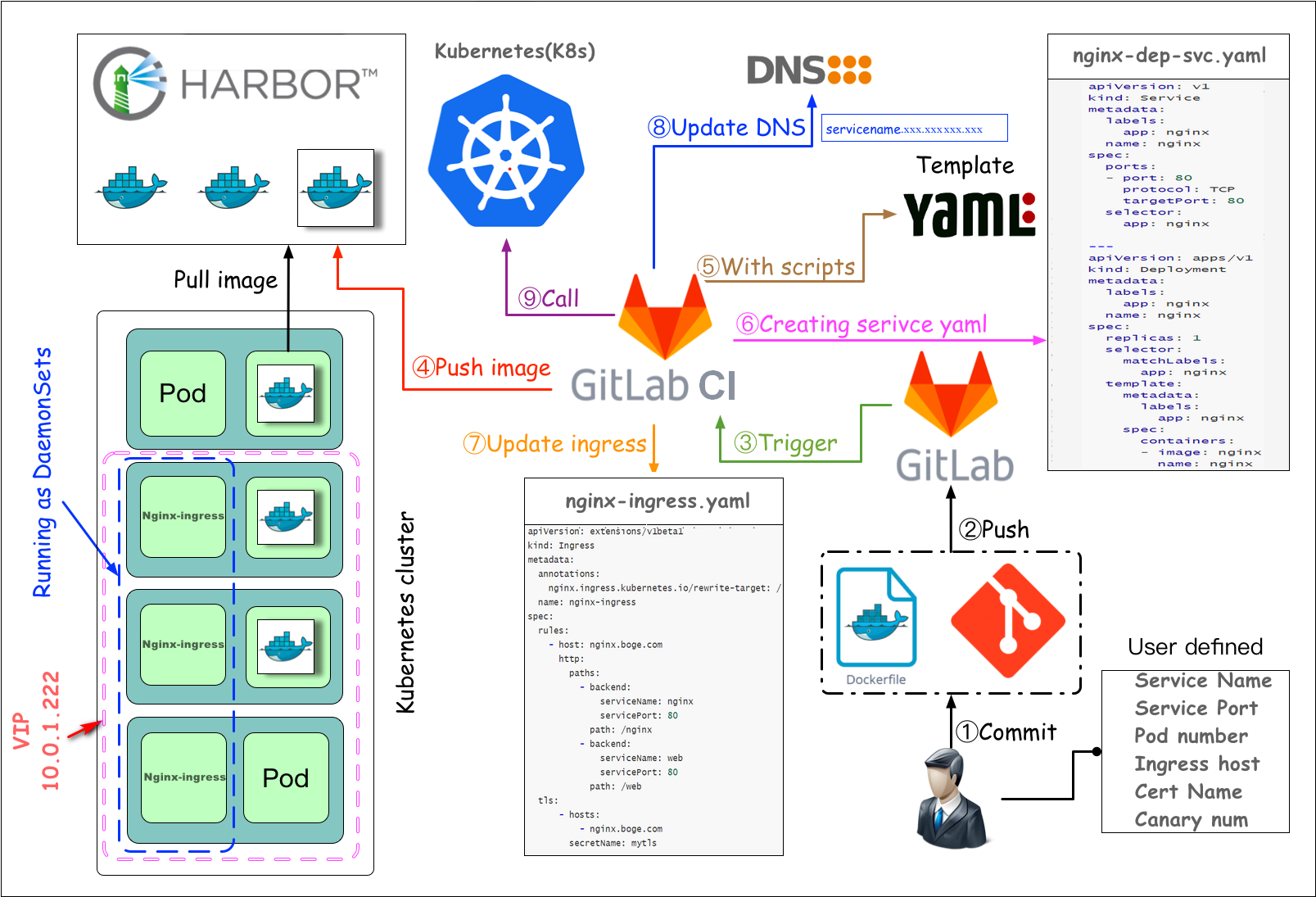
测试环境完全可以自动化 生产环境最好在CD环节人为手动发布
二 部署postgresql和redis
三 部署gitlab
本次直接部署较新的15.11.13版本并且使用内置的PostgreSQL数据库和Redis缓存数据库
runner使用相同大版本的15.11.1
dind使用Master部署节点Docker对应版本的
部署gitlab
官方gitlab镜像会有一些镜像的缺失,比如有时候会进入容器进行ping curl等调试,还有就是缺少postgresql-client工具
/usr/bin/pg_dump数据库备份工具进行软连接
gitlab对高可用需求不是很大,但是对数据、文件是最关键的
定期做一次全备,比如一天或半天,在本地或异地备份一套
# 重要命令
restore gitlab data command example:

# 全备命令
kubectl -n gitlab-ver130806 exec -it $(kubectl -n gitlab-ver130806 get pod|grep -v runner|grep gitlab|awk '{print $1}') -- gitlab-rake gitlab:backup:restore BACKUP=1602889879_2020_10_17_12.9.2

# 重新加载配置 (导入全备后)
kubectl -n gitlab-ver130806 exec -it $(kubectl -n gitlab-ver130806 get pod|grep -v runner|grep gitlab|awk '{print $1}') -- gitlab-ctl reconfigure

# 查看状态
kubectl -n gitlab-ver130806 exec -it $(kubectl -n gitlab-ver130806 get pod|grep -v runner|grep gitlab|awk '{print $1}') -- gitlab-ctl status
# harbor仓库密钥 之前是因为定制镜像要使用,这里可以不用
kubectl -n gitlab create secret docker-registry icurvestar-harbor-secret --docker-server=harbor.icurvestar.cn --docker-username=icurvestar --docker-password=icurvestar@666 --docker-email=ops@icurvestar.cnmkdir -p /nfs_dir/{gitlab_etc,gitlab_log,gitlab_opt}
kubectl create namespace gitlabkubectl label node k8s-192-168-10-204 icurvestar/gitlab-ready=true
kubectl get node --show-labels5gitlab.yaml
# pv
---
apiVersion: v1
kind: PersistentVolume
metadata:
  name: gitlab-etc-pv
  labels:
    type: gitlab-etc-pv
spec:
  capacity:
    storage: 1Gi
  accessModes:
    - ReadWriteOnce
  persistentVolumeReclaimPolicy: Retain
  storageClassName: nfs-icurvestar
  nfs:
    path: /nfs_dir/gitlab_etc
    server: 192.168.10.201

# pvc
---
kind: PersistentVolumeClaim
apiVersion: v1
metadata:
  name: gitlab-etc-pvc
spec:
  accessModes:
    - ReadWriteOnce
  resources:
    requests:
      storage: 1Gi
  storageClassName: nfs-icurvestar
  selector:
    matchLabels:
      type: gitlab-etc-pv
# pv
---
apiVersion: v1
kind: PersistentVolume
metadata:
  name: gitlab-log-pv
  labels:
    type: gitlab-log-pv
spec:
  capacity:
    storage: 1Gi
  accessModes:
    - ReadWriteOnce
  persistentVolumeReclaimPolicy: Retain
  storageClassName: nfs-icurvestar
  nfs:
    path: /nfs_dir/gitlab_log
    server: 192.168.10.201

# pvc
---
kind: PersistentVolumeClaim
apiVersion: v1
metadata:
  name: gitlab-log-pvc
spec:
  accessModes:
    - ReadWriteOnce
  resources:
    requests:
      storage: 1Gi
  storageClassName: nfs-icurvestar
  selector:
    matchLabels:
      type: gitlab-log-pv

# pv
---
apiVersion: v1
kind: PersistentVolume
metadata:
  name: gitlab-opt-pv
  labels:
    type: gitlab-opt-pv
spec:
  capacity:
    storage: 1Gi
  accessModes:
    - ReadWriteOnce
  persistentVolumeReclaimPolicy: Retain
  storageClassName: nfs-icurvestar
  nfs:
    path: /nfs_dir/gitlab_opt
    server: 192.168.10.201

# pvc
---
kind: PersistentVolumeClaim
apiVersion: v1
metadata:
  name: gitlab-opt-pvc
spec:
  accessModes:
    - ReadWriteOnce
  resources:
    requests:
      storage: 1Gi
  storageClassName: nfs-icurvestar
  selector:
    matchLabels:
      type: gitlab-opt-pv
---
apiVersion: v1
kind: Service
metadata:
  name: gitlab
  labels:
    app: gitlab
    tier: frontend
spec:
  ports:
    - name: gitlab-ui
      port: 80
      protocol: TCP
      targetPort: 80
    - name: gitlab-ssh
      port: 22
      protocol: TCP
      targetPort: 22
  selector:
    app: gitlab
    tier: frontend
  # 当 Service 类型为 NodePort 时,Kubernetes 会在每个节点上从 30000 到 32767 的端口范围内随机分配一个端口,而不是直接使用指定的端口号
  type: NodePort
---
apiVersion: v1
kind: ServiceAccount
metadata:
  name: gitlab
---
apiVersion: rbac.authorization.k8s.io/v1
kind: ClusterRoleBinding
metadata:
  name: gitlab-cb
roleRef:
  apiGroup: rbac.authorization.k8s.io
  kind: ClusterRole
  name: cluster-admin
subjects:
  - kind: ServiceAccount
    name: gitlab
    namespace: gitlab
---
apiVersion: apps/v1
kind: Deployment
metadata:
  name: gitlab
  labels:
    app: gitlab
    tier: frontend
spec:
  replicas: 1
  selector:
    matchLabels:
      app: gitlab
      tier: frontend
  strategy:
    type: Recreate
  template:
    metadata:
      labels:
        app: gitlab
        tier: frontend
    spec:
      serviceAccountName: gitlab
      containers:
        - image: harbor.icurvestar.cn/docker.io/gitlab/gitlab-ce:15.11.13-ce.0
          name: gitlab
#          resources:
#            requests:
#              cpu: 400m
#              memory: 4Gi
#            limits:
#              cpu: "800m"
#              memory: 8Gi
          securityContext:
            privileged: true
          env:
            - name: TZ
              value: Asia/Shanghai
            - name: GITLAB_OMNIBUS_CONFIG
              value: |
                #----PostgreSQL数据库启动配置------------------------------------
                postgresql['enable'] = true  # 启用或禁用 PostgreSQL 服务
                postgresql['listen_address'] = '127.0.0.1'
                postgresql['port'] = 5432  # PostgreSQL 使用的端口号
                postgresql['username'] = "gitlab-psql"  # PostgreSQL 服务使用的用户名
                ##! 可以使用命令 `gitlab-ctl pg-password-md5 gitlab` 生成 `SQL_USER_PASSWORD_HASH`
                postgresql['sql_user_password'] = '00cd25a81ee4d460bf565530d76dc435'  # PostgreSQL 用户密码的 MD5 哈希值
                postgresql['md5_auth_cidr_addresses'] = %w(127.0.0.1/24) # 使用 MD5 认证的 CIDR 地址范围
                # postgresql['trust_auth_cidr_addresses'] = %w(127.0.0.1/24) # 使用 Trust 认证的 CIDR 地址范围
                postgresql['sql_user'] = "gitlab"  # PostgreSQL 数据库的默认用户名
                #----PostgreSQL数据库连接配置------------------------------------
                gitlab_rails['db_username'] = "gitlab"
                gitlab_rails['db_password'] = "icurvestar@2024"
                gitlab_rails['db_host'] = "127.0.0.1"
                gitlab_rails['db_port'] = "5432"
                gitlab_rails['db_database'] = "gitlabhq_production"
                gitlab_rails['db_adapter'] = 'postgresql'
                gitlab_rails['db_encoding'] = 'utf8'
                #----Redis数据库启动配置------------------------------------
                redis['enable'] = true
                redis['bind'] = '127.0.0.1'  # Redis 绑定的 IP 地址(或指定单个 IP)
                redis['port'] = 6379  # Redis 监听的端口
                redis['password'] = 'icurvestar@2024'  # Redis 密码
                #----Redis数据库连接配置------------------------------------
                gitlab_rails['redis_host'] = '127.0.0.1'
                gitlab_rails['redis_port'] = '6379'
                gitlab_rails['redis_password'] = 'icurvestar@2024'
                #----端口配置------------------------------------
                gitlab_rails['gitlab_shell_ssh_port'] = 10022
                external_url 'http://gitlab.icurvestar.cn'
                nginx['listen_port'] = 80
                nginx['listen_https'] = false
                #----邮件配置------------------------------------
                gitlab_rails['gitlab_email_enabled'] = true
                gitlab_rails['gitlab_email_from'] = 'admin@icurvestar.cn'
                gitlab_rails['gitlab_email_display_name'] = 'icurvestar'
                gitlab_rails['gitlab_email_reply_to'] = 'gitlab@icurvestar.cn'
                gitlab_rails['gitlab_default_can_create_group'] = true
                gitlab_rails['gitlab_username_changing_enabled'] = true
                gitlab_rails['smtp_enable'] = true
                gitlab_rails['smtp_address'] = "smtp.exmail.qq.com"
                gitlab_rails['smtp_port'] = 465
                gitlab_rails['smtp_user_name'] = "gitlab@qq.com"
                gitlab_rails['smtp_password'] = "icurvestar@666"
                gitlab_rails['smtp_domain'] = "exmail.qq.com"
                gitlab_rails['smtp_authentication'] = "login"
                gitlab_rails['smtp_enable_starttls_auto'] = false
                gitlab_rails['smtp_tls'] = true
                #----优化配置----------------------------------
                # 关闭 promethues
                prometheus['enable'] = false
                # 关闭 grafana
                grafana['enable'] = false
                # 减少内存占用
                puma['per_worker_max_memory_mb'] = 850
                # 减少 sidekiq 的并发数
                sidekiq['concurrency'] = 16
                # 减少 postgresql 数据库缓存
                postgresql['shared_buffers'] = "256MB"
                # 减少 postgresql 数据库并发数量
                postgresql['max_connections'] = 400
                # 减少进程数   worker=CPU核数+1
                nginx['worker_processes'] = 4
                puma['worker_processes'] = 4
                #----其他配置----------------------------------
                # 保留3天备份的数据文件
                gitlab_rails['backup_keep_time'] = 259200
                #-------------------------------------------
          ports:
            - containerPort: 80
              name: gitlab
          livenessProbe:
            exec:
              command:
              - sh
              - -c
              - "curl -s http://127.0.0.1/-/health|grep -w 'GitLab OK'"
            initialDelaySeconds: 300
            periodSeconds: 10
            timeoutSeconds: 5
            successThreshold: 1
            failureThreshold: 3
          readinessProbe:
            exec:
              command:
              - sh
              - -c
              - "curl -s http://127.0.0.1/-/health|grep -w 'GitLab OK'"
            initialDelaySeconds: 300
            periodSeconds: 10
            timeoutSeconds: 5
            successThreshold: 1
            failureThreshold: 3
          volumeMounts:
            - mountPath: /etc/gitlab
              name: gitlab1
            - mountPath: /var/log/gitlab
              name: gitlab2
            - mountPath: /var/opt/gitlab
              name: gitlab3
            - mountPath: /etc/localtime
              name: tz-config

      volumes:
        - name: gitlab1
          persistentVolumeClaim:
            claimName: gitlab-etc-pvc
        - name: gitlab2
          persistentVolumeClaim:
            claimName: gitlab-log-pvc
        - name: gitlab3
          persistentVolumeClaim:
            claimName: gitlab-opt-pvc
        - name: tz-config
          hostPath:
            path: /usr/share/zoneinfo/Asia/Shanghai
      imagePullSecrets:
      - name: icurvestar-harbor-secret
      securityContext:
        runAsUser: 0
        fsGroup: 0
      nodeSelector:
        icurvestar/gitlab-ready: "true"
      tolerations:
      - operator: Exists
# kubectl -n gitlab apply -f 5gitlab.yaml
persistentvolume/gitlab-etc-pv created
persistentvolumeclaim/gitlab-etc-pvc created
persistentvolume/gitlab-log-pv created
persistentvolumeclaim/gitlab-log-pvc created
persistentvolume/gitlab-opt-pv created
persistentvolumeclaim/gitlab-opt-pvc created
service/gitlab created
serviceaccount/gitlab created
clusterrolebinding.rbac.authorization.k8s.io/gitlab-cb created
deployment.apps/gitlab created
等待12分钟
# kubectl -n gitlab top pod
NAME CPU(cores) MEMORY(bytes)
gitlab-5cd7666f84-9qbvg 120m 2705Mi
# kubectl -n gitlab get svc
NAME TYPE CLUSTER-IP EXTERNAL-IP PORT(S) AGE
gitlab NodePort 10.68.236.30 <none> 80:32691/TCP,22:32736/TCP 27m部署gitlab-ingress-tls
# 创建证书
kubectl -n gitlab create secret tls icurvestar-cn-tls --cert=/root/boge/ssl/icurvestar-cn-fullchain.pem --key=/root/boge/ssl/icurvestar-cn-privkey.pem
6gitlab-ingress.yaml
# new version
# https://kubernetes.io/docs/concepts/services-networking/ingress/
apiVersion: networking.k8s.io/v1
kind: Ingress
metadata:
  name: gitlab
  annotations:
    nginx.ingress.kubernetes.io/force-ssl-redirect: "false"
    nginx.ingress.kubernetes.io/proxy-body-size: "20m"
spec:
  tls:
  - hosts:
    - gitlab.icurvestar.cn
    secretName: icurvestar-cn-tls
  rules:
  - host: gitlab.icurvestar.cn
    http:
      paths:
      - path: /
        pathType: Prefix
        backend:
          service:
            name: gitlab
            port:
              number: 80
force-ssl-redirect: "false" 不要强制308重定向到https
proxy-body-size: "20m" 默认上传1M文件
# kubectl -n gitlab apply -f 6gitlab-ingress.yaml
ingress.networking.k8s.io/gitlab created
访问Gitlab UI
新版本的root管理员密码初始生成在etc目录下的initial_root_password文件
# cat  /nfs_dir/gitlab_etc/initial_root_password
# WARNING: This value is valid only in the following conditions
#          1. If provided manually (either via `GITLAB_ROOT_PASSWORD` environment variable or via `gitlab_rails['initial_root_password']` setting in `gitlab.rb`, it was provided before database was seeded for the first time (usually, the first reconfigure run).
#          2. Password hasn't been changed manually, either via UI or via command line.
#
#          If the password shown here doesn't work, you must reset the admin password following https://docs.gitlab.com/ee/security/reset_user_password.html#reset-your-root-password.

Password: LxG2A1QAnRVh8bABQ3gQ2rLRI086aC33j2SNyX0Eo9c=

# NOTE: This file will be automatically deleted in the first reconfigure run after 24 hours.
四 部署gitlab-runner
这节课我们来讲gitlab里面的runner,gitlab的CI/CD自动化,都是由gitlab下发指令,依靠runner这个组件去执行的,我们这里也是把runner运行在k8s上面。
runner按字面意思就是奔跑者的意思,它在整个自动化流程里面的角色也相当于一个外卖小哥,它接收gitlab下发的自动化指令,来去做相应的操作,从而实现整个CI/CD的效果。
# 创建对应runner目录
# 两种角色 1.打包镜像2.为所有gitlab项目服务,作cicd调度用,属于共享runner
mkdir -p /nfs_dir/{gitlab-runner1-docker,gitlab-runner2-share}
runner-docker
创建runner
hostAliases:
- ip: "10.68.140.109"填gitlab的svc地址
# kubectl -n gitlab get svc
NAME     TYPE       CLUSTER-IP     EXTERNAL-IP   PORT(S)                     AGE
gitlab   NodePort   10.68.236.30   <none>        80:32691/TCP,22:32736/TCP   72m
7runner-docker.yaml
# pv
---
apiVersion: v1
kind: PersistentVolume
metadata:
  name: gitlab-runner1-docker
  labels:
    type: gitlab-runner1-docker
spec:
  capacity:
    storage: 100Mi # 修改为使用Mi(米比字节)因为0.1Gi等于100Mi
  accessModes:
    - ReadWriteMany
  persistentVolumeReclaimPolicy: Retain
  storageClassName: nfs-icurvestar
  nfs:
    path: /nfs_dir/gitlab-runner1-docker
    server: 192.168.10.201

# pvc
---
kind: PersistentVolumeClaim
apiVersion: v1
metadata:
  name: gitlab-runner1-docker
  namespace: gitlab
spec:
  accessModes:
    - ReadWriteMany
  resources:
    requests:
      storage: 100Mi # 修改为使用Mi(米比字节)因为0.1Gi等于100Mi
  storageClassName: nfs-icurvestar
  selector:
    matchLabels:
      type: gitlab-runner1-docker

---
apiVersion: apps/v1
kind: Deployment
metadata:
  name: gitlab-runner1-docker
  namespace: gitlab
spec:
  replicas: 1
  selector:
    matchLabels:
      name: gitlab-runner1-docker
  template:
    metadata:
      labels:
        name: gitlab-runner1-docker
    spec:
      hostAliases:
      - ip: "10.68.236.30"
        hostnames:
        - "gitlab.icurvestar.cn"
      serviceAccountName: gitlab
      containers:
      - args:
        - run
        image: harbor.icurvestar.cn/docker.io/gitlab/gitlab-runner:v15.11.1
        name: gitlab-runner1-docker
        volumeMounts:
        - mountPath: /etc/gitlab-runner
          name: config
        - mountPath: /etc/ssl/certs
          name: cacerts
          readOnly: true
      restartPolicy: Always
      volumes:
      - persistentVolumeClaim:
          claimName: gitlab-runner1-docker
        name: config
      - hostPath:
          path: /usr/share/ca-certificates/mozilla
        name: cacerts
kubectl -n gitlab apply -f 7runner-docker.yaml配置runner
# kubectl -n gitlab logs gitlab-runner1-docker-7fb95cd85f-npvzs
Runtime platform                                    arch=amd64 os=linux pid=7 revision=0d8a024e version=15.11.1
Starting multi-runner from /etc/gitlab-runner/config.toml...  builds=0
Running in system-mode.

Created missing unique system ID                    system_id=r_DvZhuj3fJjnK
Configuration loaded                                builds=0
listen_address not defined, metrics & debug endpoints disabled  builds=0
[session_server].listen_address not defined, session endpoints disabled  builds=0
Initializing executor providers                     builds=0
ERROR: Failed to load config stat /etc/gitlab-runner/config.toml: no such file or directory  builds=0
ERROR: Failed to load config stat /etc/gitlab-runner/config.toml: no such file or directory  builds=0
runner没注册所以配置没生成
旧版:进入gitlab ui界面,点击顶部工具栏扳手按钮 admin area --> overview --> runner 右边会显示url和token
新版:进入gitlab ui界面,点击左上角三条横杠按钮 选择aAdmin--> CI/CD --> Runners 点击右边的Register an instance runner会提供注册步骤 sudo gitlab-runner register --url http://gitlab.icurvestar.cn/ --registration-token mjjDryg4R_9Ud9DZui2R
注册runner
# 进入pod
# kubectl -n gitlab exec -it gitlab-runner1-docker-6d95dd75cd-2m2l6 -- bash
root@gitlab-runner1-docker-6d95dd75cd-2m2l6:/# gitlab-runner register --url http://gitlab.icurvestar.cn/ --registration-token mjjDryg4R_9Ud9DZui2R
Runtime platform                                    arch=amd64 os=linux pid=47 revision=0d8a024e version=15.11.1
Running in system-mode.

Enter the GitLab instance URL (for example, https://gitlab.com/):
[http://gitlab.icurvestar.cn/]:
Enter the registration token:
[mjjDryg4R_9Ud9DZui2R]:
Enter a description for the runner:
[gitlab-runner1-docker-6d95dd75cd-2m2l6]: gitlab-runner1-docker
Enter tags for the runner (comma-separated):
docker
Enter optional maintenance note for the runner:

WARNING: Support for registration tokens and runner parameters in the 'register' command has been deprecated in GitLab Runner 15.6 and will be replaced with support for authentication tokens. For more information, see https://gitlab.com/gitlab-org/gitlab/-/issues/380872
Registering runner... succeeded                     runner=mjjDryg4
Enter an executor: docker-ssh+machine, kubernetes, custom, ssh, virtualbox, docker-autoscaler, shell, docker+machine, instance, docker, docker-windows, docker-ssh, parallels:
kubernetes
Runner registered successfully. Feel free to start it, but if it's running already the config should be automatically reloaded!

Configuration (with the authentication token) was saved in "/etc/gitlab-runner/config.toml"
tags是后面cicd的yaml配置用到
结束后进入进入gitlab ui界面的runner设置刷新一下 现在runner是锁住的,先不管
查看生成的配置
root@gitlab-runner1-docker-6d95dd75cd-2m2l6:/# cat /etc/gitlab-runner/config.toml
concurrent = 1
check_interval = 0
shutdown_timeout = 0

[session_server]
  session_timeout = 1800

[[runners]]
  name = "gitlab-runner1-docker"
  url = "http://gitlab.icurvestar.cn/"
  id = 1
  token = "GAzRiJrtYN9pHNamzA19"
  token_obtained_at = 2024-09-07T05:36:02Z
  token_expires_at = 0001-01-01T00:00:00Z
  executor = "kubernetes"
  [runners.cache]
    MaxUploadedArchiveSize = 0
  [runners.kubernetes]
    host = ""
    bearer_token_overwrite_allowed = false
    image = ""
    namespace = ""
    namespace_overwrite_allowed = ""
    node_selector_overwrite_allowed = ""
    pod_labels_overwrite_allowed = ""
    service_account_overwrite_allowed = ""
    pod_annotations_overwrite_allowed = ""
    [runners.kubernetes.pod_security_context]
    [runners.kubernetes.init_permissions_container_security_context]
    [runners.kubernetes.build_container_security_context]
    [runners.kubernetes.helper_container_security_context]
    [runners.kubernetes.service_container_security_context]
    [runners.kubernetes.volumes]
    [runners.kubernetes.dns_config]
修改配置,pod没有编辑工具,到nfs目录修改
root@k8s-192-168-10-201:~/boge/31-gitlab# cd /nfs_dir/gitlab-runner1-docker/
root@k8s-192-168-10-201:/nfs_dir/gitlab-runner1-docker# ll
-rw-------  1 root root 1062 Sep  7 13:37 config.toml
-rw-------  1 root root   14 Sep  7 12:33 .runner_system_id


对照来改 [runners.kubernetes]后面跟示例一样
# 新版本runner的配置是生成pod之后实时生成的配置,无法提前定义,等pod起来之后放到持久化存储里 修改
主要改[runners.kubernetes]下面的
# 设置并发执行任务的最大数量
concurrent = 30
# 设置runner的检查时间间隔,单位为秒。值为0表示不设置检查间隔
check_interval = 0
# 设置在关闭进程前等待任务完成的超时时间,单位为秒。值为0表示没有超时时间
shutdown_timeout = 0
[session_server]
# 设置session服务器的超时时间,单位为秒,此处为1800秒,即30分钟
session_timeout = 1800
[[runners]]
# runner的名称,用于识别不同的runner
name = "gitlab-runner1-docker"
# GitLab实例的URL地址
url = "http://gitlab.icurvestar.cn/"
# runner的ID,用于在GitLab中唯一标识runner
id = 1
# 用于runner注册的token
token = "GAzRiJrtYN9pHNamzA19"
# token获取的时间
token_obtained_at = 2024-09-07T05:36:02Z
# token的过期时间,此处未设置具体过期时间
token_expires_at = 0001-01-01T00:00:00Z
# runner使用的执行器类型,此处使用的是Kubernetes
executor = "kubernetes"
[runners.cache]
# 设置最大上传的缓存文件大小,值为0表示不限制大小
MaxUploadedArchiveSize = 0
[runners.kubernetes]
# Kubernetes API 服务器的地址,此处为空表示使用默认设置
host = ""
# 是否允许覆盖bearer token,false表示不允许
bearer_token_overwrite_allowed = false
# runner的Docker镜像,用于运行构建任务
image = "harbor.boge.com/docker.io/library/docker:stable"
# GitLab-runner的帮助镜像,用于协助runner运行作业
helper_image = "harbor.boge.com/docker.io/gitlab/gitlab-runner-helper:ubuntu-x86_64-v15.11.1-pwsh"
# Kubernetes命名空间,runner将会在该命名空间中创建pods
namespace = "gitlab"
# 是否允许特权模式,true表示允许runner以特权模式运行
privileged = true
# 是否允许覆盖命名空间,空字符串表示不允许
namespace_overwrite_allowed = ""
# 是否允许覆盖节点选择器,空字符串表示不允许
node_selector_overwrite_allowed = ""
# 是否允许覆盖Pod标签,空字符串表示不允许
pod_labels_overwrite_allowed = ""
# 是否允许覆盖服务账户,空字符串表示不允许
service_account_overwrite_allowed = ""
# 是否允许覆盖Pod注解,空字符串表示不允许
pod_annotations_overwrite_allowed = ""
[runners.kubernetes.pod_security_context]
# Kubernetes Pod的安全上下文配置,此处未定义具体内容
[runners.kubernetes.init_permissions_container_security_context]
# 初始化权限容器的安全上下文配置,此处未定义具体内容
[runners.kubernetes.build_container_security_context]
# 构建容器的安全上下文配置,此处未定义具体内容
[runners.kubernetes.helper_container_security_context]
# 帮助容器的安全上下文配置,此处未定义具体内容
[runners.kubernetes.service_container_security_context]
# 服务容器的安全上下文配置,此处未定义具体内容
[[runners.kubernetes.volumes.pvc]]
# 定义持久化卷的名称
name = "gitlab-runner1-docker"
# 持久化卷的挂载路径
mount_path = "/mnt"
[runners.kubernetes.dns_config]
# Kubernetes DNS配置,此处未定义具体内容修改后重启pod(删除 )
# kubectl -n gitlab delete pod gitlab-runner1-docker-6d95dd75cd-2m2l6
pod "gitlab-runner1-docker-6d95dd75cd-2m2l6" deleted
runner-share
创建runner
8runner-share.yaml
# pv
---
apiVersion: v1
kind: PersistentVolume
metadata:
  name: gitlab-runner2-share
  labels:
    type: gitlab-runner2-share
spec:
  capacity:
    storage: 100Mi # 修改为使用Mi(米比字节)因为0.1Gi等于100Mi
  accessModes:
    - ReadWriteMany
  persistentVolumeReclaimPolicy: Retain
  storageClassName: nfs-icurvestar
  nfs:
    path: /nfs_dir/gitlab-runner2-share
    server: 192.168.10.201

# pvc
---
kind: PersistentVolumeClaim
apiVersion: v1
metadata:
  name: gitlab-runner2-share
  namespace: gitlab
spec:
  accessModes:
    - ReadWriteMany
  resources:
    requests:
      storage: 100Mi # 修改为使用Mi(米比字节)因为0.1Gi等于100Mi
  storageClassName: nfs-icurvestar
  selector:
    matchLabels:
      type: gitlab-runner2-share


---
apiVersion: apps/v1
kind: Deployment
metadata:
  name: gitlab-runner2-share
  namespace: gitlab
spec:
  replicas: 1
  selector:
    matchLabels:
      name: gitlab-runner2-share
  template:
    metadata:
      labels:
        name: gitlab-runner2-share
    spec:
      hostAliases:
      - ip: "10.68.236.30"
        hostnames:
        - "gitlab.icurvestar.cn"
      serviceAccountName: gitlab
      containers:
      - args:
        - run
        image: harbor.icurvestar.cn/docker.io/gitlab/gitlab-runner:v15.11.1
        name: gitlab-runner2-share
        volumeMounts:
        - mountPath: /etc/gitlab-runner
          name: config
        - mountPath: /etc/ssl/certs
          name: cacerts
          readOnly: true
      restartPolicy: Always
      volumes:
      - persistentVolumeClaim:
          claimName: gitlab-runner2-share
        name: config
      - hostPath:
          path: /usr/share/ca-certificates/mozilla
        name: cacerts
配置runner
# kubectl -n gitlab logs gitlab-runner2-share-b56f65b74-pfxns
Runtime platform                                    arch=amd64 os=linux pid=7 revision=0d8a024e version=15.11.1
Starting multi-runner from /etc/gitlab-runner/config.toml...  builds=0
Running in system-mode.

Created missing unique system ID                    system_id=r_kavE3e5fLPJy
Configuration loaded                                builds=0
listen_address not defined, metrics & debug endpoints disabled  builds=0
[session_server].listen_address not defined, session endpoints disabled  builds=0
Initializing executor providers                     builds=0
ERROR: Failed to load config stat /etc/gitlab-runner/config.toml: no such file or directory  builds=0
ERROR: Failed to load config stat /etc/gitlab-runner/config.toml: no such file or directory  builds=0
runner没注册所以配置没生成
旧版:进入gitlab ui界面,点击顶部工具栏扳手按钮 admin area --> overview --> runner 右边会显示url和token
新版:进入gitlab ui界面,点击左上角三条横杠按钮 选择aAdmin--> CI/CD --> Runners 点击右边的Register an instance runner会提供注册步骤 sudo gitlab-runner register --url http://gitlab.icurvestar.cn/ --registration-token mjjDryg4R_9Ud9DZui2R
注册runner
root@k8s-192-168-10-201:~/boge/31-gitlab# kubectl -n gitlab exec -it gitlab-runner2-share-b56f65b74-pfxns
error: you must specify at least one command for the container
root@k8s-192-168-10-201:~/boge/31-gitlab# kubectl -n gitlab exec -it gitlab-runner2-share-b56f65b74-pfxns -- bash
root@gitlab-runner2-share-b56f65b74-pfxns:/# gitlab-runner register --url http://gitlab.icurvestar.cn/ --registration-token mjjDryg4R_9Ud9DZui2R
Runtime platform                                    arch=amd64 os=linux pid=28 revision=0d8a024e version=15.11.1
Running in system-mode.

Enter the GitLab instance URL (for example, https://gitlab.com/):
[http://gitlab.icurvestar.cn/]:
Enter the registration token:
[mjjDryg4R_9Ud9DZui2R]:
Enter a description for the runner:
[gitlab-runner2-share-b56f65b74-pfxns]: gitlab-runner2-share
Enter tags for the runner (comma-separated):
share
Enter optional maintenance note for the runner:

WARNING: Support for registration tokens and runner parameters in the 'register' command has been deprecated in GitLab Runner 15.6 and will be replaced with support for authentication tokens. For more information, see https://gitlab.com/gitlab-org/gitlab/-/issues/380872
Registering runner... succeeded                     runner=mjjDryg4
Enter an executor: kubernetes, custom, docker, docker-windows, parallels, virtualbox, docker+machine, docker-ssh, shell, ssh, docker-autoscaler, docker-ssh+machine, instance:
kubernetes
Runner registered successfully. Feel free to start it, but if it's running already the config should be automatically reloaded!

Configuration (with the authentication token) was saved in "/etc/gitlab-runner/config.toml"
tags是后面cicd的yaml配置用到
结束后进入进入gitlab ui界面的runner设置刷新一下 现在runner是锁住的,先不管
查看生成的配置
root@gitlab-runner2-share-b56f65b74-pfxns:/# cat /etc/gitlab-runner/config.toml
concurrent = 1
check_interval = 0
shutdown_timeout = 0

[session_server]
  session_timeout = 1800

[[runners]]
  name = "gitlab-runner2-share"
  url = "http://gitlab.icurvestar.cn/"
  id = 2
  token = "xpWnzJXbPdLyxSHrdC48"
  token_obtained_at = 2024-09-07T06:55:00Z
  token_expires_at = 0001-01-01T00:00:00Z
  executor = "kubernetes"
  [runners.cache]
    MaxUploadedArchiveSize = 0
  [runners.kubernetes]
    host = ""
    bearer_token_overwrite_allowed = false
    image = ""
    namespace = ""
    namespace_overwrite_allowed = ""
    node_selector_overwrite_allowed = ""
    pod_labels_overwrite_allowed = ""
    service_account_overwrite_allowed = ""
    pod_annotations_overwrite_allowed = ""
    [runners.kubernetes.pod_security_context]
    [runners.kubernetes.init_permissions_container_security_context]
    [runners.kubernetes.build_container_security_context]
    [runners.kubernetes.helper_container_security_context]
    [runners.kubernetes.service_container_security_context]
    [runners.kubernetes.volumes]
    [runners.kubernetes.dns_config]
修改配置,pod没有编辑工具,到nfs目录修改
root@k8s-192-168-10-201:~/boge/31-gitlab# cd /nfs_dir/gitlab-runner1-docker/
root@k8s-192-168-10-201:/nfs_dir/gitlab-runner1-docker# ll
-rw-------  1 root root 1062 Sep  7 13:37 config.toml
-rw-------  1 root root   14 Sep  7 12:33 .runner_system_id


对照来改 [runners.kubernetes]后面跟示例一样
# 新版本runner的配置是生成pod之后实时生成的配置,无法提前定义,等pod起来之后放到持久化存储里 修改
主要改[runners.kubernetes]下面的
concurrent = 30
check_interval = 0
shutdown_timeout = 0
[session_server]
session_timeout = 1800
[[runners]]
name = "gitlab-runner2-share"
url = "http://gitlab.icurvestar.cn/"
id = 2
token = "xpWnzJXbPdLyxSHrdC48"
token_obtained_at = 2024-09-07T06:55:00Z
token_expires_at = 0001-01-01T00:00:00Z
executor = "kubernetes"
[runners.cache]
MaxUploadedArchiveSize = 0
[runners.kubernetes]
# Kubernetes API 服务器的地址,此处为空表示使用默认设置
host = ""
# 是否允许覆盖bearer token,false表示不允许
bearer_token_overwrite_allowed = false
# runner的Docker镜像,用于运行构建任务
image = "harbor.icurvestar.cn/docker.io/library/docker:stable"
# GitLab-runner的帮助镜像,用于协助runner运行作业
helper_image = "harbor.icurvestar.cn/docker.io/gitlab/gitlab-runner-helper:ubuntu-x86_64-v15.11.1-pwsh"
# Kubernetes命名空间,runner将会在该命名空间中创建pods
namespace = "gitlab"
# 是否允许特权模式,true表示允许runner以特权模式运行
privileged = true
# 是否允许覆盖命名空间,空字符串表示不允许
namespace_overwrite_allowed = ""
# 是否允许覆盖节点选择器,空字符串表示不允许
node_selector_overwrite_allowed = ""
# 是否允许覆盖Pod标签,空字符串表示不允许
pod_labels_overwrite_allowed = ""
# 是否允许覆盖服务账户,空字符串表示不允许
service_account_overwrite_allowed = ""
# 是否允许覆盖Pod注解,空字符串表示不允许
pod_annotations_overwrite_allowed = ""
[runners.kubernetes.pod_security_context]
# Kubernetes Pod的安全上下文配置,此处未定义具体内容
[runners.kubernetes.init_permissions_container_security_context]
# 初始化权限容器的安全上下文配置,此处未定义具体内容
[runners.kubernetes.build_container_security_context]
# 构建容器的安全上下文配置,此处未定义具体内容
[runners.kubernetes.helper_container_security_context]
# 帮助容器的安全上下文配置,此处未定义具体内容
[runners.kubernetes.service_container_security_context]
# 服务容器的安全上下文配置,此处未定义具体内容
[[runners.kubernetes.volumes.pvc]]
# 定义持久化卷的名称
name = "gitlab-runner2-share"
# 持久化卷的挂载路径
mount_path = "/mnt"
[runners.kubernetes.dns_config]
# Kubernetes DNS配置,此处未定义具体内容修改后重启pod(删除 )
kubectl -n gitlab delete pod gitlab-runner2-share-b56f65b74-pfxns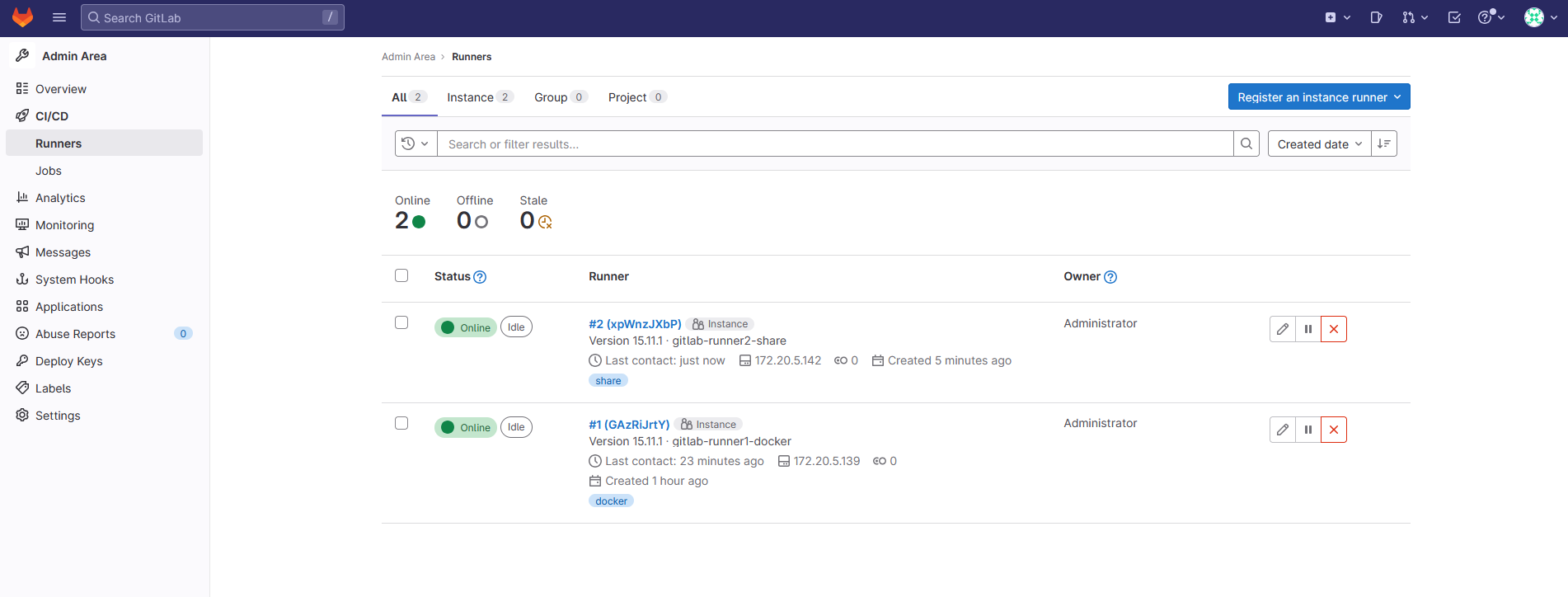
五 配置内部解析和SSH
继续来配置gitlab相关的服务。
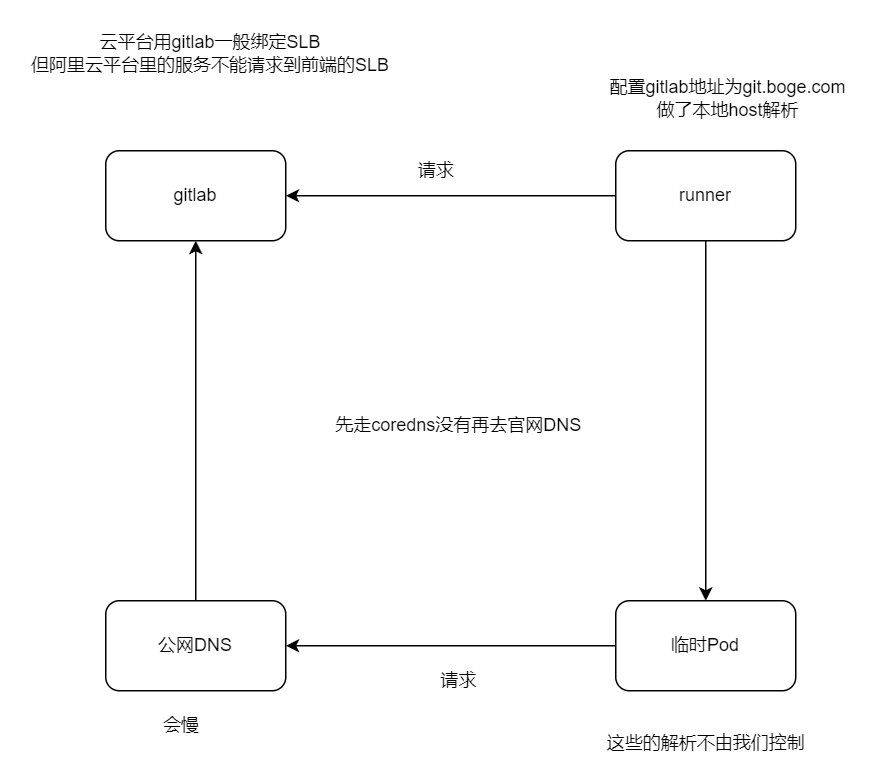
增加gitlab在k8s的内部解析
为什么这么做呢,博哥这里总结了两点原因:
- 优化gitlab网络通信,对于runner要调用gitlab服务来说,直接走内部地址速度更快
- 如果是在用阿里云的同学,采用在k8s上部署gitlab的话,那么k8s内部服务比如runner是不能通过同集群前面的公网入口SLB来请求访问的,这里阿里云自身网络架构原因,这个时候我们只需要做如下配置即可完美解决
修改配置
# kubectl -n kube-system edit configmaps coredns

添加解析
rewrite stop {
  name regex gitlab.icurvestar.cn gitlab.gitlab.svc.cluster.local
  answer name gitlab.gitlab.svc.cluster.local gitlab.icurvestar.cn
}

# kubectl -n kube-system get configmaps coredns -o yamlapiVersion: v1
data:
Corefile: |
.:53 {
errors
health
ready
log
rewrite stop {
name regex git.icurvestar.cn gitlab.gitlab.svc.cluster.local
answer name gitlab.gitlab.svc.cluster.local git.icurvestar.cn
}
kubernetes cluster.local in-addr.arpa ip6.arpa {
pods verified
fallthrough in-addr.arpa ip6.arpa
}
autopath @kubernetes
prometheus :9153
forward . /etc/resolv.conf
cache 30
loop
reload
loadbalance
}
kind: ConfigMap
metadata:
name: coredns
namespace: kube-system# 重启dns
# kubectl -n kube-system delete pod coredns-65bc7b648d-9rccf
pod "coredns-65bc7b648d-9rccf" deleted测试
# vim /etc/hosts
192.168.10.204 gitlab.icurvestar.cn

apt install iputils-ping

# ping gitlab.icurvestar.cn
PING gitlab.icurvestar.cn (192.168.10.204) 56(84) bytes of data.
64 bytes from k8s-192-168-10-204 (192.168.10.204): icmp_seq=1 ttl=64 time=1.15 ms
64 bytes from k8s-192-168-10-204 (192.168.10.204): icmp_seq=2 ttl=64 time=0.400 ms
64 bytes from k8s-192-168-10-204 (192.168.10.204): icmp_seq=3 ttl=64 time=0.471 ms
^C
--- gitlab.icurvestar.cn ping statistics ---
3 packets transmitted, 3 received, 0% packet loss, time 2016ms
rtt min/avg/max/mdev = 0.400/0.672/1.145/0.335 msapiVersion: apps/v1
kind: Deployment
metadata:
labels:
app: netshoot
name: netshoot
spec:
replicas: 1
selector:
matchLabels:
app: netshoot
template:
metadata:
labels:
app: netshoot
spec:
containers:
- image: nicolaka/netshoot
name: netshoot
args:
- /bin/bash
- -c
- >
while :; do
echo "[$(date +%F\ %T)] hello"
sleep 1
done# kubectl create ns test
# kubectl -n test apply -f test-gitlab-dns.yaml
# kubectl -n test exec -it netshoot-6bb6d79844-zpttq -- bash
netshoot-6bb6d79844-zpttq:~# ping gitlab.icurvestar.cn
PING gitlab.icurvestar.cn.test.svc.cluster.local (10.68.236.30) 56(84) bytes of data.
From gitlab.gitlab.svc.cluster.local (10.68.236.30) icmp_seq=1 Destination Port Unreachable
From gitlab.gitlab.svc.cluster.local (10.68.236.30) icmp_seq=2 Destination Port Unreachable
From gitlab.gitlab.svc.cluster.local (10.68.236.30) icmp_seq=3 Destination Port Unreachable
From gitlab.gitlab.svc.cluster.local (10.68.236.30) icmp_seq=4 Destination Port Unreachable
^C
--- gitlab.icurvestar.cn.test.svc.cluster.local ping statistics ---
4 packets transmitted, 0 received, +4 errors, 100% packet loss, time 3044ms
# curl gitlab.icurvestar.cn
<html><body>You are being <a href="http://gitlab.icurvestar.cn/users/sign_in">redirected</a>.</body></html>增加ssh端口转发
我们要保持所有开发人员能使用默认的22端口来通过ssh拉取代码,那么就需要做如下端口转发配置
再204机器上操作
# 注意配置此转发前,需要将对应NODE的本身ssh连接端口作一下修改,以防后面登陆不了该机器
vim /etc/ssh/sshd_config

把#Port 22 打开并修改为
Port 10022

重启ssh服务
systemctl restart sshd

测试
# ssh -p10022 192.168.10.204


# kubectl -n gitlab get svc
NAME     TYPE       CLUSTER-IP     EXTERNAL-IP   PORT(S)                     AGE
gitlab   NodePort   10.68.236.30   <none>        80:32691/TCP,22:32736/TCP   4h23m


iptables -t nat -A PREROUTING -d 192.168.10.204 -p tcp --dport 22 -j DNAT --to-destination 192.168.10.204:32736

对于所有发往 IP 地址 192.168.10.204 并且目标端口为 22 的 TCP 数据包,它们的目的端口将被重定向到该机器的 32736 端口

#↑ 删除上面创建的这一条规则,将-A换成-D即可
iptables -t nat -D PREROUTING -d 192.168.10.204 -p tcp --dport 22 -j DNAT --to-destination 192.168.10.204:32736

iptables -t nat  -nvL PREROUTING
请求列出 (-L) nat 表中 PREROUTING 链的所有规则,并且以数字 (-n) 和简短 (-v) 格式显示结果
# iptables -t nat  -nvL PREROUTING
Chain PREROUTING (policy ACCEPT 0 packets, 0 bytes)
 pkts bytes target     prot opt in     out     source               destination
  367 36272 cali-PREROUTING  all  --  *      *       0.0.0.0/0            0.0.0.0/0            /* cali:6gwbT8clXdHdC1b1 */
  393 39314 KUBE-SERVICES  all  --  *      *       0.0.0.0/0            0.0.0.0/0            /* kubernetes service portals */
    0     0 DNAT       tcp  --  *      *       0.0.0.0/0            192.168.10.204       tcp dpt:22 to:192.168.10.204:32736


加入开机自启
vim /etc/rc.local

#!/bin/bash
iptables -t nat -A PREROUTING -d 192.168.10.204 -p tcp --dport 22 -j DNAT --to-destination 192.168.10.204:32736

chmod +x /etc/rc.local


# ssh 192.168.10.204
@@@@@@@@@@@@@@@@@@@@@@@@@@@@@@@@@@@@@@@@@@@@@@@@@@@@@@@@@@@
@    WARNING: REMOTE HOST IDENTIFICATION HAS CHANGED!     @
@@@@@@@@@@@@@@@@@@@@@@@@@@@@@@@@@@@@@@@@@@@@@@@@@@@@@@@@@@@
IT IS POSSIBLE THAT SOMEONE IS DOING SOMETHING NASTY!
Someone could be eavesdropping on you right now (man-in-the-middle attack)!
It is also possible that a host key has just been changed.
The fingerprint for the ED25519 key sent by the remote host is
SHA256:D2TkOGSyjOTUInnxQ3k6lLgXWjsrt8dg3K89W5Q2OJY.
Please contact your system administrator.
Add correct host key in /root/.ssh/known_hosts to get rid of this message.
Offending ED25519 key in /root/.ssh/known_hosts:6
  remove with:
  ssh-keygen -f "/root/.ssh/known_hosts" -R "192.168.10.204"
Host key for 192.168.10.204 has changed and you have requested strict checking.
Host key verification failed.


# ssh 10.0.1.204
@@@@@@@@@@@@@@@@@@@@@@@@@@@@@@@@@@@@@@@@@@@@@@@@@@@@@@@@@@@
@    警告:远程主机的身份标识已改变!   @
@@@@@@@@@@@@@@@@@@@@@@@@@@@@@@@@@@@@@@@@@@@@@@@@@@@@@@@@@@@

这可能是有人正在做恶意的事情!
可能有人正在监听您的通信(中间人攻击)!
同时,也有可能是主机密钥刚刚被更改。

远程主机发送的ED25519密钥的指纹为:
SHA256:iEa2RMZd/GocZozE1V9hGM+hRXn/D56Hkzeq/y1YH0w。

请与您的系统管理员联系。
在/root/.ssh/known_hosts中添加正确的主机密钥以消除此消息。
在/root/.ssh/known_hosts中的第6行有冲突的ED25519密钥,
可以通过以下命令移除:
ssh-keygen -f "/root/.ssh/known_hosts" -R "10.0.1.204"

由于10.0.1.204的主机密钥已改变,并且您请求了严格的检查。
主机密钥验证失败。


需要ssh私钥
测试gitlab 拉取推送
给每台机器做gitlab.icurvestar.cn的本地host解析
添加公钥
https://gitlab.icurvestar.cn/-/profile/keysKey
Paste your public SSH key, which is usually contained in the file '~/.ssh/id_ed25519.pub' or '~/.ssh/id_rsa.pub' and begins with 'ssh-ed25519' or 'ssh-rsa'. Do not paste your private SSH key, as that can compromise your identity.
# ssh-keygen -t ed25519 -C "icurvestar Gitlab SSH Key"
Generating public/private ed25519 key pair.
Enter file in which to save the key (/root/.ssh/id_ed25519):
Enter passphrase (empty for no passphrase):
Enter same passphrase again:
Your identification has been saved in /root/.ssh/id_ed25519
Your public key has been saved in /root/.ssh/id_ed25519.pub
The key fingerprint is:
SHA256:itDBr25gmmEGatFtYPvmEkmVOR0HYUbDY3yBidVYBWY icurvestar Gitlab SSH Key
The key's randomart image is:
+--[ED25519 256]--+
|      XXXE+.     |
|   + *oX=o       |
|  o B o o        |
|.. = =           |
|o + = . S        |
|o+o+ = .         |
|+= .* .          |
|o  o..           |
|   .o            |
+----[SHA256]-----+

root@k8s-192-168-10-205:~/.ssh# ll
total 20
drwx------ 2 root root 4096 Sep  7 15:46 ./
drwx------ 6 root root 4096 Sep  7 15:05 ../
-rw------- 1 root root  564 Jul 28 23:04 authorized_keys
-rw------- 1 root root  419 Sep  7 15:46 id_ed25519
-rw-r--r-- 1 root root  107 Sep  7 15:46 id_ed25519.pub

公钥 id_ed25519.pub,私钥id_ed25519

# cat id_ed25519.pub
ssh-ed25519 AAAAC3NzaC1lZDI1NTE5AAAAIKiKXfVvtcxt/ybZFnNy7r3/nJrzz4ZDK/FoI9MC9p8F icurvestar Gitlab SSH Key
测试
Git 全局设置
git config --global user.name "k8s-192-168-10-205"
git config --global user.email "k8s-192-168-10-205@icurvestar.cn"

创建一个新的仓库
git clone ssh://git@gitlab.icurvestar.cn/gitlab-instance-18a0c638/Monitoring.git
cd Monitoring
git switch -c main
touch README.md
git add README.md
git commit -m "add README"
git push -u origin main
root@k8s-192-168-10-205:~/code# git clone ssh://git@gitlab.icurvestar.cn/gitlab-instance-18a0c638/Monitoring.git
Cloning into 'Monitoring'...
The authenticity of host 'gitlab.icurvestar.cn (192.168.10.204)' can't be established.
ED25519 key fingerprint is SHA256:D2TkOGSyjOTUInnxQ3k6lLgXWjsrt8dg3K89W5Q2OJY.
This key is not known by any other names
Are you sure you want to continue connecting (yes/no/[fingerprint])? yes
Warning: Permanently added 'gitlab.icurvestar.cn' (ED25519) to the list of known hosts.
warning: You appear to have cloned an empty repository.六 部署dind(docker in docker)
大家好,我是博哥爱运维。我们现在在k8s来部署dind服务,提供整个CI(持续集成)的功能。
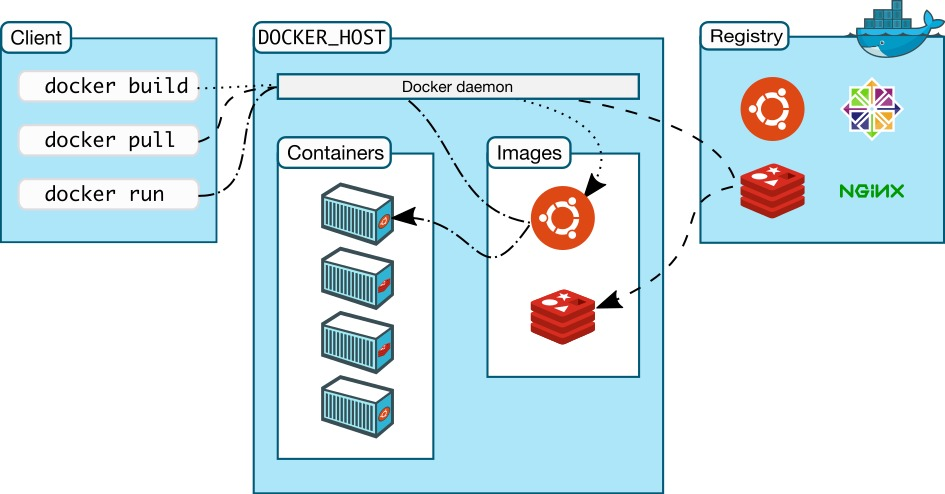
我们看看docker version列出的结果 Docker采取的是C/S架构 Docker进程默认不监听任何端口,它会生成一个socket(/var/run/docker.sock)文件来进行本地进程通信 Docker C/S 之间采取Rest API作为通信协议,我们可以让Docker daemon进程监听一个端口(2375),这就为我们用docker client调用远程调用docker daemon进程执行镜像构建提供了可行性
# docker version
Client:
 Version:           26.1.3
 API version:       1.45
 Go version:        go1.21.10
 Git commit:        b72abbb
 Built:             Thu May 16 08:32:30 2024
 OS/Arch:           linux/amd64
 Context:           default

Server: Docker Engine - Community
 Engine:
  Version:          26.1.3
  API version:      1.45 (minimum version 1.24)
  Go version:       go1.21.10
  Git commit:       8e96db1
  Built:            Thu May 16 08:33:58 2024
  OS/Arch:          linux/amd64
  Experimental:     false
 containerd:
  Version:          v1.7.17
  GitCommit:        3a4de459a68952ffb703bbe7f2290861a75b6b67
 runc:
  Version:          1.1.12
  GitCommit:        v1.1.12-0-g51d5e94
 docker-init:
  Version:          0.19.0
  GitCommit:        de40ad0
先创建证书
# 前面已经在gitlab 创建了 boge-harbor-secret
kubectl -n gitlab create secret docker-registry icurvestar-harbor-secret --docker-server=harbor.icurvestar.cn --docker-username=icurvestar --docker-password=icurvestar@666 --docker-email=admin@icurvestar.cn
# describe遇到下面错误是因为限制的资源太小了,k8s会重启它
dind pip instll staus : kill -9 code 137(128+9) ,may be limits(cpu,memory) resources need change
# 本地没有docker服务端
# only have docker client ,use dind can be use normal
#dindSvc=$(kubectl -n kube-system get svc dind |awk 'NR==2{print $3}')
#export DOCKER_HOST="tcp://${dindSvc}:2375/"
#export DOCKER_DRIVER=overlay2
#export DOCKER_TLS_CERTDIR=""
""定义为空,关闭证书验证9dind.yaml
# gitlab命名空间的
---
# SVC
kind: Service
apiVersion: v1
metadata:
  name: dind
  namespace: gitlab
spec:
  selector:
    app: dind
  ports:
    - name: tcp-port
      port: 2375
      protocol: TCP
      targetPort: 2375

---
# Deployment
apiVersion: apps/v1
kind: Deployment
metadata:
  name: dind
  namespace: gitlab
  labels:
    app: dind
spec:
  replicas: 1
  selector:
    matchLabels:
      app: dind
  template:
    metadata:
      labels:
        app: dind
    spec:
      # 映射端口到宿主机,对打包好一些
      hostNetwork: true
      containers:
      - name: dind
        image: harbor.icurvestar.cn/docker.io/library/docker:26-dind
        # 生命周期
        lifecycle:
          # 启动之前
          postStart:
            exec:
              command: ["/bin/sh", "-c", "docker login harbor.icurvestar.cn -u 'icurvestar' -p 'icurvestar@666'"]
           # 3. when delete this pod , use this keep kube-proxy to flush role done
          preStop:
            exec:
              # 有些容器退出比较快,导致kube api server 还没有感知到这个pod挂掉了,还会把流量引入 这里等待5s再关闭或重启
              command: ["/bin/sh", "-c", "sleep 5"]
        ports:
        - containerPort: 2375
#        resources:
#          requests:
#            cpu: 200m
#            memory: 256Mi
#          limits:
#            cpu: 0.5
#            memory: 1Gi
        readinessProbe:
          tcpSocket:
            port: 2375
          initialDelaySeconds: 10
          periodSeconds: 30
        livenessProbe:
          tcpSocket:
            port: 2375
          initialDelaySeconds: 10
          periodSeconds: 30
        securityContext:
            privileged: true
        env:
          - name: DOCKER_HOST
            value: tcp://localhost:2375
          - name: DOCKER_DRIVER
            value: overlay2
          - name: DOCKER_TLS_CERTDIR
            value: ''
        # 把宿主机docker的数据挂着到容器里,加快容器构 建速度
        volumeMounts:
          - name: docker-graph-storage
            mountPath: /var/lib/docker
          - name: tz-config
            mountPath: /etc/localtime
         # 使用的icurvestar.cn证书不是自签的
          # - name: harbor-ca
            # mountPath: /etc/docker/certs.d/harbor.icurvestar.cn/ca.crt
            # subPath: harbor-ca
       # kubectl create secret docker-registry boge-secret --docker-server=harbor.boge.com --docker-username=boge --docker-password=Boge@666 --docker-email=admin@boge.com
      hostAliases:
      - hostnames:
        - harbor.icurvestar.cn
        ip: 192.168.10.201
      imagePullSecrets:
      - name: icurvestar-harbor-secret
      volumes:
#      - emptyDir:
#          medium: ""
#          sizeLimit: 10Gi
      - hostPath:
          path: /var/lib/container/docker
        name: docker-graph-storage
      - hostPath:
          path: /usr/share/zoneinfo/Asia/Shanghai
        name: tz-config
      # - name: harbor-ca
        # secret:
          # secretName: harbor-ca
          # defaultMode: 0600
#
#        kubectl taint node 10.0.1.201 Ingress=:NoExecute
#        kubectl describe node 10.0.1.201 |grep -i taint
#        kubectl taint node 10.0.1.201 Ingress:NoExecute-
      # docker的数据在201master节点,所以要指定
      nodeSelector:
        kubernetes.io/hostname: "k8s-192-168-10-201"
      # 忽视所有污点
      tolerations:
      - operator: Exists
查看下pod的标签
注意密钥
# 204节点部署harbor,执行下面
mkdir /data/harbor/ssl && cd /data/harbor/ssl
openssl genrsa -out tls.key 2048
openssl req -new -x509 -key tls.key -out tls.cert -days 360 -subj /CN=*.boge.com


# 在201节点上面拉取harbor镜像
mkdir -p /etc/docker/certs.d/harbor.boge.com
scp 10.0.1.204:/data/harbor/ssl/tls.cert /etc/docker/certs.d/harbor.boge.com/ca.crt
使用scp(Secure Copy)命令从IP地址为10.0.1.204的远程主机上复制tls.cert文件到本地的/etc/docker/certs.d/harbor.boge.com/ca.crt路径下。这样做的目的是为了让Docker能够信任Harbor仓库的TLS证书,从而在进行图像拉取或推送操作时不会出现安全警告


# gitlab(204节点)部署dind
kubectl -n kube-system create secret generic harbor-ca --from-file=harbor-ca=/data/harbor/ssl/tls.cert

kubectl -n gitlab-ver130806 create secret generic harbor-ca --from-file=harbor-ca=/root/boge/0720/tls/boge.com.cert
# kubectl -n gitlab apply -f 9dind.yaml
service/dind created
deployment.apps/dind created# kubectl -n gitlab exec -it dind-6f688b847-jrx9c -- sh
/ # docker pull harbor.icurvestar.cn/boge/alertmanaer-webhook:1.0
1.0: Pulling from boge/alertmanaer-webhook
930bdd4d222e: Pull complete
c1057d6133e0: Pull complete
1d2580b1e1b7: Pull complete
ceb8d8d0ce63: Pull complete
Digest: sha256:fed325cf4489c335380fd2fd068f1c4dd19152bd05fdb90122ca9fe2c2c82e49
Status: Downloaded newer image for harbor.icurvestar.cn/boge/alertmanaer-webhook:1.0
harbor.icurvestar.cn/boge/alertmanaer-webhook:1.0七 CI/CD生产实战项目
采用目前企业较常见的编程语言python的flask模块来实施完整的项目自动化流程步骤,其他语言都可以参照这个项目来实施自动化流程。
先把k8s的二进制命令行工具kubectl容器化备用(CD发布需要用到)
配置
kubectl容器化
把二进制文件复制过来
# which kubectl
/opt/kube/bin/kubectl

# cp /opt/kube/bin/kubectl .
Dockerfile
FROM harbor.icurvestar.cn/docker.io/library/alpine:3.13

MAINTAINER boge

ENV TZ "Asia/Shanghai"

RUN sed -ri 's+dl-cdn.alpinelinux.org+mirrors.aliyun.com+g' /etc/apk/repositories \
 && apk add --no-cache curl tzdata ca-certificates \
 && cp -f /usr/share/zoneinfo/Asia/Shanghai /etc/localtime \
 && apk upgrade \
 && rm -rf /var/cache/apk/*

COPY kubectl /usr/local/bin/
RUN chmod +x /usr/local/bin/kubectl

ENTRYPOINT ["kubectl"]
CMD ["help"]
# kubectl get node
NAME STATUS ROLES AGE VERSION
k8s-192-168-10-201 Ready,SchedulingDisabled master 40d v1.27.14
k8s-192-168-10-202 Ready,SchedulingDisabled master 40d v1.27.14
k8s-192-168-10-203 Ready node 40d v1.27.14
k8s-192-168-10-204 Ready node 40d v1.27.14
k8s-192-168-10-205 Ready node 40d v1.27.14
docker build -t harbor.icurvestar.cn/open/kubectl:v1.27.14 .
docker push harbor.icurvestar.cn/open/kubectl:v1.27.14上传python的flask模块代码
准备好flask相关的代码文件上传到gitlab代码仓库
git clone ssh://git@gitlab.icurvestar.cn/root/test-cicd-python.git
cd test-cicd-python
app.py
from flask import Flask
app = Flask(__name__)

@app.route('/')
def hello_world():
    return 'Hello, icurvestar! 24.07.16.01'

@app.route('/gg/<username>')
def hello(username):
    return 'welcome' + ': ' + username + '!'
简单两个路由
vim app.py
git add app.py
git commit -m "add app.py"
git push -u origin main
Dockerfile
FROM harbor.icurvestar.cn/docker.io/library/python:3.10-slim-bullseye
MAINTAINER boge

WORKDIR /kae/app

COPY requirements.txt .

RUN  sed -i 's/deb.debian.org/ftp.cn.debian.org/g' /etc/apt/sources.list \
  && sed -i 's/security.debian.org/ftp.cn.debian.org/g' /etc/apt/sources.list \
  && apt-get update -y \
  && apt-get install -y wget gcc libsm6 libxext6 libglib2.0-0 libxrender1 make \
  && apt-get clean && apt-get autoremove -y && rm -rf /var/lib/apt/lists/*
RUN pip install --no-cache-dir -i https://mirrors.aliyun.com/pypi/simple -r requirements.txt \
    && rm requirements.txt

COPY . .

EXPOSE 5000
HEALTHCHECK CMD curl --fail http://localhost:5000 || exit 1

ENTRYPOINT ["gunicorn", "app:app", "-c", "gunicorn_config.py"]
https://www.debian.org/releases/index.zh-cn.html
sed -i 's/deb.debian.org/ftp.cn.debian.org/g' /etc/apt/sources.list
sed -i 's/security.debian.org/ftp.cn.debian.org/g' /etc/apt/sources.list
/# cat /etc/apt/sources.list
deb http://ftp.cn.debian.org/debian stretch main
deb http://ftp.cn.debian.org/debian-security stretch/updates main
deb http://ftp.cn.debian.org/debian stretch-updates main
# cat /etc/debian_version
9.13
root@973592d4f863:/# cat /etc/os-release
PRETTY_NAME="Debian GNU/Linux 9 (stretch)"
NAME="Debian GNU/Linux"
VERSION_ID="9"
VERSION="9 (stretch)"
VERSION_CODENAME=stretch
ID=debian
HOME_URL="https://www.debian.org/"
SUPPORT_URL="https://www.debian.org/support"
BUG_REPORT_URL="https://bugs.debian.org/"
清华
sed -i 's/deb.debian.org/ftp.cn.debian.org/g' /etc/apt/sources.list
sed -i 's/security.debian.org/ftp.cn.debian.org/g' /etc/apt/sources.list
apt-get update -y
apt-get install -y wget gcc libsm6 libxext6 libglib2.0-0 libxrender1 make
apt-get clean
&& apt-get autoremove -y
&& rm -rf /var/lib/apt/lists/*
RUN pip install --no-cache-dir -i https://mirrors.aliyun.com/pypi/simple -r requirements.txt \
&& rm requirements.txt
# cat /etc/apt/sources.list
# deb http://snapshot.debian.org/archive/debian/20200908T070000Z stretch main
deb http://deb.debian.org/debian stretch main
# deb http://snapshot.debian.org/archive/debian-security/20200908T070000Z stretch/updates main
deb http://security.debian.org/debian-security stretch/updates main
# deb http://snapshot.debian.org/archive/debian/20200908T070000Z stretch-updates main
deb http://deb.debian.org/debian stretch-updates main
echo 'deb http://mirrors.aliyun.com/debian/ stretch main non-free contrib
deb-src http://mirrors.aliyun.com/debian/ stretch main non-free contrib
deb http://mirrors.aliyun.com/debian-security stretch/updates main
deb-src http://mirrors.aliyun.com/debian-security stretch/updates main
deb http://mirrors.aliyun.com/debian/ stretch-updates main non-free contrib
deb-src http://mirrors.aliyun.com/debian/ stretch-updates main non-free contrib
deb http://mirrors.aliyun.com/debian/ stretch-backports main non-free contrib
deb-src http://mirrors.aliyun.com/debian/ stretch-backports main non-free contrib
' > /etc/apt/sources.list
echo 'deb http://ftp.cn.debian.org/debian oldoldstable main
deb http://ftp.cn.debian.org/debian-security oldoldstable/updates main
deb http://ftp.cn.debian.org/debian oldoldstable-updates main' > /etc/apt/sources.list
docker run --rm -it docker.io/python:3.10-slim-bullseye bash
docker pull python:3.5-slim-bullseye
docker pull python:3.10-slim-bullseyevim Dockerfile
git add Dockerfile
git commit -m "add Dockerfile"
git push -u origin maingunicorn_config.py
bind = '0.0.0.0:5000'
graceful_timeout = 3600
timeout = 1200
max_requests = 1200
workers = 1
worker_class = 'gevent'
vim gunicorn_config.py
git add gunicorn_config.py
git commit -m "add gunicorn_config.py"
git push -u origin mainrequirements.txt
flask
gevent
gunicorn
vim requirements.txt
git add requirements.txt
git commit -m "add requirements.txt"
git push -u origin main上面4个文件上传到代码仓库
仓库名随便取,视频为test
配置代码仓库变量
在代码仓库变量配置里面配置如下变量值
gitlab ui --> 进入一个代码仓库 -->左侧边栏 --> Settings --> CI/CD --> Variables -->expand --> Add Variable
Type           Key                      Value                    State        Masked
Variable   DOCKER_USER                 icurvestar                   Flags下面都关闭 下面都关闭
Variable   DOCKER_PASS                 icurvestar@666
Variable   REGISTRY_URL                harbor.icurvestar.cn
Variable   REGISTRY_NS                 icurvestar #harbor项目名称
File       KUBE_CONFIG_TEST            k8s相关config配置文件内容(RBAC)
Protect variable (保护变量):
- 如果你选择了这个选项,变量只会在运行在受保护的分支(如
main、master或特定配置为受保护的分支)和标签上导出给 CI/CD 管道。这可以防止敏感信息在开发分支上泄露或被误用。Mask variable (遮蔽变量):
- 当你启用了这个选项,变量的值会在 CI/CD 作业日志中被遮蔽,即使有人查看日志,他们也看不到具体的变量值。启用这个功能时,变量的值必须符合一定的正则表达式要求(例如,不能包含特殊字符),以确保安全性。
Expand variable reference (展开变量引用)(套娃引用)可以打开:
- 启用后,变量的值中的
$符号会被视为另一个变量的引用。也就是说,如果你的变量值中包含$,GitLab 会自动尝试解析它为另一个环境变量。例如,如果某个变量的值是$CI_COMMIT_REF_NAME,那么在 CI/CD 运行时它将被替换为当前提交的分支名称。
对于每个服务/项目,建议给他单独创建个命名空间,方便权限管理,资源控制 创建一个只能访问该命名空间资源的config配置

KUBE_CONFIG_TEST要填写整个配置文件的内容

第22关
kubectl create ns test-cicd-python

脚本创建

bash ns-all.sh [命名空间] [api server地址]
# bash ns-all.sh test-cicd-python https://192.168.10.201:6443
All namespaces is here:
default
gitlab
harbor
ingress-controller
kube-node-lease
kube-public
kube-system
monitoring
nfs-sc
test
test-cicd-python
endpoint server if local network you can use https://192.168.10.201:6443
serviceaccount/test-cicd-python-user created
secret/secret-sa-test-cicd-python-user created
role.rbac.authorization.k8s.io/test-cicd-python-user-full-access created
rolebinding.rbac.authorization.k8s.io/test-cicd-python-user-view created
配置项目自动化文件
准备项目自动化配置文件.gitlab-ci.yml
注意修改DOCKER_HOST: tcp://10.68.86.33:2375/
# 创建证书
kubectl -n test-cicd-python create secret tls icurvestar-cn-tls --cert=/root/boge/ssl/icurvestar-cn-fullchain.pem --key=/root/boge/ssl/icurvestar-cn-privkey.pem
# kubectl -n gitlab get svc
NAME TYPE CLUSTER-IP EXTERNAL-IP PORT(S) AGE
dind ClusterIP 10.68.103.251 <none> 2375/TCP 4h28m
gitlab NodePort 10.68.236.30 <none> 80:32691/TCP,22:32736/TCP 9h.gitlab-ci.yml推送到代码仓库
stages:
  - build
  - deploy
  - rollback

variables:
  namecb: "flask-test"
  svcport: "5000"
  replicanum: "2"
  ingress: "flask-test.icurvestar.cn"
  certname: "icurvestar-cn-tls"
  CanarylIngressNum: "20"

.deploy_k8s: &deploy_k8s |
  if [ $CANARY_CB -eq 1 ];then cp -arf .project-name-canary.yaml ${namecb}-${CI_COMMIT_TAG}.yaml; sed -ri "s+CanarylIngressNum+${CanarylIngressNum}+g" ${namecb}-${CI_COMMIT_TAG}.yaml; sed -ri "s+NomalIngressNum+$(expr 100 - ${CanarylIngressNum})+g" ${namecb}-${CI_COMMIT_TAG}.yaml ;else cp -arf .project-name.yaml ${namecb}-${CI_COMMIT_TAG}.yaml;fi
  sed -ri "s+projectnamecb.icurvestar.cn+${ingress}+g" ${namecb}-${CI_COMMIT_TAG}.yaml
  sed -ri "s+projectnamecb+${namecb}+g" ${namecb}-${CI_COMMIT_TAG}.yaml
  sed -ri "s+5000+${svcport}+g" ${namecb}-${CI_COMMIT_TAG}.yaml
  sed -ri "s+replicanum+${replicanum}+g" ${namecb}-${CI_COMMIT_TAG}.yaml
  sed -ri "s+mytls+${certname}+g" ${namecb}-${CI_COMMIT_TAG}.yaml
  sed -ri "s+mytagcb+${CI_COMMIT_TAG}+g" ${namecb}-${CI_COMMIT_TAG}.yaml
  sed -ri "s+harbor.icurvestar.cn/library+${IMG_URL}+g" ${namecb}-${CI_COMMIT_TAG}.yaml
  cat ${namecb}-${CI_COMMIT_TAG}.yaml

  [ -d ~/.kube ] || mkdir ~/.kube
  cat "$KUBE_CONFIG" > ~/.kube/config

  if [ $NORMAL_CB -eq 1 ];then if kubectl get deployments.|grep -w ${namecb}-canary &>/dev/null;then kubectl delete deployments.,svc ${namecb}-canary ;fi;fi
  kubectl apply -f ${namecb}-${CI_COMMIT_TAG}.yaml --record
  echo
  echo
  echo "============================================================="
  echo "                    Rollback Indx List"
  echo "============================================================="
  kubectl rollout history deployment ${namecb}|tail -5|awk -F"[ =]+" '{print $1"\t"$5}'|sed '$d'|sed '$d'|sort -r|awk '{print $NF}'|awk '$0=""NR".   "$0'

.rollback_k8s: &rollback_k8s |
  [ -d ~/.kube ] || mkdir ~/.kube
  echo "$KUBE_CONFIG" > ~/.kube/config
  last_version_command=$( kubectl rollout history deployment ${namecb}|tail -5|awk -F"[ =]+" '{print $1"\t"$5}'|sed '$d'|sed '$d'|tail -${ROLL_NUM}|head -1 )
  last_version_num=$( echo ${last_version_command}|awk '{print $1}' )
  last_version_name=$( echo ${last_version_command}|awk '{print $2}' )
  kubectl rollout undo deployment ${namecb} --to-revision=$last_version_num
  echo $last_version_num
  echo $last_version_name
  kubectl rollout history deployment ${namecb}


build:
  stage: build
  retry: 2
  variables:
    # use dind.yaml to depoy dind'service on k8s
    DOCKER_HOST: tcp://10.68.103.251:2375/
    DOCKER_DRIVER: overlay2
    DOCKER_TLS_CERTDIR: ""
  before_script:
    - docker login ${REGISTRY_URL} -u "$DOCKER_USER" -p "$DOCKER_PASS"
  script:
    - docker pull ${REGISTRY_URL}/${REGISTRY_NS}/${namecb}:latest || true
    - docker build --network host --cache-from ${REGISTRY_URL}/${REGISTRY_NS}/${namecb}:latest --tag ${REGISTRY_URL}/${REGISTRY_NS}/${namecb}:$CI_COMMIT_TAG --tag ${REGISTRY_URL}/${REGISTRY_NS}/${namecb}:latest .
    - docker push ${REGISTRY_URL}/${REGISTRY_NS}/${namecb}:$CI_COMMIT_TAG
    - docker push ${REGISTRY_URL}/${REGISTRY_NS}/${namecb}:latest
  after_script:
    - docker logout ${REGISTRY_URL}
  tags:
    - "docker"
  only:
    - tags


#--------------------------K8S DEPLOY--------------------------------------------------

BOGE-deploy:
  stage: deploy
  image: harbor.icurvestar.cn/open/kubectl:v1.27.14
  variables:
    # 仓库的变量
    KUBE_CONFIG: "$KUBE_CONFIG_TEST"
    IMG_URL: "${REGISTRY_URL}/${REGISTRY_NS}"
    # 标记 判断金丝雀发布还是正常发布
    NORMAL_CB: 1
  # 引用前面的函数
  script:
    - *deploy_k8s
  # 自动开关
  when: manual
  tags:
    - "share"
  only:
    - tags

# canary start
BOGE-canary-deploy:
  stage: deploy
  image: harbor.icurvestar.cn/open/kubectl:v1.27.14
  variables:
    KUBE_CONFIG: "$KUBE_CONFIG_TEST"
    IMG_URL: "${REGISTRY_URL}/${REGISTRY_NS}"
    CANARY_CB: 1
  script:
    - *deploy_k8s
  when: manual
  tags:
    - "share"
  only:
    - tags
# canary end

# 3个回滚
BOGE-rollback-1:
  stage: rollback
  image: harbor.icurvestar.cn/open/kubectl:v1.27.14
  variables:
    KUBE_CONFIG: "$KUBE_CONFIG_TEST"
    ROLL_NUM: 1
  script:
    - *rollback_k8s
  when: manual
  tags:
    - "share"
  only:
    - tags


BOGE-rollback-2:
  stage: rollback
  image: harbor.icurvestar.cn/open/kubectl:v1.27.14
  variables:
    KUBE_CONFIG: "$KUBE_CONFIG_TEST"
    ROLL_NUM: 2
  script:
    - *rollback_k8s
  when: manual
  tags:
    - "share"
  only:
    - tags


BOGE-rollback-3:
  stage: rollback
  image: harbor.icurvestar.cn/open/kubectl:v1.27.14
  variables:
    KUBE_CONFIG: "$KUBE_CONFIG_TEST"
    ROLL_NUM: 3
  script:
    - *rollback_k8s
  when: manual
  tags:
    - "share"
  only:
    - tags
vim .gitlab-ci.yml
git add .gitlab-ci.yml
git commit -m "add gitlab-ci.yml"
git push -u origin maink8s deployment模板
准备k8s的deployment模板文件 .project-name.yaml
这里要注意提前在K8S把harbor拉取的凭证secret给创建好,命令如下:
kubectl -n test-cicd-python create secret docker-registry icurvestar-harbor-secret --docker-server=harbor.icurvestar.cn --docker-username=icurvestar --docker-password=icurvestar@666 --docker-email=admin@icurvestar.cn.project-name.yaml正式发布模板文件
---
# SVC
kind: Service
apiVersion: v1
metadata:
  labels:
    kae: "true"
    kae-app-name: projectnamecb
    kae-type: app
  name: projectnamecb
spec:
  selector:
    kae: "true"
    kae-app-name: projectnamecb
    kae-type: app
  ports:
    - name: http-port
      port: 80
      protocol: TCP
      targetPort: 5000
#      nodePort: 12345
#  type: NodePort

---
# Ingress
apiVersion: networking.k8s.io/v1
kind: Ingress
metadata:
  labels:
    kae: "true"
    kae-app-name: projectnamecb
    kae-type: app
  name: projectnamecb
spec:
  tls:
  - hosts:
    - projectnamecb.icurvestar.cn
    secretName: mytls
  rules:
  - host: projectnamecb.icurvestar.cn
    http:
      paths:
      - path: /
        pathType: Prefix
        backend:
          service:
            name: projectnamecb
            port:
              number: 80


---
# Deployment
apiVersion: apps/v1
kind: Deployment
metadata:
  name: projectnamecb
  labels:
    kae: "true"
    kae-app-name: projectnamecb
    kae-type: app
spec:
  replicas: replicanum
  selector:
    matchLabels:
      kae-app-name: projectnamecb
  template:
    metadata:
      labels:
        kae: "true"
        kae-app-name: projectnamecb
        kae-type: app
    spec:
      containers:
      - name: projectnamecb
        image: harbor.icurvestar.cn/library/projectnamecb:mytagcb
        env:
          - name: TZ
            value: Asia/Shanghai
        ports:
        - containerPort: 5000
        # 健康检测,根据实际修改
        readinessProbe:
          httpGet:
            scheme: HTTP
            path: /
            port: 5000
          initialDelaySeconds: 10
          periodSeconds: 5
          timeoutSeconds: 3
          successThreshold: 1
          failureThreshold: 3
        livenessProbe:
          httpGet:
            scheme: HTTP
            path: /
            port: 5000
          initialDelaySeconds: 10
          periodSeconds: 5
          timeoutSeconds: 3
          successThreshold: 1
          failureThreshold: 3
        # 资源分配,根据实际修改
        resources:
          requests:
            cpu: 0.3
            memory: 300Mi
          limits:
            cpu: 0.3
            memory: 300Mi
      imagePullSecrets:
      - name: icurvestar-harbor-secret
vim .project-name.yaml
git add .project-name.yaml
git commit -m "add project-name.yaml"
git push -u origin main准备好K8S上金丝雀部署的模板文件 .project-name-canary.yaml
---
# SVC
kind: Service
apiVersion: v1
metadata:
  labels:
    kae: "true"
    kae-app-name: projectnamecb-canary
    kae-type: app
  name: projectnamecb-canary
spec:
  selector:
    kae: "true"
    kae-app-name: projectnamecb-canary
    kae-type: app
  ports:
    - name: http-port
      port: 80
      protocol: TCP
      targetPort: 5000
#      nodePort: 12345
#  type: NodePort

---
# Ingress
apiVersion: networking.k8s.io/v1
kind: Ingress
metadata:
  labels:
    kae: "true"
    kae-app-name: projectnamecb-canary
    kae-type: app
  name: projectnamecb
  annotations:
    # 金丝雀重点 定义2个svc 进行流量百分比
    nginx.ingress.kubernetes.io/service-weight: |
        projectnamecb: NomalIngressNum, projectnamecb-canary: CanarylIngressNum
spec:
  tls:
  - hosts:
    - projectnamecb.icurvestar.cn
    secretName: mytls
  rules:
  - host: projectnamecb.icurvestar.cn
    http:
      paths:
      - path: /
        backend:
          serviceName: projectnamecb
          servicePort: 80
      - path: /
        backend:
          serviceName: projectnamecb-canary
          servicePort: 80

---
# Deployment
apiVersion: apps/v1
kind: Deployment
metadata:
  name: projectnamecb-canary
  labels:
    kae: "true"
    kae-app-name: projectnamecb-canary
    kae-type: app
spec:
  replicas: replicanum
  selector:
    matchLabels:
      kae-app-name: projectnamecb-canary
  template:
    metadata:
      labels:
        kae: "true"
        kae-app-name: projectnamecb-canary
        kae-type: app
    spec:
      containers:
      - name: projectnamecb-canary
        image: harbor.icurvestar.cn/library/projectnamecb:mytagcb
        env:
          - name: TZ
            value: Asia/Shanghai
        ports:
        - containerPort: 5000
        readinessProbe:
          httpGet:
            scheme: HTTP
            path: /
            port: 5000
          initialDelaySeconds: 10
          periodSeconds: 5
          timeoutSeconds: 3
          successThreshold: 1
          failureThreshold: 3
        livenessProbe:
          httpGet:
            scheme: HTTP
            path: /
            port: 5000
          initialDelaySeconds: 10
          periodSeconds: 5
          timeoutSeconds: 3
          successThreshold: 1
          failureThreshold: 3
        resources:
          requests:
            cpu: 0.3
            memory: 300Mi
          limits:
            cpu: 0.3
            memory: 300Mi
      imagePullSecrets:
      - name: icurvestar-harbor-secret
vim .project-name-canary.yaml
git add .project-name-canary.yaml
git commit -m "add project-name-canary.yaml"
git push -u origin main注意证书名称和之前的mytls不一样,重新创建
boge-secret在test项目命名空间
kubectl -n test-cicd-python create secret docker-registry boge-harbor-secret --docker-server=harbor.boge.com --docker-username=boge --docker-password=Boge@666 --docker-email=ops@boge.com最后,在修改完代码,提交tag版本号后,即会触发CI/CD自动化流程,详细操作可以看博哥录制的同名视频教程好了。
测试
gitlab 打tag
gitlab ui --> 进入一个代码仓库 -->左侧边栏 --> Repository --> Tags --> New Tag
20.11.21.01 年月日 次数
24.07.21.01
查看
gitlab ui --> 进入一个代码仓库 -->左侧边栏 --> CI/CD--> Pipelines
最好头5次发布之后再用金丝雀,不然没有旧的
回滚选择版本在日志看
echo "============================================================="
echo "                    Rollback Indx List"
echo "============================================================="
kubectl rollout history deployment ${namecb}|tail -5|awk -F"[ =]+" '{print $1"\t"$5}'|sed '$d'|sed '$d'|sort -r|awk '{print $NF}'|awk '$0=""NR".   "$0'
好啦,到这里为止整个历时40多天的K8S架构师课程也就告一个段落了,希望本套课程能对的大家有所帮助,如果你觉得博哥视频教程不错的话,请分享给你的朋友,让更多人能掌握K8S,掌握CI/CD自动化。